1. Pengenalan dan Maklumat Keselamatan
This manual provides essential instructions for the safe and efficient operation of your Candy CMG 25 DCS Microwave with Grill. Please read it thoroughly before using the appliance and retain it for future reference.
1.1 Langkah Keselamatan Am
- Always ensure the appliance is properly grounded.
- Do not operate the microwave if the door seal is damaged or if the door does not close properly.
- Never heat sealed containers, as they may explode.
- Do not use metal utensils or foil in microwave mode, as this can cause arcing.
- Supervise children when the appliance is in use, especially when the grill function is active.
- Do not attempt to service or repair the microwave yourself. Contact qualified service personnel.
The Candy CMG 25 DCS is a 25-liter microwave oven with an integrated grill function, designed for residential use. It features a digital display, multiple power levels, and automatic programs for convenient cooking.

2. Produk Lebihview
Familiarize yourself with the components and control panel of your Candy CMG 25 DCS microwave.
2.1 Komponen
- Meja Putar: Memastikan masakan sekata dengan menggilirkan makanan.
- Sokongan Meja Putar: Holds the turntable in place.
- Rak Grill: Used for grilling food, elevating it closer to the heating element.
- Crunchy Plate: Special accessory for achieving crispy results.
- Door with Safety Lock System: Prevents microwave operation when the door is open.
2.2 Panel Kawalan


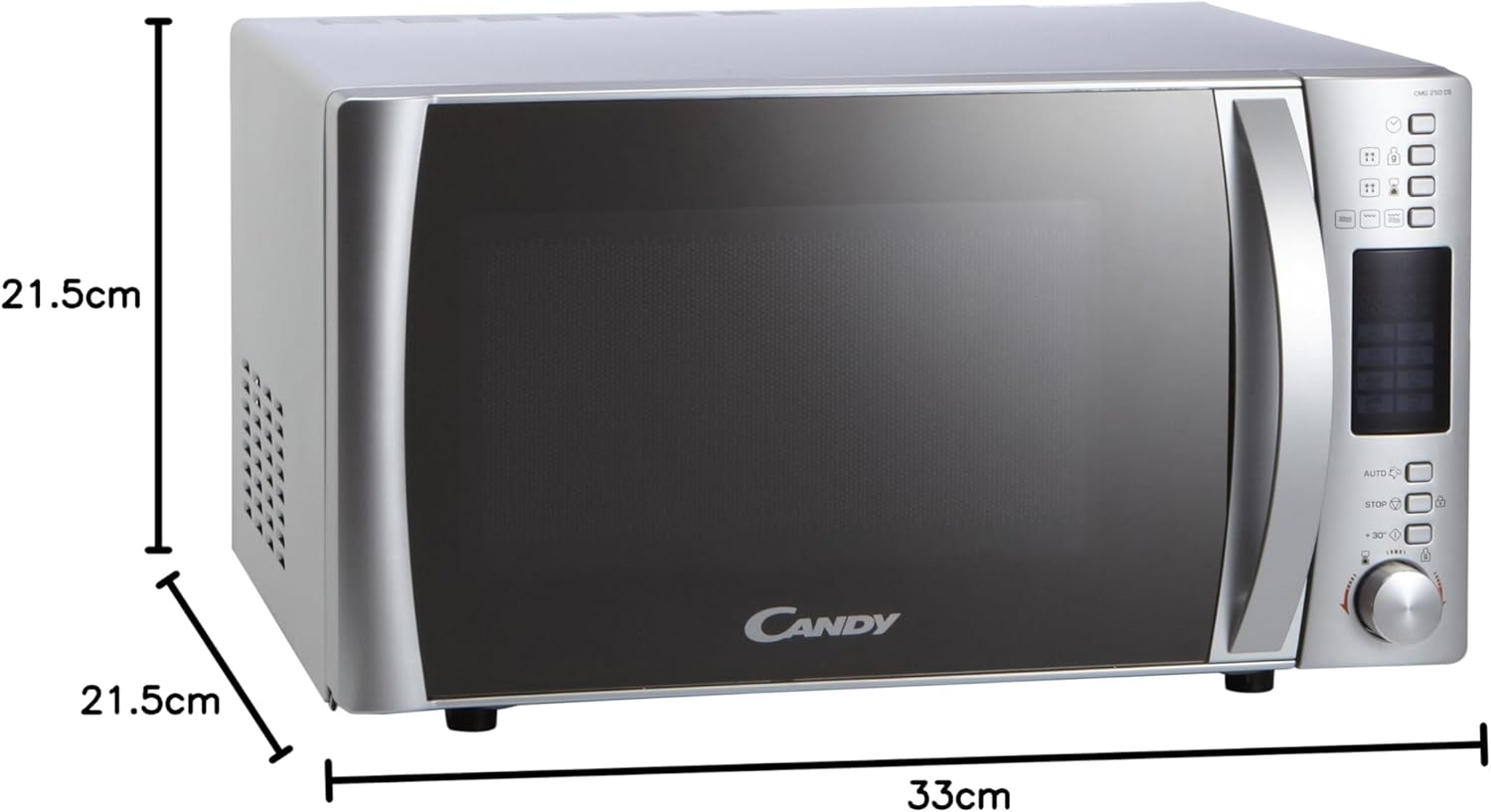
The control panel features a digital display for time and program information, a Joggle Hi-Fi knob for setting time and selecting options, and dedicated buttons for functions such as power level, grill, automatic programs, defrost, and express start.
3. Persediaan dan Pemasangan
Proper installation is crucial for the safe and optimal performance of your microwave oven.
3.1 Membongkar
- Keluarkan semua bahan pembungkusan dan aksesori.
- Inspect the microwave for any damage, such as dents or a misaligned door. Do not operate if damaged.
3.2 Penempatan
- Place the microwave on a stable, level surface strong enough to support its weight.
- Ensure adequate ventilation. Leave a minimum of 10 cm (4 inches) clearance at the rear, 20 cm (8 inches) on the top, and 5 cm (2 inches) on the sides. The front of the microwave should be at least 30 cm (12 inches) from the edge of the counter to prevent tipping.
- Do not place the microwave near heat sources or in areas of high humidity.
3.3 Sambungan Elektrik
- Plug the microwave into a dedicated, properly grounded 230V AC outlet.
- Jangan gunakan kord sambungan atau penyesuai.
3.4 Persediaan Awal
- After plugging in, the display will show '0:00' or similar.
- To set the clock, refer to the 'Setting the Clock' section in Operating Instructions.
4. Arahan Operasi
This section details how to use the various functions of your microwave oven.
4.1 Menetapkan Jam
- Press the 'Clock' button (if available, otherwise consult the specific button for time setting).
- Rotate the Joggle Hi-Fi knob to set the hour. Press the 'Start' button to confirm.
- Rotate the Joggle Hi-Fi knob to set the minutes. Press the 'Start' button to confirm.
4.2 Memasak Ketuhar gelombang mikro
- Letakkan makanan dalam bekas selamat gelombang mikro di atas meja putar.
- Tutup pintu.
- Press the 'Microwave' button repeatedly to select the desired power level (5 levels available).
- Rotate the Joggle Hi-Fi knob to set the cooking time.
- Tekan butang 'Mula' untuk mula memasak.
4.3 Fungsi Grill
- Letakkan makanan di atas rak gril dalam pinggan tahan panas.
- Tutup pintu.
- Tekan butang 'Panggang'.
- Rotate the Joggle Hi-Fi knob to set the grilling time.
- Press the 'Start' button to begin grilling.
4.4 Memasak Gabungan (Microwave + Grill)
- Place food in a microwave and grill-safe container.
- Tutup pintu.
- Press the 'Combi' button (or the relevant button for combined mode).
- Rotate the Joggle Hi-Fi knob to set the cooking time.
- Press the 'Start' button to begin combined cooking.
4.5 Program Automatik
The microwave features 8 automatic programs for various food types. Refer to the icons on the control panel for specific program selection.
- Press the 'Auto' button.
- Rotate the Joggle Hi-Fi knob to select the desired program number.
- Press the 'Start' button. The microwave will automatically set the cooking time and power level.
4.6 Fungsi Penyahbekuan
The automatic defrost function allows defrosting by weight or time.
- Tekan butang 'Nyahbeku'.
- Rotate the Joggle Hi-Fi knob to select defrost by weight or time, and adjust the value.
- Tekan butang 'Mula'.
4.7 Express Start (+30 Seconds)
For quick heating at maximum power, press the '+30s' button. Each press adds 30 seconds to the cooking time.
4.8 Safety Lock (Child Lock)
To activate the child lock, press and hold the 'Stop' button for approximately 3 seconds until a lock indicator appears on the display. To deactivate, repeat the process.
5. Penyelenggaraan dan Pembersihan
Regular cleaning ensures hygiene and prolongs the life of your appliance.
5.1 Pembersihan Dalaman
- Selepas setiap penggunaan, lap bahagian dalam dengan iklanamp kain untuk menghilangkan percikan makanan.
- For stubborn stains, place a bowl of water with lemon juice inside and microwave for 2-3 minutes. The steam will loosen the grime.
- Clean the turntable and turntable support with warm, soapy water. They are usually dishwasher safe.
5.2 Pembersihan Luaran
- Lap permukaan luar dengan lembut, damp kain.
- Avoid abrasive cleaners or scouring pads, as they can damage the finish.
- Clean the door and door seal regularly to ensure proper closure.
5.3 Grill Element Cleaning
- Ensure the microwave is cool before cleaning the grill element.
- Wipe the grill element with a damp kain. Jangan gunakan air berlebihan.
6. Penyelesaian masalah
If you encounter issues with your microwave, refer to the following common problems and solutions.
| Masalah | Kemungkinan Punca | Penyelesaian |
|---|---|---|
| Ketuhar gelombang mikro tidak bermula. | Pintu tidak ditutup dengan betul; Kord kuasa dicabut; Fius putus; Kunci kanak-kanak diaktifkan. | Pastikan pintu ditutup rapat; Periksa sambungan kuasa; Periksa fius/pemutus litar rumah; Nyahaktifkan kunci kanak-kanak. |
| Makanan tidak dipanaskan. | Aras kuasa atau masa memasak yang ditetapkan salah; Pintu tidak ditutup dengan betul. | Adjust power level and time; Ensure door is firmly closed. |
| Bunyi luar biasa semasa operasi. | Meja putar tidak diletakkan dengan betul; Objek asing dalam rongga. | Ensure turntable and support are correctly positioned; Remove any obstructions. |
| Paparan tidak berfungsi. | Kuasa outage; Appliance unplugged. | Check power supply; Plug in the appliance. |
If the problem persists after attempting these solutions, please contact Candy customer service or a qualified technician.
7. Spesifikasi
Technical details for the Candy CMG 25 DCS Microwave with Grill.
| Ciri | Spesifikasi |
|---|---|
| Jenama | gula-gula |
| Nombor Model | CMG 25 DCS (8016361823310) |
| Kapasiti | 25 Liter |
| Kuasa Gelombang Mikro | 900 Watt |
| Voltage | 230 Volt |
| bahan | Keluli Tahan Karat |
| warna | Perak |
| Dimensi Produk (L x W x H) | 42.5 x 51.3 x 30.5 cm |
| Internal Cavity Dimensions (W x D x H) | 33 x 34.6 x 21.5 cm |
| Diameter Meja putar | 31.5 sm |
| Ciri Khas | Automatic Defrost, 95 min Timer, Express Start, Safety Lock |
| Komponen yang Disertakan | Grill Rack, Microwave, Crunchy Plate |
| Jenis Pengawal | Button, Joggle Hi-Fi Knob |
8. Waranti dan Sokongan
Your Candy CMG 25 DCS Microwave with Grill comes with a manufacturer's warranty. Please refer to the warranty card provided with your purchase for specific terms and conditions.
For technical assistance, spare parts, or service inquiries, please contact Candy customer support. Keep your purchase receipt and model number (CMG 25 DCS) readily available when contacting support.


