pengenalan
This manual provides essential information for the setup, operation, and maintenance of your Microsoft Xbox 360 Wired Controller. Designed for use with both Windows PCs and Xbox 360 consoles, this controller offers a reliable and responsive gaming experience.

Rajah 1: Depan view of the Microsoft Xbox 360 Wired Controller.
The controller features an ergonomic design for comfortable extended play, precise thumb sticks, two pressure-point triggers, and an 8-way directional pad. It connects via a flexible nine-foot cable, providing a stable connection without the need for batteries during use.
Apa yang ada dalam Kotak
Upon opening your product packaging, please ensure all the following items are present:
- Microsoft Xbox 360 Wired Controller
- 90-Day Limited Warranty Information

Figure 2: Product packaging for the Xbox 360 Wired Controller.
Ciri-ciri Utama
- Reka bentuk ergonomik: A compact, ergonomic shape allows for comfortable gameplay for extended periods on both PC and Xbox 360.
- Maklum Balas Getaran: Integrated vibration motors provide a more immersive and responsive gaming experience.
- Kawalan Tepat: Features precise thumb sticks, two pressure-point triggers, and an 8-way directional pad for accurate input.
- Kesambungan Berwayar: Connects via a powered USB port, ensuring a stable and lag-free connection.
- Kabel Fleksibel: The thin, flexible nine-foot cord is designed to offer the sensation of wireless freedom with the consistent performance of a wired connection.
- Integrated Headset Port: Includes a port for connecting a headset, enabling Xbox LIVE® play and in-game communication.
Panduan Persediaan
Connecting to Xbox 360 Console:
- Locate an available USB port on your Xbox 360 console.
- Insert the USB connector of the controller's cable firmly into the USB port.
- The Xbox Guide button on the controller will illuminate, indicating a successful connection and that the controller is ready for use.
Connecting to Windows PC:
- Cari port USB yang tersedia pada PC Windows anda.
- Insert the USB connector of the controller's cable firmly into the USB port.
- Pemasangan Pemandu:
- For most modern Windows operating systems (Windows 7, 8, 10, 11), drivers should install automatically upon connection.
- If automatic installation fails, use the provided driver disc (if included) or download the latest drivers from the official Microsoft support webtapak.
- Follow the on-screen prompts to complete the driver installation. A system restart may be required.
- Once drivers are installed, the Xbox Guide button on the controller will illuminate, indicating it is ready for use with your PC games.
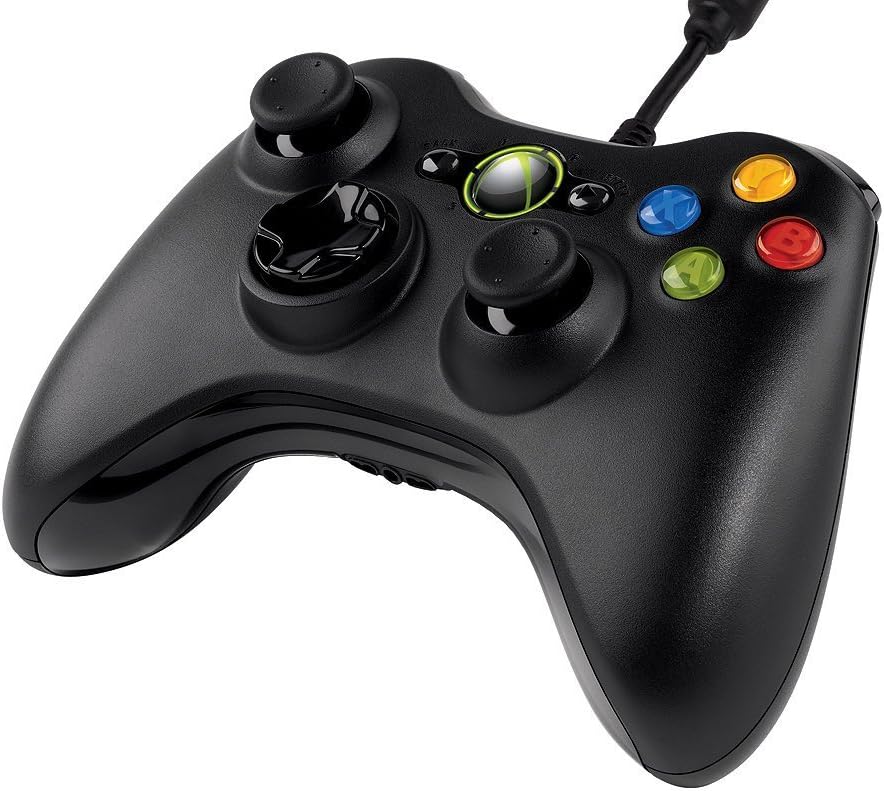
Rajah 3: Bersudut atas view of the controller, highlighting the cable connection point.
Arahan Operasi
The Xbox 360 Wired Controller provides intuitive controls for a wide range of games. Familiarize yourself with the button layout for optimal gameplay.
- Kayu Analog: Use the left and right analog sticks for movement, camera control, or other in-game actions.
- D-Pad: The directional pad is typically used for menu navigation or specific in-game commands.
- Butang Muka (A, B, X, Y): These colored buttons are used for primary actions, interactions, or specific game functions.
- Butang Bahu (LB, RB) & Pencetus (LT, RT): Located on the top of the controller, these are commonly used for secondary actions, aiming, or firing.
- Start & Back Buttons: Used for pausing games, accessing menus, or confirming selections.
- Butang Panduan Xbox: Press the glowing Xbox Guide button in the center to access the Xbox Guide on your console or the Xbox Game Bar/overlay on PC.
Penyelenggaraan
To ensure the longevity and optimal performance of your Xbox 360 Wired Controller, follow these maintenance guidelines:
- Pembersihan: Gunakan kain lembut dan kering untuk mengelap alat kawalan dengan kerap. Untuk kotoran degil, gunakan sedikit kainamp Kain boleh digunakan, tetapi pastikan tiada kelembapan memasuki komponen dalaman. Elakkan bahan kimia yang keras atau pembersih yang kasar.
- Storan: Store the controller in a clean, dry place away from extreme temperatures, direct sunlight, and excessive dust. Avoid wrapping the cable too tightly around the controller to prevent damage.
- Pengendalian: Avoid dropping the controller or subjecting it to strong impacts, as this can damage internal circuitry or external components.
Menyelesaikan masalah
If you encounter issues with your Xbox 360 Wired Controller, try the following common troubleshooting steps:
- Pengawal Tidak Menjawab:
- Pastikan kabel USB dipasang dengan selamat pada kedua-dua pengawal dan konsol/PC.
- Cuba pasangkan pengawal ke port USB yang berbeza.
- Restart your Xbox 360 console or PC.
- Getaran Tidak Berfungsi:
- Semak tetapan dalam permainan untuk memastikan maklum balas getaran diaktifkan.
- Verify that your console/PC drivers are up to date.
- Buttons/Sticks Not Functioning Correctly:
- Pastikan tiada serpihan yang tersangkut di sekitar butang atau kayu.
- Test the controller on another game or system to determine if the issue is specific to one application.
- On PC, check controller calibration settings in your operating system.
If problems persist, refer to the official Microsoft support resources or the full user guide linked in the Support section.
Spesifikasi
| Ciri | Perincian |
|---|---|
| Jenama | Microsoft |
| Nama Model | MICROSOFT CORP/LICENSING |
| Nombor Model Item | 52A-00004 |
| Peranti Serasi | PC, Xbox 360 Console (Windows Operating System) |
| Jenis Pengawal | Pad permainan |
| Teknologi Ketersambungan | USB (Berwayar) |
| Platform Perkakasan | PC, Xbox 360 |
| warna | Hitam |
| Berat Barang | 12.5 auns (lebih kurang 354 gram) |
| Dimensi Produk (LxWxH) | 7.91 x 5.51 x 2.56 inci (lebih kurang 20.09 x 14.00 x 6.50 cm) |
| Sumber Kuasa | Elektrik Bertali arus (Berkuasa USB) |
Waranti dan Sokongan
Waranti Terhad:
Your Microsoft Xbox 360 Wired Controller comes with a 90-Day Limited Warranty. Please refer to the warranty information included in your product packaging for full terms and conditions.
Sumber Tambahan:
- Untuk panduan pengguna yang lebih terperinci, anda boleh memuat turun dokumen PDF rasmi: Panduan Pengguna (PDF)
- For further assistance, technical support, or to find updated drivers, please visit the official Microsoft Support webtapak.


