1. Pengenalan
The Grandstream GXP2100 is an enterprise-grade IP phone designed for business communication. It features support for four lines, a backlit graphical LCD, and various programmable keys to enhance user experience. This manual provides detailed instructions for the installation, configuration, and operation of your GXP2100 IP phone.
2. Kandungan Pakej
Upon unpacking your Grandstream GXP2100, verify that all items are present and in good condition. The standard package typically includes:
- Grandstream GXP2100 IP Phone Unit
- Telefon bimbit dengan kord bergelung
- Penyangga telefon
- Kabel Ethernet
- Penyesuai kuasa
- Quick Installation Guide (this manual provides more detail)
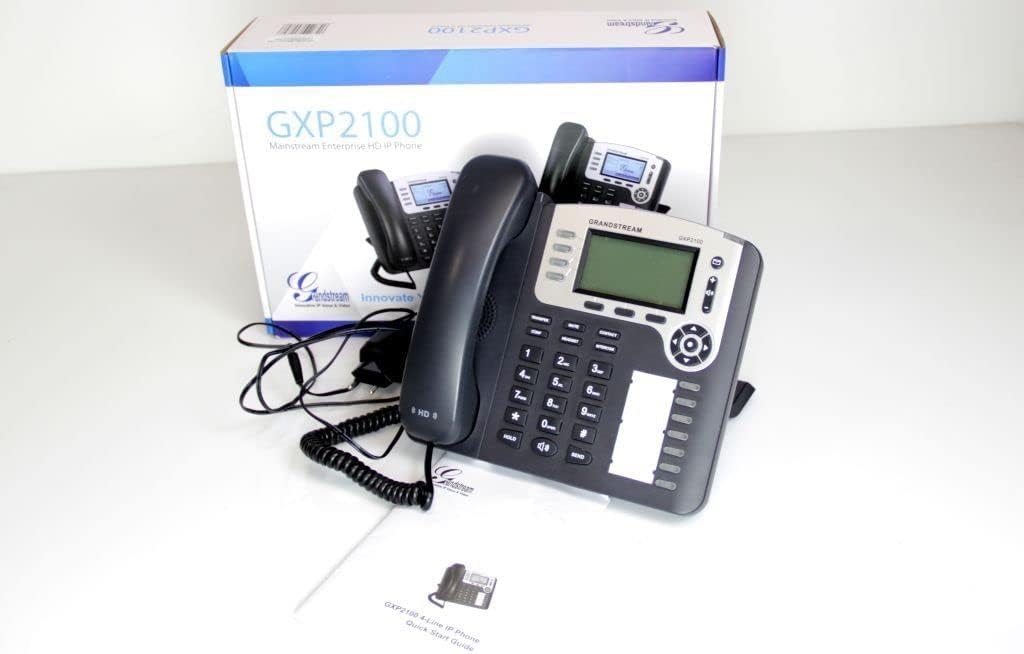
Image 2.1: Grandstream GXP2100 IP Phone unit, handset, coiled cord, power adapter, Ethernet cable, and quick start guide, displayed with its retail packaging.
3. Ciri-ciri Produk
The GXP2100 IP phone offers a range of features designed for efficient business communication:
- Kekunci Baris: 4 dual-color line keys supporting up to 4 SIP accounts.
- Kekunci lembut: 3 XML programmable context-sensitive soft keys for dynamic functions.
- BLF Extension Keys: 7 dual-color BLF (Busy Lamp Field) extension keys, supporting up to 11 call appearances.
- Conference Calling: Up to 5-way conference capability.
- Kualiti Audio: HD wideband audio and a superb full-duplex hands-free speakerphone with advanced acoustic echo cancellation.
- Kesambungan Rangkaian: Dual network ports with integrated Power over Ethernet (PoE).
- Buku telefon: Automated phone book synchronization with directory servers using XML.
- Permohonan: Integrated real-time web applications (e.g., weather, stock, currency, RSS news).
- Keselamatan: Advanced security protection for privacy.
- Kerahan: Supports automated provisioning for easy deployment.

Imej 3.1: Depan view of the Grandstream GXP2100 IP Phone, highlighting the display, keypad, and function buttons.
4. Persediaan
4.1 Sambungan Fizikal
Follow these steps to connect your GXP2100 IP phone:
- Sambungkan Handset: Plug the coiled cord into the handset port on the side of the phone and into the handset.
- Sambungkan Fon Kepala (Pilihan): If using a headset, plug it into the dedicated headset port.
- Sambungkan ke Rangkaian:
- If using PoE: Connect one end of the Ethernet cable to the LAN port on the phone and the other end to a PoE-enabled switch or hub.
- If not using PoE: Connect one end of the Ethernet cable to the LAN port on the phone and the other end to your network switch/router. Then, connect the power adapter to the phone's power jack and to an electrical outlet.
- Sambung ke PC (Pilihan): Jika anda ingin menyambungkan komputer melalui telefon, sambungkan kabel Ethernet daripada port PC pada telefon ke port Ethernet komputer anda.

Imej 4.1: Sisi view of the Grandstream GXP2100 IP Phone, showing the various connection ports for handset, headset, LAN, and PC.
4.2 Tatarajah Awal
After physical connection, the phone will attempt to obtain an IP address via DHCP. You can access the phone's web configuration interface for detailed setup:
- Dapatkan Alamat IP: Tekan ke Menu button on the phone, navigate to Status, kemudian Status Rangkaian to find the phone's IP address.
- Akses Web Antara muka: Buka a web browser on a computer connected to the same network and enter the phone's IP address in the address bar.
- log masuk: Enter the administrator username and password (default values are typically 'admin' for both, refer to your network administrator or Grandstream documentation for specific defaults).
- Configure SIP Accounts: Navigasi ke Akaun section to configure your SIP account details provided by your VoIP service provider. This includes SIP Server, SIP User ID, Authenticate ID, and Password.
- Save and Apply: After making changes, save and apply the configuration. The phone may reboot.
5. Arahan Operasi
5.1 Fungsi Panggilan Asas
- Membuat Panggilan:
- Angkat telefon bimbit, tekan butang Penceramah button, or press an available Talian kunci.
- Dail nombor yang dikehendaki.
- Tekan ke HANTAR button or wait a few seconds for automatic dialing.
- Menjawab Panggilan:
- Angkat telefon bimbit.
- Tekan berkelip Talian kunci.
- Tekan ke Penceramah butang.
- Menamatkan Panggilan: Tutup telefon bimbit atau tekan butang Penceramah butang jika menggunakan pembesar suara telefon.
5.2 Fungsi Panggilan Lanjutan
- Tahan: Semasa panggilan aktif, tekan TAHAN button. The line key will flash. To resume, press the flashing Talian kunci.
- Pemindahan:
- Semasa panggilan aktif, tekan PEMINDAHAN soft key. The active call will be put on hold.
- Dail nombor yang anda ingin pindahkan panggilan.
- Tekan ke PEMINDAHAN soft key again to complete the transfer (blind transfer) or wait for the party to answer and announce the call before pressing PEMINDAHAN (perpindahan yang dihadiri).
- Persidangan:
- Semasa panggilan aktif, tekan SULIT soft key. The active call will be put on hold.
- Dail nombor peserta seterusnya dan tekan HANTAR.
- Setelah pihak kedua menjawab, tekan SULIT soft key again to establish the conference call. Repeat for additional participants (up to 5-way).
- Redam: Tekan ke HILANGKAN butang untuk meredamkan mikrofon anda semasa panggilan. Tekan sekali lagi untuk menyahredam.
- Telefon pembesar suara: Tekan ke Penceramah butang untuk menghidupkan atau mematikan mod pembesar suara telefon.
- BLF Keys: The BLF (Busy Lamp Field) keys can be programmed to monitor the status of other extensions. A green light indicates idle, red indicates busy, and flashing red indicates ringing. Pressing a BLF key can initiate a call to that extension or pick up a ringing call.
- Kekunci lembut: The three soft keys below the LCD display change their function based on the phone's current state (e.g., during a call, idle, or in a menu). Their current function is displayed on the LCD directly above them.
6. Penyelenggaraan
- Pembersihan: Gunakan kain lembut dan kering untuk membersihkan permukaan telefon. Elakkan pembersih atau pelarut yang kasar.
- Kemas kini Firmware: Grandstream periodically releases firmware updates to improve performance and add features. Firmware updates are typically performed via the phone's web interface. Consult your network administrator or Grandstream's official support resources for the latest firmware and update procedures. Manual firmware updates often require downloading files from the manufacturer and hosting them on a local web pelayan.
- Keadaan Persekitaran: Operate the phone within recommended temperature and humidity ranges to ensure optimal performance and longevity.
7. Penyelesaian masalah
This section addresses common issues you might encounter with your GXP2100 IP phone.
| Masalah | Kemungkinan Punca | Penyelesaian |
|---|---|---|
| Telefon tidak dihidupkan. | No power from adapter or PoE switch. |
|
| Tiada nada dail / Tidak boleh membuat atau menerima panggilan. | Network connectivity issue, SIP account not registered, incorrect configuration. |
|
| One-way audio (you can hear, but the other party cannot, or vice-versa). | Network firewall/NAT issues, incorrect audio codec settings. |
|
| Phone frequently loses registration. | Unstable network connection, SIP server issues, incorrect registration expiration. |
|
8. Spesifikasi
Key technical specifications for the Grandstream GXP2100 IP Business Phone:
| Atribut | Nilai |
|---|---|
| Nombor Model | GXP2100 |
| Jenama | Grandstream |
| Dimensi Produk (L x W x H) | 8.7 x 8.3 x 3.6 inci |
| Berat Barang | 2.4 paun |
| warna | Kelabu |
| Jenis Telefon | Corded |
| Sumber Kuasa | Elektrik Berwayar (berupaya PoE) |
| Jenis Pendail | Papan kekunci tunggal |
| Jenis Sistem Menjawab | digital |
| Keupayaan Panggilan Persidangan | 5 hala |
| Operasi Berbilang Baris | Multi-Line Operation (4 lines) |
| ASIN | B004PAS3SM |
| Tarikh Mula-mula Tersedia | 9 Februari 2011 |
9. Waranti dan Sokongan
Untuk maklumat waranti, sokongan teknikal atau bantuan lanjut dengan Telefon IP Grandstream GXP2100 anda, sila rujuk Grandstream rasmi website or contact your product vendor. Keep your purchase receipt and product serial number handy when seeking support.
Grandstream Rasmi Webtapak: www.grandstream.com


