pengenalan
The PreSonus AudioBox Studio package provides a complete solution for computer-based recording. This manual guides you through the setup, operation, and maintenance of your AudioBox USB interface, M7 large-diaphragm condenser microphone, HD7 professional monitoring headphones, and Studio One Artist digital audio workstation software.
Komponen Produk
Your PreSonus AudioBox Studio package includes the following components:
- AudioBox USB Interface: A 2-channel USB audio/MIDI interface for connecting microphones and instruments to your computer.
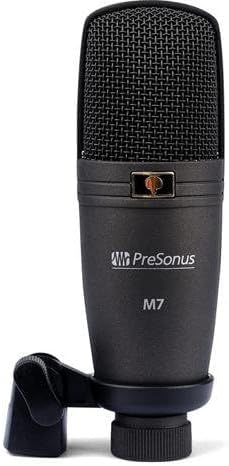
- M7 Microphone: A large-diaphragm condenser microphone for capturing vocals and instruments.
- HD7 Headphones: High-definition headphones for accurate audio monitoring.
- Wayar USB: For connecting the AudioBox USB to your computer.
- Kabel Mikrofon: For connecting the M7 microphone to the AudioBox USB.
- Studio One Artist Software: A digital audio workstation (DAW) for recording, editing, and mixing audio.


Persediaan
Keperluan Sistem
The AudioBox Studio package is compatible with personal computers running Windows operating systems. Ensure your system meets the minimum requirements for Studio One Artist software.
Sambungan Perkakasan
- Connect AudioBox USB: Use the provided USB cable to connect the AudioBox USB interface to an available USB port on your computer. The AudioBox USB is bus-powered, meaning it draws power directly from the USB connection.
- Connect M7 Microphone: Connect the M7 microphone to one of the XLR inputs (Input 1 or Input 2) on the front of the AudioBox USB using the provided microphone cable. If using a condenser microphone like the M7, ensure 48V phantom power is enabled (see Operating Instructions).
- Connect HD7 Headphones: Plug the HD7 headphones into the 'Phones' output jack on the front of the AudioBox USB.

Pemasangan Perisian
- Pasang Pemacu: Before installing Studio One Artist, install the necessary drivers for your AudioBox USB. These can typically be found on the PreSonus website. It is recommended to download the latest drivers directly from presonus.com.
- Install Studio One Artist: Follow the instructions provided with your package to install Studio One Artist software. This usually involves downloading the software from the PreSonus website and entering a product key.
- Pengaktifan Perisian: Activate Studio One Artist online as prompted during installation.
Arahan Operasi
AudioBox USB Controls
Familiarize yourself with the controls on the front panel of your AudioBox USB:
- Input 1/2 Gain Knobs: Adjust the input level for microphones or instruments connected to Input 1 and Input 2.
- LED Klip: Illuminate when the input signal is too high, indicating potential clipping. Reduce the gain if these light up.
- Butang 48V: Activates phantom power for condenser microphones (like the M7). Press this button when using condenser microphones.
- Mixer Knob: Blends the direct input signal with the playback signal from your computer for zero-latency monitoring. Turn towards 'Inputs' to hear more of your live input, towards 'Playback' to hear more of your computer's audio.
- Main Knob: Controls the overall output level to your main studio monitors (if connected to the rear outputs).
- Phones Knob: Melaraskan tahap kelantangan untuk output fon kepala.
- LED kuasa: Indicates that the AudioBox USB is receiving power and is connected.
Recording with Studio One Artist
- Launch Studio One Artist: Buka perisian pada komputer anda.
- Create New Song: Start a new project and configure your audio device settings to use the AudioBox USB.
- Add Audio Track: Create a new audio track for your microphone or instrument.
- Arm for Recording: Select the correct input (e.g., Input 1 for M7 mic) and arm the track for recording.
- Set Input Level: Speak or play into the microphone/instrument and adjust the corresponding Input Gain knob on the AudioBox USB until the signal is strong but does not consistently light the Clip LED.
- Monitor Audio: Use the HD7 headphones and adjust the Phones knob and Mixer knob on the AudioBox USB to achieve a comfortable monitoring balance.
- Rekod: Press the record button in Studio One Artist to begin recording.
Zero-Latency Monitoring
The AudioBox USB features a hardware mixer (controlled by the Mixer knob) that allows for zero-latency monitoring. This means you can hear your live input signal directly through your headphones without any delay, which is crucial for comfortable recording performance.
Penyelenggaraan
To ensure the longevity and optimal performance of your PreSonus AudioBox Studio components:
- Pembersihan: Use a soft, dry cloth to clean the surfaces of the AudioBox USB, M7 microphone, and HD7 headphones. Avoid using liquid cleaners or solvents.
- Storan: Store components in a dry, dust-free environment when not in use.
- Penjagaan Kabel: Elakkan selekoh tajam atau tarikan kabel yang berlebihan untuk mengelakkan kerosakan.
- Microphone Protection: When not in use, store the M7 microphone in its protective pouch or case to prevent dust and physical damage.
Menyelesaikan masalah
If you encounter issues with your AudioBox Studio package, consider the following common solutions:
- No Sound/Device Not Recognized:
- Ensure the AudioBox USB is securely connected to your computer via USB.
- Verify that the AudioBox USB drivers are correctly installed and updated.
- Check your computer's sound settings and Studio One Artist's audio device settings to ensure the AudioBox USB is selected as the input/output device.
- Microphone Not Working/Low Level:
- Confirm the M7 microphone is properly connected to an XLR input on the AudioBox USB.
- Ensure the 48V phantom power button is engaged for the M7 condenser microphone.
- Adjust the corresponding Input Gain knob on the AudioBox USB.
- Check that the track in Studio One Artist is armed for recording and the correct input is selected.
- Hissing/Noise in Recordings:
- Pastikan semua kabel disambungkan dengan kukuh dan tidak rosak.
- Reduce input gain if the Clip LED is frequently lighting up.
- Test in a different USB port on your computer.
- Minimize other electrical interference sources near your setup.
- Software Issues (Studio One Artist):
- Ensure your Studio One Artist software is updated to the latest version.
- Refer to the Studio One Artist user manual or online resources for specific software-related troubleshooting.
Untuk bantuan lanjut, sila rujuk kepada Sokongan PreSonus webtapak.
Spesifikasi
| Berat Barang | 2 paun |
| Dimensi Produk | 9.8 x 3.54 x 6.69 inci |
| Nombor Model Item | Abox Studio |
| Bilangan Saluran | 2 |
| Teknologi Ketersambungan | USB |
| Perisian yang Disokong | Studio Satu |
| Peranti Serasi | Komputer Peribadi |
| Sistem Operasi | Windows |
Maklumat Waranti
PreSonus products are covered by a limited warranty. For detailed information regarding the warranty period, coverage, and terms and conditions for your AudioBox Studio package, please visit the official PreSonus website and navigate to the support or warranty section. Retain your proof of purchase for warranty claims.
Sokongan
For technical support, product registration, driver downloads, and additional resources, please visit the PreSonus support page:
https://www.presonus.com/support
You can also find user forums and knowledge bases on the PreSonus website for community assistance and common queries.


