1. Pengenalan
Thank you for choosing the Coby SNAPP CAM3002 Mini Camcorder. This compact device is designed for easy video recording and photo capture, offering portability and user-friendly operation. This manual provides detailed instructions to help you set up, operate, and maintain your camcorder effectively.
2. Kandungan Pakej
Sila semak pakej untuk item berikut:
- Coby SNAPP CAM3002 Mini Camcorder
- 2 x Bateri Beralkali AA
- TV Connection Cable (RCA/Composite Video Cable)
- Muvee Software (on CD or via download link)
- Manual Pengguna (dokumen ini)
3. Camcorder Overview
Familiarize yourself with the main components of your Coby SNAPP CAM3002 Mini Camcorder:
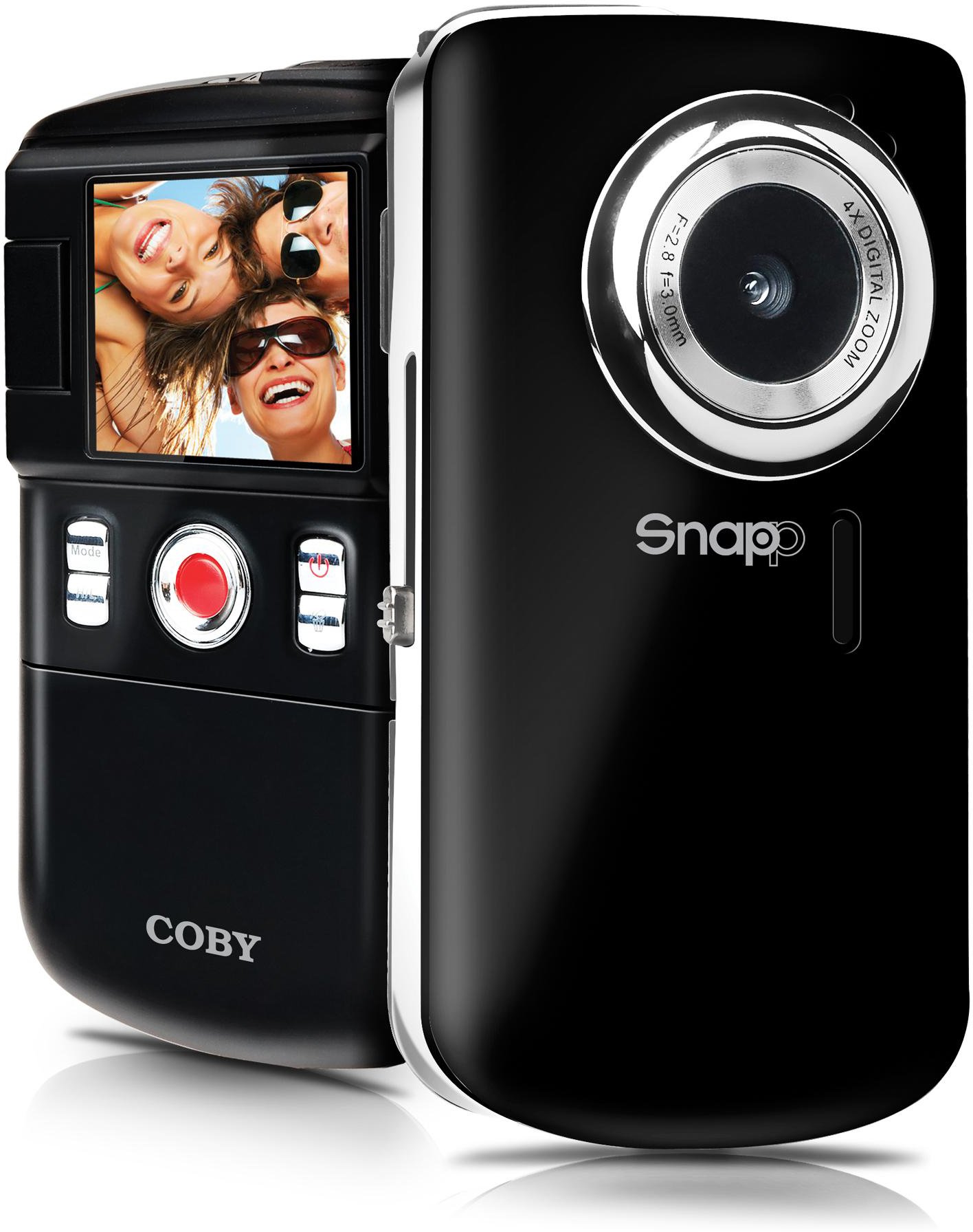
This image displays the front of the Coby SNAPP CAM3002 Mini Camcorder. Visible features include the camera lens, a small microphone opening, and several control buttons on the side, indicating its compact and portable design.
- Kanta Kamera: Menangkap video dan imej pegun.
- mikrofon: Records audio during video capture.
- Skrin LCD 1.8 inci: Displays menus, live view, and playback. This screen can flip out for self-portraits.
- Butang Kawalan: For power, mode selection, recording, photo capture, and navigation.
- Petak Bateri: Holds 2 AA alkaline batteries.
- Slot Kad SD/SDHC: For inserting a memory card (up to 16GB).
- Integrated USB Plug: For direct connection to a computer for file transfer and charging (if rechargeable batteries are used).
- TV Out Port: For connecting to a television using the included cable.
4. Persediaan
4.1. Memasang Bateri
- Locate the battery compartment cover on the camcorder.
- Luncurkan atau angkat penutup untuk membukanya.
- Insert two (2) AA alkaline batteries, ensuring correct polarity (+/-) as indicated inside the compartment.
- Tutup penutup petak bateri dengan selamat.
4.2. Memasukkan Kad Memori
The camcorder requires an SD or SDHC memory card (up to 16GB) to store videos and photos.
- Locate the SD/SDHC card slot on the camcorder.
- Insert the memory card with the metal contacts facing down (or as indicated by a diagram near the slot) until it clicks into place.
- To remove the card, gently push it in until it clicks, then release, and it will eject slightly.
4.3. Menghidupkan/Mematikan
- To power on, press and hold the Power button until the LCD screen illuminates.
- To power off, press and hold the Power button again until the screen turns off. The camcorder may also power off automatically after a period of inactivity to conserve battery life.
5. Mengendalikan Camcorder
5.1. Pemilihan Mod
Use the Mode button to switch between the following functions:
- Mod Rakaman Video: For capturing moving images with sound.
- Mod Foto Pegun: For taking single photographs.
- Mod Main Semula: Untuk semulaviewing recorded videos and photos.
5.2. Rakaman Video
- Tukar ke Mod Rakaman Video.
- Frame your subject using the 1.8-inch LCD screen. The screen can be flipped out for self-recording.
- Press the Record/Capture button to start recording. A red indicator or timer will appear on the screen.
- Press the Record/Capture button again to stop recording.
5.3. Mengambil Foto
- Tukar kepada Mod Foto Pegun.
- Bingkai subjek anda menggunakan skrin LCD.
- Press the Record/Capture button to take a photo. The image will be saved to the memory card.
5.4. Main balik
- Switch to Playback Mode.
- Use the navigation buttons to browse through your recorded videos and photos.
- Press the Record/Capture button to play a video or view foto dalam skrin penuh.
5.5. Menyambung ke Televisyen
awak boleh view your recorded content on a larger screen using the included TV connection cable.
- Ensure both the camcorder and the television are powered off.
- Connect one end of the TV connection cable to the TV Out port on the camcorder.
- Connect the other end of the cable to the corresponding video (yellow) and audio (white) input jacks on your television.
- Power on the television and select the correct AV input source.
- Power on the camcorder and switch to Playback Mode to view media anda.
5.6. Memindahkan Files ke Komputer
The camcorder features an integrated USB plug for easy file pemindahan.
- Pastikan camcorder dihidupkan.
- Extend the integrated USB plug from the camcorder.
- Plug the camcorder directly into an available USB port on your computer (Mac or PC).
- Your computer should recognize the camcorder as a removable storage device. You can then access the files (videos and photos) and copy them to your computer.
5.7. Using Muvee Software
The included Muvee software is designed to help you edit your videos and photos, and facilitate uploading them to online platforms.
- Install the Muvee software on your computer using the provided CD or download link.
- Follow the software's on-screen instructions for editing and sharing your media.
6. Penyelenggaraan
6.1. Pembersihan
- Use a soft, dry cloth to clean the exterior of the camcorder.
- For the lens and LCD screen, use a specialized lens cleaning cloth and solution to avoid scratches.
- Jangan gunakan bahan kimia atau pembersih kasar.
6.2. Penyimpanan
- Apabila tidak digunakan untuk tempoh yang lama, tanggalkan bateri untuk mengelakkan kebocoran.
- Store the camcorder in a cool, dry place, away from direct sunlight and extreme temperatures.
7. Penyelesaian masalah
Jika anda menghadapi masalah dengan camcorder anda, rujuk kepada masalah dan penyelesaian biasa berikut:
| Masalah | Penyelesaian yang Mungkin |
|---|---|
| Camcorder tidak dihidupkan. | Check if batteries are correctly inserted and fully charged. Replace with fresh AA alkaline batteries if necessary. |
| Poor video or photo quality. | Ensure sufficient lighting in the environment. Hold the camcorder steady during recording/capture. Clean the lens if it appears smudged. |
| Tidak boleh memindahkan files kepada komputer. | Ensure the camcorder is powered on and correctly connected via the integrated USB plug. Try a different USB port on your computer. Verify your computer's operating system recognizes the device. |
| Hayat bateri pendek. | Use fresh, high-quality AA alkaline batteries. Reduce screen brightness if possible (check settings). |
| Ralat kad memori. | Ensure the memory card is correctly inserted. Try reformatting the card (this will erase all data). Try a different compatible SD/SDHC card. |
8. Spesifikasi
| Ciri | Spesifikasi |
|---|---|
| Nama Model | CAM3002 |
| Paparan | 1.8-inch Full-color LCD Electronic Viewfinder (flips out) |
| Resolusi Video | 480p (640x480) |
| Still Photo Resolution | 0.3 MP |
| Zum Digital | 4x |
| Media Storan | SD/SDHC Memory Card (up to 16GB) |
| Ketersambungan | Integrated Hi-speed USB 2.0 plug, TV Out (RCA) |
| Sumber Kuasa | 2 x Bateri Beralkali AA |
| Disokong File Format | Video: MP4, Photo: JPEG |
| Ciri Khas | Built-in speaker, Muvee software included |
9. Waranti dan Sokongan
Coby products are manufactured to high-quality standards. This product is covered by a limited warranty against defects in materials and workmanship. Please refer to the warranty card included with your purchase for specific terms and conditions.
For technical support or customer service inquiries, please visit the official Coby website or contact their customer support line. Keep your purchase receipt as proof of purchase for warranty claims.


