1. Pengenalan
Thank you for choosing the Acctim Sonnet 12613 Analog Alarm Clock. This manual provides important information regarding the setup, operation, and maintenance of your new alarm clock. Please read it thoroughly before use and retain it for future reference.
The Acctim Sonnet alarm clock is designed for reliability and ease of use, featuring a silent sweep movement, a loud alarm, snooze function, backlight, and luminous hands for clear visibility in low light conditions.
2. Maklumat Keselamatan
- Jauhkan jam daripada air dan kelembapan yang tinggi.
- Do not expose the clock to direct sunlight or extreme temperatures.
- Use only the specified battery type (1 x C battery).
- Jangan campurkan bateri lama dan baharu, atau jenis bateri yang berlainan.
- Tanggalkan bateri jika jam tidak akan digunakan untuk tempoh yang lama.
- Buang bateri terpakai secara bertanggungjawab mengikut peraturan tempatan.
- Jangan cuba membuka atau membaiki jam sendiri. Rujuk kepada kakitangan perkhidmatan yang berkelayakan.
- Jauhkan daripada kanak-kanak.
3. Komponen Produk
Familiarize yourself with the main parts of your Acctim Sonnet alarm clock:
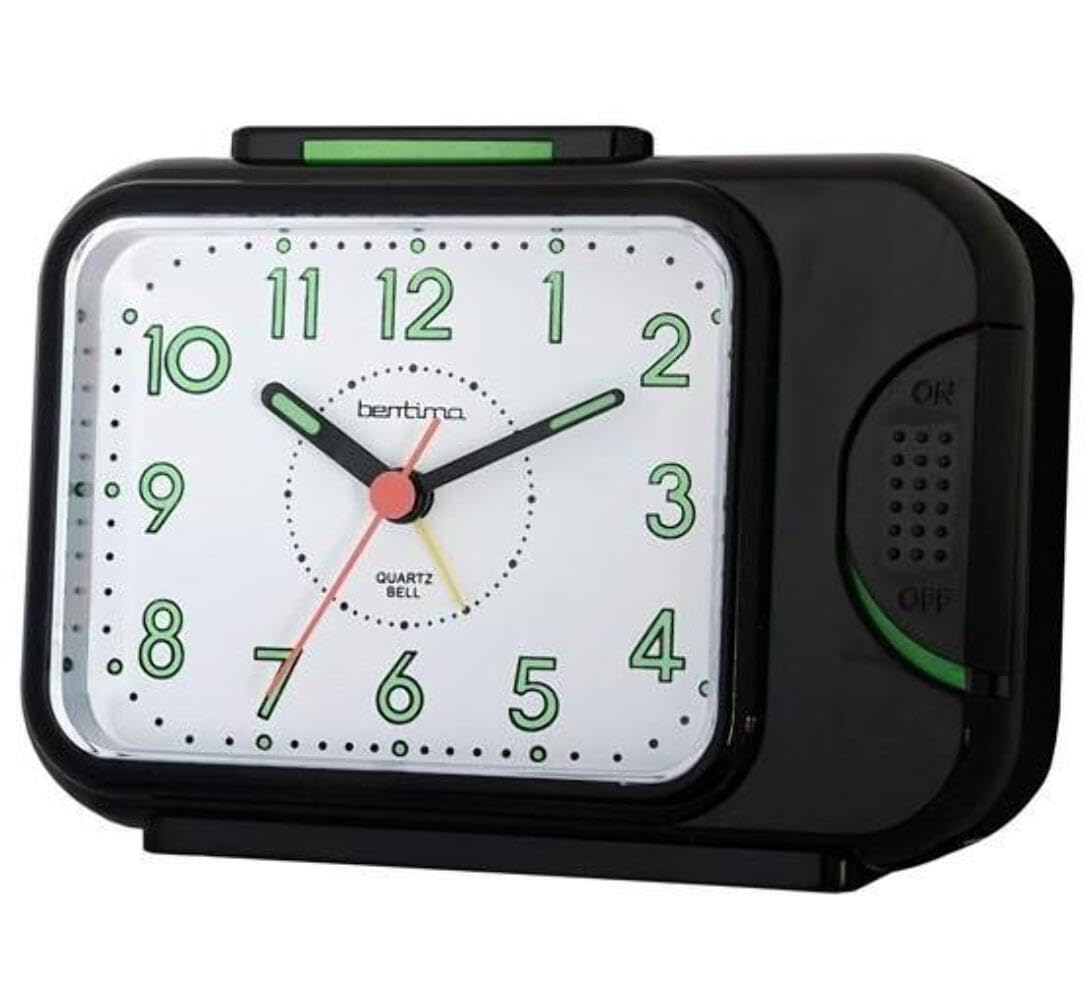
- Dail Depan: Displays time with hour, minute, and second hands. Includes luminous hands for night visibility.
- Tangan penggera: A smaller hand on the dial used to set the alarm time.
- Butang Tunda/Cahaya: Located on the top of the clock. Press to activate snooze or backlight.
- Petak Bateri: Located on the back of the clock.
- Tombol Tetapan Masa: Located on the back, used to adjust the current time.
- Tombol Tetapan Penggera: Located on the back, used to set the alarm time.
- Suis HIDUP/MATI penggera: Located on the back, to activate or deactivate the alarm.
4. Persediaan
4.1. Pemasangan Bateri
- Buka penutup petak bateri yang terletak di belakang jam.
- Insert one (1) C battery, ensuring the polarity (+ and -) matches the diagram inside the compartment.
- Tutup penutup petak bateri dengan selamat.
Note: A C battery is not included with the product.
4.2. Menetapkan Masa Semasa
- Cari Tombol Tetapan Masa di bahagian belakang jam.
- Rotate the knob in either direction until the hour and minute hands display the correct current time.
4.3. Menetapkan Masa Penggera
- Cari Tombol Tetapan Penggera di bahagian belakang jam.
- Rotate this knob to move the small alarm hand on the clock face to your desired alarm time.
- Memastikan Suis ON / OFF penggera (also on the back) is in the "ON" position to activate the alarm.
5. Operasi
5.1. Menggunakan Penggera
- Once the alarm time is set and the Suis ON / OFF penggera is "ON", the alarm will sound at the set time.
- Untuk mematikan penggera, luncurkan penggera Suis ON / OFF penggera ke kedudukan "MATI".
5.2. Using the Snooze Function
- Apabila penggera berbunyi, tekan Butang Tunda/Cahaya on the top of the clock.
- The alarm will temporarily stop and sound again after approximately 5 minutes.
- Anda boleh mengulangi fungsi tunda beberapa kali.
- To fully turn off the alarm, slide the Suis ON / OFF penggera ke kedudukan "MATI".
5.3. Using the Backlight and Luminous Hands
- The clock features luminous hour and minute hands that glow in the dark after exposure to light, allowing for easy time reading at night without pressing any buttons.
- For additional illumination, press and hold the Butang Tunda/Cahaya on the top of the clock to activate the backlight. The backlight will remain on as long as the button is pressed.
6. Penyelenggaraan
6.1. Pembersihan
- Lap jam dengan kain lembut dan kering.
- Do not use abrasive cleaners, solvents, or chemical sprays, as these may damage the casing atau dail.
6.2. Penggantian Bateri
- When the clock starts to lose time or the alarm weakens, it is time to replace the battery.
- Follow the battery installation steps (Section 4.1) to replace the C battery.
7. Penyelesaian masalah
| Masalah | Kemungkinan Punca | Penyelesaian |
|---|---|---|
| Jam tidak berfungsi / Tangan tidak bergerak. | Bateri mati atau tidak dipasang dengan betul. | Check battery polarity. Replace with a new C battery. |
| Penggera tidak berbunyi. | Alarm ON/OFF switch is "OFF". Alarm time not set correctly. Battery low. | Ensure Alarm ON/OFF switch is "ON". Re-set alarm time. Replace battery. |
| Alarm is too quiet. | Low battery. Clock placed on a soft surface. | Replace battery. Place clock on a hard, flat surface for better sound projection. |
| Lampu latar tidak berfungsi. | Bateri lemah. | Gantikan bateri. |
8. Spesifikasi
| Jenama | Acctim |
| Nombor Model | 12613 |
| warna | Hitam |
| Dimensi (L x W x H) | 10.31 x 14 x 5.79 cm (kira-kira 4.06 x 5.51 x 2.28 inci) |
| Berat badan | 199.58 gram (lebih kurang 0.44 paun) |
| bahan | Plastic (silent tick movement) |
| Jenis Paparan | Analog |
| Sumber Kuasa | 1 x C Battery (not included) |
| Ciri Khas | Alarm, Silent Clock Movement, Snooze, Backlight, Luminous Hands |
9. Waranti dan Sokongan
The Acctim Sonnet 12613 Analog Alarm Clock comes with a Waranti 1 tahun dari tarikh pembelian, meliputi kecacatan pembuatan.
For technical support, warranty claims, or further assistance, please contact Acctim customer service. Refer to the official Acctim webtapak atau dokumentasi pembelian anda untuk butiran hubungan.
Sila sediakan nombor model anda (12613) dan bukti pembelian semasa menghubungi sokongan.


