pengenalan
Terima kasih kerana membeliasing the ADESSO Dynamo Radio Atomic Clock, Model C-6020. This versatile device is designed for both daily use and emergency situations, featuring a dynamo power generation function, AM/FM radio, atomic clock, thermometer, and mobile phone charging capabilities. Please read this manual carefully to ensure proper use and maintenance of your device.
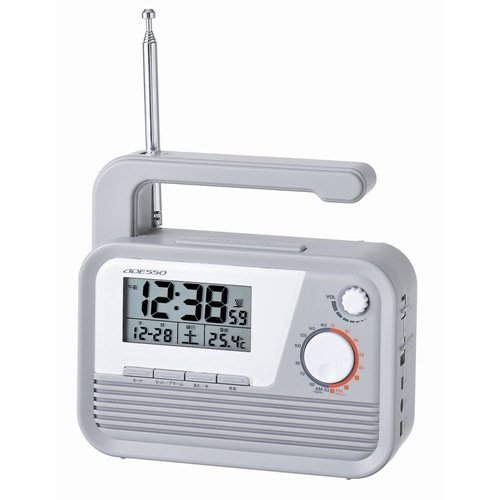
Figure 1: ADESSO Dynamo Radio Atomic Clock C-6020 with its integrated light activated.
Ciri-ciri Produk
- Atomic Clock Function: Automatically receives 40/60KHz radio signals for accurate timekeeping.
- Radio AM/FM: For listening to broadcasts.
- Dynamo Power Generation: Hand-crank for emergency power.
- Pengecasan Telefon Bimbit: Includes various plugs for charging compatible mobile phones.
- Cahaya Bersepadu: Menyediakan pencahayaan.
- Termometer: Displays ambient temperature.
- Emergency Buzzer: For signaling in emergencies.
- Jack fon telinga: Untuk mendengar secara peribadi.
- Fungsi lampu latar: Menerangi paparan untuk keterlihatan dalam cahaya malap.
Kandungan Pakej
- ADESSO Dynamo Radio Atomic Clock (C-6020)
- 3 types of mobile phone charging plugs
- Manual Pengguna
Persediaan
1. Permulaan Kuasa
Insert 3 AAA batteries (included) into the battery compartment. One battery powers the clock, and two batteries power the radio, light, and siren. The unit can also be powered via an AC adapter (sold separately) or the dynamo crank.
2. Penetapan Masa
- Tekan dan tahan butang MASA DITETAPKAN button for 2 seconds until the hours/minutes display blinks.
- Tekan ke ▲ / ▼ butang untuk melaraskan jam.
- Tekan ke TU+/- butang untuk melaraskan minit.
- Tekan MASA DITETAPKAN again to enter month/day setup (blinking). Use ▲ / ▼ for the day and TU+/- for the month.
- Tekan MASA DITETAPKAN again to enter year setup (blinking). Use TU+/- untuk menyesuaikan tahun.
- Tekan MASA DITETAPKAN again to toggle between 12-hour or 24-hour format. Use TU+/- to select your preference.
- Tekan MASA DITETAPKAN again to save all settings.
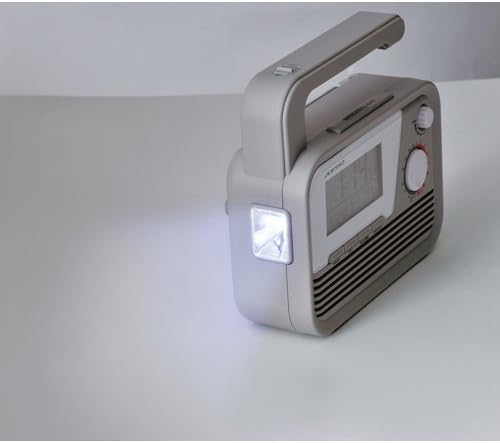
Figure 2: Control panel for time and alarm settings.
3. Alarm Setup
- View/Enable Alarms: Tekan sebentar AL1/AL2 button to check the setting alarm time or enable/disable an alarm.
- Tetapkan Waktu Penggera: Tekan dan tahan AL1/AL2 button for 2 seconds until the hours/minutes blink. Use TU+/- to adjust minutes and ▲ / ▼ to adjust hours.
- Laraskan Kelantangan: Tekan AL1/AL2 button again to enter volume setup (blinking). Use ▲ / ▼ button to set the alarm volume (U0-U15).
- Alarm Repeat Days: Tekan AL1/AL2 button again to enter days of the week setup (blinking). Use TU+/- button to choose which days the alarm repeats: 1. Monday to Sunday, 2. Monday to Friday, 3. Saturday to Sunday, 4. Single day.
- Sahkan: Tekan AL1/AL2 button to save all alarm settings.
Arahan Operasi
1. Operasi Radio
- Hidupkan Radio: In STANDBY mode, press TU+/- button briefly to turn FM radio on.
- Tune Manually: Tekan TU+/- button briefly to adjust the frequency.
- Stesen Imbasan Automatik: Tekan dan tahan TU+/- button for 2 seconds to auto-search for available stations.
- Save a Station: Tekan dan tahan butang STO button for 2 seconds until the memory slot blinks (e.g., P01-P20). Press TU+/- button to select a slot (P01-P20). Press STO button briefly to save the current frequency.
- Recall Saved Stations: Tekan ke MEM button to access saved stations. Press TU+/- button to cycle through stored slots (P01-P20). Leave it 2 seconds to view the FM frequency, after 2 more seconds the display will return to the time display.
2. Dynamo Power Generation
Extend the hand crank from the side of the unit. Rotate the crank clockwise or counter-clockwise to generate power. This power can be used to operate the radio, light, or charge a mobile phone. For optimal charging, crank at a steady pace.
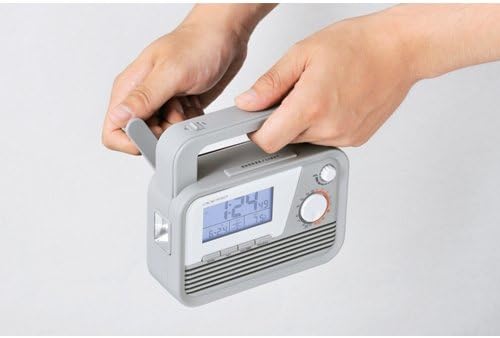
Figure 3: Operating the hand crank for power generation.
3. Mobile Phone Charging
Connect one of the provided charging plugs to your mobile phone and then to the charging port on the ADESSO C-6020. Begin cranking the dynamo to initiate charging. Note that charging speed and compatibility may vary depending on the phone model.
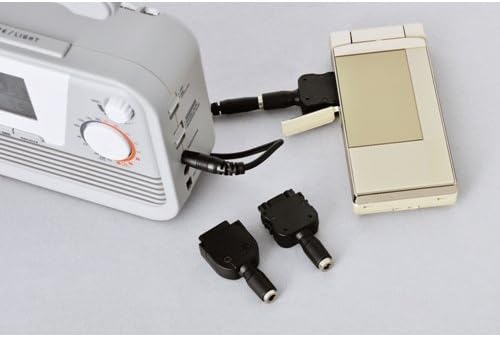
Figure 4: Mobile phone charging function with included adapter plugs.
4. Light and Buzzer
Tekan ke LED button to turn the integrated light on or off. Press the EMERGENCY BUZZER button to activate the emergency siren. Press it again to turn it off.
Penyelenggaraan
- Bersihkan unit dengan kain lembut dan kering. Jangan gunakan pembersih atau pelarut yang melelas.
- Replace batteries when the display dims or functions become unreliable. Ensure correct polarity.
- Simpan unit di tempat yang sejuk dan kering jauh dari cahaya matahari langsung dan suhu yang melampau.
Menyelesaikan masalah
| Masalah | Penyelesaian |
|---|---|
| No display/Unit not turning on | Check battery installation and charge level. Ensure AC adapter (if used) is properly connected. |
| Penerimaan radio yang lemah | Extend the antenna fully. Try repositioning the unit for better signal. Perform an auto-scan for stations. |
| Telefon bimbit tidak dicas | Ensure the correct charging plug is used and securely connected. Crank the dynamo consistently. Some modern smartphones may require more power than the dynamo can provide for efficient charging. |
| Atomic clock not syncing | Ensure the unit is placed in an area with good radio signal reception (away from electronic interference). Allow time for the unit to receive the signal. |
Spesifikasi
- Nombor Model: C-6020
- Dimensi: lebih kurang 150mm (H) x 140mm (W) x 50mm (D)
- Berat: lebih kurang 470g
- Bahan: damar
- Sumber Kuasa: 3 x AAA batteries (included), Dynamo, AC Adapter (sold separately)
- Frekuensi Radio: AM, FM
- Atomic Clock Frequency: 40/60 KHz
- warna: Kelabu
- Negara Asal: China
Waranti dan Sokongan
For warranty information and customer support, please refer to the documentation included with your purchase or contact ADESSO customer service directly. Specific warranty terms may vary by region and retailer.