pengenalan
Thank you for choosing the Classic Cantabile DP-400F RH Digital Piano. This instrument combines the authentic feel of an acoustic piano with the versatility of modern digital technology. Featuring 88 weighted keys, 559 sounds, 64-note polyphony, and comprehensive connectivity options including MIDI and USB, the DP-400F RH is designed for musicians of all levels. This manual provides essential information for safe and effective use, setup, operation, and maintenance of your digital piano.
Arahan Keselamatan Penting
- Bekalan Kuasa: Gunakan hanya penyesuai kuasa yang ditentukan. Pastikan voltage sepadan dengan bekalan kuasa tempatan anda.
- Air dan Kelembapan: Do not expose the instrument to rain, moisture, or excessive humidity. Do not place containers with liquids on the instrument.
- Pengudaraan: Pastikan pengudaraan yang betul. Jangan sekat bukaan pengudaraan.
- Sumber Haba: Keep the instrument away from heat sources such as radiators, heat registers, stoves, or other apparatus that produce heat.
- Pembersihan: Clean only with a dry cloth. Avoid using liquid cleaners or solvents.
- penempatan: Place the instrument on a stable, level surface to prevent tipping.
- Servis: Jangan cuba servis produk ini sendiri. Rujuk semua perkhidmatan kepada pegawai perkhidmatan yang berkelayakan.
Kandungan Pakej
Sila pastikan semua item yang disenaraikan di bawah disertakan dalam pakej anda:
- Classic Cantabile DP-400F RH Digital Piano Unit
- Unit 3-Pedal
- Penyesuai Kuasa
- Rehat Muzik
- Manual Pengguna (dokumen ini)
Persediaan
1. Perhimpunan
The Classic Cantabile DP-400F RH requires some assembly. Follow these general steps:
- Buka bungkusan semua komponen dari kotak dengan berhati-hati.
- Attach the side panels to the main keyboard unit using the provided screws.
- Kencangkan panel belakang.
- Connect the 3-pedal unit cable to the designated port on the underside of the piano.
- Place the music rest into its slot on the top panel.
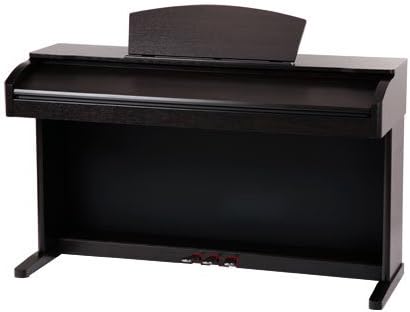
Image: The Classic Cantabile DP-400F RH Digital Piano fully assembled, showing the main unit, stand, and pedal board.
2. Sambungan Kuasa
Connect the power adapter to the DC IN jack on the rear of the piano, then plug the adapter into a suitable wall outlet. Ensure the piano's power switch is in the OFF position before connecting power.
3. Pedal Connection
The 3-pedal unit provides Sustain, Sostenuto, and Soft pedal functions. Ensure the pedal cable is securely connected to the corresponding port on the piano's base.

Imej: Dari dekat view of the three chrome-plated pedals (Sustain, Sostenuto, Soft) integrated into the digital piano's stand.
4. MIDI and USB Connectivity
The DP-400F RH features MIDI IN/OUT ports and a USB-to-Host port for connecting to computers or other MIDI devices. Use a standard USB cable to connect the piano to your computer for MIDI data transfer.
Arahan Operasi
1. Hidupkan/Mati Kuasa
Tekan ke KUASA button located on the control panel to turn the instrument on or off. The display will illuminate upon power-on.

Image: A wide shot of the digital piano's control panel, showing various buttons, knobs, and the central LCD screen.
2. Kawalan Kelantangan
Adjust the overall volume using the large JILID knob on the control panel. Turn clockwise to increase volume, counter-clockwise to decrease.
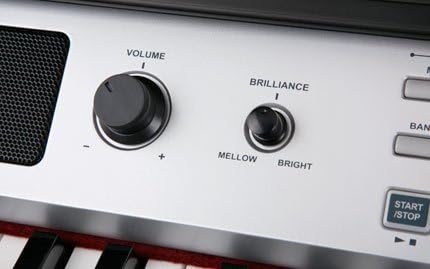
Imej: A terperinci view of the 'Volume' and 'Brilliance' rotary knobs on the control panel, with labels indicating their functions.
3. Sound Selection (Voices)
The DP-400F RH offers 559 different instrument voices. Use the SUARA buttons and the data entry dial to browse and select desired sounds. The selected voice will be displayed on the LCD screen.
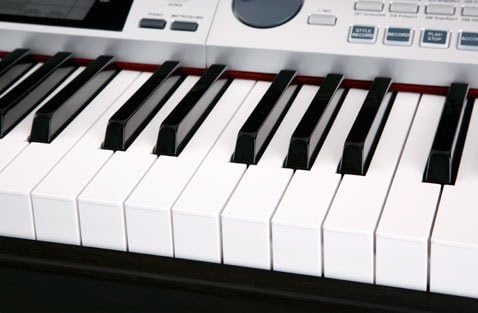
Imej: Dari dekat view of the 88-key keyboard, showing the black and white keys of the digital piano.
4. Using the Display
The LCD screen provides visual feedback on current settings, selected voices, tempo, and other parameters. Navigate through menus and adjust values using the buttons and dial adjacent to the display.

Imej: A terperinci view of the digital piano's LCD screen, displaying musical notation, current voice ("St.Gr.Pn1"), tempo, and other operational parameters.

Image: A close-up of the LCD display, showing "VOICE R1" and "St.Gr.Pn1" along with musical staff, measure, beat, and tempo information.
5. Pedal Functions
- Right Pedal (Sustain): Holds the notes played, similar to an acoustic piano's sustain pedal.
- Pedal Tengah (Sostenuto): Hanya mengekalkan not yang dipegang pada saat pedal ditekan.
- Pedal Kiri (Lembut): Reduces the volume and changes the timbre of the notes played.
6. Fungsi Lain
Explore other features such as DUAL (layering two voices), BERPECAH (dividing the keyboard into two voices), SENTUH (adjusting touch sensitivity), and various effects (DSP). Refer to the control panel for dedicated buttons and the display for detailed settings.
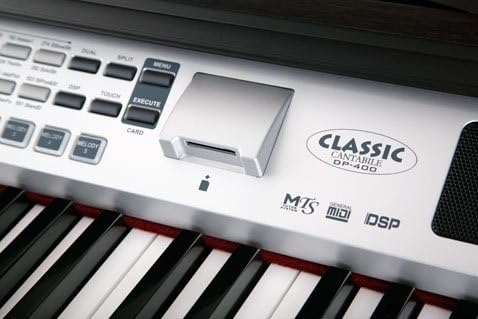
Image: A section of the control panel featuring the "Classic Cantabile DP-400" logo, along with indicators for MTS, General MIDI, and DSP, and buttons like MENU and EXECUTE.
Penyelenggaraan
1. Pembersihan
Wipe the instrument's surface with a soft, dry cloth. For stubborn dirt, slightly dampen the cloth with water and a mild detergent, then wipe dry immediately. Avoid abrasive cleaners, waxes, or solvents as they can damage the finish.
2. Penyimpanan
When not in use for extended periods, cover the digital piano with a dust cover to protect it from dust and dirt. Store in a location with stable temperature and humidity, away from direct sunlight and extreme temperatures.
Menyelesaikan masalah
| Masalah | Kemungkinan Punca | Penyelesaian |
|---|---|---|
| Tiada bunyi | Kelantangan terlalu rendah atau disenyapkan. Fon kepala disambungkan. | Increase the VOLUME knob. Disconnect headphones. |
| Kuasa tidak menyala | Power adapter not connected properly. Power outlet not working. | Check power adapter connection. Try a different power outlet. |
| Kunci tidak bertindak balas | Instrument may be in a demo mode or a specific setting. | Restart the instrument. Check the manual for specific mode settings. |
| Pedal tidak berfungsi | Pedal unit cable is loose or disconnected. | Ensure the pedal cable is securely connected to the piano. |
Spesifikasi
- model: DP-400F RH
- kunci: 88 weighted keys
- Pedal: 3 (Sustain, Sostenuto, Soft)
- Sounds (Voices): 559
- Polifoni: 64-nota
- Ketersambungan: MIDI IN/OUT, USB-to-Host
- Dimensi (Pakej): 159 x 65.5 x 45.5 cm
- Berat (Produk): 68.7 kg
- Kuasa: AC Adapter (specified voltage)
- Bateri: 1 Lithium-metal battery (included, likely for internal memory/clock)
Maklumat Waranti
Classic Cantabile products are designed and manufactured to high-quality standards. This product is covered by a limited warranty against defects in materials and workmanship. For specific warranty terms, duration, and claim procedures, please refer to the warranty card included with your purchase or contact your local Classic Cantabile dealer or customer support.
Sokongan Pelanggan
Should you encounter any issues or have questions regarding your Classic Cantabile DP-400F RH Digital Piano that are not addressed in this manual, please contact Classic Cantabile customer support. You can typically find contact information on the manufacturer's official webtapak atau melalui peruncit anda.
For service inquiries, please have your model number (DP-400F RH) and purchase date ready.


