pengenalan
Welcome to the world of homemade bread with your new Oster Expressbake Bread Maker. This appliance is designed to simplify the bread-making process, offering a variety of settings for different bread types, doughs, and even jams. Enjoy fresh, delicious bread with minimal effort.
Produk Selesaiview dan Ciri Utama
The Oster Expressbake Bread Maker (CKSTBR9050-NP) is a versatile kitchen appliance designed for ease of use and consistent results. It features a compact design and intuitive controls.
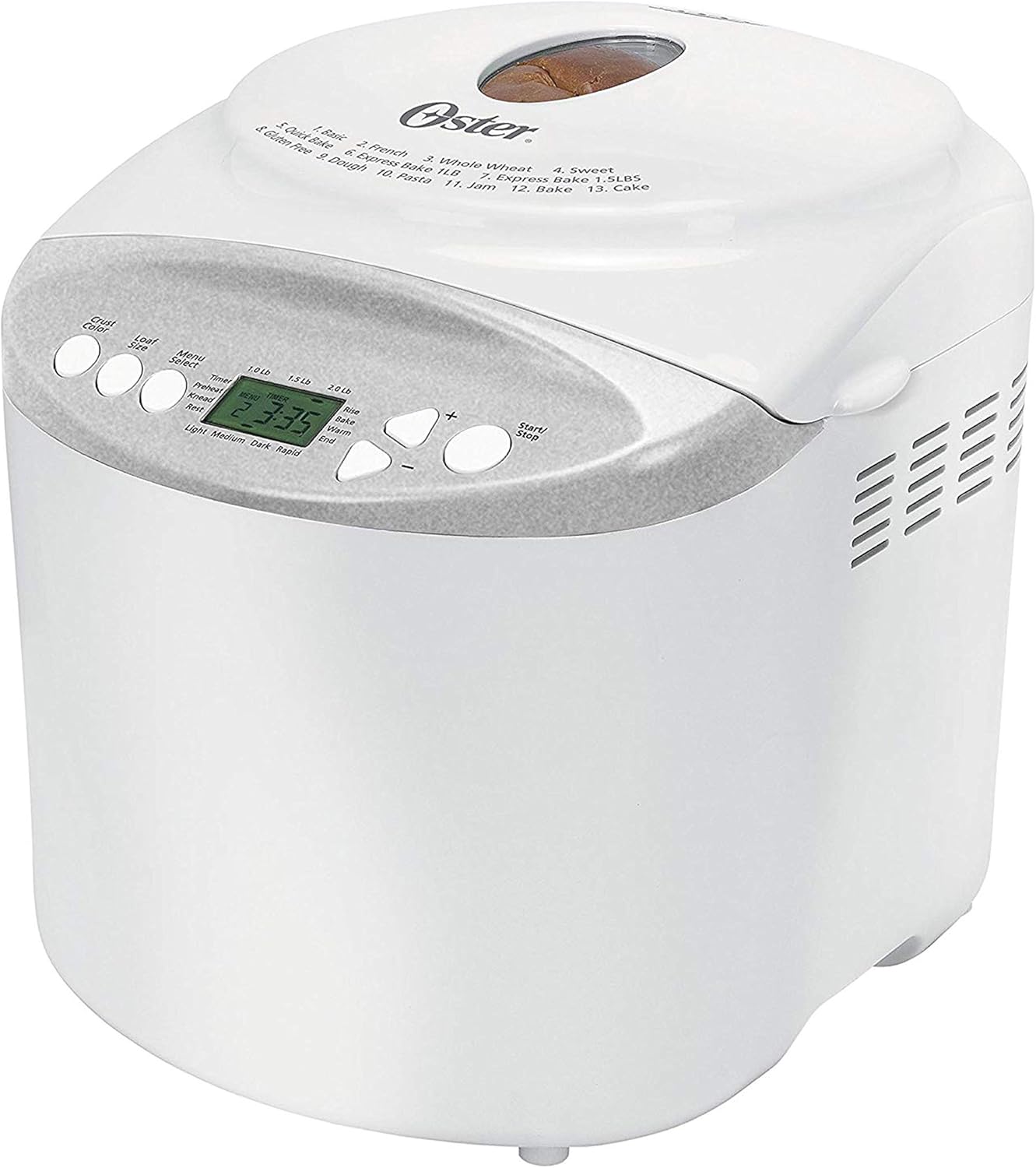
Depan view of the Oster Expressbake Bread Maker, showing the control panel and viewtetingkap masuk.

Dalaman view highlighting the removable lid, nonstick aluminum pan, and easy-to-read LCD display.
Ciri-ciri Utama:
- 2-Pound Loaf Capacity: Ideal for families, allowing for larger bread batches.
- 13 Tetapan: Offers a wide range of options for various breads, doughs, and jams.
- Gluten-Free Setting: Dedicated program for preparing gluten-free bread.
- Express Bake Setting: Bakes bread in under an hour for quick results.
- Crust Color Selection: Choose from light, medium, or dark crusts.
- Pemasa Boleh Aturcara 13 Jam: Allows for delayed baking, so you can wake up to fresh bread.
- Aksesori yang Mudah: Includes a measuring cup and spoon.
Product Features Video: A Closer Look
This video provides a detailed visual overview of the Oster Expressbake Bread Maker, showcasing its various components and features, including the bread pan, kneading paddle, and control panel. It highlights the ease of use and the different settings available.
Panduan Persediaan
- Membongkar: Carefully remove all packaging materials from the bread maker and its accessories.
- Pembersihan: Before first use, wash the bread pan and kneading paddle with warm, soapy water. Wipe the exterior of the unit with a damp kain. Pastikan semua bahagian kering sepenuhnya sebelum dipasang.
- penempatan: Letakkan pembuat roti di atas permukaan yang stabil, rata dan tahan haba, jauh daripada cahaya matahari langsung dan sumber haba. Pastikan pengudaraan yang mencukupi di sekeliling unit.
- Install Bread Pan: Insert the kneading paddle onto the shaft inside the bread pan. Place the bread pan into the bread maker, ensuring it clicks securely into place.
- Sambungan Kuasa: Palamkan kord kuasa ke salur keluar elektrik yang dibumikan.

The included measuring cup and spoon are essential for accurate ingredient measurement.

The control panel displays the 13 available settings for various bread types and functions.
Arahan Operasi
Follow these steps for successful bread baking:
- Tambah Bahan: Always add liquid ingredients first, followed by dry ingredients. Create a small well in the dry ingredients for the yeast, ensuring it does not come into direct contact with liquids or salt initially.
- Pilih Program: Press the "Menu Select" button to choose from the 13 available settings (e.g., Basic, French, Whole Wheat, Sweet, Gluten-Free, Express Bake, Dough, Jam, Cake).
- Pilih Saiz Roti: Press the "Loaf Size" button to select your desired loaf size (1.0 lb, 1.5 lb, or 2.0 lb).
- Pilih Warna Kerak: Press the "Crust Color" button to choose your preferred crust shade (Light, Medium, or Dark).
- Mula Membakar: Press the "Start/Stop" button to begin the baking cycle. The machine will automatically knead, rise, and bake the bread.
- Delayed Baking (Optional): To use the 13-hour programmable timer, add ingredients, then set the desired delay time before pressing "Start/Stop".
Petua Penting untuk Keputusan Terbaik:
- Ensure all ingredients are at room temperature unless otherwise specified in the recipe.
- Measure ingredients precisely. Use the provided measuring cup and spoon for accuracy.
- During the kneading cycle, use a rubber spatula to scrape down any flour from the sides of the pan to ensure all ingredients are incorporated.
- Avoid opening the lid during the baking cycle, especially during the rising phase, as this can affect the bread's texture.
Penyelenggaraan dan Pembersihan
Penyelenggaraan yang betul memastikan ketahanan dan prestasi optimum pembuat roti anda.
- Selepas Setiap Penggunaan: Unplug the bread maker and allow it to cool completely before cleaning.
- Kuali Roti dan Dayung Uli: Remove the bread pan and kneading paddle. Wash them with warm, soapy water. Do not use abrasive cleaners or scouring pads, as this can damage the nonstick coating. Rinse thoroughly and dry completely.
- Luaran: Lap bahagian luar pembuat roti dengan lembut, damp kain. Jangan rendam unit ini di dalam air atau sebarang cecair lain.
- Tudung: The inner lid is detachable for easy cleaning. Wipe it down with a damp kain.
- Storan: Store the bread maker in a dry, cool place when not in use.
Menyelesaikan masalah
If you encounter issues with your bread maker, refer to the common problems and solutions below:
| Masalah | Kemungkinan Punca | Penyelesaian |
|---|---|---|
| Bread is too dense or flat | Too much liquid, old yeast, or incorrect ingredient order. | Reduce liquid slightly. Ensure yeast is fresh. Always add liquids first, then dry ingredients, with yeast last in a well. |
| Bread did not rise | Inactive yeast, water too hot/cold, or too much salt/sugar. | Check yeast expiration. Use water between 77°-85°F. Measure salt and sugar accurately. |
| Uli dayung tersangkut dalam roti | Kejadian biasa. | Allow bread to cool. Use the provided metal hook to carefully remove the paddle. |
| Mesin tidak dihidupkan | Not plugged in, lid not closed, or incorrect program selection. | Ensure power cord is securely plugged in. Close the lid firmly. Verify program settings. |
Spesifikasi Produk
- Nombor Model: CKSTBR9050
- warna: putih
- Kapasiti Roti: Sehingga 2 paun
- Bilangan Program: 13
- Dimensi Produk: 12.1"D x 13.5"W x 13.2"H
- Berat Barang: 8 paun
- Pengeluar: Oster
- UPC: 750343688389, 034264440203
- Tarikh Pertama Tersedia: 17 Januari 2011

Detailed dimensions of the Oster Expressbake Bread Maker.
Waranti dan Sokongan
For detailed warranty information and customer support, please refer to the official user guide provided with your product or visit the Oster website. A digital version of the user guide is often available for download.
Untuk bantuan tambahan, anda juga boleh merujuk kepada Panduan Pengguna (PDF).


