
1. Pengenalan dan Lebihview
The Tetra WP Aquarium Water Pump is designed to provide efficient water circulation for aquariums ranging from 80 to 200 liters. This powerful, submersible pump features an adjustable flow system, ensuring optimal water movement for a healthy aquatic environment. Its compact design allows for easy placement and quiet operation, making it an ideal choice for maintaining water quality.
Ciri-ciri utama termasuk:
- Powerful Impeller System: Delivers high water flow for effective circulation.
- Kadar Aliran Boleh Laras: Allows precise control over water movement to suit your aquarium's needs.
- Boleh Tenggelam Sepenuhnya: Designed for complete immersion in water.
- Operasi senyap: Engineered to run silently, minimizing disturbance.
- Pemasangan dan Penyelenggaraan Mudah: Simple setup and straightforward cleaning procedures.
2. Arahan Keselamatan
Before operating the Tetra WP Aquarium Water Pump, please read and understand all safety instructions to prevent injury or damage to the product or your aquarium. Failure to follow these instructions may result in electric shock, fire, or other hazards.
- Always disconnect the power supply before performing any maintenance, installation, or removal of the pump.
- Ensure your hands are dry when handling the power plug.
- The pump is designed for indoor use only and must be fully submerged in water during operation.
- Jangan kendalikan pam jika kord kuasa atau palam rosak.
- Jangan gunakan pam untuk tujuan selain daripada yang dinyatakan dalam manual ini.
- Jauhkan daripada kanak-kanak.
- Pastikan voltage indicated on the pump matches your local power supply.
3. Kandungan Pakej
Carefully unpack the box and ensure all items are present and in good condition. The package should contain:
- 1 x Tetra WP Aquarium Water Pump (Model WP 600)
Note: Additional tubing or accessories may need to be purchased separately depending on your specific aquarium setup.
4. Persediaan
Follow these steps for proper installation of your Tetra WP Aquarium Water Pump:
- Sediakan Pam: Ensure the pump is clean and free from any debris.
- Kedudukan: Place the pump fully submerged inside your aquarium. The pump is equipped with suction cups for secure attachment to the aquarium glass. Ensure it is positioned where it can effectively circulate water without being obstructed by decorations or substrate.
- Connect Tubing (Optional): If you are using the pump to drive a filter or other accessory, connect the appropriate tubing to the pump's outlet nozzle.
- Laraskan Kadar Aliran: Locate the flow adjustment slider on the pump. Set it to the desired water flow intensity. Start with a moderate setting and adjust as needed after observing your aquarium's water movement.
- Sambungan Kuasa: Once the pump is securely placed and fully submerged, connect the power plug to a suitable electrical outlet.
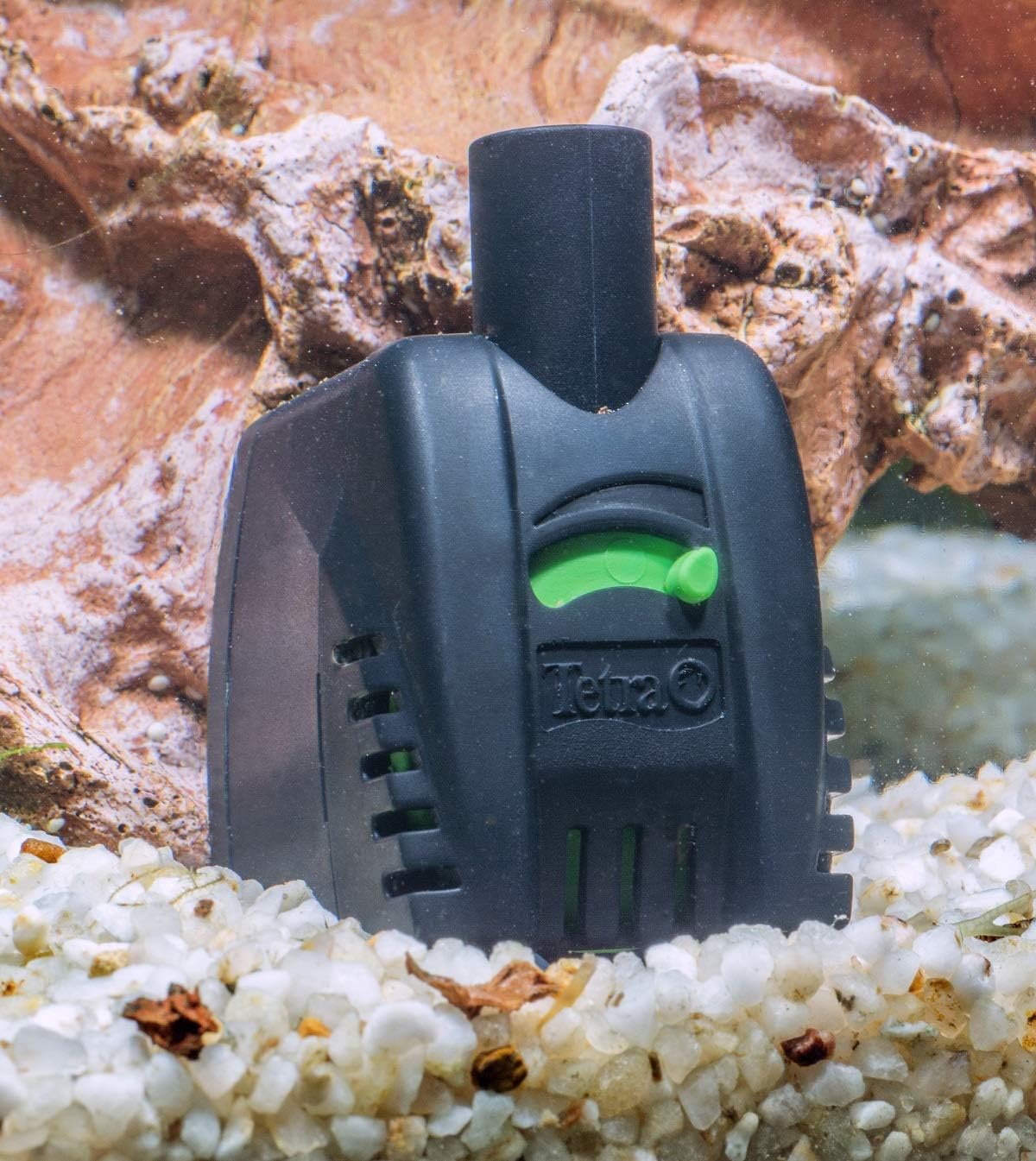

5. Beroperasi
Once installed, operating the Tetra WP pump is straightforward:
- Hidupkan kuasa: Plug the pump into a power outlet. The pump will start immediately.
- Pelarasan Aliran: Use the green slider on the front of the pump to increase or decrease the water flow. Adjust it to achieve the desired current for your fish and plants.
- Operasi Berterusan: The pump is designed for continuous operation. Monitor your aquarium's water parameters and fish behavior to ensure optimal conditions.
6. Penyelenggaraan
Regular maintenance ensures the longevity and efficient performance of your pump. Always disconnect the power before performing any maintenance.
- Pembersihan rutin: Periodically remove the pump from the aquarium. Disassemble the front cover and impeller housing. Clean the impeller and its chamber thoroughly to remove any accumulated debris, algae, or mineral deposits. A small brush can be helpful.
- Semak Sekatan: Inspect the intake grilles and outlet nozzle for any blockages that might impede water flow.
- Pemeriksaan Pendesak: Check the impeller for any signs of wear or damage. A worn impeller can lead to reduced performance or increased noise.
- Pemasangan semula: Reassemble the pump carefully, ensuring all parts are correctly fitted.
For optimal aquarium health and filter performance, consider using products like Tetra FilterActive Bacteria after filter changes, filter cleaning, or water changes. This helps maintain biological activity and extends the interval between cleanings.

7. Penyelesaian masalah
If you encounter issues with your Tetra WP pump, refer to the following common problems and solutions:
| Masalah | Kemungkinan Punca | Penyelesaian |
|---|---|---|
| Pam tidak bermula | No power; Impeller jammed; Airlock | Check power connection; Disconnect and clean impeller; Ensure pump is fully submerged and free of air bubbles. |
| Aliran air berkurangan | Clogged intake/outlet; Dirty impeller; Flow rate set too low | Clean intake grilles and outlet; Clean impeller; Adjust flow slider to a higher setting. |
| Pam bising atau bergetar | Impeller dirty or damaged; Improper seating of components; Air trapped in pump | Disconnect and clean impeller; Ensure all parts are correctly assembled; Gently shake pump to release trapped air; Check for worn impeller. |
| Pam berhenti sekejap-sekejap | Overheating; Loose connection; Impeller obstruction | Ensure pump is fully submerged; Check power connection; Clean impeller for obstructions. |
8. Spesifikasi
Detailed technical specifications for the Tetra WP 600 Aquarium Water Pump:
| Ciri | Spesifikasi |
|---|---|
| Model | WP 600 |
| Saiz Akuarium yang Sesuai | 80 - 200 Liter |
| Kadar Aliran Maksimum | 600 Liters per hour (l/h) |
| Penggunaan Kuasa | 11 Watt |
| Ketinggian Penghantaran Maksimum | 1.3 meters (m) |
| Maximum Immersion Height | 1 meter (m) |
| Dimensi (Anggaran) | Tinggi: 80 mm, Kedalaman: 70 mm, Lebar: 50 mm |
| bahan | Logam (komponen dalaman), Plastik (perumah) |
| Sumber Kuasa | Elektrik dengan kabel |
| GTIN (Nombor Item Perdagangan Global) | 04004218188785 |
| ASIN | B004AWF0TA |
| Negara Asal | Itali |


9. Waranti dan Sokongan
The Tetra WP Aquarium Water Pump comes with a Waranti 2 tahun dari tarikh pembelian, meliputi kecacatan pembuatan. Sila simpan bukti pembelian anda untuk tuntutan waranti.
For returns or issues with defective/damaged products, please refer to the retailer's return policy or contact their customer support directly. For specific information regarding purchases made on marketplaces, consult their respective help pages.
For technical support or further inquiries about your Tetra product, please visit the official Tetra webtapak atau hubungi bahagian perkhidmatan pelanggan mereka.