1. Pengenalan
This manual provides instructions for the proper use and installation of the BT SATA 7-Pin Male to SATA 7-Pin Female Adapter, 90 Degrees. This adapter is designed to facilitate connections in confined spaces by changing the orientation of a standard SATA data port.
2. Maklumat Keselamatan
- Ensure all power is disconnected from the computer system before installing or removing the adapter.
- Handle the adapter by its body; avoid touching the connector pins directly.
- Do not apply excessive force when connecting or disconnecting the adapter.
- Keep the adapter away from moisture, extreme temperatures, and direct sunlight.
3. Produk Lebihview
The BT SATA 7-Pin Male to SATA 7-Pin Female Adapter is a compact accessory designed to provide a 90-degree angle connection for SATA data cables. This is particularly useful in computer cases or enclosures where space is limited, allowing for cleaner cable management and preventing strain on existing SATA ports.
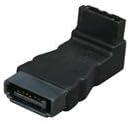
Image 1: BT SATA 7-Pin Male to SATA 7-Pin Female 90-Degree Adapter. This image shows the black, molded adapter with a male 7-pin SATA connector on one end and a female 7-pin SATA connector on the other, angled at 90 degrees.
Ciri-ciri Utama:
- Jenis Penyambung: SATA 7-Pin Male to SATA 7-Pin Female
- Sudut: 90-degree connection for space optimization
- Pembinaan: Fully molded for durability
- warna: Hitam
4. Persediaan dan Pemasangan
- Sistem Matikan Kuasa: Before beginning, ensure your computer or device is completely powered off and disconnected from the power source.
- Locate SATA Port: Identify the SATA data port on your motherboard or storage device where you intend to use the adapter.
- Sambungkan Penyesuai: Gently align the 7-pin male connector of the adapter with the SATA data port. Push firmly but carefully until it is securely seated. The 90-degree angle will orient the female connector in a different direction.
- Connect SATA Cable: Take your standard SATA data cable and connect its male end to the female 7-pin port on the adapter. Ensure a snug fit.
- Sahkan Sambungan: Double-check that both the adapter and the SATA cable are fully inserted and secure.
- Sistem Hidupkan Kuasa: Reconnect power to your system and power it on. The adapter is a passive component and requires no software installation.
5. Arahan Operasi
The BT SATA 7-Pin Male to SATA 7-Pin Female Adapter is a passive hardware component. It does not require any specific operating procedures, drivers, or software. Once correctly installed, it functions as an extension and re-orientation of your existing SATA data connection. Data transfer will occur as if the adapter were not present, assuming a proper connection.
6. Penyelenggaraan
- Pembersihan: If necessary, gently wipe the adapter with a dry, lint-free cloth. Do not use liquid cleaners or solvents.
- Storan: When not in use, store the adapter in a clean, dry, and dust-free environment.
- Pemeriksaan: Periodically inspect the connectors for any signs of damage or corrosion.
7. Penyelesaian masalah
If you experience issues after installing the adapter, consider the following:
- Peranti Tidak Dikesan:
- Ensure both the adapter and the SATA data cable are fully and securely connected to their respective ports.
- Verify that the SATA power cable is also correctly connected to the storage device.
- Test the SATA data cable directly without the adapter to rule out a cable issue.
- Try the adapter on a different SATA port or with a different storage device if available.
- Kerosakan Fizikal: Inspect the adapter for any visible damage to the connectors or housing. If damaged, discontinue use.
8. Spesifikasi
| Ciri | Perincian |
|---|---|
| Jenama | BT |
| Nombor Model | SATA-90MF |
| Jenis Penyambung | SATA 7-Pin Male to SATA 7-Pin Female |
| Connection Angle | 90 Darjah |
| warna | Hitam |
| Dimensi Produk (LxWxH) | 1 x 1 x 1 inci |
| Berat Barang | 0.48 auns |
9. Waranti dan Sokongan
Specific warranty terms and conditions for this product are not provided within this manual. Please refer to the product packaging or the retailer's weblaman web untuk maklumat jaminan terperinci.
For technical support or further assistance, please contact the vendor or retailer from whom the product was purchased. Specific manufacturer contact information is not available in this document.