pengenalan
This manual provides comprehensive instructions for the safe and efficient use of your BlackBerry HS-300 Wireless Bluetooth Headset. Please read this manual thoroughly before operating the device and retain it for future reference. The BlackBerry HS-300 is designed for hands-free communication with compatible Bluetooth-enabled devices.
Kandungan Pakej
Sahkan bahawa pakej anda mengandungi item berikut:
- BlackBerry HS-300 Wireless Bluetooth Headset
- Ear hook (optional, for secure fit)
- Ear gels/tips (various sizes for comfort)
- Kabel pengecasan
- Manual Pengguna (dokumen ini)
Peranti Lebihview
Familiarize yourself with the components of your BlackBerry HS-300 headset.
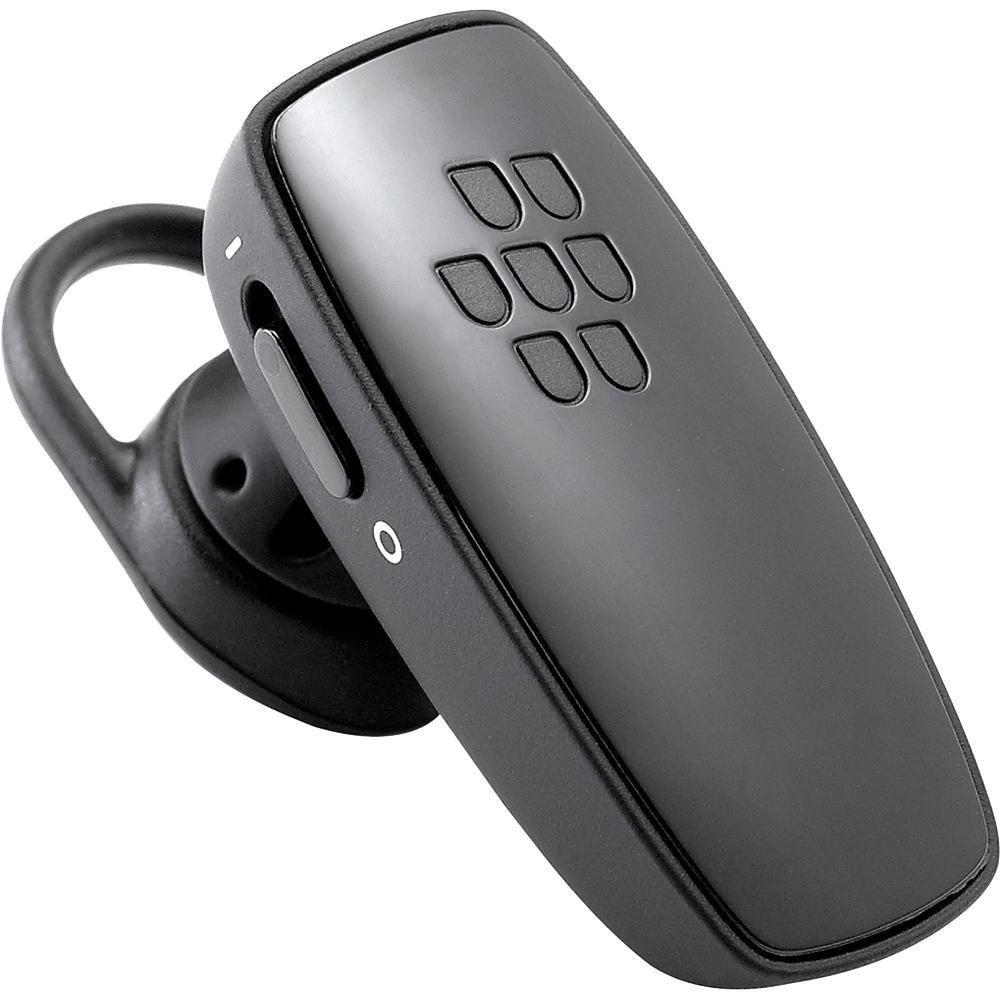
Imej 1: Depan view of the BlackBerry HS-300 Wireless Bluetooth Headset. The image displays the main body of the headset, featuring the BlackBerry logo (seven-dot pattern) on the front surface. A slender button, likely for volume control or multi-function, is visible on the side. An ear hook is attached, designed to secure the headset over the ear. A small indicator light is also present near the button.
- Butang pelbagai fungsi: Used for answering/ending calls, voice commands, and pairing.
- Butang Kawalan Kelantangan: Adjusts call and media volume.
- Lampu Penunjuk LED: Memaparkan status (kuasa, berpasangan, mengecas).
- mikrofon: Captures your voice during calls.
- Suis kuasa: Menghidupkan atau mematikan alat dengar.
- Port Pengecasan: Connects to the charging cable.
Persediaan
1. Mengecas Alat Dengar
Before initial use, fully charge your headset. The HS-300 features rapid charge capabilities.
- Connect the charging cable to the headset's charging port and to a compatible USB power source.
- The LED indicator will show the charging status (e.g., solid red for charging, solid blue for fully charged).
- Cas penuh menyediakan sehingga 4 jam masa berbual.
2. Berpasangan dengan Peranti Bluetooth
To use your headset, it must be paired with a Bluetooth-enabled phone or device.
- Pastikan alat dengar dimatikan.
- Press and hold the Multi-function Button until the LED indicator flashes blue and red alternately. This indicates pairing mode.
- On your phone, enable Bluetooth and search for new devices.
- Select "BlackBerry HS-300" from the list of available devices.
- Jika digesa untuk kod laluan, masukkan "0000" (empat sifar).
- Setelah dipasangkan, penunjuk LED akan berkelip biru secara berkala.
Arahan Operasi
Hidupkan/Mati Kuasa
- Untuk Menghidupkan: Slide the Power Switch to the 'On' position. The LED indicator will flash blue.
- Untuk Mematikan: Slide the Power Switch to the 'Off' position. The LED indicator will turn off.
Membuat dan Menerima Panggilan
- Menjawab Panggilan: Tekan Butang Berbilang fungsi sekali.
- Menamatkan Panggilan: Tekan Butang Pelbagai Fungsi sekali semasa panggilan.
- Menolak Panggilan: Tekan dan tahan Butang Berbilang Fungsi selama lebih kurang 2 saat.
- Membuat Panggilan: Dial the number on your phone. The call will automatically transfer to the headset if connected.
- Voice Dialing (if supported by phone): Press the Multi-function Button once when not on a call.
Kawalan Kelantangan
- Use the Volume Control Buttons on the headset to adjust the call or media volume.
Penyelenggaraan
- Bersihkan set kepala dengan kerap menggunakan kain lembut dan kering.
- Elakkan daripada mendedahkan alat dengar kepada suhu, kelembapan atau bahan menghakis yang melampau.
- Simpan set kepala di tempat yang sejuk dan kering apabila tidak digunakan.
- Do not attempt to disassemble or modify the headset, as this will void the warranty and may cause damage.
Menyelesaikan masalah
| Masalah | Penyelesaian |
|---|---|
| Fon kepala tidak dihidupkan. | Ensure the headset is charged. Connect it to a power source using the charging cable. |
| Tidak dapat memasangkan alat dengar dengan telefon saya. |
|
| Tiada audio atau kualiti audio yang lemah. |
|
| Fon kepala kerap terputus sambungan. |
|
Spesifikasi
| Ciri | Perincian |
|---|---|
| Nombor Model | HS-300 |
| Ketersambungan | Bluetooth Wireless (Version 2.1) |
| Masa Berbual | Sehingga 4 jam |
| Mengecas | Rapid charge capable |
| Kawalan | Volume control, Multi-function button |
| Mikrofon | Bersepadu |
| Faktor Bentuk | On-ear (single ear) |
| Berat badan | Kira-kira 3.2 auns |
| Dimensi | 2.5 x 2 x 6.5 inci (anggaran) |
Waranti dan Sokongan
For warranty information and technical support, please refer to the documentation provided at the time of purchase or visit the official BlackBerry support webtapak. Simpan bukti pembelian anda untuk tuntutan waranti.
Sokongan dalam talian: www.blackberry.com/support


