pengenalan
The Cellularline Roller Clip Bluetooth Headset is designed for convenient, hands-free communication. Featuring a retractable cable and a wireless Bluetooth clip, this headset offers flexibility and ease of use. It supports simultaneous connection to two mobile phones, automatically activating when a call is received or made on either device. Its automatic cable winder ensures a tidy experience, making it ideal for users who prefer to wear the headset only during calls.
Produk Selesaiview
Familiarize yourself with the components and features of your Cellularline Roller Clip Bluetooth Headset.

Rajah 1: Depan view of the Cellularline Roller Clip Bluetooth Headset, showing the main unit with the retractable earbud.
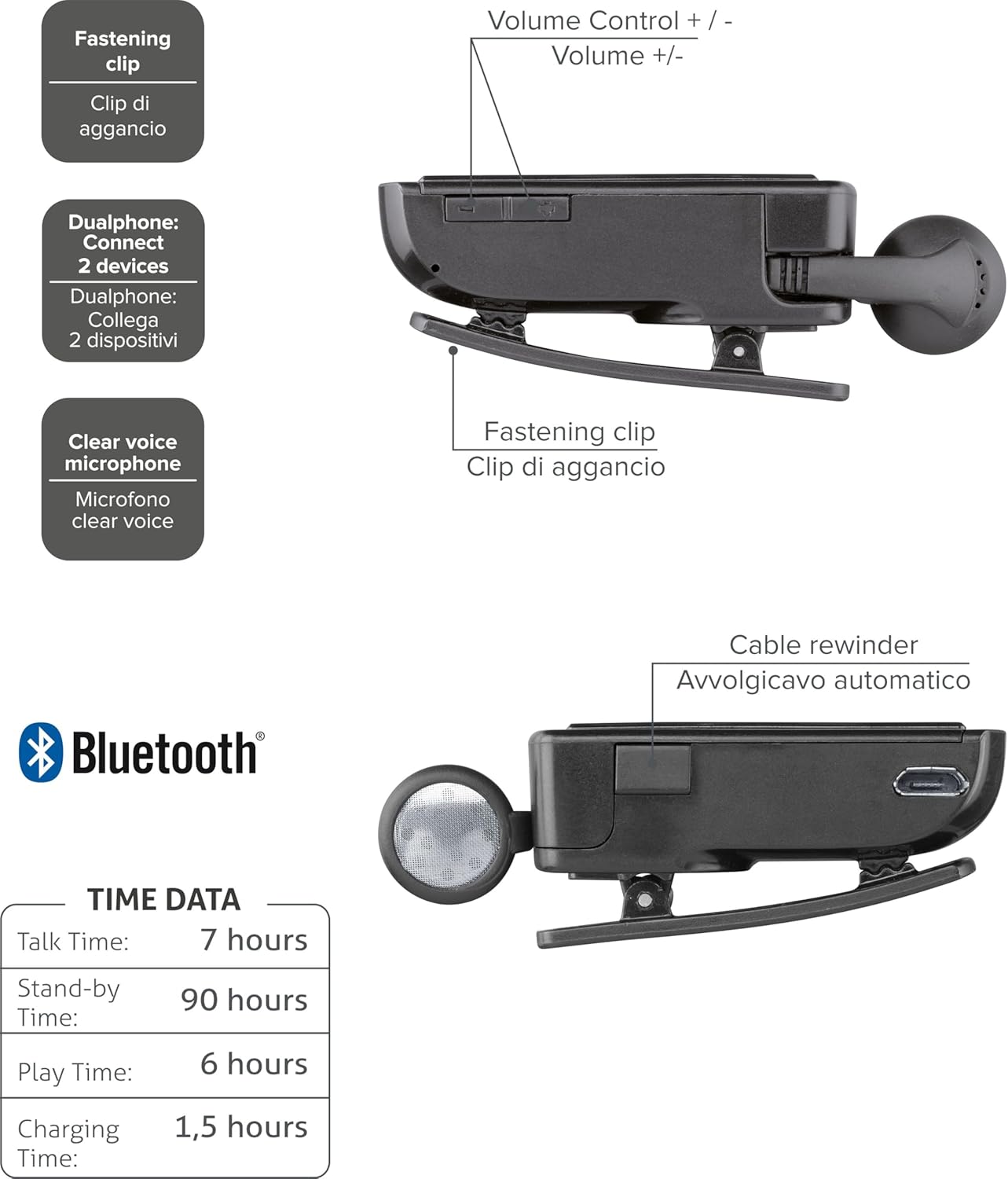
Rajah 2: Diagram illustrating key features including the fastening clip, volume controls, dualphone connectivity, clear voice microphone, and cable rewinder.
- Retractable Earbud: The earbud cable automatically retracts into the main unit for compact storage.
- Bluetooth Clip: The main unit features a clip for attaching to clothing.
- Kawalan Kelantangan: Buttons located on the side for adjusting audio volume.
- Sambungan berbilang titik: Connects to two mobile phones simultaneously.
- Clear Voice Microphone: Ensures clear audio transmission during calls.
- Port USB Mikro: Untuk mengecas peranti.
Persediaan
1. Mengecas Alat Dengar
Before first use, fully charge the headset. Use the provided Micro-USB cable to connect the headset to a USB power source (e.g., computer USB port or wall adapter).
- Lampu penunjuk pengecasan akan menyala semasa pengecasan.
- Pengecasan penuh biasanya mengambil masa lebih kurang 1.5 jam.
- Lampu penunjuk akan bertukar atau mati setelah pengecasan selesai.

Rajah 3: sebelah view of the headset showing the Micro-USB charging port.
2. Berpasangan dengan Peranti Mudah Alih
To use the headset, it must be paired with your Bluetooth-enabled mobile phone or device.
- Pastikan alat dengar dimatikan.
- Press and hold the Multi-function button (usually the main power button) until the indicator light flashes blue and red alternately, indicating pairing mode.
- Pada peranti mudah alih anda, dayakan Bluetooth dan cari peranti baharu.
- Select "Cellularline Roller Clip" or a similar name from the list of available devices.
- Jika digesa untuk kod laluan, masukkan "0000" (empat sifar).
- Once paired, the indicator light will typically flash blue slowly, and you may hear a confirmation tone.
3. Connecting to Two Devices (Multi-point)
The headset can be connected to two mobile phones simultaneously.
- Pair the headset with the first mobile device as described above.
- Lumpuhkan Bluetooth pada peranti pertama.
- Put the headset back into pairing mode and pair it with the second mobile device.
- Once paired with the second device, re-enable Bluetooth on the first device.
- The headset should now be connected to both devices. It will automatically switch to the active call on either phone.
Arahan Operasi
Hidupkan/Mati Kuasa
- Hidupkan kuasa: Press and hold the Multi-function button for approximately 3 seconds until the blue indicator light flashes.
- Matikan: Press and hold the Multi-function button for approximately 3 seconds until the red indicator light flashes and then turns off.
Membuat dan Menerima Panggilan
- Jawab Panggilan: Press the Multi-function button once when a call comes in.
- Tamatkan Panggilan: Tekan butang Berbilang fungsi sekali semasa panggilan.
- Tolak Panggilan: Press and hold the Multi-function button for approximately 2 seconds when a call comes in.
- Dail Semula Nombor Terakhir: Double-press the Multi-function button when the headset is idle.
- Voice Dialing (if supported by phone): Press and hold the Multi-function button for approximately 1 second when the headset is idle.
Kawalan Kelantangan
Adjust the call or media volume using the dedicated volume buttons on the side of the headset.

Rajah 4: sebelah view of the headset showing the volume control buttons.
- Kelantangan: Tekan butang '+'.
- Perlahankan suara: Tekan butang '-'.
Kabel boleh tarik balik
To extend the earbud, gently pull it out. To retract, press the cable winder button (if present) or gently pull the cable slightly further and release to activate the retraction mechanism.
Penyelenggaraan
- Pembersihan: Lap alat dengar dengan kain lembut dan kering. Jangan gunakan pembersih atau pelarut yang kasar.
- Storan: Simpan alat dengar di tempat yang sejuk dan kering jauh dari cahaya matahari langsung dan suhu yang melampau.
- Penjagaan Bateri: Untuk memanjangkan hayat bateri, elakkan daripada menyahcas sepenuhnya bateri dengan kerap. Cas alat dengar dengan kerap, walaupun tidak digunakan untuk tempoh yang lama.
- Penjagaan Kabel: Avoid forcefully pulling the retractable cable. Allow the automatic winder to retract the cable smoothly.
Menyelesaikan masalah
| Masalah | Kemungkinan Punca | Penyelesaian |
|---|---|---|
| Alat dengar tidak dihidupkan. | Bateri lemah. | Caskan set kepala sepenuhnya. |
| Tidak boleh memasangkan alat dengar. | Headset not in pairing mode; Bluetooth disabled on device; device too far. | Ensure headset is in pairing mode (flashing red/blue). Enable Bluetooth on your device. Move headset closer to the device. |
| Tiada audio atau kualiti audio yang lemah. | Kelantangan terlalu rendah; alat dengar tidak disambungkan; gangguan. | Increase volume on both headset and phone. Reconnect the headset. Move away from other electronic devices. |
| Retractable cable not working smoothly. | Halangan atau kerosakan mekanisme. | Ensure no debris is obstructing the cable. Avoid forceful pulling. If damaged, contact support. |
| Cannot connect to two devices. | Urutan pasangan yang salah. | Follow the multi-point pairing instructions carefully (pair first, disable Bluetooth, pair second, re-enable first). |
Spesifikasi
| Ciri | Perincian |
|---|---|
| Nombor Model | BTCLIPARDP |
| Jenama | Talian selular |
| warna | Black/Grey (Schwarz) |
| Penempatan Telinga | Di Telinga |
| Faktor Bentuk | Di Telinga |
| Impedans | 32 Ohm |
| Dimensi Produk | 9 x 2.4 x 11cm; 50g |
| Jenis Bateri | 1 Bateri Litium Ion |
| Masa Berbual | Sehingga 7 jam |
| Masa Tunggu Sedia | Sehingga 90 jam |
| Masa Main | Sehingga 6 jam |
| Masa Mengecas | Lebih kurang 1.5 jam |
Waranti dan Sokongan
For warranty information and technical support, please refer to the official Cellularline webtapak atau hubungi perkhidmatan pelanggan mereka secara langsung. Simpan bukti pembelian anda untuk tuntutan waranti.
Untuk bantuan tambahan, anda boleh layari product page on Amazon.ae.


