1. Pengenalan
The Digitus DA-70544 is a versatile docking station designed for 2.5" and 3.5" SATA hard drives and SSDs. It provides a convenient way to access your data with high-speed USB connectivity, supporting data transfer rates up to 3000 Mbit/s. This manual will guide you through the setup, operation, and maintenance of your device.
2. Produk Lebihview
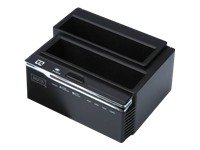
Figure 1: Digitus DA-70544 SATA Docking Station. This image shows the top-down view of the black docking station with two slots for SATA drives and front-facing indicator lights and buttons.
Key features of the Digitus DA-70544 include:
- High-speed data transfer up to 3000 Mbit/s.
- Supports SATA hard disk drives (HDDs) and solid-state drives (SSDs).
- USB interface for easy connection to computers.
- Compatible with Windows XP, Vista, 7, Mac, and Linux operating systems.
- Persediaan pasang dan main yang mudah.
3. Persediaan
- Buka bungkusan Peranti: Carefully remove the docking station and all accessories from the packaging. Ensure all components are present: the docking station, power adapter, and USB cable.
- Sambungkan Kuasa: Connect the provided power adapter to the DC input port on the back of the docking station, then plug the adapter into a power outlet.
- Insert SATA Drive(s): Gently slide your 2.5" or 3.5" SATA hard drive(s) or SSD(s) into the appropriate slots on the top of the docking station until they are firmly seated. Ensure the SATA connector aligns correctly.
- Sambung ke Komputer: Connect one end of the supplied USB cable to the USB port on the docking station and the other end to an available USB port on your computer.
- Hidupkan kuasa: Press the power button on the docking station (if available). The power indicator light should illuminate. Your operating system should automatically detect the new hardware.
4. Arahan Operasi
- Pengecaman Drive: Once connected and powered on, your operating system should recognize the inserted drive(s) as external storage devices. You may need to initialize and format new drives via Disk Management (Windows) or Disk Utility (Mac) before use.
- Pemindahan Data: Anda kini boleh seret dan lepas files to and from the drive(s) in the docking station, just like any other external storage device. The high-speed USB interface ensures quick data transfers.
- Penyingkiran Selamat: Before disconnecting the docking station or removing a drive, always safely eject the drive from your operating system (e.g., "Safely Remove Hardware" in Windows, "Eject" in Mac Finder) to prevent data corruption.
- Pertukaran Panas: The DA-70544 supports hot-swapping of drives. After safely ejecting a drive, you can remove it and insert another without powering down the docking station, provided the operating system has fully released the previous drive.
5. Penyelenggaraan
- Pembersihan: Use a soft, dry cloth to clean the exterior of the docking station. Do not use liquid cleaners or aerosols.
- Storan: Apabila tidak digunakan, simpan stesen dok di tempat yang sejuk dan kering, jauh daripada cahaya matahari langsung dan suhu yang melampau.
- Handling Drives: Always handle hard drives and SSDs with care. Avoid dropping or subjecting them to physical shock, as this can cause data loss or damage.
- Pengudaraan: Pastikan stesen dok mempunyai pengudaraan yang mencukupi untuk mengelakkan terlalu panas, terutamanya semasa penggunaan yang berpanjangan.
6. Penyelesaian masalah
| Masalah | Penyelesaian |
|---|---|
| Pemacu tidak dikesan oleh komputer. |
|
| Kelajuan pemindahan data yang perlahan. |
|
| Stesen dok tidak dapat dihidupkan. |
|
7. Spesifikasi
| Ciri | Nilai |
|---|---|
| Jenama | DIGIT |
| Nombor Model | DA-70544 |
| Supported HDD Interface | SATA |
| Antara muka | USB 2.0 |
| Kadar Pemindahan Data Maksimum | 3000 Mbit/s |
| Bilangan USB 2.0 Port | 1 |
| Sistem Operasi yang Serasi | Win XP, Vista, 7, Mac, Linux |
| Dimensi Produk | 16.2 x 12.4 x 12.2 cm |
| Berat Produk | 699 g (1.54 Paun) |


