1. Pengenalan
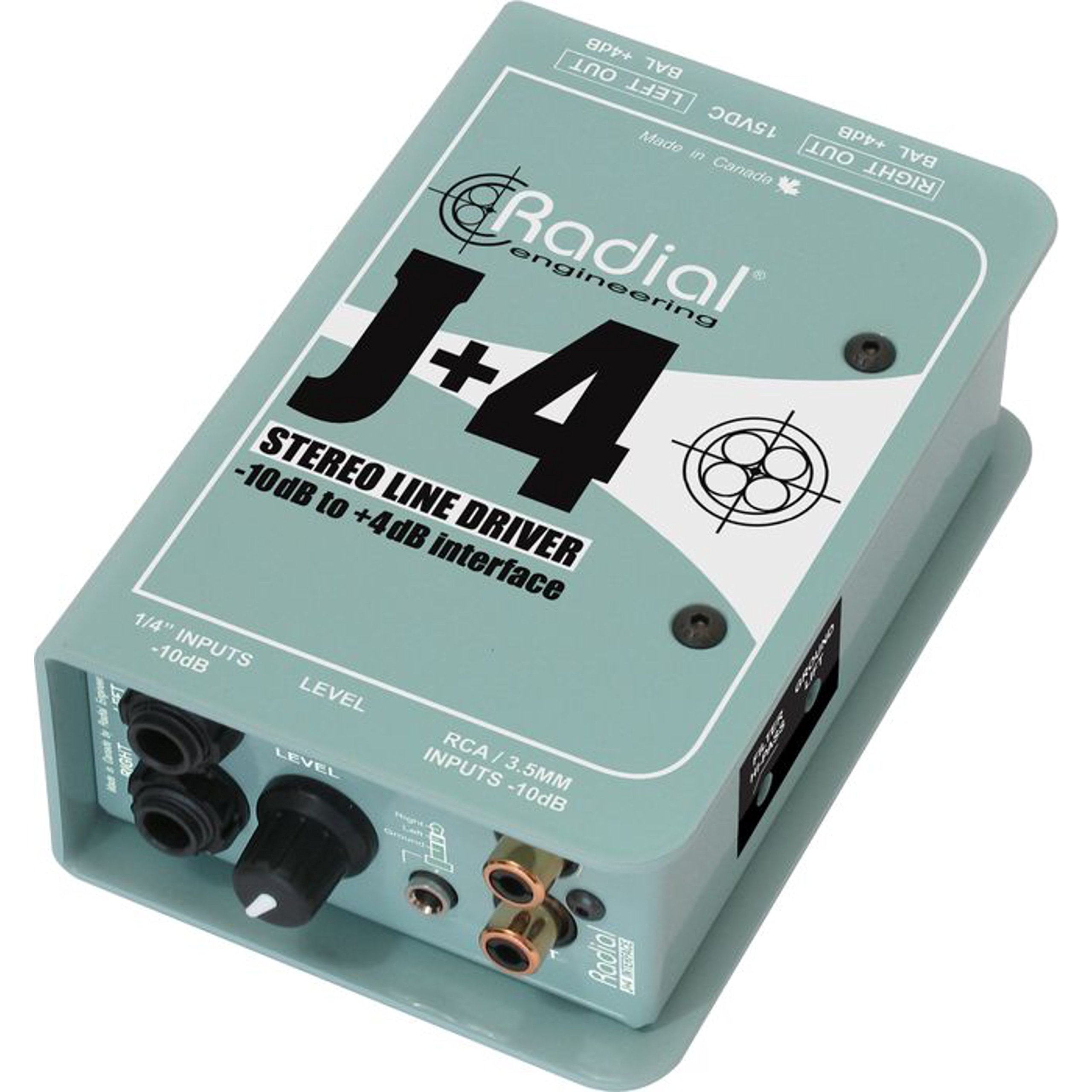
The Radial J+4 is a 2-channel signal level driver designed to interface professional audio equipment with consumer-level or low-output devices. It effectively boosts incoming signals from -10dB to a professional +4dB line level, ensuring optimal signal integrity and compatibility within recording studios, broadcast environments, and live sound applications. Its robust construction and active circuitry provide reliable performance and noise reduction.
2. Maklumat Keselamatan Penting
- Sumber Kuasa: Use only the specified power adapter for this unit. Incorrect voltage can damage the device and void the warranty.
- Kelembapan: Jangan dedahkan unit kepada hujan, lembapan atau kelembapan berlebihan.
- haba: Elakkan meletakkan unit berhampiran sumber haba seperti radiator, daftar haba, dapur atau peralatan penghasil haba yang lain.
- Pengudaraan: Pastikan pengudaraan yang betul. Jangan sekat sebarang bukaan pengudaraan.
- Servis: Rujuk semua servis kepada kakitangan perkhidmatan yang berkelayakan. Jangan cuba servis produk ini sendiri.
- Kabel: Ensure all cables are securely connected and free from damage to prevent signal loss or electrical hazards.
3. Ciri-ciri Utama
- Operasi 2 Saluran: Processes two independent audio channels.
- Signal Level Matching: Boosts -10dB consumer-level signals to +4dB professional line level.
- Discrete Circuitry: 100% discrete signal path for optimal audio fidelity.
- Active Buffering: Maintains signal integrity over long cable runs.
- Transformer Isolation: Helps eliminate ground loop hum and noise.
- Stereo Gain Control: Allows precise level adjustment for both channels.
- Penapis Laluan Tinggi: Reduces unwanted low-frequency rumble and noise.
- Suis Angkat Tanah: Breaks the ground connection to further combat hum.
- Input Serbaguna: Features dual 1/4" TRS, RCA, and a stereo 1/8" TRS input.
- Pembinaan Tahan Lama: Built with 14-gauge steel for roadworthy reliability.
4. Kawalan dan Sambungan
The Radial J+4 features a straightforward layout for easy integration into any audio setup.
Panel Depan
The front panel provides access to input connections and primary controls.
- INPUTS (1/4" TRS, RCA, 1/8" TRS): Connect your low-level audio sources here. The 1/4" and RCA jacks are typically for stereo pairs, while the 1/8" TRS is for portable devices.
- Kawalan GAIN: A rotary knob to adjust the output level of the boosted signal.
- HIGHPASS Filter Switch: Engages a filter to remove low-frequency content.
- Suis LIFT GROUND: Disconnects the audio ground from the chassis ground to eliminate hum and buzz caused by ground loops.
Panel Belakang
The rear panel houses the output connections and power input.
- OUTPUTS (XLR): Balanced XLR outputs for connecting to professional audio equipment such as mixers, audio interfaces, or power amppenyelamat.
- INPUT KUASA: Connection point for the external power supply.
5. Panduan Persediaan
Follow these steps for initial setup of your Radial J+4:
- Matikan Semua Peralatan: Before making any connections, ensure all audio equipment (source devices, mixers, amplifiers) are powered off.
- Sambungkan Sumber Input: Connect your low-level audio source (e.g., MP3 player, computer, instrument output) to the appropriate input jacks on the front panel of the J+4 (1/4" TRS, RCA, or 1/8" TRS).
- Sambungkan Output: Connect the XLR outputs of the J+4 to the line-level inputs of your professional audio equipment (e.g., mixer, audio interface). Use balanced XLR cables for optimal performance.
- Sambungkan Kuasa: Connect the provided power adapter to the POWER INPUT on the rear panel of the J+4, then plug the adapter into an appropriate power outlet.
- Hidupkan kuasa: Power on your professional audio equipment first, then power on your source device. The J+4 will power on automatically when connected to its power supply.
- Initial Gain Setting: Set the GAIN control on the J+4 to its minimum position before playing audio.
6. Operasi
Once connected, operating the J+4 is straightforward:
- Melaraskan Keuntungan: Play audio from your source device. Slowly increase the GAIN control on the J+4 until the desired output level is achieved at your professional audio equipment. Monitor the input levels on your mixer or interface to avoid clipping.
- Using the Highpass Filter: If you notice excessive low-frequency rumble or unwanted bass content, engage the HIGHPASS filter switch. This can help clean up the signal, especially with vocal or acoustic instrument sources.
- Addressing Hum and Buzz: If you experience a persistent hum or buzz, try engaging the GROUND LIFT switch. This can often resolve ground loop issues by breaking the electrical ground connection between the J+4 and other equipment. If the hum persists, check all cable connections and try different power outlets.
7. Penyelenggaraan
The Radial J+4 is designed for durability and requires minimal maintenance.
- Pembersihan: Gunakan kain lembut dan kering untuk membersihkan bahagian luar unit. Jangan gunakan pembersih, pelarut atau lilin yang kasar.
- Pemeriksaan: Periodically inspect cables and connections for any signs of wear or damage.
- Storan: When not in use for extended periods, store the unit in a dry, dust-free environment.
8. Penyelesaian masalah
If you encounter issues with your Radial J+4, refer to the following common problems and solutions:
| Masalah | Kemungkinan Punca | Penyelesaian |
|---|---|---|
| Tiada keluaran bunyi |
|
|
| Hum atau Buzz |
|
|
| Bunyi herot |
|
|
9. Spesifikasi
- model: R800 8015
- Bilangan Saluran: 2
- Teknologi Ketersambungan: 1/4" TRS, 1/8" TRS, RCA (inputs), XLR (outputs)
- Signal Level Conversion: -10dB hingga + 4dB
- Jenis Bahan: Keluli Tahan Karat
- Dimensi Produk: 10.8 x 4.9 x 2.8 inci
- Berat Barang: 0.01 auns
- Peranti Serasi: Personal Computer, various audio sources
- Perisian yang Disokong: Pro Tools, Logic Pro, Ableton Live, FL Studio, Cubase (when used with compatible audio interfaces)
10. Waranti dan Sokongan
For warranty information and technical support, please refer to the official Radial Engineering webtapak atau hubungi bahagian perkhidmatan pelanggan mereka. Simpan resit pembelian anda sebagai bukti pembelian untuk sebarang tuntutan waranti.


