pengenalan
This manual provides detailed instructions for the safe and effective use of your Optimus 50003 Personal Grooming System. This system is designed for comfortable removal of nose, ear, and eyebrow hairs, and includes a high-performance trimmer head attachment for larger areas. Please read this manual thoroughly before initial use and retain it for future reference.
Maklumat Keselamatan
- Pendedahan Air: Keep the trimmer away from direct water sources. While water-resistant, it is not designed for submersion.
- Keselamatan Bateri: Keep batteries out of reach of children. Do not mix old and new batteries, or different types of batteries. Dispose of used batteries responsibly.
- Penggunaan yang Dimaksudkan: Gunakan produk ini hanya untuk tujuan yang dimaksudkan seperti yang diterangkan dalam manual ini.
- Penjagaan Bilah: The blades are self-sharpening and maintenance-free. Do not attempt to sharpen or modify the blades.
- Pembersihan: Pastikan peranti dimatikan sebelum membersihkan.
Kandungan Pakej
Sahkan bahawa semua item terdapat dalam pakej:
- Optimus 50003 Personal Grooming System (Main Unit)
- Rotary Blade Head (pre-installed)
- High-Performance Trimmer Head Attachment
- Fast Trimming Comb
- Convenient Storage Stand
- Manual Arahan
- Note: One AA battery is required and not included.

Image: Back of product packaging illustrating the included components.
Produk Selesaiview
The Optimus 50003 features a durable design with an easy-grip rubber-coated body. It is equipped with self-sharpening stainless steel blades for consistent performance.
- Sistem Bilah Putar: Designed for comfortable and precise removal of nose, ear, and eyebrow hairs.
- High-Performance Trimmer Head: An interchangeable attachment for trimming hair in larger areas.
- Fast Trimming Comb: Used with the trimmer head for uniform hair length.
- Tahan Air: Allows for easy cleaning under running water.

Image: The Optimus 50003 grooming system with its main unit, interchangeable trimmer head, and storage stand.
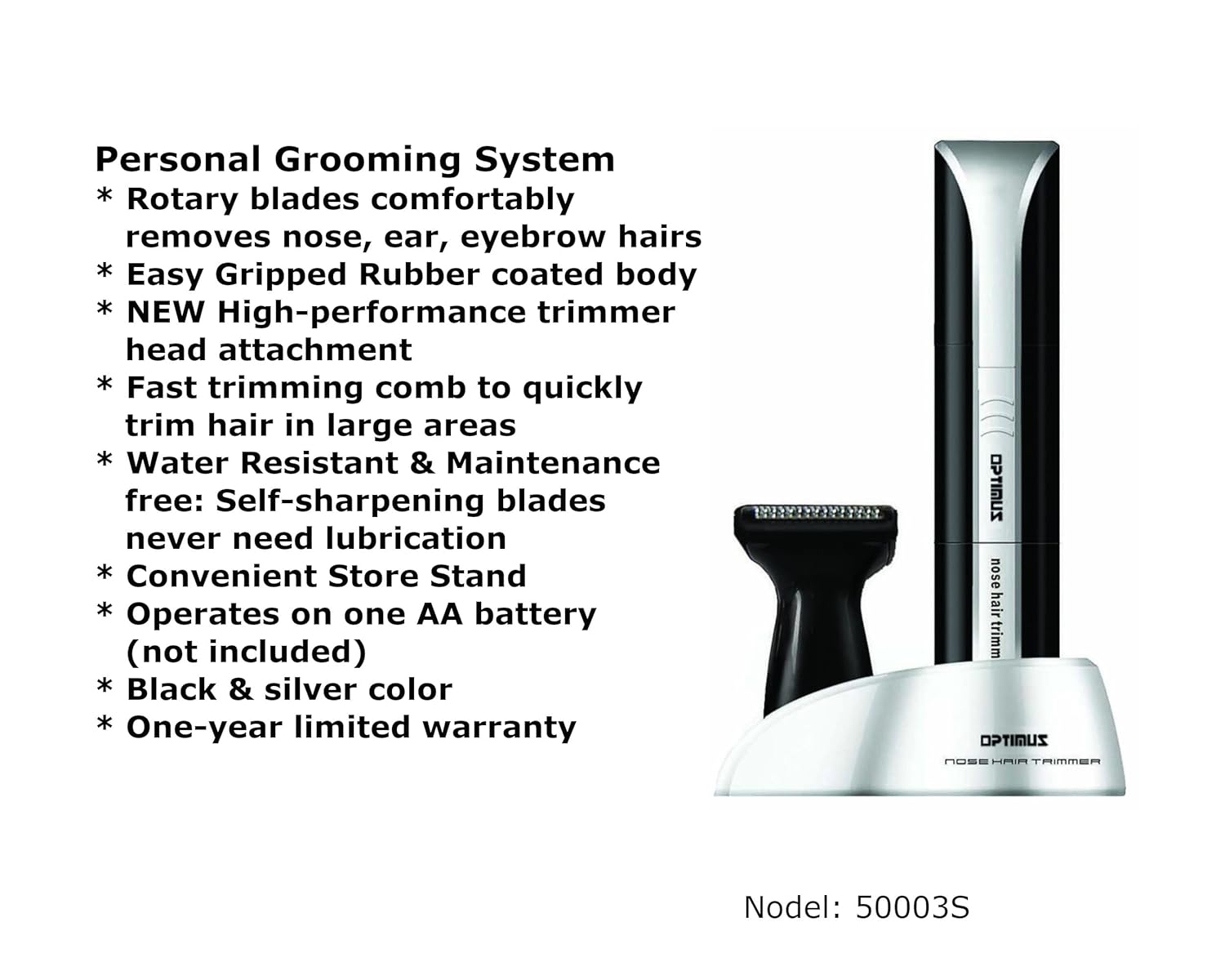
Image: Visual representation of the key features of the Optimus 50003 grooming system.
Persediaan
Pemasangan Bateri
- Ensure the grooming system is turned off.
- Gently twist the bottom part of the main unit counter-clockwise to open the battery compartment.
- Masukkan satu (1) bateri AA, pastikan terminal positif (+) dan negatif (-) sejajar dengan betul dengan tanda di dalam petak.
- Replace the bottom cover by twisting it clockwise until securely closed.
Arahan Operasi
Using the Rotary Blade Head (Nose, Ear, Eyebrows)
- Ensure the rotary blade head is securely attached to the main unit.
- Turn on the device by sliding the power switch.
- For Nose/Ear Hair: Gently insert the rotary blade tip into the nostril or ear canal. Move the trimmer in a circular motion to trim unwanted hair. Do not insert too deeply.
- For Eyebrow Hair: Carefully guide the rotary blade along the desired eyebrow line to trim stray hairs. Use caution to avoid over-trimming.
- Selepas digunakan, matikan peranti.

Imej: Terperinci view of the rotary blade head, designed for precise trimming.
Using the High-Performance Trimmer Head and Comb
- To attach the trimmer head, twist the rotary blade head counter-clockwise and remove it. Align the trimmer head with the main unit and twist clockwise until it locks into place.
- For uniform trimming, slide the fast trimming comb onto the trimmer head.
- Hidupkan peranti.
- Gently guide the trimmer head with the comb against the direction of hair growth to trim hair in larger areas.
- Selepas digunakan, matikan peranti.
Penyelenggaraan
Pembersihan
- Ensure the grooming system is turned off and remove the battery if storing for extended periods.
- Remove the trimming head (rotary or trimmer head) from the main unit.
- Rinse the trimming head under running water to remove hair clippings. The blades are water-resistant.
- Use the included cleaning brush to remove any stubborn hair from the blades or inside the head.
- Allow the trimming head to air dry completely before reattaching it to the main unit or storing.
- Lap unit utama dengan iklanamp cloth if necessary. Do not immerse the main unit in water.
Penyimpanan
Store the grooming system and its attachments in the convenient storage stand in a cool, dry place, away from direct sunlight and moisture.
Menyelesaikan masalah
| Masalah | Kemungkinan Punca | Penyelesaian |
|---|---|---|
| Peranti tidak dihidupkan. | Bateri mati atau salah dimasukkan. | Check battery orientation. Replace with a new AA battery. |
| Trimmer menarik rambut atau memotong dengan teruk. | Blades are clogged with hair. Battery power is low. | Clean the trimming head thoroughly. Replace the battery. |
| Trimming head is difficult to attach/detach. | Penjajaran atau serpihan yang salah. | Ensure proper alignment and twist firmly. Check for any obstructions. |
Spesifikasi
- model: Optimus 50003
- Sumber Kuasa: 1 x Bateri AA (tidak termasuk)
- Bahan Bilah: Keluli Tahan Karat
- ciri-ciri: Rotary Blade System, High-Performance Trimmer Head, Fast Trimming Comb, Water Resistant, Self-Sharpening Blades, Easy-Grip Rubber Coated Body
- Dimensi: Kira-kira 3 x 2 x 7 inci
- Berat: Kira-kira 3.2 auns
- warna: Hitam/Perak
- UPC: 630326500030
- Pengeluar: Optimus Enterprises, Inc.
Waranti dan Sokongan
The Optimus 50003 Personal Grooming System is backed by a waranti terhad setahun dari tarikh pembelian. Waranti ini meliputi kecacatan pembuatan di bawah penggunaan biasa. Ia tidak melindungi kerosakan akibat penyalahgunaan, kemalangan, pengubahan atau pembaikan tanpa kebenaran.
For warranty claims or technical support, please contact Optimus Enterprises, Inc. customer service. Refer to the product packaging or the manufacturer's webtapak untuk maklumat hubungan semasa.


