1. Pengenalan
The Polk Audio SWA500 Power Amplifier is engineered to provide dedicated power for Polk Audio CSW Series built-in subwoofers. This Class D digital amplifier delivers 500 watts into 4 ohms, ensuring robust and distortion-free bass performance. Its design prioritizes long-term reliability and efficient operation. This manual provides essential information for the safe and effective installation, operation, and maintenance of your SWA500 amplebih hidup.
2. Arahan Keselamatan Penting
- Read these instructions thoroughly before operating the amplebih hidup.
- Simpan arahan ini untuk rujukan masa hadapan.
- Patuhi semua amaran pada produk dan dalam manual ini.
- Follow all instructions for safe use and installation.
- Jangan gunakan radas ini berhampiran air atau lembapan.
- Bersihkan hanya dengan kain kering.
- Jangan sekat sebarang bukaan pengudaraan. Pasang mengikut arahan pengilang.
- Jangan pasang berhampiran mana-mana sumber haba seperti radiator, daftar haba, dapur, atau radas lain (termasuk amppenghidup) yang menghasilkan haba.
- Jangan kalahkan tujuan keselamatan plag terkutub atau jenis pembumian. Palam terkutub mempunyai dua bilah dengan satu lebih lebar daripada yang lain. Palam jenis pembumian mempunyai dua bilah dan serampang pembumian ketiga. Bilah lebar atau serampang ketiga disediakan untuk keselamatan anda. Jika palam yang disediakan tidak sesuai dengan alur keluar anda, rujuk juruelektrik untuk menggantikan alur keluar usang.
- Lindungi kord kuasa daripada berjalan atau tersepit, terutamanya pada palam, bekas kemudahan dan tempat keluar dari radas.
- Hanya gunakan lampiran/aksesori yang ditentukan oleh pengilang.
- Cabut plag radas ini semasa ribut petir atau apabila tidak digunakan untuk jangka masa yang lama.
- Rujuk semua servis kepada kakitangan perkhidmatan yang berkelayakan. Servis diperlukan apabila radas telah rosak dalam apa jua cara, seperti kord bekalan kuasa atau palam rosak, cecair telah tertumpah atau objek jatuh ke dalam radas, radas telah terdedah kepada hujan atau lembapan, tidak beroperasi seperti biasa. , atau telah digugurkan.
AMARAN: Untuk mengurangkan risiko kebakaran atau kejutan elektrik, jangan dedahkan radas ini kepada hujan atau lembapan.
3. Persediaan dan Sambungan
Sebelum membuat sebarang sambungan, pastikan amplifier is powered off and unplugged from the AC outlet. The SWA500 is designed to power up to two Polk Audio CSW Series subwoofers of the same model.
3.1. SPEX Circuit Card Installation
The SWA500 amplifier utilizes SPEX circuit cards to optimize its performance for specific CSW subwoofer models. Ensure the correct SPEX card for your subwoofer model is inserted into the designated slot on the rear panel of the amplifier. These cards provide custom frequency shaping for optimal bass response.
3.2. Sambungan Panel Belakang
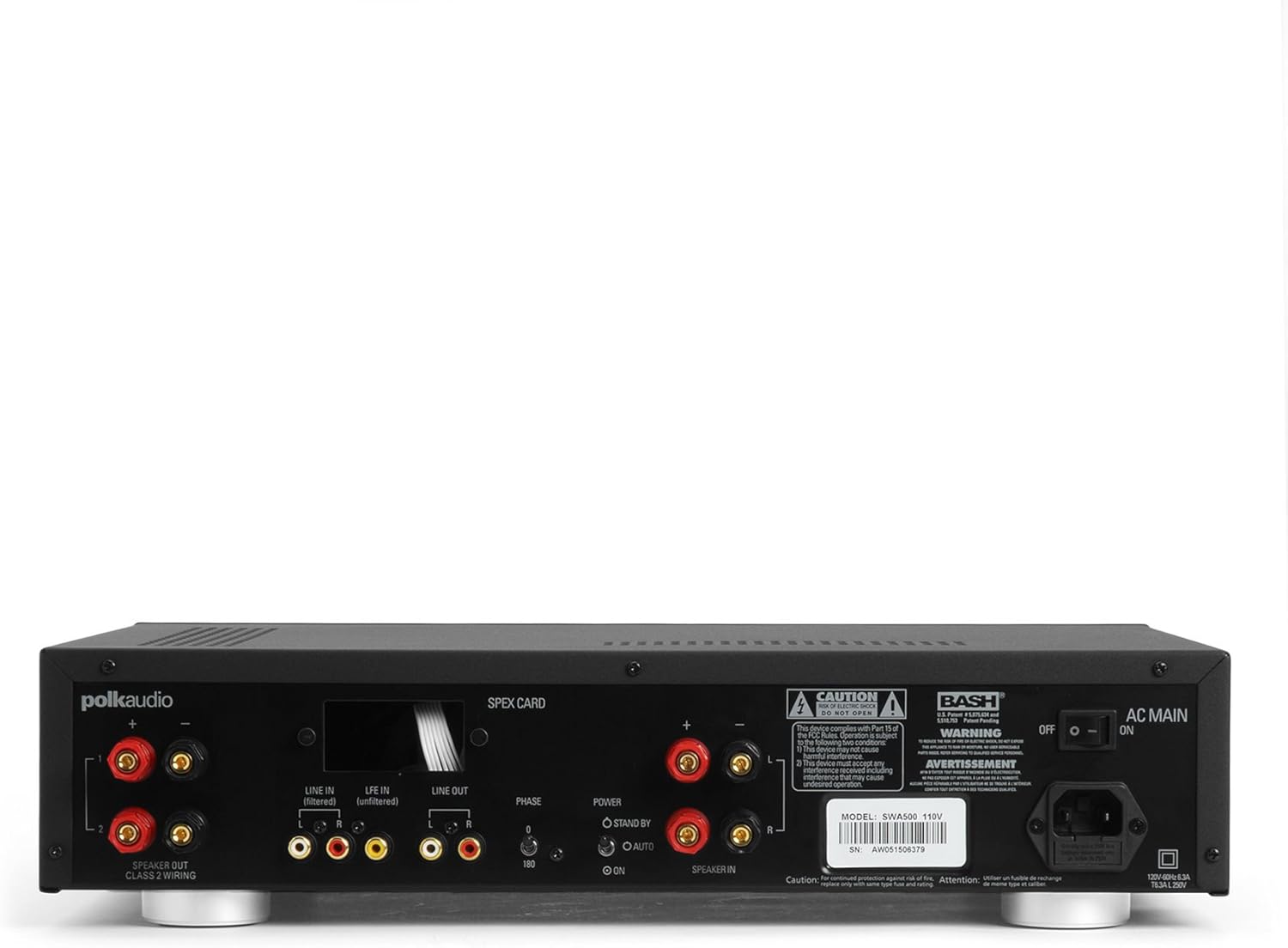
Figure 1: Rear panel of the SWA500 amplifier, illustrating various connection points including Line In, Line Out, Speaker Out, SPEX Card slot, Phase switch, Power mode switch, and AC Main input.
- Line In (Filtered/Unfiltered): Connect your audio source (e.g., AV receiver's subwoofer output) to the appropriate Line In jacks using RCA cables. The "Filtered" input applies a low-pass filter, while "Unfiltered" bypasses it, useful if your source provides its own filtered signal.
- Beratur: These RCA outputs can be used to pass the audio signal to another amplifier or device.
- Penceramah Keluar: Connect your Polk Audio CSW subwoofer(s) to these terminals using appropriate speaker wire. Ensure correct polarity (+ to + and - to -). The SWA500 supports Class 2 wiring.
- Suis Fasa: Adjust this switch (0° or 180°) to optimize the subwoofer's phase with your main speakers for seamless sound integration.
- Suis Mod Kuasa: Select between "ON" (always on), "AUTO" (turns on when an audio signal is detected), or "STANDBY" (low power mode, awaiting signal).
- AC Utama: Connect the supplied power cord to this input and then to a suitable AC power outlet.
4. Operasi
Once all connections are made and the amplifier is plugged in, you can begin operating your SWA500.
4.1. Kawalan Panel Hadapan

Figure 2: Front panel of the SWA500 amplifier, featuring the Power button, Protection indicator, Low Pass Filter control, and Volume control.
- Butang Kuasa: Tekan untuk menghidupkan amplifier on or off. The power indicator light will illuminate when the unit is on.
- Penunjuk Perlindungan: This light illuminates if the amplifier enters protection mode due to overheating or an electrical fault. If this occurs, turn off the amplifier, check connections, and allow it to cool before restarting.
- Low Pass Filter (80Hz - 120Hz): This knob adjusts the upper frequency limit of the subwoofer's output. Adjust this to blend the subwoofer's sound seamlessly with your main speakers. Start with a setting around 80Hz and adjust by ear.
- Volume (Min - Max): This knob controls the overall output level of the subwoofer. Adjust to achieve the desired bass intensity relative to your main speakers.
4.2. Pelarasan Bunyi Permulaan
Begin with the Low Pass Filter set to a mid-point (e.g., 100Hz) and the Volume knob at a low setting. Play a familiar piece of music or movie scene. Gradually increase the Volume until the bass is noticeable but not overpowering. Then, fine-tune the Low Pass Filter and Phase switch to achieve the most natural and integrated sound with your main speakers. The goal is for the subwoofer to enhance the low frequencies without drawing attention to its location.
5. Penyelenggaraan
- Pembersihan: Disconnect the power cord before cleaning. Use a soft, dry cloth to wipe the exterior surfaces of the amppenghidrat. Jangan gunakan pembersih cecair atau semburan aerosol.
- Pengudaraan: Pastikan bukaan pengudaraan pada amplifier are not blocked. Proper airflow is crucial for preventing overheating and maintaining long-term reliability.
- Storan: Jika menyimpan amplifier for an extended period, unplug it from the power outlet and store it in a cool, dry place, away from direct sunlight and extreme temperatures.
6. Penyelesaian masalah
If you experience issues with your SWA500 amplifier, consult the following troubleshooting guide:
| Masalah | Kemungkinan Punca | Penyelesaian |
|---|---|---|
| Tiada lampu penunjuk kuasa | Power cord not connected; AC outlet not active; Power switch off. | Ensure power cord is securely connected. Check AC outlet with another device. Press the front panel power button. |
| Tiada bunyi daripada subwufer | Incorrect input connection; Speaker wires loose or incorrect polarity; Volume too low; SPEX card missing or incorrect; Amplifier in standby/auto mode without signal. | Verify RCA input connections. Check speaker wire connections and polarity. Increase volume. Ensure correct SPEX card is installed. Set Power Mode switch to "ON" for testing. |
| Distorted or poor quality sound | Volume too high; Incorrect Low Pass Filter setting; Phase mismatch; Damaged speaker wire or subwoofer. | Reduce volume. Adjust Low Pass Filter. Toggle Phase switch (0°/180°). Inspect speaker wires and subwoofer for damage. |
| Protection indicator illuminated | Overheating; Short circuit in speaker wiring; Ampkesalahan penguat. | Matikan amplifier and allow to cool. Check speaker wiring for shorts. If problem persists, contact customer support. |
7. Spesifikasi
- model: SWA500
- Output Kuasa: 500 watt menjadi 4 ohm
- AmpJenis yang lebih hidup: Kelas D Digital
- Keserasian: Designed for Polk Audio CSW Series built-in subwoofers (requires specific SPEX circuit card)
- Penapis Pas Rendah: Adjustable (Front Panel)
- Kawalan Kelantangan: Adjustable (Front Panel)
- Kawalan Fasa: 0°/180° (Rear Panel)
- Mod Kuasa: ON, AUTO, STANDBY (Rear Panel)
- Dimensi Produk: 1 x 1 x 1 inches (approximate, as per provided data)
- Berat Barang: 12.25 paun
- Pengeluar: Audio Polk
- Tarikh Mula-mula Tersedia: 18 April 2005
8. Waranti dan Sokongan
For specific warranty information, please refer to the warranty card included with your product or visit the official Polk Audio webtapak. Simpan resit pembelian anda sebagai bukti pembelian untuk tuntutan waranti.
If you require technical assistance or have questions not covered in this manual, please contact Polk Audio customer support. Contact information can typically be found on the official Polk Audio webtapak atau pada pembungkusan produk anda.
Polk Audio Official Webtapak: www.polkaudio.com


