1. Pengenalan
The J-Tech Digital JTD-EX-120M HDMI Extender is designed to transmit High-Definition Multimedia Interface (HDMI) signals over a single Cat5e/6/7 cable. This system converts the HDMI signal to standard TCP/IP for transmission, allowing for extension up to 120 meters (394 feet) while maintaining full HD 1080p resolution. It also includes Infrared (IR) extension functionality for remote control of source devices.
This manual provides detailed instructions for the installation, operation, and troubleshooting of your J-Tech Digital HDMI Extender.
2. Maklumat Keselamatan
- Jangan dedahkan unit ini kepada air, lembapan atau kelembapan berlebihan.
- Jangan letakkan unit pada permukaan yang tidak stabil.
- Use only the provided power adapters. Using unauthorized power adapters may damage the device and void the warranty.
- Pastikan pengudaraan yang betul di sekeliling unit untuk mengelakkan terlalu panas.
- Jangan cuba membuka atau membaiki unit sendiri. Rujuk semua servis kepada kakitangan yang berkelayakan.
- Jauhkan unit daripada cahaya matahari langsung, sumber haba dan medan magnet yang kuat.
3. Kandungan Pakej
Sahkan bahawa semua item terdapat dalam pakej anda:
- 1x HDMI Extender Transmitter (JTD-EX-120M)
- 1x HDMI Extender Receiver (JTD-EX-120M)
- 2x DC 5V/1A Power Adapters
- 1x Kabel Penerima IR
- 1x Kabel Pemancar IR
- 1x Manual Pengguna

Image: Contents of the J-Tech Digital HDMI Extender package, including the transmitter, receiver, power adapters, IR cables, and user manual.
4. Produk Lebihview
The JTD-EX-120M system consists of a Transmitter unit and a Receiver unit. Both units feature an Ethernet port for Cat5e/6/7 cable connection, HDMI ports, power ports, and IR ports.
4.1 Unit Pemancar

Imej: Terperinci view of the J-Tech Digital HDMI Extender Transmitter unit, showing the Ethernet Port, Power Port, IR TX Port, Reset Button, Status Indicator, Power Indicator, and HDMI Input.
- Pelabuhan Ethernet: Connects to the Receiver unit via Cat5e/6/7 cable.
- Power Port (DC/5V): Menyambung kepada penyesuai kuasa 5V yang disertakan.
- IR TX Port: Connects to the IR Transmitter cable to send IR signals to the source device.
- Butang Tetapkan Semula: Used to reset the unit.
- Input HDMI: Connects to the HDMI source device (e.g., Blu-ray player, cable box).
- Penunjuk Status: Menunjukkan status operasi unit.
- Penunjuk Kuasa: Indicates if the unit is receiving power.
4.2 Unit Penerima

Imej: Terperinci view of the J-Tech Digital HDMI Extender Receiver unit, showing the Ethernet Port, Power Port, IR RX Port, Reset Button, Status Indicator, Power Indicator, and HDMI Output.
- Pelabuhan Ethernet: Connects to the Transmitter unit via Cat5e/6/7 cable.
- Power Port (DC/5V): Menyambung kepada penyesuai kuasa 5V yang disertakan.
- IR RX Port: Connects to the IR Receiver cable to receive IR signals from a remote control.
- Butang Tetapkan Semula: Used to reset the unit.
- Output HDMI: Connects to the HDMI display device (e.g., TV, projector).
- Penunjuk Status: Menunjukkan status operasi unit.
- Penunjuk Kuasa: Indicates if the unit is receiving power.
5. Persediaan dan Pemasangan
Follow these steps to set up your J-Tech Digital HDMI Extender:
- Sediakan Kabel: Ensure you have a high-quality Cat5e, Cat6, or Cat7 Ethernet cable of the appropriate length (up to 120m/394ft). Also, have your HDMI cables ready.
- Connect HDMI Source to Transmitter: Connect an HDMI cable from your source device (e.g., DVD player, game console, PC) to the Input HDMI port pada unit Pemancar.
- Connect HDMI Display to Receiver: Connect an HDMI cable from your display device (e.g., HDTV, projector) to the Output HDMI port pada unit Penerima.
- Sambungkan Kabel Ethernet: Connect one end of the Cat5e/6/7 cable to the Pelabuhan Ethernet on the Transmitter unit and the other end to the Pelabuhan Ethernet on the Receiver unit.
- Sambungkan Kabel IR (Pilihan):
- Sambungkan IR TX Cable kepada IR TX Port on the Transmitter unit. Position the IR emitter head near the IR sensor of your source device.
- Sambungkan IR RX Cable kepada IR RX Port on the Receiver unit. Position the IR receiver head in a location where it can receive signals from your remote control.
- Guna Kuasa: Connect the two included 5V power adapters to the Power Ports (DC/5V) on both the Transmitter and Receiver units, then plug them into power outlets. The Power Indicator LEDs on both units should illuminate.
- Sahkan Sambungan: Once all connections are made and power is supplied, turn on your HDMI source and display devices. The Status Indicator LEDs on both units should show a stable connection, and the video should appear on your display.
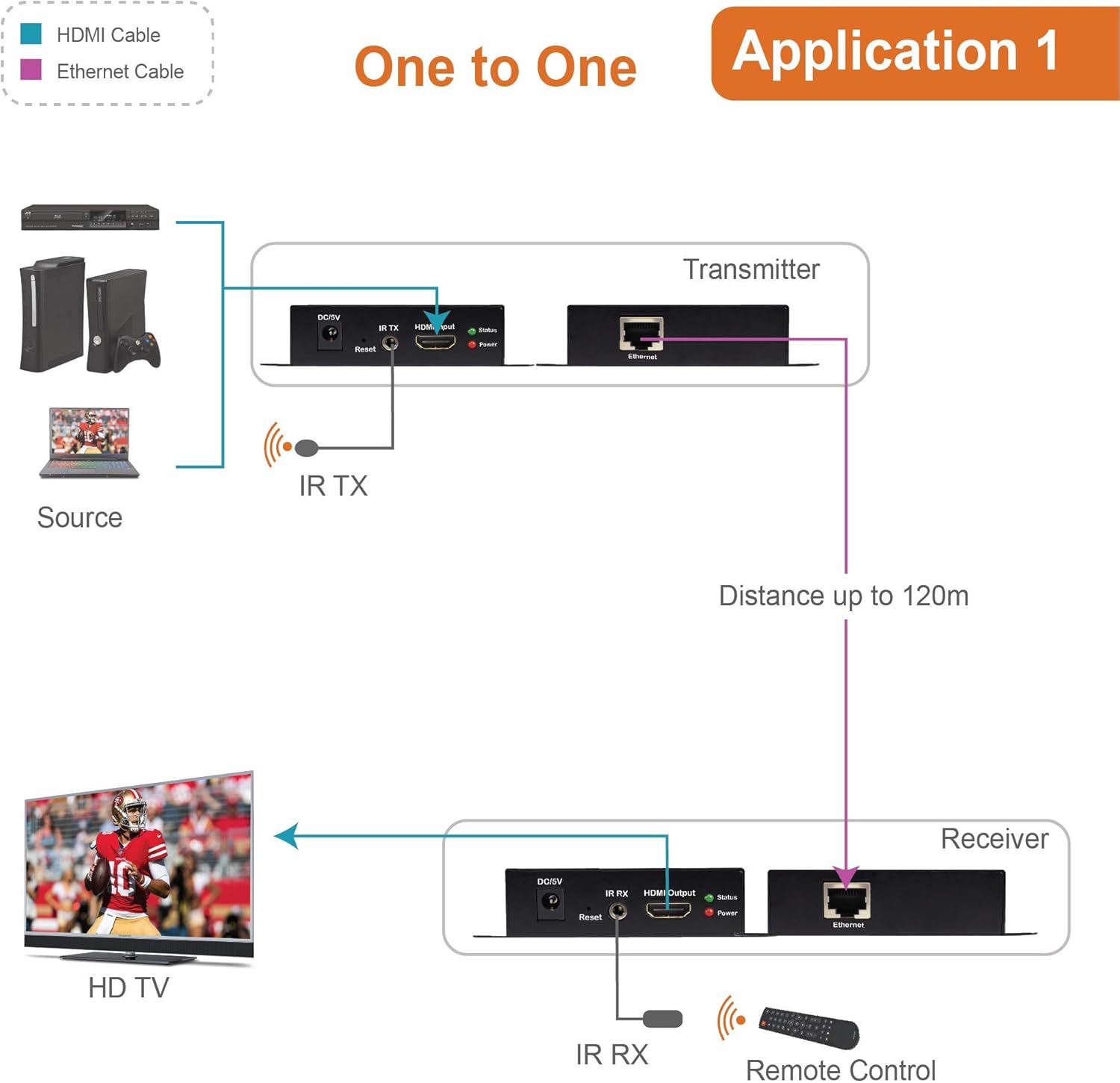
Image: Diagram illustrating a typical one-to-one setup for the J-Tech Digital HDMI Extender, showing a source device connected to the Transmitter, a Cat cable connecting Transmitter and Receiver, and the Receiver connected to an HD TV. IR cables are also shown for remote control functionality.
5.1 Multi-Receiver Application (via Ethernet Switch)
This extender supports a one-to-many configuration using an Ethernet switch. To achieve this, connect the HDMI Transmitter to an Ethernet switch, and then connect multiple HDMI Receivers to the same Ethernet switch. Each Receiver will then connect to its respective display.

Image: Diagram showing the J-Tech Digital HDMI Extender in a multi-receiver setup. A laptop (source) connects to the Transmitter, which then connects to an Ethernet switch. Multiple Receiver units are connected to the switch, each feeding a separate display, extending the signal up to 400ft.
6. Arahan Operasi
Once the setup is complete, the extender operates automatically. Ensure all devices are powered on in the correct sequence (source, then extender units, then display) for optimal performance.
6.1 IR Control Functionality
The IR extension feature allows you to control your HDMI source device from the location of your display. Point your remote control at the IR Receiver head connected to the Receiver unit. The signal will be transmitted through the Cat cable to the IR Emitter head connected to the Transmitter unit, which then relays the command to your source device.

Image: Diagram illustrating the IR extender control feature. A remote control sends a signal to the IR RX connected to the Receiver unit. This signal is then transmitted via the Cat cable to the IR TX connected to the Transmitter unit, which controls the source device.
7. Penyelenggaraan
- Clean the unit with a soft, dry cloth. Do not use liquid or aerosol cleaners.
- Pastikan unit bebas daripada habuk dan serpihan untuk memastikan pengudaraan yang betul.
- Periksa sambungan kabel secara kerap untuk memastikan ia selamat.
8. Penyelesaian masalah
If you encounter issues with your HDMI Extender, refer to the following common problems and solutions:
| Masalah | Kemungkinan Punca | Penyelesaian |
|---|---|---|
| No video or audio on display. | Loose cable connections, power issue, incorrect input selection on display. | Check all HDMI and Ethernet cable connections. Ensure both Transmitter and Receiver units are powered on. Verify the display is set to the correct HDMI input. Try restarting all devices. |
| Poor video quality (flickering, distortion). | Low quality or damaged Cat cable, excessive cable length, interference. | Use a high-quality Cat6 or Cat7 cable. Ensure cable length does not exceed 120m (394ft). Avoid running Cat cable near strong electrical interference sources. |
| IR remote control not working. | IR emitter/receiver misaligned, IR cables not connected properly. | Ensure the IR emitter is directly over or very close to the IR sensor of the source device. Confirm the IR receiver is positioned to receive signals from your remote. Check that both IR cables are securely plugged into their respective ports. |
| Power indicator not lit. | Penyesuai kuasa tidak disambungkan, soket kuasa rosak. | Ensure the power adapter is securely connected to the unit and a working power outlet. Try a different power outlet. |
9. Spesifikasi
| Ciri | Perincian |
|---|---|
| Nombor Model | JTD-EX-120M |
| Versi HDMI | Supports 1080p, 3D, HDCP |
| Sokongan Audio | Dolby TrueHD, DTS Master Audio |
| Jarak Penghantaran | Up to 120m (394ft) over single Cat5e/6/7 cable |
| Video Color Support | 36bit (CAT7); 24bit (CAT6) |
| Pemampatan Imej | M-JPEG technique (no image quality loss) |
| Sambungan IR | ya |
| Bekalan Kuasa | DC 5V/1A (x2) |
| Dimensi Produk | 4 x 3 x 1 inci (setiap unit) |
| Berat Barang | 1 pound (total) |
10. Waranti dan Sokongan
J-Tech Digital products are designed for reliability and performance. For warranty information and technical support, please refer to the official J-Tech Digital website or contact their customer service directly. Contact information is typically provided in the product packaging or on the manufacturer's webtapak.
Pengeluar: J-Tech Digital INC
Webtapak: www.jtechdigital.com


