1. Pengenalan
Welcome to the user manual for your new NEC NP43 Portable Projector. This manual provides essential information for the safe and efficient operation, setup, maintenance, and troubleshooting of your projector. Please read this manual thoroughly before using the product and keep it for future reference.
2. Maklumat Keselamatan
To ensure safe operation and prevent damage to the projector, please observe the following precautions:
- Jangan halang bukaan pengudaraan. Pastikan aliran udara yang mencukupi di sekitar projektor.
- Jangan lihat terus ke dalam kanta projektor apabila lamp sedang dihidupkan, kerana cahaya terang boleh menyebabkan kerosakan mata.
- Avoid placing the projector in direct sunlight, near heat sources, or in areas with high humidity or excessive dust.
- Use only the power cord supplied with the projector. Connect to a properly grounded outlet.
- Jangan cuba menservis projektor sendiri. Rujuk semua servis kepada kakitangan servis yang berkelayakan.
- Cabut plag projektor daripada salur keluar kuasa sebelum membersihkan atau apabila tidak digunakan untuk tempoh yang lama.
3. Kandungan Pakej
Sahkan bahawa semua item terdapat dalam pakej:
- Projektor Mudah Alih NEC NP43
- Kord Kuasa
- Kabel VGA
- Kawalan Jauh dengan Bateri
- Manual Pengguna (dokumen ini)
- Beg Pembawa (mungkin berbeza mengikut wilayah)
4. Produk Lebihview
Familiarize yourself with the various parts and connections of your NEC NP43 projector.

Rajah 4.1: Sisi view of the NEC NP43 projector, showing the lamp cover release and ventilation grilles. The "OPEN" arrow indicates the direction to slide the cover.
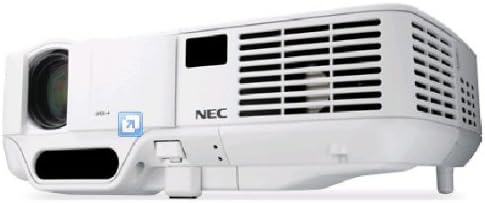
Figure 4.2: Front-side perspective view of the NEC NP43 projector, highlighting the lens, focus ring, zoom ring, and control panel area with indicator lights.
4.1 Panel Depan
- Kanta Tayangan: Memancarkan imej.
- Cincin Fokus: Melaraskan ketajaman imej.
- Cincin Zum: Melaraskan saiz imej.
- Penerima IR: Menerima isyarat dari alat kawalan jauh.
4.2 Rear Panel (Input/Output Ports)
- Input VGA: Connects to computers or other VGA-compatible devices.
- RCA Video Input: Connects to composite video sources.
- Input Audio: Connects to audio sources.
- Saluran Kuasa: Menyambungkan kord kuasa.
5. Persediaan
5.1 Penempatan Projektor
Place the projector on a stable, flat surface or mount it securely. Ensure the projector is positioned at an appropriate distance from the screen to achieve the desired image size. Maintain adequate ventilation space around the unit.
5.2 Sambungan Kuasa
- Sambungkan kord kuasa yang dibekalkan ke salur masuk kuasa projektor.
- Palamkan hujung kord kuasa yang lain ke dalam salur keluar elektrik yang dibumikan.
5.3 Menyambungkan Peranti Sumber
The NEC NP43 supports VGA and RCA connectivity.
- Sambungan VGA: Connect a VGA cable from your computer's VGA output port to the projector's VGA input port.
- Sambungan RCA: Connect an RCA composite video cable from your video source (e.g., DVD player) to the projector's RCA video input. Ensure to also connect audio cables if your source provides separate audio output.
6. Arahan Operasi
6.1 Menghidupkan/Mematikan
- Untuk Menghidupkan: Press the Power button on the projector's control panel or the remote control. The power indicator light will turn green.
- Untuk Mematikan: Press the Power button again. A confirmation message may appear. Press the Power button a second time to confirm shutdown. Allow the projector to cool down before unplugging.
6.2 Pemilihan Sumber Input
Press the "Input" or "Source" button on the projector or remote control to cycle through available input sources (VGA, Video).
6.3 Pelarasan Imej
- Fokus: Rotate the focus ring on the lens until the image appears sharp.
- Zum: Rotate the zoom ring on the lens to adjust the image size.
- Pembetulan Keystone: Use the keystone correction buttons on the control panel or remote to correct trapezoidal distortion if the projector is not perfectly perpendicular to the screen.
7. Penyelenggaraan
7.1 Lamp Penggantian
Lamp has a life expectancy of up to 2500 hours in normal mode and 3500 hours in eco mode. When the lamp penunjuk menyala atau imej menjadi malap, sudah tiba masanya untuk menggantikan lamp. Refer to the lamp replacement section in the full service manual for detailed instructions. Always use genuine NEC replacement lamps.
7.2 Pembersihan Penapis Udara
Regularly clean the air filter to maintain optimal performance and prevent overheating. The filter is typically located on the side or bottom of the projector. Use a soft brush or vacuum cleaner to remove dust. Replace the filter if it is heavily soiled or damaged.
7.3 Pembersihan Am
Wipe the projector's exterior with a soft, dry cloth. For stubborn marks, dampen the cloth slightly with water. Do not use abrasive cleaners or solvents. Clean the lens gently with a lens cleaning cloth designed for optical surfaces.
8. Penyelesaian masalah
| Masalah | Kemungkinan Punca | Penyelesaian |
|---|---|---|
| Tiada gambar di skrin | Incorrect input source selected; Loose cable connection; Projector in standby mode. | Select the correct input source. Check all cable connections. Press the Power button to wake the projector. |
| Imej kabur | Focus not adjusted; Lens is dirty. | Adjust the focus ring on the lens. Clean the projector lens. |
| Projektor terlalu panas dan mati | Blocked ventilation; Dirty air filter; High ambient temperature. | Ensure clear ventilation paths. Clean or replace the air filter. Operate in a cooler environment. |
| Tiada bunyi | Kabel audio tidak disambungkan; Kelantangan terlalu rendah; Dibisukan. | Connect audio cable. Increase volume. Unmute the projector or source device. |
9. Spesifikasi
| Ciri | Perincian |
|---|---|
| Nombor Model | NP43 |
| Teknologi Paparan | DLP (0.55" DMD) |
| Resolusi Asli | 1024 x 768 (XGA) |
| Resolusi Paparan Maksimum | 1024 x 768 |
| Kecerahan | 2300 Lumen |
| Nisbah Kontras | 1600:1 |
| Lamp taip | 200W AC/170 eco |
| Lamp kehidupan | 2500 hours (Normal) / 3500 hours (Eco) |
| Standard Video yang Disokong | NTSC 4.43, PAL, PAL-60, PAL-M, PAL-N, SECAM |
| Teknologi Ketersambungan | VGA, RCA |
| Dimensi Produk (L x W x H) | 7.17 x 9.69 x 2.83 inci |
| Berat Barang | 3.75 paun |
| Ciri Khas | Pico, Speakers |
10. Waranti dan Sokongan
For warranty information and technical support, please refer to the warranty card included with your product or visit the official NEC Display Solutions webtapak. Simpan bukti pembelian anda untuk tuntutan waranti.
Maklumat Hubungan: Please refer to the contact details provided on the NEC website or in your product's packaging for customer service and technical assistance.


