1. Pengenalan
The Antec TruePower TPQ-1200 is a high-performance 1200-watt power supply designed for demanding computer systems. It features an 80 PLUS Silver certification, indicating high energy efficiency, and provides stable power delivery through its six +12V rails. This manual provides essential information for the safe installation, operation, and maintenance of your TPQ-1200 power supply.
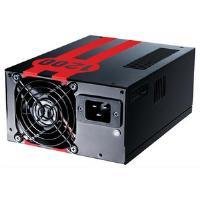
Image 1.1: The Antec TruePower TPQ-1200 Power Supply unit, showcasing its design and modular connectors.
2. Maklumat Keselamatan
Sila baca dan fahami semua arahan keselamatan sebelum memasang atau mengendalikan bekalan kuasa. Kegagalan berbuat demikian boleh mengakibatkan kecederaan diri atau kerosakan pada peralatan anda.
- Always disconnect the power cord from the wall outlet before installing, removing, or cleaning the power supply.
- This power supply is designed for use in personal computers only. Do not use it for any other purpose.
- Jangan buka bekalan kuasa casing. vol tinggitagterdapat di dalam, dan tiada bahagian yang boleh diservis oleh pengguna. Membuka casing akan membatalkan jaminan.
- Pastikan sistem komputer anda dibumikan dengan betul.
- Elakkan mengendalikan bekalan kuasa dalam persekitaran kelembapan tinggi atau suhu yang melampau.
- Keep the power supply away from liquids and sources of heat.
3. Kandungan Pakej
Sahkan bahawa pakej anda mengandungi item berikut:
- Antec TruePower TPQ-1200 Power Supply Unit
- Modular Cable Set (PCIe, SATA, Molex, Floppy)
- Kord Kuasa AC
- Skru Pemasangan
- Manual Pengguna (dokumen ini)
If any items are missing or damaged, please contact your retailer or Antec customer support.
4. Ciri-ciri
The Antec TruePower TPQ-1200 power supply offers advanced features for reliable and efficient performance:
- 1200 Watts Continuous Power: Menyediakan ample power for high-end gaming and workstation systems.
- 80 PLUS Silver Certified: Achieves up to 88% efficiency, reducing heat generation and operating costs.
- Six +12V Rails: Delivers stable and clean power to critical components.
- Advanced Cable Management: Semi-modular design allows for cleaner builds and improved airflow.
- PowerCache High Performance Capacitors: Enhances stability and transient response.
- Ultra-Quiet Pulse Width Modulation (PWM) Fan: Provides efficient cooling with minimal noise.
- Industrial Grade Protection Circuitry: Termasuk Perlindungan Arus Lebih (OCP), Voltan Lebihtage Protection (OVP), Di Bawah Voltage Protection (UVP), Short Circuit Protection (SCP), Over Power Protection (OPP), and Over Temperature Protection (OTP).
5. Persediaan dan Pemasangan
Follow these steps carefully to install your Antec TruePower TPQ-1200 power supply.
5.1 Senarai Semak Pra-Pemasangan
- Ensure your computer case supports an ATX power supply.
- Kumpulkan alatan yang diperlukan: Pemutar skru kepala Phillips.
- Unplug your computer from the wall outlet and discharge any residual power by pressing the power button.
5.2 Memasang Bekalan Kuasa
- Carefully place the power supply into the designated PSU bay in your computer case. Ensure the fan is oriented correctly (typically facing down for bottom-mounted PSUs, or according to case design for top-mounted).
- Align the screw holes on the power supply with those on the case.
- Secure the power supply using the provided mounting screws. Do not overtighten.
5.3 Menyambung Kabel Kuasa
Connect the necessary cables to your motherboard and components. The TPQ-1200 features both fixed and modular cables.
- 24-Pin ATX Motherboard Power: Connect the main 24-pin connector to the corresponding port on your motherboard. Ensure it clicks into place.
- 8-Pin EPS12V (CPU) Power: Connect the 8-pin (or 4+4 pin) EPS12V connector to the CPU power port on your motherboard.
- PCIe (Graphics Card) Power: For graphics cards requiring additional power, connect the appropriate 6-pin or 6+2 pin PCIe modular cables from the power supply to your graphics card(s).
- Kuasa SATA: Connect SATA modular cables to your SATA hard drives, SSDs, and optical drives.
- Molex (Peripheral) Power: Use Molex modular cables for older peripherals or case fans that require this connector type.
- Pengurusan Kabel: Route cables neatly behind the motherboard tray or in other designated areas of your case to improve airflow and aesthetics.
5.4 Hidupkan Kuasa Awal
- Pastikan semua sambungan selamat.
- Sambungkan kord kuasa AC ke bekalan kuasa dan kemudian ke alur keluar dinding yang dibumikan.
- Flip the power switch on the back of the power supply to the 'ON' (I) position.
- Hidupkan komputer anda.
6. Arahan Operasi
The Antec TruePower TPQ-1200 is designed for continuous operation within its specified limits. Ensure adequate ventilation around your computer case to prevent overheating. The intelligent PWM fan will adjust its speed based on the power supply's temperature to maintain optimal cooling and noise levels.
Always shut down your computer properly through the operating system before turning off the power supply switch or unplugging the AC cord.
7. Penyelenggaraan
Penyelenggaraan tetap membantu memastikan jangka hayat dan prestasi optimum bekalan kuasa anda.
- Pembersihan Habuk: Periodically (e.g., every 6-12 months), disconnect the power supply from the wall outlet and use compressed air to gently clean dust from the fan grille and ventilation openings. Do not open the power supply casing.
- Pemeriksaan Kabel: Occasionally check all power cable connections to ensure they are secure and free from damage.
8. Penyelesaian masalah
If you encounter issues with your power supply, refer to the following troubleshooting guide:
| Masalah | Kemungkinan Punca | Penyelesaian |
|---|---|---|
| Komputer tidak boleh dihidupkan. | AC power cord not connected or loose. Power supply switch is OFF. Faulty power supply. | Ensure AC cord is firmly connected. Flip PSU switch to 'ON' (I). Test with another power supply if possible. |
| Sistem dihidupkan tetapi dimatikan serta-merta. | Overload, short circuit, or overheating. | Check for short circuits (e.g., loose screws). Ensure adequate ventilation. Disconnect non-essential components to check for overload. |
| System instability or random reboots. | Insufficient power, faulty component, or power supply issue. | Verify all power connectors are secure. Ensure total system wattage does not exceed PSU capacity. Test components individually if possible. |
| Bunyi kipas yang kuat dari PSU. | Dust accumulation, fan malfunction, or high load. | Clean dust from the fan grille. If noise persists and is excessive, contact support. |
If troubleshooting steps do not resolve the issue, contact Antec customer support for further assistance.
9. Spesifikasi
Detailed technical specifications for the Antec TruePower TPQ-1200 power supply:
- Nama Model: TruePower TPQ-1200
- Output Wattage: 1200 Watt
- Faktor Bentuk: ATX12V
- Jenis Penyambung: ATX
- Kecekapan: 80 PLUS Silver Certified
- Kaedah penyejukan: Air (PWM Fan)
- Kiraan Peminat: 1
- Peranti Serasi: Komputer Peribadi
- Berat Barang: 4.96 paun (2.25 kg)
- Dimensi Pakej: 12.91 x 9.84 x 5.59 inci (32.8 x 25 x 14.2 cm)
- Tarikh Mula-mula Tersedia: 17 April 2012
10. Waranti dan Sokongan
For warranty information and technical support, please refer to the official Antec webtapak atau hubungi perkhidmatan pelanggan mereka secara langsung. Terma dan syarat waranti mungkin berbeza mengikut wilayah dan tarikh pembelian.
Antec Official Webtapak: www.antec.com


