pengenalan
Terima kasih kerana membeliasing the Brookstone TimeSmart Auto-Setting Alarm Clock. This manual provides detailed instructions for setting up, operating, and maintaining your new alarm clock. Please read this manual thoroughly before use to ensure proper function and longevity of your device.
The Brookstone TimeSmart alarm clock is designed for convenience, automatically setting itself to the correct time upon connection and adjusting for power outages and Daylight Saving Time. It features an easy-to-read display with adjustable backlight and user-friendly controls.
Produk Selesaiview
Familiarize yourself with the components of your Brookstone TimeSmart alarm clock.
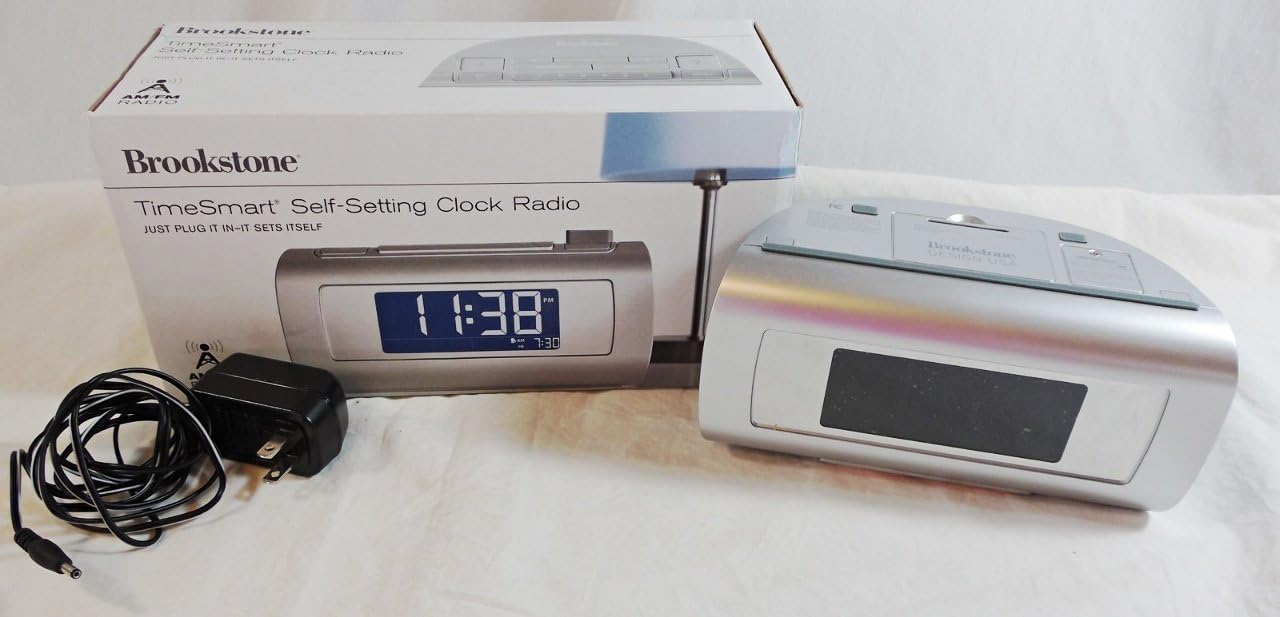
Image 1: The Brookstone TimeSmart alarm clock, its retail packaging, and the included power adapter. The clock features a large digital display.

Imej 2: Muka depan dekat view of the alarm clock, showing its large, blue digital display indicating the time 12:19 PM, along with alarm settings and AM/PM indicator.
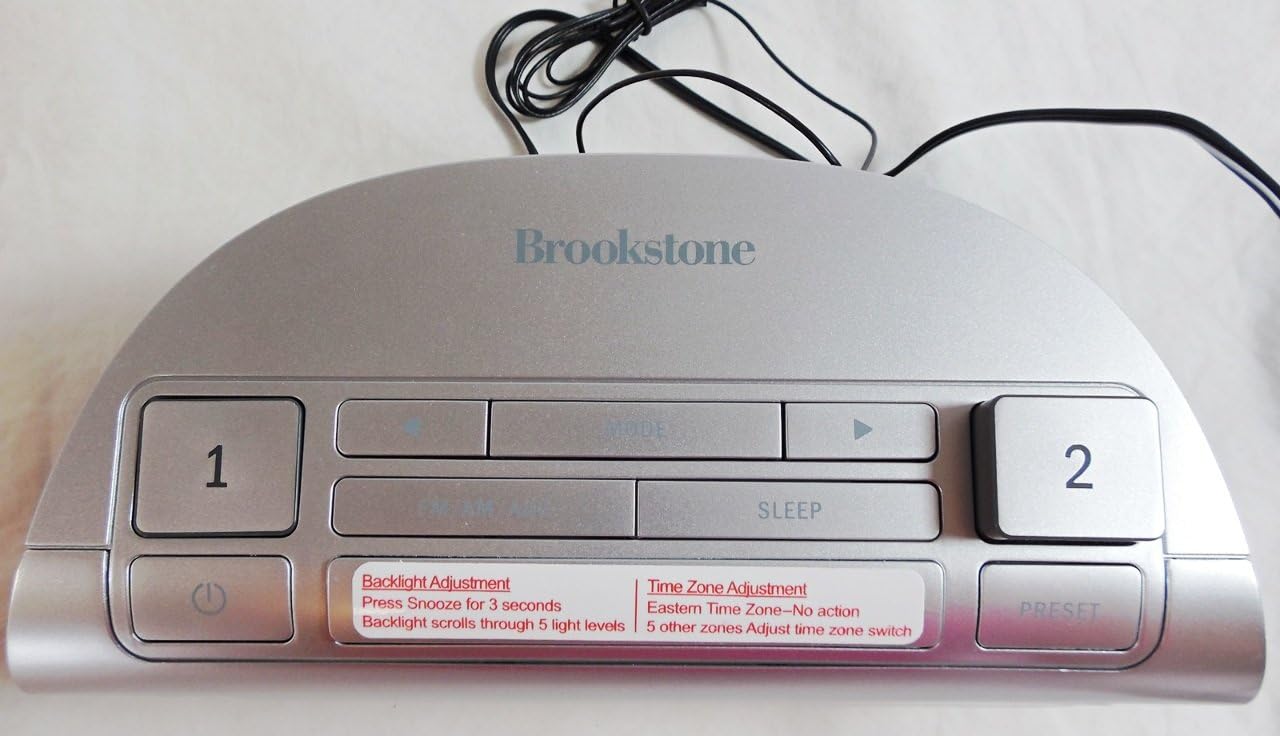
Imej 3: Atas view of the alarm clock, highlighting the control buttons including Alarm 1, Alarm 2, Mode, Sleep, and Preset buttons. Labels for Backlight Adjustment and Time Zone Adjustment are visible.

Imej 4: Belakang view of the alarm clock, showing the speaker grille, AUX input, and power input port. FCC compliance information and model number are also visible.
Persediaan
Follow these steps to set up your Brookstone TimeSmart alarm clock for the first time.
- Sambungan Kuasa: Connect the included power adapter to the DC input port on the back of the alarm clock. Plug the other end into a standard electrical outlet. The clock will automatically power on.
- Pemilihan Zon Waktu: Upon initial power-up, the clock will prompt you to select your time zone. Use the navigation buttons (likely labeled with arrows or 'Mode') to cycle through the available time zones. Press the 'Preset' or 'Set' button to confirm your selection. The clock will then automatically set the correct time.
- Waktu Penjimatan Siang (DST): The clock is designed to automatically adjust for Daylight Saving Time. Ensure this feature is enabled if applicable to your region. Refer to the 'Operating' section for details on checking or changing this setting.
- Sandaran Bateri (Pilihan): While the clock remembers settings during power outages, for extended outages, you may insert backup batteries (not included) into the battery compartment on the bottom of the unit. This ensures timekeeping continues even without AC power.
Arahan Operasi
Menetapkan Penggera
The Brookstone TimeSmart alarm clock features two independent alarms (Alarm 1 and Alarm 2).
- Pilih Penggera: Press the 'Alarm 1' or 'Alarm 2' button on the top of the clock. The alarm time will appear on the display.
- Laraskan Masa: Use the 'Hour' and 'Minute' buttons (often integrated with 'Mode' or arrow buttons) to set the desired wake-up time.
- Sahkan Penggera: Press the 'Alarm 1' or 'Alarm 2' button again to confirm the setting and activate the alarm. An alarm icon will appear on the display.
- Fungsi Tunda: When the alarm sounds, press the large 'Snooze' bar on the top of the clock to temporarily silence the alarm. The alarm will sound again after a set interval (typically 9 minutes).
- Matikan Penggera: To turn off a sounding alarm, press the corresponding 'Alarm 1' or 'Alarm 2' button. To disable an alarm completely, press its button until the alarm icon disappears from the display.
Melaraskan Kecerahan Lampu Latar
The display backlight has five adjustable settings.
- Press and hold the 'Snooze' button for approximately 3 seconds.
- The backlight will cycle through its five brightness levels (High, Medium, Low, Dim, Off). Release the button when the desired brightness is reached.
Menggunakan Input AUX
You can connect external audio devices to your alarm clock.
- Connect a 3.5mm audio cable (not included) from your audio device's headphone jack or line-out to the 'AUX' input port on the back of the alarm clock.
- The clock will automatically switch to AUX mode, or you may need to press the 'Mode' button to select AUX.
- Kawal main balik dan kelantangan daripada peranti audio anda yang disambungkan.
Penyelenggaraan
Proper care will ensure the longevity of your alarm clock.
- Pembersihan: Wipe the clock's exterior with a soft, dry cloth. Do not use abrasive cleaners, waxes, or solvents.
- Kuasa: Always disconnect the power adapter before cleaning or if the unit will be unused for an extended period.
- penempatan: Place the clock on a stable, flat surface away from direct sunlight, heat sources, and excessive moisture.
- Penggantian Bateri: If using backup batteries, replace them periodically (e.g., every 5 years or as needed) to ensure continuous timekeeping during power outages.
Menyelesaikan masalah
| Masalah | Kemungkinan Punca | Penyelesaian |
|---|---|---|
| Jam tidak boleh dihidupkan. | Penyesuai kuasa tidak disambungkan atau alur keluar tidak aktif. | Ensure the power adapter is securely plugged into the clock and a working electrical outlet. Test the outlet with another device. |
| Masa tidak betul. | Incorrect time zone selected or initial setup incomplete. | Verify your time zone setting. If recently moved or after a long power outage, the clock may need a moment to re-sync. |
| Penggera tidak berbunyi. | Penggera tidak diaktifkan, kelantangan terlalu rendah atau masa penggera ditetapkan dengan salah. | Ensure the alarm is enabled (alarm icon visible). Check the alarm time. Ensure the alarm volume is not set to minimum (if adjustable). |
| Paparan terlalu terang/malap. | Backlight setting needs adjustment. | Press and hold the 'Snooze' button for 3 seconds to cycle through backlight brightness levels. |
Spesifikasi
- model: Brookstone TimeSmart Auto-Setting Alarm Clock (B002MB89GW)
- Sumber Kuasa: AC Adapter (included), Battery Backup (not included)
- paparan: Large Digital LED with adjustable backlight
- Ciri-ciri Penggera: Dual crescendo alarms, Snooze function
- Pelarasan Masa: Automatic time setting, auto-adjusts for Daylight Saving Time
- Ketersambungan: Input AUX (3.5mm)
- Dimensi: Kira-kira 15.24 x 7.62 x 6.35 cm (6 x 3 x 2.5 inci)
- Berat: Kira-kira 612.35 g (1.35 paun)
Waranti dan Sokongan
For warranty information or technical support, please refer to the official Brookstone webtapak atau hubungi perkhidmatan pelanggan mereka secara langsung. Simpan resit pembelian anda sebagai bukti pembelian.
Note: This manual provides general guidance. Specific features and operations may vary slightly.


