1. Pengenalan
This manual provides detailed instructions for the safe and effective operation of your TC Electronic RH450 450W Bass Amplifier Head. The RH450 is a powerful and versatile Class D bass amplifier designed for professional musicians, featuring advanced tone-shaping capabilities, an integrated tuner, and user-definable presets.
Ciri-ciri utama termasuk:
- TubeTone Emulation: Provides realistic tube ampciri-ciri pengalir.
- SpectraComp Compression: Multi-band compression for consistent bass dynamics.
- Penala Bersepadu: High-resolution tuner with a light ring for quick and accurate tuning.
- User Memory Banks: Store and recall up to three custom sound presets.
- Rehearsal Inputs: Rear-mounted auxiliary inputs for connecting MP3 players or computers.
- Output Fon Kepala: Features a speaker filter for practice without a cabinet.
2. Arahan Keselamatan Penting
Please read and follow all safety instructions before operating the RH450 amplifier head. Retain this manual for future reference.
- Sumber Kuasa: Connect the unit only to an AC power source of the specified voltage (100-240V~, 50/60Hz). Ensure the mains ground is connected.
- Pengudaraan: Jangan sekat sebarang bukaan pengudaraan. Pasang mengikut arahan pengilang. Pastikan aliran udara yang mencukupi di sekeliling unit.
- Air dan Kelembapan: Do not expose this apparatus to rain or moisture. Do not use near water.
- haba: Jangan pasang berhampiran mana-mana sumber haba seperti radiator, daftar haba, dapur, atau radas lain (termasuk amppenghidup) yang menghasilkan haba.
- Kabel: Lindungi kord kuasa daripada berjalan atau tersepit, terutamanya pada palam, bekas kemudahan dan tempat keluar dari radas.
- Servis: Rujuk semua servis kepada kakitangan perkhidmatan yang berkelayakan. Servis diperlukan apabila radas telah rosak dalam apa jua cara, seperti kord bekalan kuasa atau palam rosak, cecair telah tertumpah atau objek jatuh ke dalam radas, radas telah terdedah kepada hujan atau lembapan, tidak beroperasi seperti biasa. , atau telah digugurkan.
- Sambungan Pembesar Suara: Always use high-quality speaker cables. Ensure the minimum speaker load of 4 ohms is met. Never operate the amplifier without a speaker load connected unless using headphones with the speaker muting feature.
3. Persediaan dan Sambungan
This section details how to properly connect your RH450 amplifier head to your instrument, speakers, and other external devices.
3.1 Panel Hadapan Atasview
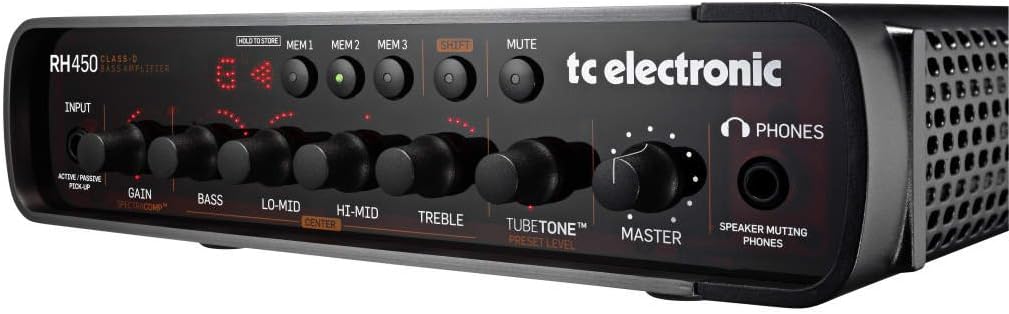
Figure 3.1: Front panel of the TC Electronic RH450 Bass Amplifier Head, showing input, EQ controls, TubeTone, Master, memory buttons, tuner display, and headphone jack.
3.2 Sambungan Panel Belakang
The rear panel provides all necessary connections for power, speakers, and external audio devices.

Figure 3.2: Rear panel of the TC Electronic RH450 Bass Amplifier Head, displaying power input, speaker outputs, remote input, digital out, auxiliary input, insert, and line driver output.
3.2.1 Sambungan Kuasa
- Sambungkan kabel kuasa yang dibekalkan ke UTAMA DI socket on the rear panel and then to a grounded AC outlet.
- Pastikan suis kuasa berada dalam kedudukan MATI sebelum menyambungkannya.
3.2.2 Instrument Input
- Sambungkan gitar bes anda ke INPUT jack on the front panel using a standard 1/4" instrument cable.
- Gunakan ACTIVE/PASSIVE PICKUP switch to match your instrument's output level. Select 'ACTIVE' for instruments with higher output (e.g., active pickups) and 'PASSIVE' for standard passive pickups.
3.2.3 Output Pembesar Suara
- Sambungkan kabinet pembesar suara anda ke PEMBICARA KELUAR (Speakon or 1/4" combo jack) on the rear panel.
- The RH450 requires a minimum speaker load of 4 ohm. Ensure your cabinet(s) impedance meets this requirement.
- For optimal performance and safety, use high-quality speaker cables.
3.2.4 Auxiliary Input (Rehearsal)
- Connect an MP3 player, computer, or other audio source to the AUX IN (RCA jacks) on the rear panel for rehearsal purposes.
- A mini-jack-to-RCA adapter may be required for some devices.
3.2.5 Sambungan Lain
- JAUH DALAM: For connecting an optional TC Electronic RC4 footswitch (sold separately) for remote control of presets and tuner.
- DIGITAL OUT (AES/EBU 96kHz): Provides a digital audio output of the pre-preamp signal for recording or external processing.
- INSERT (PRE/AMP I/O): Allows connection of external effects processors into the signal path.
- LINE DRIVER OUT: Transformer-balanced XLR output for sending a pre or post-preamplifier signal to a mixing console or recording interface.
4. Arahan Operasi
This section guides you through the functions and controls of your RH450 ampkepala penguat.
4.1 Kawalan Panel Hadapan
- INPUT (Gain & SpectraComp): Adjusts the input sensitivity. The DAPATKAN knob controls the overall input level. The integrated SpectraComp multi-band compressor is always active and optimized for bass.
- EQ Section (Bass, Lo-Mid, Hi-Mid, Treble): A 4-band equalizer for precise tone shaping. Each band has a dedicated knob. The PUSAT button allows you to adjust the center frequency for the Lo-Mid and Hi-Mid bands.
- TUBETONE™: This control emulates the characteristics of a tube amplifier, adding warmth and harmonic richness. Adjust the PRESET LEVEL knob to control the intensity of the TubeTone effect.
- MASTER: Mengawal volum keluaran keseluruhan amplebih hidup.
- MEMORY (MEM1, MEM2, MEM3): These buttons allow you to store and recall up to three complete amplifier settings (including EQ, TubeTone, and Gain).
- HOLD TO STORE: Press and hold one of the MEM buttons to save the current settings to that memory slot.
- SHIFT: Used in conjunction with other buttons for advanced functions, such as accessing the tuner or specific EQ frequency adjustments.
- MATI: Silences the amplifier output to the speakers and Line Driver Out, useful for tuning or changing instruments. The headphone output remains active.
- PENALA: The integrated tuner provides a full-resolution display with a light ring for accurate tuning. Activate by pressing the SHIFT button and a MEM button simultaneously (refer to full manual for specific combination).
- TELEFON: Connect headphones for silent practice. The headphone output includes a speaker filter for a more natural sound.
4.2 Menggunakan Pratetap
The RH450 allows you to save and recall your favorite settings quickly.
- Untuk Menyimpan Pratetap: Adjust all controls (Gain, EQ, TubeTone) to your desired sound. Press and hold the desired MEM1, MEM2, or MEM3 button until the display confirms the save.
- Untuk Mengingat semula Pratetap: Hanya tekan MEM1, MEM2, or MEM3 button corresponding to the desired preset. The amplifier will instantly switch to the stored settings.
5. Penyelenggaraan
Proper care will ensure the longevity and optimal performance of your RH450 ampkepala penguat.
- Pembersihan: Gunakan kain lembut dan kering untuk membersihkan bahagian luar unit. Jangan gunakan pembersih, pelarut atau lilin yang kasar.
- Pengudaraan: Periksa secara berkala bahawa bukaan pengudaraan bersih daripada habuk dan serpihan.
- Storan: Apabila tidak digunakan untuk tempoh yang lama, simpan amplifier in a dry, cool environment, away from direct sunlight and extreme temperatures.
- Pengangkutan: Sentiasa mengangkut amplifier in a protective case to prevent damage.
6. Penyelesaian masalah
If you encounter issues with your RH450, consult the following table before contacting support.
| Masalah | Kemungkinan Punca | Penyelesaian |
|---|---|---|
| Tiada keluaran bunyi | Power not connected; Mute engaged; Speaker cable disconnected or faulty; Master volume low; Instrument cable faulty. | Check power connection and switch; Disengage Mute; Verify speaker and instrument cable connections; Increase Master volume. |
| Bunyi herot | Input Gain too high; Faulty instrument or cable; Speaker impedance mismatch. | Reduce Input Gain; Test with another instrument/cable; Ensure speaker impedance is 4 ohms or higher. |
| Penala tidak bertindak balas | Tuner not activated correctly; Instrument not plugged in; Mute engaged. | Activate tuner using SHIFT + MEM button combination; Ensure instrument is connected; Disengage Mute. |
| Presets not saving/recalling | Incorrect save procedure; Unit power cycled before saving. | Ensure you hold the MEM button until save is confirmed; Save presets before powering off. |
7. Spesifikasi
| Ciri | Perincian |
|---|---|
| Model | RH450 |
| Output Wattage | 450W |
| Sumber Kuasa | Corded Electric (100-240V~, 50/60Hz) |
| Minimum Speaker Load | 4 ohm |
| Dimensi (H x W x D) | 2.6 x 10.8 x 11.4 inci (lebih kurang 6.6 x 27.4 x 29 cm) |
| Berat Barang | 9 paun (lebih kurang 4.1 kg) |
| Penyambung input | 1/4" TS (Active/Passive switch) |
| Penyambung Keluaran Pembesar suara | Speakon / 1/4" Combo Jack |
| Input Bantu | RCA (Stereo) |
| Output Digital | AES/EBU (96kHz, Pre-Preamp) |
| Line Driver Output | Balanced XLR (Pre/Post Preamp switchable) |
| Output Fon Kepala | 1/4" TRS with Speaker Filter |
8. Maklumat Waranti
TC Electronic products are covered by a limited warranty. For detailed information regarding warranty terms, conditions, and registration, please refer to the official TC Electronic webtapak atau kad jaminan yang disertakan dengan produk anda.
Sila simpan bukti pembelian anda untuk sebarang tuntutan waranti.
9. Sokongan
For technical support, service, or further information about your TC Electronic RH450, please visit the official TC Electronic webtapak:
You may also find additional resources, FAQs, and software updates on their support pages.