pengenalan
The Electro-Harmonix Voice Box is a versatile vocal effects pedal designed to process vocal signals with harmony and vocoder effects. This device allows musicians to add 2- to 4-part harmonies to their vocals, which intelligently follow the chords played on an accompanying instrument. It also features a 256-band articulate vocoder for classic synth-robot sounds. The unit is housed in a durable, compact die-cast chassis and includes a US96DC-200BI power supply.
Ciri-ciri Utama
- Intelligent Vocal Harmonies: Generates 2- to 4-part harmonies that track the chords played on your instrument and the melody you sing.
- Natural Glissando: Harmony notes smoothly transition between intervals without stepping.
- Instrument Tracking: Compatible with any electric instrument connected to its input.
- Vocoder Mode: Features a 256-band articulate vocoder with adjustable harmonic enhancement and controllable formant shift.
- Professional Pitch Shifting: Utilizes a high-quality pitch shifting algorithm for realistic harmonies.
- Gender Bender Knob: Modifies vocal formants for male/female voice characteristics.
- Voice Mix Knob: Adjusts the blend of harmony notes, allowing for custom mixes (e.g., more 5th, less 3rd).
- Harmony Modes: Includes Low Harmony (3rd and 5th below), High Harmony (3rd and 5th above), Low/High Harmony (one 3rd below, one 3rd above), 3 Multi Harmony modes (complex combinations and octaves), Octave mode (one octave above and below), and Whistle mode (synthesizes a whistle tone one octave above).
- Separate Reverb Controls: Independent reverb adjustments for both dry and effected vocals.
- Built-In Mic Pre: Features phantom power and a gain switch for microphone input.
- Balanced XLR Line Output: Direct interface with mixing boards or A/D converters.
- High Impedance Instrument Input/Output: Ensures signal integrity and tone preservation for connected instruments.
- 9 User Presets: Store and recall custom settings via footswitch.
- Pembinaan Tahan Lama: Housed in a tough and compact die-cast chassis.
- Bekalan Kuasa: Includes US96DC-200BI power supply.
Persediaan
Proper setup is essential for optimal performance of your Voice Box pedal. Follow these steps to connect your device:
- Sambungan Kuasa: Connect the included US96DC-200BI power supply to the 9V power input jack on the Voice Box. Plug the power supply into a standard electrical outlet.
- Sambungan Mikrofon: Connect your microphone to the MIC INPUT XLR jack. If using a condenser microphone that requires phantom power, ensure the phantom power switch on the Voice Box is engaged. Adjust the MIC GAIN switch (LO/HI) based on your microphone's output level.
- Sambungan Instrumen: Connect your instrument (e.g., guitar, keyboard) to the INST INPUT 1/4" jack. This input is high impedance and low noise to maintain your instrument's tone.
- Sambungan Output: Connect the Voice Box to your amplifier, mixing board, or audio interface. Use the BALANCED XLR LINE OUTPUT for direct connection to a mixing board or A/D converter, or the INST OUTPUT 1/4" jack for connection to an instrument amplebih hidup.

Rajah 1: Atas-bawah view of the Electro-Harmonix Voice Box pedal, illustrating the layout of controls and connections.
Video 1: Tamatview of the Electro-Harmonix Voice Box, demonstrating its features and connectivity. This video illustrates how to connect instruments and microphones, and provides examples of the vocoder and harmony modes in action.
Arahan Operasi
The Voice Box offers various modes and controls to shape your vocal effects. Familiarize yourself with each control for optimal use:
- Tombol BLEND: Controls the mix between your dry (unaffected) vocal signal and the processed effect signal. Turn clockwise to increase the effect blend.
- REVERB Knobs (DRY & HARMONY): These two knobs independently control the amount of reverb applied to your dry vocal signal and the harmony/vocoder effect signal, respectively.
- GENDER BENDER Knob: Adjusts the formant of the vocal signal, allowing for modification of the perceived gender of the voice. Turning it counter-clockwise lowers the formant (more masculine), and clockwise raises it (more feminine).
- VOICE MIX Knobs (LOW & HIGH): These knobs allow you to fine-tune the mix of the generated harmony notes. The 'LOW' knob adjusts the volume of lower harmony notes, while the 'HIGH' knob adjusts the volume of higher harmony notes.
- MODE Knob / PUSH PRESET Button: This multi-function control selects the operating mode of the Voice Box. Rotate the knob to cycle through the different harmony and vocoder modes. Press the knob to save or recall one of the 9 user presets. The available modes include:
- Low Harmony
- High Harmony
- Low+High
- Multi Harmony 1
- Multi Harmony 2
- Multi Harmony 3
- Oktaf
- Unison+Whistle
- Vokoder
- MIC GAIN Switch (LO/HI): Adjusts the input gain for the microphone. Use 'HI' for lower output microphones and 'LO' for higher output microphones to prevent clipping.
- MIC BYPASS Footswitch: Toggles the microphone signal between processed and bypassed (dry).
- PRESET Suis Kaki: Recalls the next user preset in sequence.
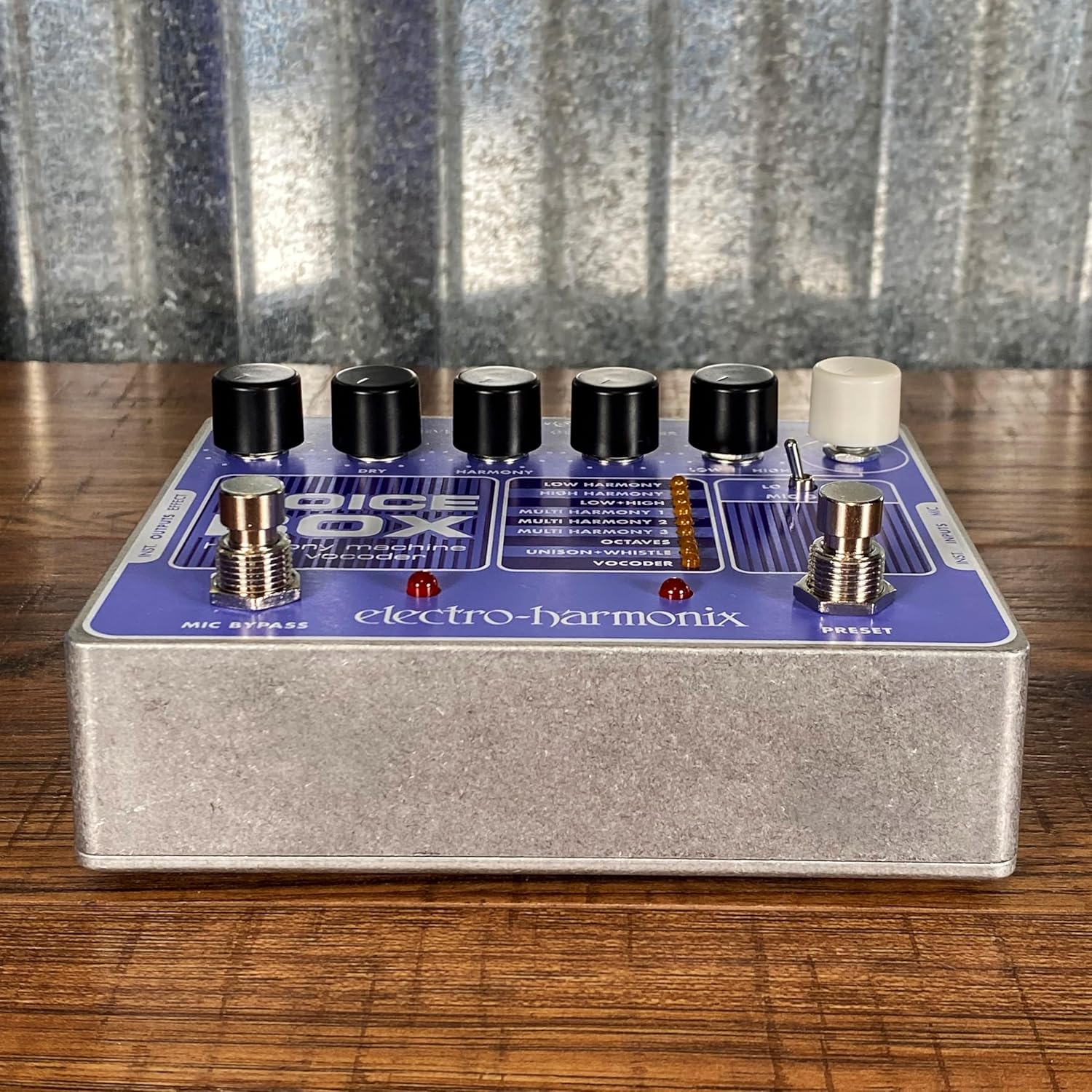
Rajah 2: Bersudut view of the Electro-Harmonix Voice Box pedal, showing the footswitches and input/output jacks.
Penyelenggaraan
To ensure the longevity and optimal performance of your Electro-Harmonix Voice Box, follow these maintenance guidelines:
- Pembersihan: Use a soft, dry cloth to clean the exterior of the pedal. Avoid using abrasive cleaners, solvents, or waxes, as these can damage the finish or internal components.
- Storan: When not in use, store the pedal in a cool, dry place away from direct sunlight and extreme temperatures.
- Bekalan Kuasa: Always use the original US96DC-200BI power supply provided with the unit. Using an incorrect power supply can damage the pedal and void the warranty.
- Sambungan: Periodically check all cable connections for wear and tear. Ensure jacks are free of dust and debris.
- Elakkan Kelembapan: Keep the pedal away from liquids and excessive humidity to prevent electrical damage.
Menyelesaikan masalah
If you encounter issues with your Electro-Harmonix Voice Box, consider the following general troubleshooting steps:
- Tiada Bunyi/Bunyi Lemah:
- Verify all cable connections are secure and correctly plugged into the appropriate inputs and outputs.
- Check the power supply connection and ensure the unit is receiving power (LED indicator should be on).
- Adjust the BLEND knob to ensure the effect signal is not completely mixed out.
- Check the MIC GAIN switch; if your microphone has low output, switch to 'HI'.
- Test with different cables, microphones, or instruments to isolate the source of the problem.
- Bunyi/Dengungan yang Tidak Diingini:
- Ensure you are using the supplied power adapter.
- Check for ground loops by trying different power outlets or using a power conditioner.
- Jauhkan kabel audio daripada kabel kuasa.
- Harmonies Not Tracking Correctly:
- Ensure your instrument is properly connected to the INST INPUT and is playing clear, in-tune chords.
- Confirm that the MODE knob is set to a harmony mode and not Vocoder or Unison+Whistle.
- Check your vocal pitch and clarity; the pedal relies on accurate input for optimal harmony generation.
For persistent issues or more detailed technical support, please refer to the official Electro-Harmonix support channels.
Spesifikasi
| Ciri | Perincian |
|---|---|
| Berat Barang | 1.95 paun |
| Dimensi Produk | 5.75"P x 4.75"L x 2.5"T (lebih kurang 8 x 7 x 3.5 inci) |
| Nombor Model | KOTAK SUARA |
| warna | Violet |
| Jenis Bahan | sintetik |
| Sumber Kuasa | Corded Electric (9V DC, US96DC-200BI PSU included) |
| Antara Muka Perkakasan | Audio 1/4 inci, XLR |
| Format Isyarat | Analog |
Waranti dan Sokongan
Electro-Harmonix products are designed for reliability and performance. For information regarding product warranty, service, or technical assistance, please visit the official Electro-Harmonix webtapak atau hubungi sokongan pelanggan mereka secara langsung. Simpan bukti pembelian anda untuk sebarang tuntutan waranti.
Manual Pengguna Rasmi (PDF): Muat turun PDF


