pengenalan
This manual provides essential instructions for the safe and effective operation of your Microlife WS100 Digital Body Fat Analyzer Weight Scale. Please read this manual thoroughly before using the device and retain it for future reference. The Microlife WS100 is designed to measure body weight, body fat percentage, dan jisim otot.
Maklumat Keselamatan
- Do not use this device if you have a pacemaker or other electronic medical implant.
- Wanita hamil perlu berunding dengan doktor mereka sebelum menggunakan alat ini.
- Ensure the scale is placed on a hard, flat surface for accurate measurements. Avoid carpets or uneven floors.
- Jangan gunakan penimbang pada permukaan yang basah atau licin untuk mengelakkan terjatuh.
- Jauhkan peranti daripada capaian kanak-kanak.
- Jangan buka atau cuba membaiki peranti itu sendiri. Hubungi sokongan pelanggan jika timbul masalah.
Persediaan
1. Membongkar dan Pemeriksaan Awal
Carefully remove the Microlife WS100 scale from its packaging. Inspect the device for any signs of damage. If any damage is observed, do not use the scale and contact your retailer.
2. Pemasangan Bateri
The Microlife WS100 scale comes with batteries included. Locate the battery compartment on the underside of the scale. Open the compartment cover and ensure the batteries are correctly inserted according to the polarity indicators (+/-). Close the battery compartment securely.
3. Penentukuran Awal
Before first use or after moving the scale, it is recommended to perform an initial calibration. Place the scale on a hard, flat surface. Briefly step onto the scale, then step off. The display will show "0.0" or a similar indication, confirming calibration.
4. Pengguna Profile Setup (for Body Fat Analysis)
To utilize the body fat and muscle mass analysis features, you must set up a user profile. Refer to the detailed instructions in the "Operating Instructions" section for setting up user profiles, including age, gender, and height.
Arahan Operasi
1. Pengukuran Berat Asas
- Letakkan penimbang di atas permukaan yang keras dan rata.
- Melangkah ke penimbang tanpa alas kaki dan berdiri diam.
- Your weight will be displayed on the screen. The scale will automatically turn off after a few seconds.
2. Body Fat and Muscle Mass Measurement
For body composition analysis, ensure your user profile telah disediakan.
- Press the "SET" button to enter user selection mode.
- Use the arrow buttons to select your user number (P1, P2, etc.).
- Step onto the scale barefoot, ensuring your feet are positioned on the metal electrodes.
- Stand still until the measurements (weight, body fat percentage, peratus jisim otottage) are displayed sequentially.
- The scale will automatically store the data and turn off.
3. Menukar Unit Pengukuran
The unit switch button (usually located on the underside of the scale) allows you to toggle between kilograms (kg) and pounds (lb). Press this button to select your preferred unit before taking a measurement.
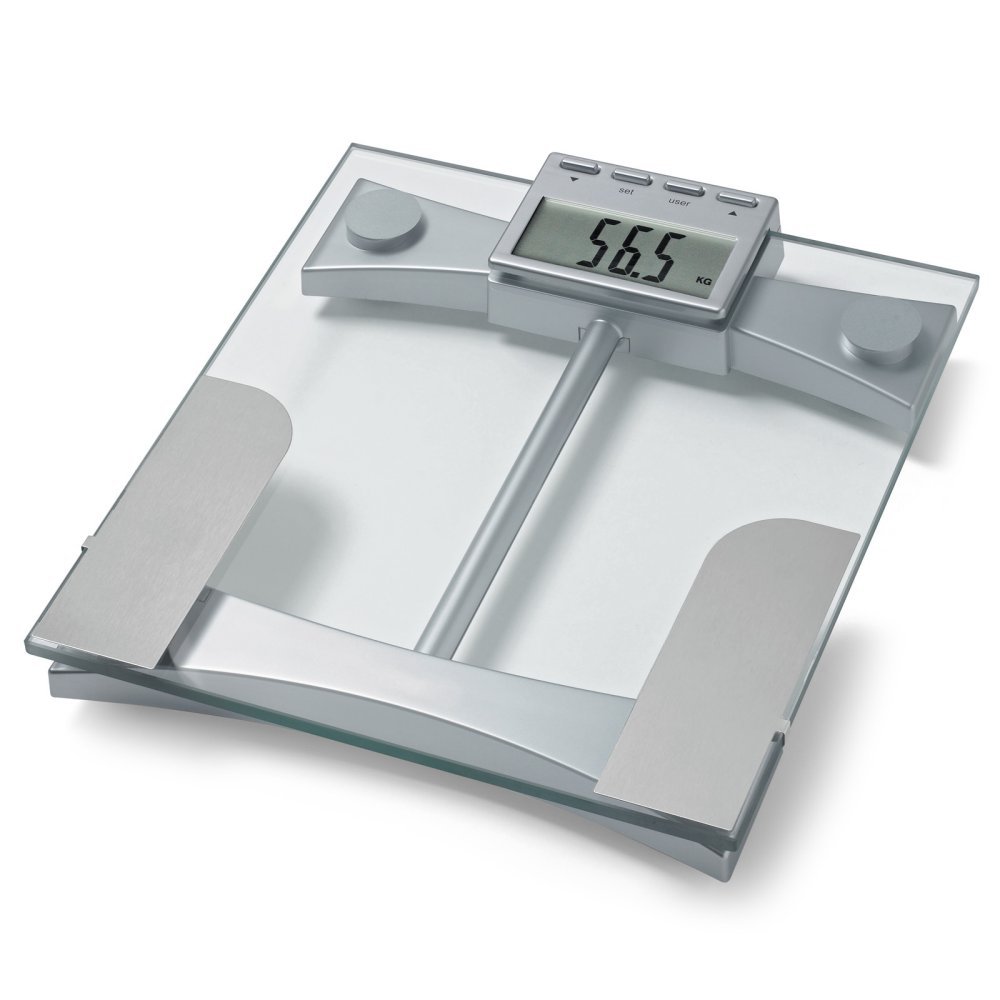
Rajah 1: Atas view of the Microlife WS100 scale. Note the display area and the metallic electrodes for body composition analysis. Ensure feet are placed correctly on these electrodes for accurate readings.
Penyelenggaraan
1. Membersihkan Penimbang
Lap permukaan skala dengan lembut, damp cloth. Do not use abrasive cleaners or immerse the scale in water. Avoid harsh chemicals that may damage the surface or electronic components.
2. Penyimpanan
Store the scale in a cool, dry place, away from direct sunlight and extreme temperatures. Avoid placing heavy objects on the scale when not in use.
3. Penggantian Bateri
When the display shows a "Lo" indicator, it is time to replace the batteries. Open the battery compartment on the underside of the scale, remove the old batteries, and insert new ones of the same type, observing correct polarity. Dispose of old batteries responsibly.
Menyelesaikan masalah
| Masalah | Kemungkinan Punca | Penyelesaian |
|---|---|---|
| "Lo" dipaparkan | Kuasa bateri rendah. | Gantikan bateri dengan yang baru. |
| "Err" displayed | Beban berlebihan atau ralat pengukuran. | Ensure the scale is not overloaded. Step off and then back on the scale. Ensure stable footing. |
| Bacaan tidak tepat | Scale on uneven surface, not calibrated, or user profile tak betul. | Place scale on a hard, flat surface. Perform initial calibration. Verify user profile settings (age, height, gender). |
| Tiada paparan | Batteries incorrectly installed or completely drained. | Periksa polariti bateri. Gantikan bateri jika perlu. |
Spesifikasi
- model: WS100
- Jenama: Microlife
- Jenis Paparan: digital
- Ciri Khas: Body Fat, Bodyweight, Muscle Mass
- Bahan: plastik
- warna: Hitam
- Sumber Kuasa: Bateri (termasuk)
- Dimensi Produk: 31.75 x 7.62 x 37.47 cm (12.5 x 3 x 14.75 inci)
- Berat Barang: 2.99 kg (6.59 lbs)
- GTIN/UPC: 642632841233
Waranti dan Sokongan
For warranty information or technical support, please refer to the warranty card included with your product or visit the official Microlife website. Do not attempt to repair the device yourself, as this may void the warranty.


