1. Produk Lebihview
The ONKYO AV Center SA-205HD is a 5.1-channel AV receiver designed to enhance your home entertainment experience. It supports high-definition audio formats such as DOLBY TrueHD and DTS-HD Master Audio, providing immersive sound for movies, music, and games. Featuring multiple HDMI inputs and digital audio connections, this unit serves as the central hub for your audio and video components.

Rajah 1.1: Depan view of the ONKYO AV Center SA-205HD. This image shows the silver-colored receiver with its main volume knob, display, and front panel controls.
2. Kawalan dan Penunjuk Panel Hadapan
Biasakan diri anda dengan kawalan panel hadapan untuk pengendalian yang mudah.

Rajah 2.1: Terperinci view of the ONKYO AV Center SA-205HD front panel, highlighting the main controls and display area.
- ON/STANDBY Button: Press to turn the unit on or put it into standby mode.
- Tombol Kelantangan Utama: Melaraskan tahap bunyi keseluruhan.
- Jack TELEFON: Sambungkan fon kepala untuk mendengar secara peribadi.
- DISPLAY: Shows current input, volume level, and sound mode.
- SW LVL CTRL (Subwoofer Level Control): Melaraskan tahap output subwufer.
- LISTENING MODE Buttons: Selects various audio listening modes (e.g., Stereo, Surround).
- INPUT Selectors: Cycles through available input sources (e.g., HDMI 1, Optical 2).
- SETUP MIC Jack: Connect the included setup microphone for automatic speaker calibration.
3. Sambungan Panel Belakang
The rear panel provides all the necessary ports for connecting your audio and video devices, as well as your speakers.

Figure 3.1: Rear panel of the ONKYO AV Center SA-205HD, showing all input and output terminals.
- HDMI IN (1, 2): Connect HDMI-compatible devices such as Blu-ray players, game consoles, or cable boxes.
- KELUAR HDMI: Connect to your TV or projector for video output.
- DIGITAL IN (OPTICAL 1, 2 / COAXIAL 1): Connect digital audio sources like TVs, CD players, or satellite receivers.
- ANALOG AUDIO IN (LINE 1, 2, 3): Connect analog audio devices using RCA cables.
- SPEAKER TERMINALS (FRONT, CENTER, SURROUND): Connect your passive speakers. Ensure correct polarity (+/-).
- SUBWOOFER PRE OUT: Sambungkan ke subwoofer berkuasa.
- KAWALAN JAUH: Input for external IR receiver (if applicable).
4. Persediaan
4.1 Sambungan Pembesar suara
Connect your 5.1 channel speakers to the corresponding terminals on the rear panel. Ensure that the positive (+) and negative (-) terminals on the receiver match those on your speakers. Use appropriate speaker wire for optimal performance.
Nota Penting: Speaker compatibility is not guaranteed. Ensure your speakers' impedance matches the receiver's specifications. The receiver supports 3Ω for the subwoofer and 6Ω for other speakers.
4.2 Audio/Video Device Connection
- Peranti HDMI: Connect your Blu-ray player, game console, or streaming device to the HDMI IN 1 or 2 ports. Connect the HDMI OUT port to your TV.
- Peranti Audio Digital: For devices without HDMI, use optical or coaxial cables to connect to the DIGITAL IN ports.
- Peranti Audio Analog: Use RCA cables to connect older audio equipment to the ANALOG AUDIO IN ports.
4.3 Sambungan Kuasa
After all audio/video and speaker connections are made, connect the power cord to the receiver and then to a wall outlet.
5. Arahan Operasi
5.1 Operasi Asas
- Hidupkan/Mati Kuasa: Tekan ke BERSIAP SEDIA butang pada panel hadapan atau alat kawalan jauh.
- Pemilihan Input: Gunakan INPUT selector buttons on the front panel or the remote control to choose your desired source (e.g., HDMI 1, Optical 2).
- Pelarasan Kelantangan: Putar VOLUME MASTER knob on the front panel or use the volume buttons on the remote control.
5.2 Sound Mode Selection
Tekan ke MOD MENDENGAR buttons on the front panel or remote control to cycle through available sound modes, such as Stereo, Direct, or various surround sound modes (e.g., Dolby TrueHD, DTS-HD Master Audio) depending on the input signal.
5.3 Menggunakan Alat Kawalan Jauh
The included remote control provides full functionality for your AV receiver. Insert two AAA batteries (not included) into the remote control before use.
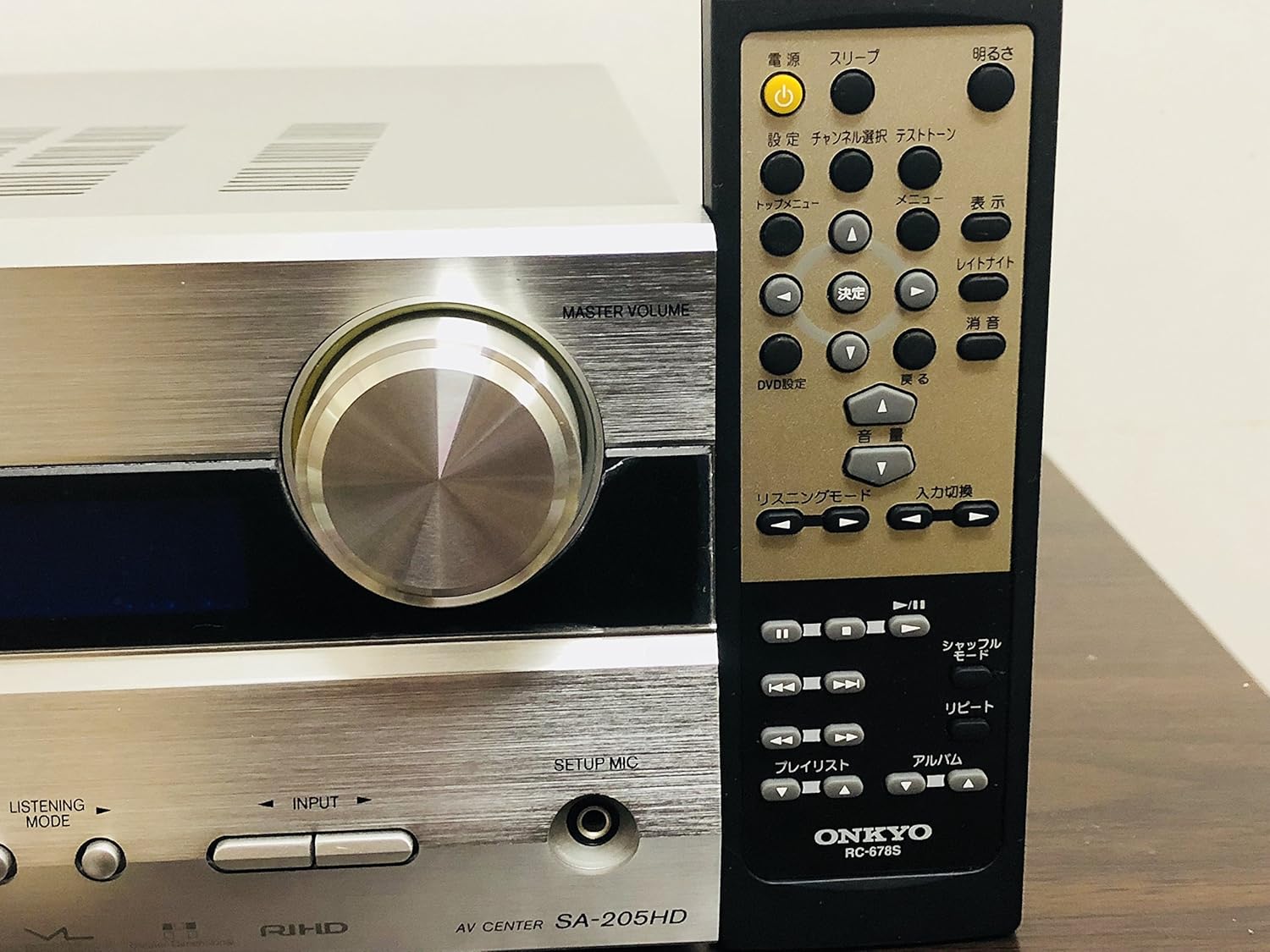
Figure 5.1: The ONKYO AV Center SA-205HD shown with its dedicated remote control, which allows for convenient operation from a distance.
6. Penyelenggaraan
- Pembersihan: Lap unit dengan kain lembut dan kering. Jangan gunakan pembersih atau pelarut yang melelas.
- Pengudaraan: Ensure adequate ventilation around the unit. Do not block the ventilation openings on the top or sides. Overheating can cause malfunction.

Rajah 6.1: Atas view of the ONKYO AV Center SA-205HD, illustrating the ventilation grilles essential for proper heat dissipation.
7. Penyelesaian masalah
Jika anda menghadapi masalah, rujuk kepada masalah dan penyelesaian biasa berikut:
| Masalah | Kemungkinan Punca | Penyelesaian |
|---|---|---|
| Tiada bunyi | Incorrect input selected, volume too low, speaker wires disconnected. | Select correct input, increase volume, check speaker connections. |
| Tiada gambar | HDMI cable not connected properly, incorrect input selected on TV. | Check HDMI cable connections, select correct HDMI input on TV. |
| Alat kawalan jauh tidak berfungsi | Batteries depleted or inserted incorrectly, obstruction between remote and receiver. | Replace batteries, ensure correct polarity, remove obstructions, point remote directly at receiver. |
| Unit dimatikan tanpa diduga | Overheating due to poor ventilation, power surge. | Ensure proper ventilation, connect to a surge protector. |
8. Spesifikasi
- model: SA-205HD
- Saluran: 5.1-saluran
- Kuasa Output Maksimum: 210W (30W x 5 channels + 60W subwoofer)
- Format Audio yang Disokong: DOLBY TrueHD, DTS-HD Master Audio, AAC
- Input Audio Digital: Optik x 2, Koaksial x 1
- Input HDMI: 2
- Output HDMI: 1
- Input Audio Analog: RCA (Line 1, 2, 3)
- Penyambung: HDMI, RCA, USB (for service/firmware, not user device port)
- Supported Media Formats (via USB, if applicable): WAV, WMA
- Impedans Pembesar Suara: Subwoofer 3Ω, Other Speakers 6Ω
- warna: Perak
- Berat produk: 4.5 kg
- Bateri Kawalan Jauh: 2 x AAA (tidak termasuk)
9. Waranti dan Sokongan
For warranty information and technical support, please refer to the official Onkyo website or contact your local Onkyo dealer. Keep your purchase receipt as proof of purchase for warranty claims.


