pengenalan
This manual provides essential information for the installation, operation, and maintenance of your Intel Core 2 Duo T9300 processor. The Intel Core 2 Duo T9300 is designed to deliver energy-efficient performance for various computing tasks, featuring a 2.5 GHz clock speed and 6 MB of L2 cache.
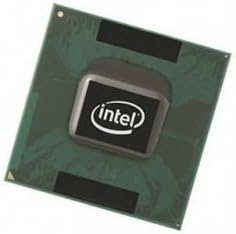
Image: Intel Core 2 Duo T9300 Processor. This image displays the top-down view of the processor, showing the Intel logo on the integrated heat spreader and the green substrate.
Persediaan dan Pemasangan
Proper installation of the CPU is crucial for optimal performance and system stability. Always ensure your system is powered off and unplugged before beginning installation. It is recommended to wear an anti-static wrist strap to prevent electrostatic discharge (ESD) damage.
- Sediakan Papan Induk: Locate the CPU socket (Socket P) on your motherboard. Gently lift the retention lever on the side of the socket.
- Handle the CPU: Hold the processor by its edges, avoiding contact with the gold pins or the surface of the integrated heat spreader (IHS). Identify the orientation notch or arrow on the CPU and align it with the corresponding mark on the CPU socket.
- Masukkan CPU: Carefully lower the CPU straight into the socket. It should drop in without significant force. If resistance is met, re-check the alignment. Do not force the CPU into the socket, as this can bend pins and damage the processor or motherboard.
- Selamatkan CPU: Once the CPU is seated correctly, push the retention lever back down until it locks into place.
- Sapukan Pes Terma: Apply a small amount (pea-sized dot) of thermal paste to the center of the CPU's IHS. This ensures efficient heat transfer to the CPU cooler.
- Pasang Penyejuk CPU: Mount your compatible CPU cooler according to its manufacturer's instructions. Ensure it makes firm, even contact with the CPU's IHS.
Note: Some older systems may require a BIOS update to fully recognize and utilize newer processors. Consult your motherboard manufacturer's documentation for specific compatibility and update procedures.
Operasi
The Intel Core 2 Duo T9300 processor operates automatically once installed and recognized by the system BIOS and operating system. Its primary function is to execute instructions and process data, enabling your computer to perform tasks. Key operational characteristics include:
- Kelajuan Jam: Operates at 2.5 GHz, providing processing power for applications.
- Front Side Bus (FSB): Designed for an 800 MHz FSB, facilitating data transfer between the CPU and the northbridge.
- Cache Memory: Utilizes 6 MB of L2 cache to speed up data access.
- Pengurusan Terma: The processor includes integrated thermal management features to prevent overheating. Ensure adequate cooling is provided by a properly installed CPU cooler.
Penyelenggaraan
While the Intel Core 2 Duo T9300 processor itself requires minimal maintenance, ensuring its operating environment is clean and cool is essential for longevity and performance.
- Penyingkiran habuk: Periodically clean dust from the CPU cooler's heatsink and fan using compressed air. Accumulation of dust can impede airflow and lead to higher operating temperatures.
- Aplikasi Semula Tampal Terma: If you remove the CPU cooler for any reason, or if you notice consistently high CPU temperatures, it is recommended to clean off the old thermal paste from both the CPU and the cooler base and apply fresh thermal paste.
- Aliran Udara Sistem: Ensure your computer case has good airflow to dissipate heat effectively. Keep vents clear of obstructions.
Menyelesaikan masalah
If you encounter issues after installing your Intel Core 2 Duo T9300 processor, consider the following troubleshooting steps:
- Sistem Tidak Boot/Tiada Paparan:
- Verify the CPU is correctly seated in the socket and the retention lever is locked.
- Check for any bent pins on the CPU. If found, carefully attempt to straighten them with a fine tool, but be aware this can damage the CPU.
- Ensure the CPU cooler is properly installed and its fan is connected to the motherboard's CPU fan header.
- Confirm your motherboard's BIOS is updated to support the T9300 processor.
- Pemanasan Terlalu Panas/Penutupan Sistem:
- Check that thermal paste was applied correctly and evenly between the CPU and cooler.
- Ensure the CPU cooler fan is spinning and free of dust.
- Monitor CPU temperatures using system monitoring software. If temperatures are consistently high, re-evaluate cooler installation or consider a more effective cooling solution.
- Isu Prestasi:
- Verify the CPU is running at its advertised clock speed (2.5 GHz) in your operating system's task manager or system information.
- Pastikan semua pemacu sistem, terutamanya pemacu cipset, dikemas kini.
- Check for background processes consuming excessive CPU resources.
Spesifikasi
| Ciri | Perincian |
|---|---|
| Jenama | Intel |
| Pengeluar CPU | Intel |
| Jenis Pemproses | Intel Core 2 Duo |
| Nombor Model | T9300 (FF80576GG0606M) |
| Kelajuan Jam | 2.5 GHz |
| Bus/Core Ratio | 12.5 |
| Soket CPU | Socket P |
| Secondary Cache (L2) | 6 MB |
| Dimensi Produk | 6.5 x 3.3 x 1 inci |
| Berat Barang | 0.32 auns |
| Tarikh Mula-mula Tersedia | 20 Mac 2008 |
Maklumat Waranti
Specific warranty details for the Intel Core 2 Duo T9300 processor are typically provided at the point of purchase or through Intel's official channels. For the most accurate and up-to-date warranty information, please refer to the documentation included with your processor or visit the official Intel support webtapak.
Sokongan
For further assistance, technical support, or driver downloads, please visit the official Intel support webtapak:
Video Produk Rasmi
No official product videos from the seller are available for this specific model in the provided data.


