1. Pengenalan
This manual provides essential information for the safe and efficient use of your Hama USB 7.1 Surround Sound Card, Model 00051620. Please read these instructions carefully before using the device and keep them for future reference. This external sound card allows you to connect headphones, microphones, or speakers with a 3.5mm jack to your computer or tablet via a USB-A port, enhancing your audio experience with simulated 7.1 surround sound.
2. Arahan Keselamatan
- Do not open the device. Opening the device voids the warranty and may lead to electric shock.
- Lindungi produk daripada kotoran, kelembapan dan terlalu panas.
- Gunakan produk hanya untuk tujuan yang dimaksudkan.
- Jangan jatuhkan produk atau dedahkan ia kepada renjatan yang teruk.
- Jauhkan produk ini, seperti semua produk elektrik, daripada jangkauan kanak-kanak.
- Buang bahan pembungkusan serta-merta mengikut peraturan tempatan yang terpakai.
3. Kandungan Pakej
Sahkan bahawa pakej anda mengandungi item berikut:
- 1x Hama USB 7.1 Surround Sound Card (Model 00051620)
- 1x Manual Arahan
4. Produk Lebihview
The Hama USB 7.1 Surround Sound Card is a compact audio adapter designed to provide enhanced sound capabilities for your computer or tablet. It features a USB-A connector for easy plug-and-play functionality and includes dedicated ports for audio input and output.
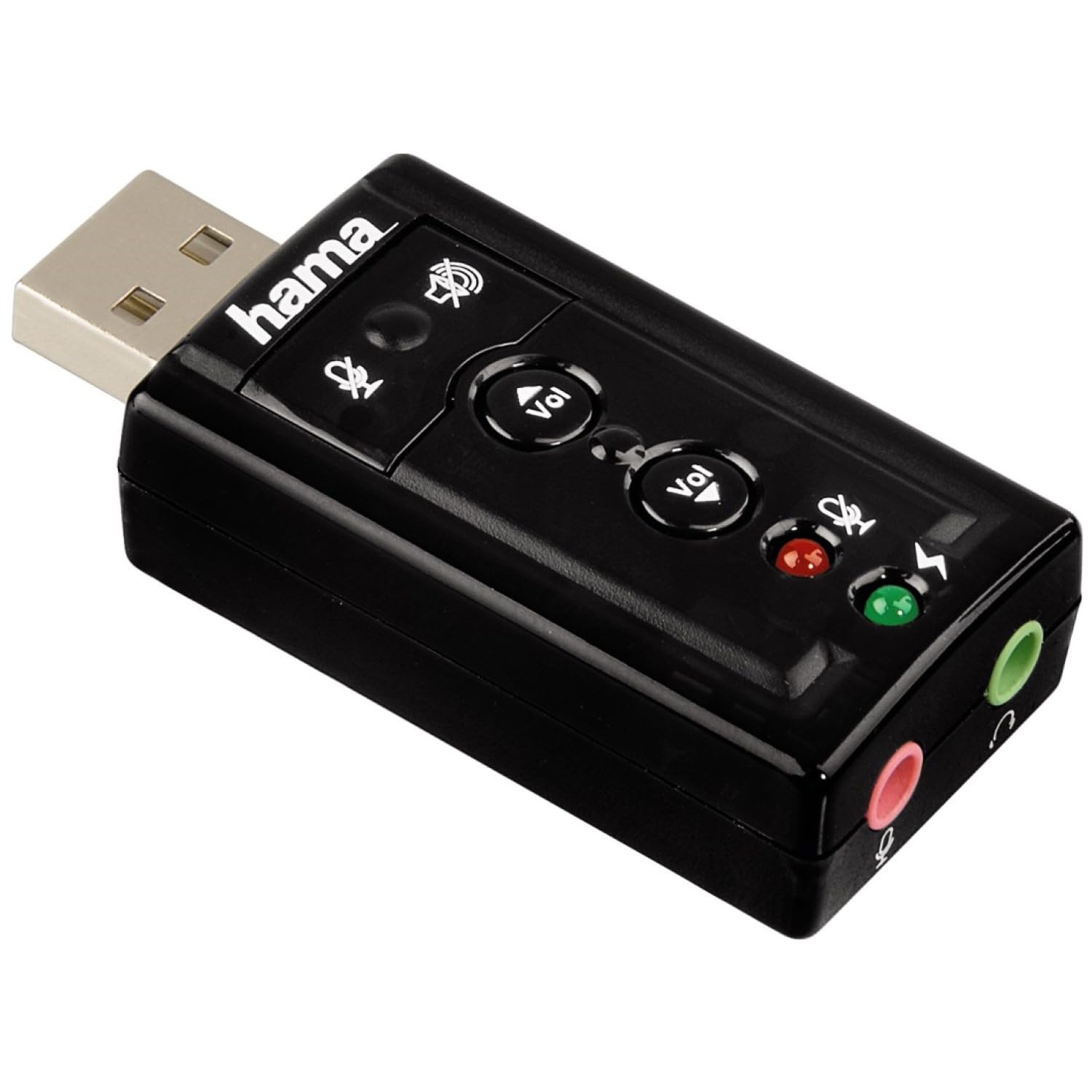
Imej 1: Atas view of the Hama USB 7.1 Surround Sound Card, showing the USB-A connector, volume control buttons, and mute indicators.
Kawalan dan Pelabuhan:
- Penyambung USB-A: For connecting to your computer or tablet.
- Butang Kelantangan / Turun Kelantangan: Melaraskan kelantangan output audio.
- Butang Redam Mikrofon: Mutes or unmutes the connected microphone.
- Speaker Mute Button: Mutes or unmutes the audio output to headphones/speakers.
- 3.5mm Microphone Jack (Red): Untuk menyambungkan mikrofon luaran.
- 3.5mm Headphone/Speaker Jack (Green): Untuk menyambungkan fon kepala atau pembesar suara.

Image 2: End view of the Hama USB 7.1 Surround Sound Card, highlighting the red microphone input jack and the green headphone/speaker output jack.
5. Keperluan Sistem
- Operating System: Windows, macOS, or compatible tablet OS.
- Port USB-A tersedia.
- Headphones, microphone, or speakers with a 3.5mm jack connector.
6. Pemasangan dan Persediaan
- Connect the Sound Card: Plug the USB-A connector of the Hama USB 7.1 Surround Sound Card into an available USB-A port on your computer or tablet.
- Pemasangan Pemandu: The device is typically plug-and-play, and your operating system should automatically detect and install the necessary drivers. If prompted, follow the on-screen instructions.
- Sambungkan Peranti Audio:
- For headphones or speakers, connect the 3.5mm jack into the hijau port on the sound card.
- For a microphone, connect the 3.5mm jack into the merah port on the sound card.
- Konfigurasikan Tetapan Audio: Access your operating system's sound settings to ensure the Hama USB 7.1 Surround Sound Card is selected as the default playback and recording device.
- Pemasangan Perisian (Pilihan): For advanced features like XeaR-Sound 7.1 surround simulation, 10-band equalizer, and karaoke functions, install the dedicated software. Refer to the manufacturer's website for software downloads and installation instructions.
7. Operasi
Basic Audio Control:
- Pelarasan Kelantangan: Use the 'Vol +' and 'Vol -' buttons on the sound card to increase or decrease the output volume.
- Mute Audio Output: Press the speaker mute button to temporarily silence the audio output. Press again to unmute.
- Mute Microphone Input: Press the microphone mute button to temporarily disable microphone input. Press again to enable.
Ciri-ciri Perisian Lanjutan:
If you have installed the optional software, you can access the following features:
- XeaR-Sound Technology: Enables simulated 7.1 crystal-clear surround sound for stereo speakers or headsets.
- Penyama 10 Band: Customize your audio experience with various presets (e.g., Jazz, Rock, Classic) or create your own.
- Additional Sound Effects: Apply various sound effects to your audio.
- Adjustable Room Acoustics: Modify the perceived acoustic environment.
- Karaoke Recording: Record karaoke performances with original voice suppression and tone adjustment capabilities.
8. Penyelenggaraan
The Hama USB 7.1 Surround Sound Card requires minimal maintenance.
- Bersihkan peranti hanya dengan sedikit damp, kain tidak berbulu. Jangan gunakan agen pembersih yang agresif.
- Ensure the USB port and audio jacks are free from dust and debris.
9. Penyelesaian masalah
Tiada Keluaran Bunyi:
- Ensure the sound card is securely plugged into a USB port.
- Check if your headphones/speakers are correctly connected to the green jack.
- Verify that the speaker mute button on the sound card is not active.
- Confirm that the Hama USB 7.1 Surround Sound Card is selected as the default playback device in your operating system's sound settings.
- Adjust the volume using the sound card's buttons and your computer's volume controls.
Mikrofon Tidak Berfungsi:
- Ensure your microphone is correctly connected to the red jack.
- Verify that the microphone mute button on the sound card is not active.
- Confirm that the Hama USB 7.1 Surround Sound Card is selected as the default recording device in your operating system's sound settings.
- Semak tetapan privasi mikrofon dalam sistem pengendalian anda.
Isu Kualiti Bunyi:
- Pastikan semua sambungan selamat.
- Try connecting the sound card to a different USB port.
- If using the optional software, check equalizer settings and disable any sound effects that might be causing distortion.
10. Spesifikasi
| Ciri | Perincian |
|---|---|
| Jenama | Hama |
| Nombor Model | 00051620 (juga dikenali sebagai 51620) |
| warna | Hitam |
| Penyambung | USB A male |
| Piawai USB | USB 2.0 |
| Sambungan Pembesar Suara | 3.5mm female jack |
| Sambungan Fon Kepala | 3.5mm female jack |
| Kawalan Kelantangan | Yes, with mute function |
| Mod Keluaran Audio | Keliling |
| Konfigurasi Saluran Bunyi Sekeliling | 7.1 (simulated with software) |
| S maksimumampKadar ling | 48 kHz |
| Peranti Serasi | USB (PC, Laptop, Tablets) |
| Pengeluar | Hama EURL |
11. Maklumat Pelupusan
Observe the applicable local regulations for the disposal of electronic devices. The product must not be disposed of with normal household waste. Dispose of the product according to the European Directive 2012/19/EU on waste electrical and electronic equipment (WEEE) at a designated collection point for electrical and electronic equipment.
12. Waranti
Hama GmbH & Co KG provides a limited warranty for this product. For detailed warranty terms and conditions, please refer to the official Hama webtapak atau hubungi peruncit tempatan anda. Simpan bukti pembelian anda untuk tuntutan waranti.
13. Sokongan Pelanggan
If you have any questions about this product or require technical assistance, please contact Hama customer support. You can find contact information on the official Hama webtapak (www.hama.com) or through your local retailer.