pengenalan
This manual provides comprehensive instructions for the safe and proper installation, operation, and maintenance of your Peerless-AV Paramount Articulating Wall Mount, model PA740. Please read all instructions carefully before beginning installation.
Maklumat Keselamatan Penting
- Pastikan permukaan pelekap dapat menyokong berat gabungan pelekap dan paparan dengan selamat.
- Jangan melebihi kapasiti berat maksimum 80 paun (36.3 kg).
- Always use appropriate tools and safety equipment during installation.
- Jika anda tidak pasti tentang mana-mana bahagian proses pemasangan, berunding dengan profesional yang berkelayakan.
- Produk ini direka untuk kegunaan dalaman sahaja.
Kandungan Pakej
Sahkan bahawa semua komponen hadir sebelum memulakan pemasangan:
- Peerless-AV PA740 Articulating Wall Mount
- Plat Penyesuai VESA
- Mounting Hardware (for wall attachment)
- Screen Attachment Hardware (various sizes for display compatibility)
- Manual Pemasangan (dokumen ini)
Persediaan dan Pemasangan
This section outlines the steps for mounting the PA740 to your wall and attaching your display.
1. Sediakan Lokasi Pemasangan
Identify a suitable wall stud for mounting. The mount is designed to attach to a single wall stud. Use a stud finder to locate the center of the stud. Ensure there are no electrical wires or plumbing in the drilling path.
Nota: When folded flat against the wall, the display will be centered approximately 2.81 inches to the left of the stud center. Plan your mounting location accordingly.
2. Pasang Plat Dinding
- Hold the wall plate against the wall at the desired height and mark the two drilling locations for the lag screws.
- Drill pilot holes into the center of the stud at the marked locations. Refer to the installation manual for recommended drill bit size (typically 1/4 inch, but verify).
- Secure the wall plate to the stud using the provided lag screws. Ensure the plate is level before fully tightening.

Imej 1: Depan view of the Peerless-AV PA740 Articulating Wall Mount. This image shows the main components of the mount, including the wall plate, articulating arm, and the VESA compliant display attachment plate. The mount is black and appears robust.
3. Attach VESA Adapter to Display
The PA740 is compatible with VESA 75/100, 200x100, and 200x200 mm mounting patterns.
- Carefully place your display face down on a soft, clean surface.
- Identify the correct size screws from the provided hardware kit that fit your display's VESA mounting holes. Refer to your display's manual for screw size recommendations.
- Attach the VESA adapter plate to the back of your display using the selected screws. Do not overtighten.
4. Mount Display to Wall Arm
- With assistance, carefully lift the display and align the VESA adapter plate on the display with the arm assembly on the wall mount.
- Slide the display onto the arm until it is securely seated.
- Secure the display to the arm using the small set screw, as indicated in the detailed installation guide.
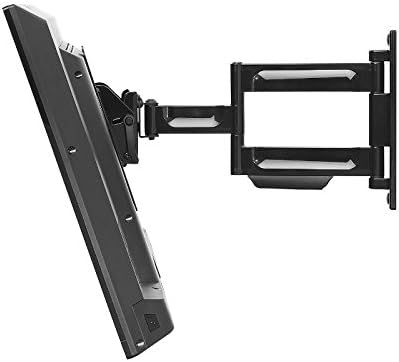
Imej 2: sebelah view of the Peerless-AV PA740 Articulating Wall Mount with a television attached. The image demonstrates the mount's extension capability from the wall and its articulating arm design, allowing for flexible display positioning.
Arahan Operasi
The PA740 mount offers versatile positioning for optimal viewing.
Melaraskan Kedudukan
- Pelanjutan dan Penarikan Balik: Gently pull the display away from the wall to extend the arm. Push the display back towards the wall to retract it. The mount extends up to 15.6 inches and retracts to 2.93 inches.
- Pusing: The articulating arm allows for 180 degrees of swivel. Carefully pivot the display left or right to achieve the desired viewsudut ing.
- Condong: The mount features +15° to -5° of continuous one-touch tilt. Adjust the tilt by gently pushing the top or bottom of the display forward or backward. No tools are required for this adjustment.
- meratakan: The mount includes a leveling feature that allows for +/-5 degrees of roll adjustment. This can be used to fine-tune the display's horizontal alignment after installation. Refer to the detailed manual for specific screw adjustments.
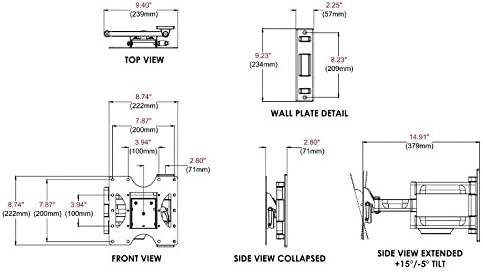
Imej 3: Technical diagram illustrating the dimensions and movement capabilities of the Peerless-AV PA740 Articulating Wall Mount. This includes top, front, side collapsed, and side extended views with tilt angles, providing precise measurements for planning and installation.
Pengurusan Kabel
The PA740 features integrated cable management to keep cables organized and out of sight. Route your display's input/output cables along the arm and through the designated channels to maintain a clean appearance, even when the display is extended or retracted.
Penyelenggaraan
- Periodically check all mounting screws and connections to ensure they remain secure.
- Bersihkan pelekap dengan kain lembut dan kering. Elakkan pembersih atau pelarut yang melelas.
- The articulating joints are designed for smooth operation. If movement becomes stiff, consult the manufacturer's support for guidance; do not apply lubricants unless specifically instructed.
Menyelesaikan masalah
| Masalah | Kemungkinan Punca | Penyelesaian |
|---|---|---|
| Display is not level after installation. | Minor misalignment during installation. | Use the +/-5 degree roll adjustment feature. Refer to the detailed manual for specific screw adjustments to level the screen. |
| Mount movement is too stiff or too loose. | Joint tension requires adjustment. | The pivot adjustment screws can be adjusted. Do not loosen more than 1/2 turn. If unsure, contact support. |
| Display does not fit the mount. | Incorrect VESA pattern or display size. | Verify your display's VESA pattern (75/100, 200x100, 200x200 mm) and weight (max 80 lbs). Ensure display size is between 22" and 43". |
| Mount terasa tidak stabil. | Improper wall attachment or overloaded. | Ensure lag screws are securely fastened into a wall stud. Do not exceed the 80 lb weight capacity. Re-check all connections. If instability persists, consult a professional. |
Spesifikasi
- model: PA740
- Jenama: Peerless-AV
- Display Size Compatibility: 22" hingga 43"
- Kapasiti Berat: 80 paun (36.3 kg)
- Keserasian VESA: 75x75mm, 100x100mm, 200x100mm, 200x200mm
- Sambungan daripada Dinding: 2.93" (ditarik balik) kepada 15.6" (dilanjutkan)
- Condong: +15° / -5° continuous one-touch
- Pusing: 180°
- Roll (Leveling): +/-5°
- Bahan: Durable Metal (Fused Epoxy Coated)
- warna: Hitam
- Dimensi Produk: 8.75 x 2.93 x 9.35 inches (Wall Plate: 9.23" H x 2.25" W)
- Berat Barang: 5.28 paun
- Pensijilan: UL Tersenarai
Maklumat Waranti
The Peerless-AV PA740 Articulating Wall Mount is backed by a limited five-year warranty. This warranty covers defects in materials and workmanship under normal use. For full warranty terms and conditions, please refer to the official Peerless-AV webtapak atau hubungi sokongan pelanggan.
Sokongan dan Hubungan
For technical assistance, troubleshooting, or warranty inquiries, please contact Peerless-AV customer support:
- Webtapak: www.peerless-av.com
- Refer to the official Peerless-AV webtapak untuk maklumat hubungan terkini dan sumber sokongan.


