1. Pengenalan
The Cobra XRS 9740 is an advanced 12-band radar and laser detector designed to provide comprehensive detection of various radar and laser signals. This manual outlines the features, setup, operation, and maintenance of your device to ensure optimal performance.
1.1 Kandungan Pakej
Sahkan bahawa semua item yang disenaraikan di bawah terdapat dalam pakej anda:
- Cobra XRS 9740 Radar Detector Unit
- Kord Kuasa DC 12V bergelung
- Windshield Mounting Bracket with suction cups
- Manual Arahan (dokumen ini)
1.2 Peranti Selesaiview
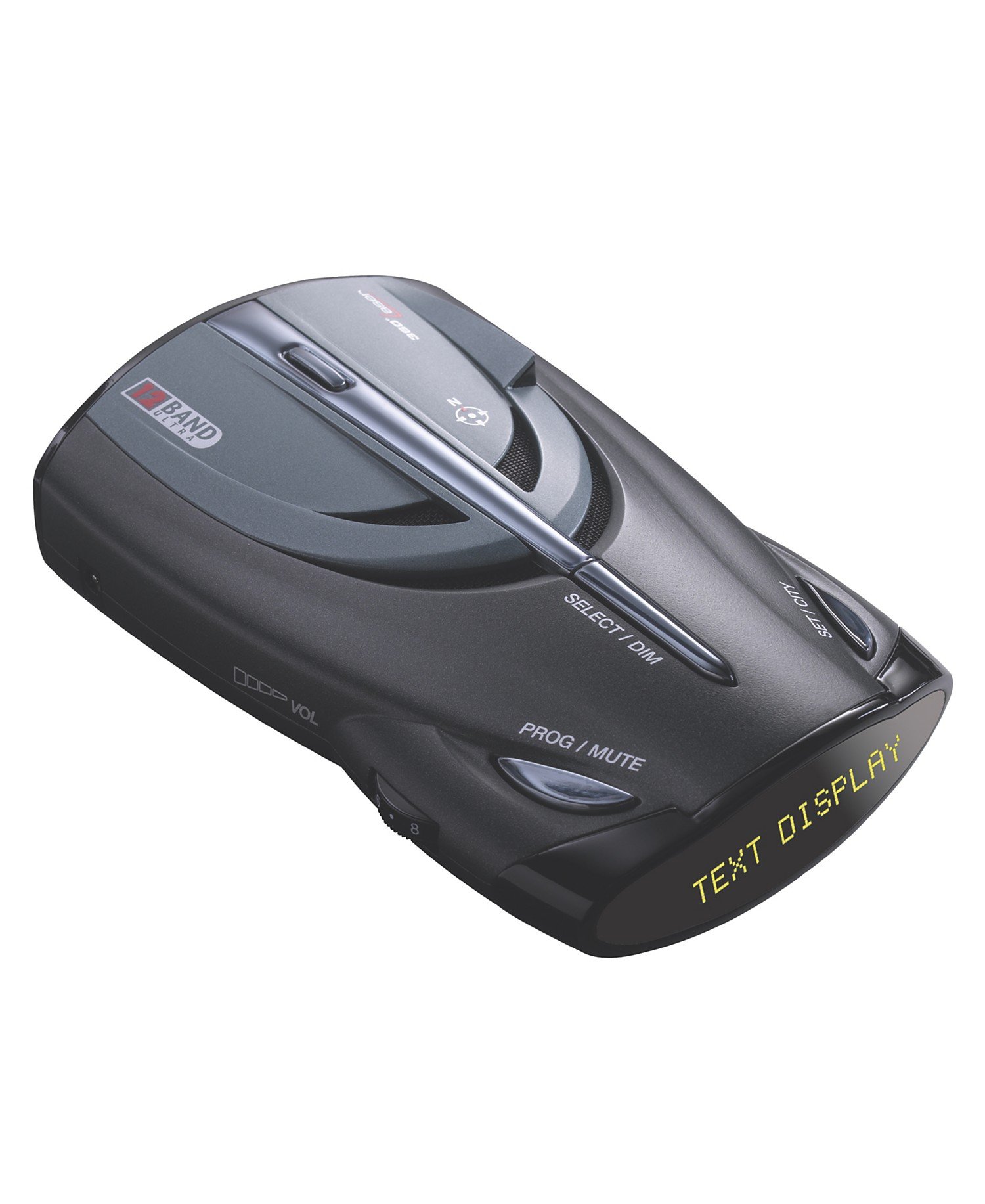
Rajah 1: Cobra XRS 9740 Radar Detector. The image shows the top-down view of the device, highlighting the "TEXT DISPLAY" screen, "SELECT/DIM" button, "PROG/MUTE" button, "SET/CITY" button, and the "VOL" control dial on the side. The "12 BAND ULTRA" logo is also visible.
2. Ciri-ciri Utama
The Cobra XRS 9740 incorporates several advanced technologies for enhanced detection and user convenience:
- Xtreme Range Superheterodyne Technology: Provides extended detection range and early warning for radar signals, including fast POP mode radar guns.
- 12-Band Detection: Detects 6 radar bands (X, K, Ka Superwide, Ku, VG-2, Spectre), 4 laser signals (LTI 20-20, Ultra Lyte, ProLaser, ProLaser III), and 2 safety signals (Safety Alert, Strobe Alert).
- DigiView Paparan Data: Offers a clear, digital text display for easy identification of detected signals.
- POP Mode Radar Gun Detection: Identifies the latest super-fast instant-on radar gun signals.
- Ku Band Detection: Prepared for future introduction of Ku Band radar in the U.S.
- LaserEye: Provides 360-degree detection of laser signals.
- Makluman Suara: Announces detected signals with specific voice prompts.
- VG-2 Alert/Undetectable: Alerts the driver when under surveillance by VG-2 Radar-Detector-Detectors and provides immunity.
- Spectre Alert I/Undetectable: Alerts the driver when under surveillance by Spectre I radar detector-detectors and provides immunity.
- Strobe Alert: Warns of emergency vehicles equipped with traffic light controlling strobe emitters.
- Makluman Keselamatan: Notifies drivers of emergency vehicles, railroad crossings, and road hazards equipped with Safety Alert transmitters.
- Auto Redam: Automatically lowers the volume of alerts after a few seconds to a less intrusive level.
- IntelliMute: A speed-sensing auto mute system to minimize false alerts.
- IntelliShield False Signal Rejection: Features a 3-level City Mode for effective false signal rejection in urban and rural environments.
- Digital Signal Strength Meter: Displays relative proximity to the signal source using a 5-level digital meter.
- SmartPower: Automatically powers off the unit when vehicle ignition is turned off.
- City/Highway Selector: Allows selection of operating mode to reduce false alerts in urban areas.
- Mod Malap: Adjusts display brightness for improved night driving visibility.
- EasySet Programming Menu: User-friendly menu for mode selection and settings adjustment.
- Stay Set Electronic Memory: Retains radar detector settings indefinitely, even when power is removed.
- 8-Point Electronic Compass: Provides an accurate electronic direction heading.
3. Persediaan dan Pemasangan
3.1 Memasang Pengesan
The Cobra XRS 9740 should be mounted in a location that provides a clear, unobstructed view of the road ahead and behind for optimal radar and laser detection. Use the provided windshield mounting bracket.
- Clean the windshield area where the detector will be mounted.
- Attach the suction cups to the mounting bracket.
- Press the suction cups firmly against the windshield to secure the bracket.
- Slide the detector onto the mounting bracket until it clicks into place. Ensure the detector is level and has a clear line of sight.
3.2 Sambungan Kuasa
Connect the coiled 12V DC power cord to the detector's power input jack and then into your vehicle's 12V accessory outlet (cigarette lighter socket).
3.3 Initial Compass Calibration
For accurate compass readings, the 8-Point Electronic Compass requires initial calibration. This procedure should be performed in an open area away from large metal objects or strong magnetic fields.
- With the detector powered on, drive your vehicle slowly in two complete circles (360 degrees each).
- The detector will automatically calibrate the compass during this process.
- Once calibrated, the compass display will show accurate directional headings.
4. Operasi
4.1 Kawalan dan Fungsi
Familiarize yourself with the detector's controls:
- Kawalan Kelantangan (VOL): Adjusts the audio alert volume.
- SELECT/DIM Button: Used to navigate menu options and adjust display brightness (Dim Mode).
- PROG/MUTE Button: Enters the programming menu and mutes audio alerts.
- SET/CITY Button: Confirms menu selections and toggles between City and Highway modes.
4.2 Mod Pengendalian
- Mod Lebuhraya: Provides full sensitivity for maximum detection range. Recommended for open road driving.
- City Mode (3 Levels): Reduces sensitivity to minimize false alerts from common urban sources like automatic door openers. Press the SET/CITY button to cycle through City modes.
4.3 Sistem Amaran
- Makluman Audio: Distinctive tones and voice announcements for different detected signals.
- Visual Alerts: DigiView Data Display shows the type of signal detected and its relative strength using a 5-level digital meter.
- Auto Redam: Automatically lowers the volume of alerts after a few seconds to a less intrusive level.
- IntelliMute: A speed-sensing feature that can automatically mute alerts when traveling below a certain speed, further reducing false alarms.
4.4 Tetapan Pengaturcaraan
The EasySet Programming Menu allows customization of various settings. Press the PROG/MUTE button to enter the menu. Use SELECT/DIM to navigate and SET/CITY to confirm selections. Settings are saved automatically by Stay Set Electronic Memory.
- Mod Malap: Adjust display brightness (Bright, Dim, Dark).
- Band Enable/Disable: Turn specific radar/laser bands on or off.
- Voice Alert On/Off: Dayakan atau lumpuhkan pengumuman suara.
- IntelliMute On/Off: Activate or deactivate the speed-sensing auto mute.
- Safety Alert On/Off: Enable or disable Safety Alert detection.
- Strobe Alert On/Off: Enable or disable Strobe Alert detection.
5. Penyelenggaraan
To ensure the longevity and optimal performance of your Cobra XRS 9740, follow these maintenance guidelines:
- Pembersihan: Lap bahagian luar pengesan dengan kerap menggunakan kain lembutamp kain. Jangan gunakan pembersih atau pelarut yang melelas.
- Penjagaan Lensa: Keep the front and rear laser lenses clean and free from obstructions. Avoid touching the lenses directly.
- Storan: When not in use for extended periods, store the detector in a cool, dry place, away from direct sunlight and extreme temperatures.
- Kord Kuasa: Inspect the 12V DC power cord periodically for any signs of damage. Replace if necessary.
- Pemasangan: Ensure the suction cups on the mounting bracket are clean for a secure attachment to the windshield.
6. Penyelesaian masalah
If you experience issues with your Cobra XRS 9740, refer to the following common problems and solutions:
| Masalah | Kemungkinan Punca | Penyelesaian |
|---|---|---|
| Tiada kuasa kepada unit. | Power cord not properly connected; vehicle's 12V outlet is not functioning; blown fuse in power cord. | Ensure power cord is securely plugged into both the detector and the vehicle's outlet. Check vehicle's 12V outlet with another device. Inspect and replace fuse in the power cord if necessary. |
| Amaran palsu yang kerap. | Operating in Highway Mode in urban areas; interference from other vehicle systems or automatic door openers. | Switch to City Mode (try different levels). Ensure IntelliShield False Signal Rejection is active. Reposition the detector if it's too close to other electronics. |
| Inaccurate compass readings. | Compass not calibrated; strong magnetic interference. | Perform the Initial Compass Calibration procedure (Section 3.3). Move the detector away from large metal objects or strong magnetic sources. |
| No radar/laser detection. | Detector is off; volume is too low; specific bands are disabled; obstructed view. | Ensure the unit is powered on and volume is audible. Check programming settings to ensure desired bands are enabled. Verify the detector has a clear line of sight to the road. |
7. Spesifikasi
| Ciri | Perincian |
|---|---|
| Nombor Model | XRS-9740 |
| Dimensi (L x W x H) | 4.89 x 1.44 x 3.01 inci |
| Berat badan | 14.4 auns |
| Detection Bands | X, K, Ka Superwide, Ku, VG-2, Spectre (Radar); LTI 20-20, Ultra Lyte, ProLaser, ProLaser III (Laser); Safety Alert, Strobe Alert (Safety) |
| Jenis Paparan | DigiView Data Display (Text) |
| Input Kuasa | 12V DC |
| Pengeluar | Ular tedung |
8. Waranti dan Sokongan
8.1 Waranti Produk
The Cobra XRS 9740 Ultra Performance 12-Band Radar/Laser Detector is covered by a one-year warranty from the date of purchase. This warranty covers defects in materials and workmanship under normal use. Please retain your proof of purchase for warranty claims.
8.2 Sokongan Pelanggan
For technical assistance, troubleshooting beyond this manual, or warranty service, please refer to the contact information provided with your product packaging or visit the official Cobra webtapak.


