pengenalan
The TCP 12537 - 12536Q Circline Adapter is an electronic ballast designed to power compatible T9 fluorescent lamps. This 36-watt ballast ensures efficient and stable operation of your fluorescent lighting system. It is specifically engineered for use with TCP 32032 T6 32-watt lamps or TCP 32030 T9 30-watt lamps, providing the necessary electrical current to ignite and maintain the light output of these circline fluorescent tubes.
Maklumat Keselamatan
Always observe the following safety precautions when handling or installing electrical components:
- Putuskan Kuasa: Before any installation, maintenance, or troubleshooting, ensure the power supply to the fixture is completely disconnected at the circuit breaker or fuse box.
- Kakitangan Berkelayakan: Installation and servicing should be performed by a qualified electrician or trained personnel familiar with electrical wiring and fluorescent lighting systems.
- Voltage Keserasian: Sahkan bahawa input voltage (120 Volts) of the ballast matches the electrical supply of your installation.
- Lamp Keserasian: Use only with specified TCP 32032 T6 32-watt or TCP 32030 T9 30-watt circline fluorescent lamps. Using incompatible lamps may damage the ballast or lamp.
- Pembumian yang betul: Pastikan semua sambungan elektrik dibumikan dengan betul mengikut kod elektrik tempatan.
- Elakkan Kelembapan: Do not expose the ballast to moisture or operate in damp lokasi.
- Periksa Kerosakan: Before installation, inspect the ballast for any signs of physical damage. Do not install damaged components.
Persediaan dan Pemasangan
This section outlines the general steps for installing the TCP 12537 - 12536Q ballast. Specific fixture wiring may vary.
Komponen Lebihview
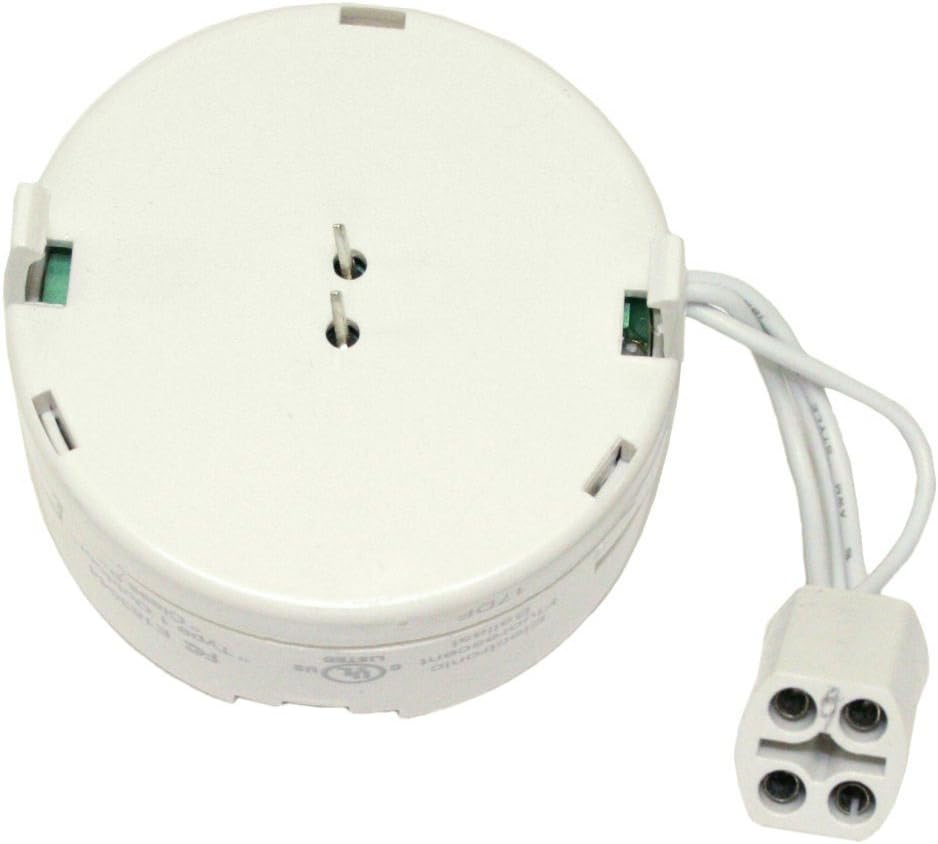
Image: The TCP 12537 - 12536Q Circline Adapter ballast. This image shows the compact, round white electronic ballast with its integrated wiring and connector designed for circline fluorescent lamps. The two prongs for lamp connection are visible on the top surface, along with the power input wires extending from the side.
The ballast is a compact, round unit with integrated wiring and a connector designed to interface with compatible circline fluorescent lamps. It features two prongs for direct lamp connection and power input wires for connection to the electrical supply.
Langkah Pemasangan
- Pemutusan Kuasa: Before beginning, ensure the main power supply to the lighting fixture is turned off at the circuit breaker. Verify with a voltage penguji.
- Access Fixture: Open or disassemble the lighting fixture to access the existing ballast and wiring.
- Remove Old Ballast (if applicable): Carefully disconnect and remove the old ballast, noting the wiring connections (input power, lamp sambungan).
- Connect New Ballast:
- Connect the input wires of the TCP 12537 - 12536Q ballast to the fixture's power supply wires (typically black to hot, white to neutral, green/bare to ground). Ensure secure connections using appropriate wire connectors.
- Connect the ballast's lamp connector to the corresponding receptacle on the circline fluorescent lamp. The two prongs on the ballast should align with the lamp's connection points.
- Secure Ballast: Mount the ballast securely within the fixture, ensuring it does not interfere with other components or the lamp. The ballast is designed for integration within a fixture, often with a "Table Mount" style, implying it sits flat or is secured to a surface.
- Pasang Lamp: Carefully install the compatible TCP 32032 T6 32-watt or TCP 32030 T9 30-watt circline fluorescent lamp into its designated position within the fixture.
- Pasang semula Lekapan: Close or reassemble the lighting fixture.
- Pulihkan Kuasa: Turn the power supply back on at the circuit breaker.
- Operasi Ujian: Turn on the light switch to verify proper operation of the lamp.
Arahan Operasi
The TCP 12537 - 12536Q ballast is an automatic electronic component. Once properly installed and connected to a compatible fluorescent lamp and power supply, it operates automatically when power is supplied to the lighting fixture. There are no user-adjustable controls on the ballast itself.
- Ensure the light switch connected to the fixture is in the "ON" position.
- The ballast will provide the necessary voltage and current to ignite and sustain the fluorescent lamp.
- To turn off the light, simply switch off the power to the fixture.
Penyelenggaraan
The TCP 12537 - 12536Q electronic ballast is designed for long-term, maintenance-free operation under normal conditions. Regular maintenance is generally not required for the ballast itself.
- Pembersihan: If the ballast becomes dusty, ensure power is disconnected and gently wipe the exterior with a dry, lint-free cloth. Do not use liquid cleaners.
- Pemeriksaan: Periodically inspect the wiring connections for any signs of loosening or corrosion. Ensure all connections remain secure.
- Penggantian: If the ballast fails (e.g., lamp does not light, flickers excessively, or hums loudly after lamp replacement), it should be replaced by a qualified professional. Do not attempt to repair the ballast.
Menyelesaikan masalah
If your fluorescent lamp system is not functioning correctly, consider the following troubleshooting steps:
| Masalah | Kemungkinan Punca | Penyelesaian |
|---|---|---|
| Lamp tidak menyala. |
|
|
| Lamp flickers or hums excessively. |
|
|
| Lamp is dim or takes long to start. |
|
|
Penting: Always disconnect power before performing any troubleshooting steps involving physical inspection or manipulation of wiring or components.
Spesifikasi
| Atribut | Nilai |
|---|---|
| Jenama | TCP |
| Nombor Model | 12536Q |
| Nombor Bahagian | 12537 |
| Penerangan | 36 watt Circline TCP Adapter (EC2T-36 HPF) |
| Serasi Lamp Wattage | 30W (T9) or 32W (T6) |
| Serasi Lamps | TCP 32032 T6 32-watt Lamp, TCP 32030 T9 30-watt Lamp |
| Voltage | 120 Volt |
| Jenis Sumber Cahaya | pendarfluor |
| Sumber Kuasa | Elektrik Bertali |
| bentuk | Bulat |
| bahan | Komponen elektronik |
| Jenis Selesai | Belum selesai |
| Jenis Pemasangan | Table Mount (for fixture integration) |
| Berat Barang | 3.2 auns |
| Dimensi Pakej | 3.9 x 2.5 x 0.8 inci |
| UPC | 762148125372 |
| Tarikh Mula-mula Tersedia | 20 September 2007 |
Maklumat Waranti
Specific warranty terms for the TCP 12537 - 12536Q Circline Adapter are provided by the manufacturer, TCP. Please refer to the product packaging or contact TCP directly for detailed warranty coverage, duration, and claim procedures.
Sokongan Pelanggan
For further assistance, technical support, or inquiries regarding the TCP 12537 - 12536Q Circline Adapter, please contact TCP customer service or visit their official webtapak.
You can find more information about TCP products by visiting the Kedai TCP di Amazon.


