1. Pengenalan
This manual provides detailed instructions for the setup, operation, and maintenance of your Acctim Smartlite Grande Alarm Clock, Model 13422X. Please read this manual thoroughly before using the product to ensure correct operation and to maximize its lifespan.
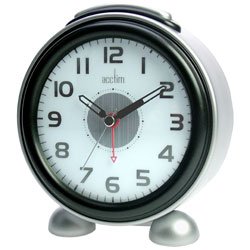
Rajah 1: Depan view of the Acctim Smartlite Grande Alarm Clock, displaying its analog dial, time hands, and brand logo.
2. Maklumat Keselamatan
- Keselamatan Bateri: Use only the specified battery type (not included). Do not mix old and new batteries, or different types of batteries. Insert batteries with correct polarity (+/-). Remove exhausted batteries promptly. Do not dispose of batteries in fire.
- penempatan: Place the clock on a stable, flat surface. Avoid placing it in direct sunlight, near heat sources, or in areas with high humidity or extreme temperatures.
- Pembersihan: Clean the clock with a soft, dry cloth. Do not use liquid cleaners or abrasive materials.
- Pembongkaran: Jangan cuba membuka atau membaiki jam sendiri. Rujuk semua servis kepada kakitangan yang berkelayakan.
3. Kandungan Pakej
Sila pastikan semua item ada:
- Acctim Smartlite Grande Alarm Clock (1 unit)
- Manual Arahan (dokumen ini)
Nota: Bateri tidak disertakan dan mesti dibeli secara berasingan.
4. Ciri-ciri Produk
- Smartlite Technology: An innovative feature that automatically illuminates the clock dial for easy viewing in low-light conditions. A built-in light sensor detects ambient light levels, turning the illumination off during daytime to conserve battery life.
- Fungsi Penggera: Integrated alarm with an on/off switch.
- Non-Ticking Sweep Movement: The second hand moves in a continuous, smooth motion, designed to reduce audible ticking sounds.
- Paparan Analog: Clear and easy-to-read analog dial.
- Dikuasakan Bateri: Operates on batteries for portability and convenience.
5. Persediaan
5.1. Pemasangan Bateri
- Cari penutup petak bateri di belakang jam.
- Remove the cover by sliding or lifting it according to the markings.
- Insert the required batteries (check the compartment for battery type) ensuring correct polarity (+ and -) as indicated inside the compartment.
- Gantikan penutup petak bateri dengan selamat.
5.2. Penetapan Masa Awal
- Cari tombol tetapan masa di bahagian belakang jam.
- Rotate the knob in either direction to set the current time. Ensure the hour and minute hands are accurately positioned.
6. Arahan Operasi
6.1. Menetapkan Penggera
- Cari tombol tetapan penggera di bahagian belakang jam.
- Putar tombol tetapan penggera untuk menggerakkan jarum penggera ke masa penggera yang anda inginkan.
- Locate the alarm ON/OFF switch (usually a small slider or button) on the back or side of the clock.
- Slide the switch to the "ON" position to activate the alarm.
6.2. Silencing the Alarm
When the alarm sounds, you can silence it by:
- Pressing the snooze/light button (if available, typically on top). This will temporarily silence the alarm, and it will sound again after a few minutes.
- Sliding the alarm ON/OFF switch to the "OFF" position. This will deactivate the alarm until it is manually turned "ON" again.
6.3. Smartlite Function
The Smartlite feature operates automatically. The built-in light sensor will detect low ambient light conditions and illuminate the clock dial. During brighter conditions, the illumination will turn off to conserve battery power. No manual adjustment is required for this feature.
7. Penyelenggaraan
7.1. Pembersihan
Wipe the clock's exterior with a soft, dry, lint-free cloth. Do not use abrasive cleaners, solvents, or chemical sprays, as these can damage the finish and internal components.
7.2. Penggantian Bateri
When the clock's display dims, the alarm weakens, or the clock stops functioning, it is time to replace the batteries. Follow the battery installation steps in Section 5.1.
8. Penyelesaian masalah
- Clock not working / Display dim:
- Periksa sama ada bateri dimasukkan dengan betul dengan polariti yang betul.
- Ganti dengan bateri segar.
- Penggera tidak berbunyi:
- Ensure the alarm ON/OFF switch is in the "ON" position.
- Sahkan masa penggera ditetapkan dengan betul.
- Gantikan bateri jika ia rendah.
- Smartlite not illuminating:
- Ensure the clock is in a sufficiently dark environment for the sensor to activate.
- Gantikan bateri jika ia rendah.
- Unusual noise from the clock:
- While the clock features a non-ticking sweep movement, some subtle mechanical sounds may be audible in very quiet environments. This is generally normal for analog movements.
- Ensure the clock is on a stable, flat surface to prevent vibrations.
9. Spesifikasi
| Jenama | Acctim |
| Nombor Model | 13422X |
| Jenis Paparan | Analog |
| Gaya | moden |
| Ciri Khas | Alarm, Smartlite (Automatic Dial Illumination) |
| Sumber Kuasa | Dikuasakan Bateri |
| bentuk | Bulat |
| Bahan Bingkai | Akrilonitril Butadiena Stirena |
| Bateri Termasuk | Tidak |
| Mod Operasi | Elektrik |
| Pengeluar | Acctim |
| ASIN | B000TLIGD8 |
| Tarikh Mula-mula Tersedia | 1 Mac 2014 |
10. Waranti dan Sokongan
For warranty information and customer support, please refer to the documentation provided at the point of purchase or visit the official Acctim webtapak. Simpan bukti pembelian anda untuk sebarang tuntutan waranti.
For further assistance, please contact your retailer or the manufacturer's customer service department.


