1. Pengenalan
This manual provides detailed instructions for the installation, operation, maintenance, and troubleshooting of your Antec TPQ-1000 TruePower Quattro 1000W Power Supply. Please read this manual thoroughly before installation and use to ensure proper functionality and safety.
The Antec TPQ-1000 is a high-performance power supply designed for demanding computer systems, featuring 1000 watts of continuous power, 80PLUS certification for efficiency, and a modular cable design for improved cable management.
2. Maklumat Keselamatan
AMARAN: Improper installation or use can lead to equipment damage, electric shock, or serious injury. Always follow these safety guidelines:
- Pastikan bekalan kuasa diputuskan sambungannya daripada soket AC sebelum pemasangan atau pengendalian.
- Jangan buka bekalan kuasa casing. vol tinggitages are present inside, even when disconnected. There are no user-serviceable parts.
- Install the power supply in a well-ventilated area. Do not block any ventilation openings.
- Use only the modular cables provided with the power supply.
- Pastikan semua kabel disambungkan dengan kukuh sebelum menghidupkan sistem.
- This product is designed for use with personal computers. Do not use it for any other purpose.
3. Kandungan Pakej
Sahkan bahawa pakej anda mengandungi item berikut:
- Antec TPQ-1000 TruePower Quattro 1000W Power Supply Unit
- Modular Cable Set (including ATX 20+4 pin, EPS12V 8-pin, PCI-E 6+2 pin, SATA, Molex)
- Kord Kuasa AC
- Skru Pemasangan
- Manual Pengguna (dokumen ini)
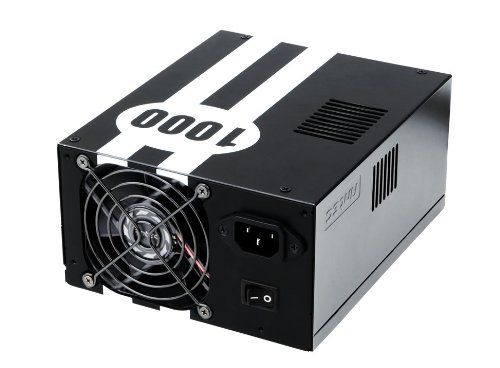
Image: The Antec TPQ-1000 TruePower Quattro 1000W Power Supply unit, typically shown with its modular cables. This image illustrates the main power supply unit and its various connectors.
4. Persediaan dan Pemasangan
4.1 Senarai Semak Pra-Pemasangan
- Ensure your computer case supports ATX power supplies.
- Kumpulkan alatan yang diperlukan: Pemutar skru kepala Phillips.
- Unplug your computer from the wall outlet and discharge any residual power by pressing the power button.
- Tanggalkan panel sisi casing komputer anda.
4.2 Memasang Bekalan Kuasa
- Carefully place the Antec TPQ-1000 into the power supply mounting bay of your computer case. Ensure the fan is oriented correctly for optimal airflow (usually facing down if there's a bottom vent, or facing into the case if top-mounted).
- Selamatkan bekalan kuasa ke bekas menggunakan skru pelekap yang disediakan.
4.3 Menyambung Kabel Modular
Connect only the necessary modular cables to the power supply and your components. This reduces cable clutter and improves airflow.
- 20+4 Pin ATX Motherboard Power: Connect the main ATX cable to the corresponding port on your motherboard.
- 4+4 Pin EPS12V CPU Power: Connect this cable to the CPU power connector on your motherboard. Modern motherboards typically use an 8-pin connector.
- 6+2 Pin PCI-E Power: For graphics cards. The TPQ-1000 provides multiple PCI-E connectors. Connect as many as required by your graphics card(s).
- Kuasa SATA: Connect to SATA devices such as hard drives, SSDs, and optical drives.
- Molex Power: Connect to older peripherals or case fans that use Molex connectors.
Ensure all connections are firm and properly seated. Route cables neatly to avoid obstructing airflow.
4.4 Kuasa Awal Hidup
- Once all components are connected, replace the computer case side panel.
- Sambungkan kord kuasa AC ke bekalan kuasa dan kemudian ke alur keluar dinding.
- Flip the power switch on the back of the power supply to the "ON" position (usually marked with "I").
- Tekan butang kuasa pada sarung komputer anda untuk memulakan sistem.
5. Arahan Operasi
The Antec TPQ-1000 TruePower Quattro is designed for continuous and stable operation once properly installed. It features:
- 80PLUS Certification: This indicates high power efficiency, reducing wasted energy and heat generation.
- Input Universal: Automatically adjusts for 100V to 240V power grids, making it suitable for global use.
- Active Power Factor Correction (PFC): Improves power efficiency and reduces electrical waste.
- Multiple 12V Rails: Provides stable power delivery to critical components.
No specific user interaction is required during normal operation beyond ensuring adequate ventilation and a stable power source.
6. Penyelenggaraan
Untuk memastikan jangka hayat dan prestasi optimum bekalan kuasa anda, pertimbangkan petua penyelenggaraan berikut:
- Pembersihan Habuk: Periodically (e.g., every 6-12 months), disconnect the power supply from the AC outlet and use compressed air to gently clean dust from the fan grille and ventilation openings. Do not open the power supply casing.
- Pengudaraan: Ensure that the power supply's fan and ventilation openings are not obstructed by cables or other components within the PC case. Maintain good airflow within the entire system.
- Pengurusan Kabel: Keep cables tidy to prevent them from interfering with airflow or fan operation.
7. Penyelesaian masalah
If you encounter issues with your Antec TPQ-1000 power supply, refer to the following common troubleshooting steps:
- Sistem Tidak Dihidupkan:
- Periksa sama ada kord kuasa AC disambungkan dengan selamat ke kedua-dua bekalan kuasa dan alur keluar dinding.
- Ensure the power switch on the back of the power supply is in the "ON" (I) position.
- Verify that the 20+4 pin ATX and 4+4 pin EPS12V CPU power cables are correctly and firmly connected to the motherboard.
- Uji alur keluar dinding dengan peranti lain untuk mengesahkan ia mempunyai kuasa.
- Sistem Dihidupkan tetapi Dimatikan Serta-merta:
- This could indicate a short circuit or an overloaded component. Disconnect all non-essential components (e.g., extra drives, graphics card if integrated graphics are available) and try again.
- Ensure all modular cables are correctly seated at both the power supply and component ends.
- System Instability or Random Restarts:
- Ensure adequate ventilation within the PC case to prevent overheating of components, including the PSU.
- Sahkan bahawa keperluan kuasa sistem anda tidak melebihi kapasiti 1000W bekalan kuasa.
- Periksa sambungan kabel yang longgar.
If issues persist after performing these steps, contact Antec customer support or a qualified technician.
8. Spesifikasi
| Ciri | Spesifikasi |
|---|---|
| Nombor Model | TPQ-1000 |
| Output Wattage | 1000 Watt |
| Faktor Bentuk | ATX12V |
| Pensijilan Kecekapan | 80PLUS Certified |
| Input Voltage | 100V - 240V (Universal Input) |
| Pembetulan Faktor Kuasa | PFC aktif |
| Dimensi (L x W x H) | 7.1 x 5.9 x 3.4 inci |
| Berat Barang | 8.3 paun |
| Kaedah Penyejukan | Udara |
| Jenis Penyambung | PCI-E, PCI-Express |
9. Waranti dan Sokongan
Antec products are manufactured to the highest quality standards. This product is covered by Antec's limited warranty. For specific warranty terms and conditions, please refer to the warranty card included with your product or visit the official Antec webtapak.
For technical support, troubleshooting assistance, or warranty claims, please contact Antec Customer Service:
- Webtapak: www.antec.com/support (Cthamppautan le, pautan sebenar mungkin berbeza-beza)
- e-mel: Refer to the Antec webtapak untuk maklumat hubungan serantau.
- telefon: Refer to the Antec webtapak untuk maklumat hubungan serantau.
Please have your product model number (TPQ-1000) and purchase date available when contacting support.