1. Maklumat Keselamatan Penting
Please read and understand all instructions before installing or operating this device. Failure to follow these instructions could result in electrical shock, fire, or serious injury.
- Putuskan kuasa pada pemutus litar atau kotak fius sebelum memasang atau menservis.
- Installation and wiring must comply with all national and local electrical codes.
- This device is intended for indoor use in a NEMA 1 enclosure.
- Jangan melebihi penarafan elektrik maksimum peranti.
- Pastikan semua sambungan selamat dan terlindung dengan betul.
- Sekiranya anda tidak pasti mengenai mana-mana bahagian arahan ini, berjumpa dengan juruelektrik yang berkelayakan.
2. Produk Lebihview
The Intermatic T101B is a heavy-duty 24-hour mechanical time switch designed for residential, commercial, and industrial applications. It provides direct 24-hour control for various electrical loads up to 40 Amps. This model features a single-pole, single-throw (SPST) switch and includes one ON and one OFF tripper for programming daily operations.
Ciri-ciri utama termasuk:
- Controls electrical loads up to 40 Amps.
- Provides direct 24-hour control of most loads.
- Capable of 1 to 12 ON/OFF operations each day.
- Minimum ON/OFF time of 1 hour.
- Keupayaan penggantian manual.
- Equipped with one ON and one OFF tripper.
- Separate clock motor terminals for switching circuits not on line voltage.
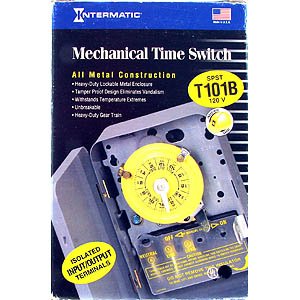
This image displays the packaging for the Intermatic T101B Mechanical Time Switch. The packaging highlights features such as all-metal construction, heavy-duty lockable metal enclosure, tamper-proof design, resistance to temperature extremes, and heavy-duty gear train. The model number T101B and voltage 120V are clearly visible, along with a diagram of the timer dial and isolated input/output terminals.
3. Spesifikasi
| Ciri | Nilai |
|---|---|
| Nombor Model | T101B |
| Vol Operasitage | 120 Volt |
| Penilaian Semasa | 40 Amps |
| Mod Operasi | Automatik |
| Jenis Kenalan | Biasanya Terbuka (SPST) |
| Jenis Penyambung | Terminal Skru |
| Jenis Litar | 1 hala |
| Minimum ON/OFF Time | 1 Jam |
| Dimensi Produk (L x W x H) | 7 x 7 x 7 inci |
| Berat Barang | 2.7 paun |
| Pengeluar | Intermatik |
4. Pemasangan (Persediaan)
Installation of the Intermatic T101B should be performed by a qualified electrician in accordance with all national and local electrical codes. Ensure power is disconnected before beginning installation.
4.1 Pemasangan
- Select a suitable indoor location for mounting the timer, ensuring it is protected from moisture and extreme temperatures.
- Securely mount the timer's enclosure to a wall or suitable surface using appropriate fasteners.
4.2 Pendawaian
Refer to the wiring diagram provided inside the timer's enclosure for specific connection details. The T101B features screw terminals for connections.
- Baris (L): Connect the incoming 120V power supply to the 'LINE' terminal.
- Load (LOAD): Connect the wire leading to the appliance or lighting fixture you wish to control to the 'LOAD' terminal.
- Neutral (N): Connect the neutral wire from the power supply to the 'NEUTRAL' terminal.
- Tanah (GND): Connect the ground wire to the designated ground terminal.
- Clock Motor Terminals: If using separate power for the clock motor, connect the appropriate voltage to the dedicated clock motor terminals as per the internal diagram. Otherwise, the clock motor typically draws power from the line voltage.
After wiring, ensure all connections are tight and the enclosure is properly closed before restoring power.
5. Operasi
The Intermatic T101B uses a mechanical dial and trippers for programming.
5.1 Menetapkan Masa Semasa
- Rotate the dial clockwise until the current time aligns with the time arrow or indicator on the timer mechanism.
- Ensure AM/PM is correctly observed if your dial has such markings.
5.2 Pengaturcaraan Kitaran HIDUP/MATI
The T101B comes with one ON tripper and one OFF tripper. Additional trippers can be purchased separately for more cycles.
- Locate the ON tripper (typically green or silver) and the OFF tripper (typically red or black).
- To set an ON time, push the ON tripper onto the dial at the desired time.
- To set an OFF time, push the OFF tripper onto the dial at the desired time.
- Ensure the trippers are firmly seated and make contact with the switch mechanism as the dial rotates.
- The minimum time between an ON and OFF tripper is 1 hour.
5.3 Pembatalan Manual
The timer includes a manual override switch, typically a lever or button, that allows you to temporarily turn the connected load ON or OFF without affecting the programmed schedule. The timer will resume its programmed schedule at the next scheduled ON or OFF event.
6. Penyelenggaraan
The Intermatic T101B is designed for reliable operation with minimal maintenance.
- Periodically inspect the timer for any signs of damage or loose connections.
- Keep the enclosure clean and free from dust and debris.
- Do not lubricate any internal components.
- If the timer is exposed to harsh environments, ensure the enclosure remains sealed.
7. Penyelesaian masalah
If you encounter issues with your Intermatic T101B, refer to the following common problems and solutions:
| Masalah | Kemungkinan Punca | Penyelesaian |
|---|---|---|
| Pemasa tidak HIDUP/MATI pada waktu yang diprogramkan. | Trippers not set correctly or loose. | Ensure ON/OFF trippers are firmly seated on the dial at the desired times. |
| Load remains ON or OFF continuously. | Penggantian manual telah digunakan. | Check the manual override switch and return it to the automatic position. |
| Clock dial is not advancing. | No power to the clock motor or motor failure. | Verify power supply to the timer. If power is present and the dial still doesn't move, the clock motor may require service or replacement. |
| No power to the connected load. | Loose wiring, tripped circuit breaker, or faulty timer. | Check all wiring connections. Reset the circuit breaker. If issues persist, consult a qualified electrician. |
8. Waranti dan Sokongan
8.1 Maklumat Waranti
Intermatic products are manufactured to high-quality standards and are typically backed by a limited warranty. For specific warranty terms and conditions applicable to your T101B model, please refer to the warranty card included with your product or visit the official Intermatic webtapak.
8.2 Sokongan Pelanggan
For technical assistance, troubleshooting, or inquiries regarding your Intermatic T101B time switch, please contact Intermatic customer support. You can find contact information, FAQs, and additional resources on the official Intermatic weblaman web atau dengan melayari kedai mereka di Amazon: Intermatic Store.


