1. Pengenalan
This manual provides essential information for the proper installation, operation, and maintenance of your ViewSonic VA703b 17-Inch LCD Monitor. Please read this manual thoroughly before using the product to ensure optimal performance and safety.
The ViewSonic VA703b LCD monitor is designed to deliver clear graphics and smooth, full-motion video. It features a 17-inch display with fast 8ms video response, 280 nits of brightness (typical), and a 600:1 contrast ratio (typical). The OSD power lock feature helps secure your screen settings, and a Kensington security port is included for theft deterrence. Its stylish, slim bezel design allows for easy integration into any desktop environment, saving valuable space. This monitor is suitable for home users, small offices, educational institutions, and government applications.
2. Maklumat Keselamatan
Always follow these safety precautions to prevent damage to the monitor and ensure user safety:
- Jangan buka monitor casing. Tiada bahagian yang boleh diservis pengguna di dalamnya. Rujuk semua servis kepada kakitangan perkhidmatan yang berkelayakan.
- Jangan dedahkan monitor kepada hujan atau lembapan untuk mengelakkan bahaya kebakaran atau kejutan.
- Pastikan pengudaraan yang betul. Jangan sekat bukaan pengudaraan.
- Gunakan hanya kord kuasa dan penyesuai yang dibekalkan bersama monitor.
- Letakkan monitor pada permukaan yang stabil dan rata untuk mengelakkannya daripada jatuh.
- Cabut plag monitor dari salur keluar kuasa sebelum membersihkan. Gunakan kain lembut dan kering untuk pembersihan.
3. Panduan Persediaan
3.1. Membongkar Monitor
Carefully remove the monitor and all accessories from the packaging. Ensure all components are present:
- ViewSonic VA703b LCD Monitor
- Kabel Kuasa
- Kabel VGA
- HDMI Cable (if included with your model)
- Manual Pengguna (dokumen ini)

Rajah 3.1: Depan view daripada ViewSonic VA703b monitor.
3.2. Memasang Pendirian
Attach the monitor base to the stand column, then secure the column to the back of the monitor. Ensure all screws are tightened securely.

Rajah 3.2: Sisi view daripada ViewSonic VA703b monitor, showing its slim profile.
3.3. Menyambungkan Kabel
Connect the video cable (VGA or HDMI) from your computer to the corresponding port on the monitor. Then, connect the power cable to the monitor and a power outlet.

Rajah 3.3: Belakang view of the monitor, highlighting the video input ports (VGA, HDMI) and power input.
For optimal display, ensure your computer's graphics card is set to the monitor's native resolution of 1280x1024 pixels.
4. Arahan Operasi
4.1. Menghidupkan/Mematikan
Tekan ke kuasa button located on the front or bottom bezel of the monitor to turn it on or off. The power indicator light will illuminate when the monitor is on.
4.2. Menu Paparan Pada Skrin (OSD).
The OSD menu allows you to adjust various display settings. Use the physical buttons (Menu, Up, Down, Auto) typically found on the bottom bezel to navigate and select options.
- Menu: Activates the OSD menu or enters a sub-menu.
- Atas bawah: Menavigasi pilihan menu atau melaraskan nilai.
- Auto: Automatically adjusts the screen image for optimal display (primarily for VGA connections).
- Power Lock: This monitor features an OSD power lock to prevent accidental changes to settings. Consult the full user manual for instructions on how to activate or deactivate this feature.
4.3. Melaraskan Tetapan Paparan
Common adjustable settings include:
- Kecerahan: Melaraskan kecerahan keseluruhan skrin.
- Kontras: Adjusts the difference between light and dark areas of the image.
- Suhu Warna: Modifies the color balance (e.g., warm, cool, user-defined).
- Pilihan Input: Manually switch between VGA and HDMI inputs.
5. Penyelenggaraan
5.1. Membersihkan Monitor
To clean the monitor, first unplug it from the power outlet. Use a soft, lint-free cloth lightly dampened with water or a mild, non-abrasive screen cleaner. Do not spray liquid directly onto the screen or into any openings.
5.2. Penyimpanan
When storing the monitor for an extended period, ensure it is powered off and unplugged. Store it in a cool, dry place, ideally in its original packaging to protect it from dust and physical damage.
6. Penyelesaian masalah
| Masalah | Kemungkinan Punca | Penyelesaian |
|---|---|---|
| Tiada gambar di skrin | Power cable not connected; Video cable not connected; Monitor is off. | Check power and video cable connections. Press the Power button to turn on the monitor. |
| Imej kabur atau herot | Incorrect resolution setting; Loose video cable connection. | Set display resolution to 1280x1024. Ensure video cable is securely connected. Use the OSD Auto-Adjust function. |
| Warna tidak betul | Incorrect color settings in OSD. | Adjust color settings in the OSD menu. Reset to factory defaults if necessary. |
| OSD menu is locked | OSD Power Lock feature is active. | Refer to the full user manual for instructions on how to unlock the OSD menu. |
7. Spesifikasi Produk
- model: VA703b
- Jenis Peranti: Monitor LCD
- Saiz Skrin: 17 Inci
- Resolusi Asli: 1280x1024 pixels (SXGA)
- Nisbah Aspek: 4:3
- Masa Respons: 8ms
- Kecerahan: 280 nits (biasa)
- Nisbah Kontras: 600: 1 (biasa)
- Viewsudut: 178 degrees (if applicable, based on video review)
- Dimensi (WxDxH): 14.9" x 8.3" x 15.7"
- Berat Barang: 9.0 paun
- warna: Hitam
- Pelabuhan Input: VGA, HDMI
- Keselamatan: Kensington Security Port
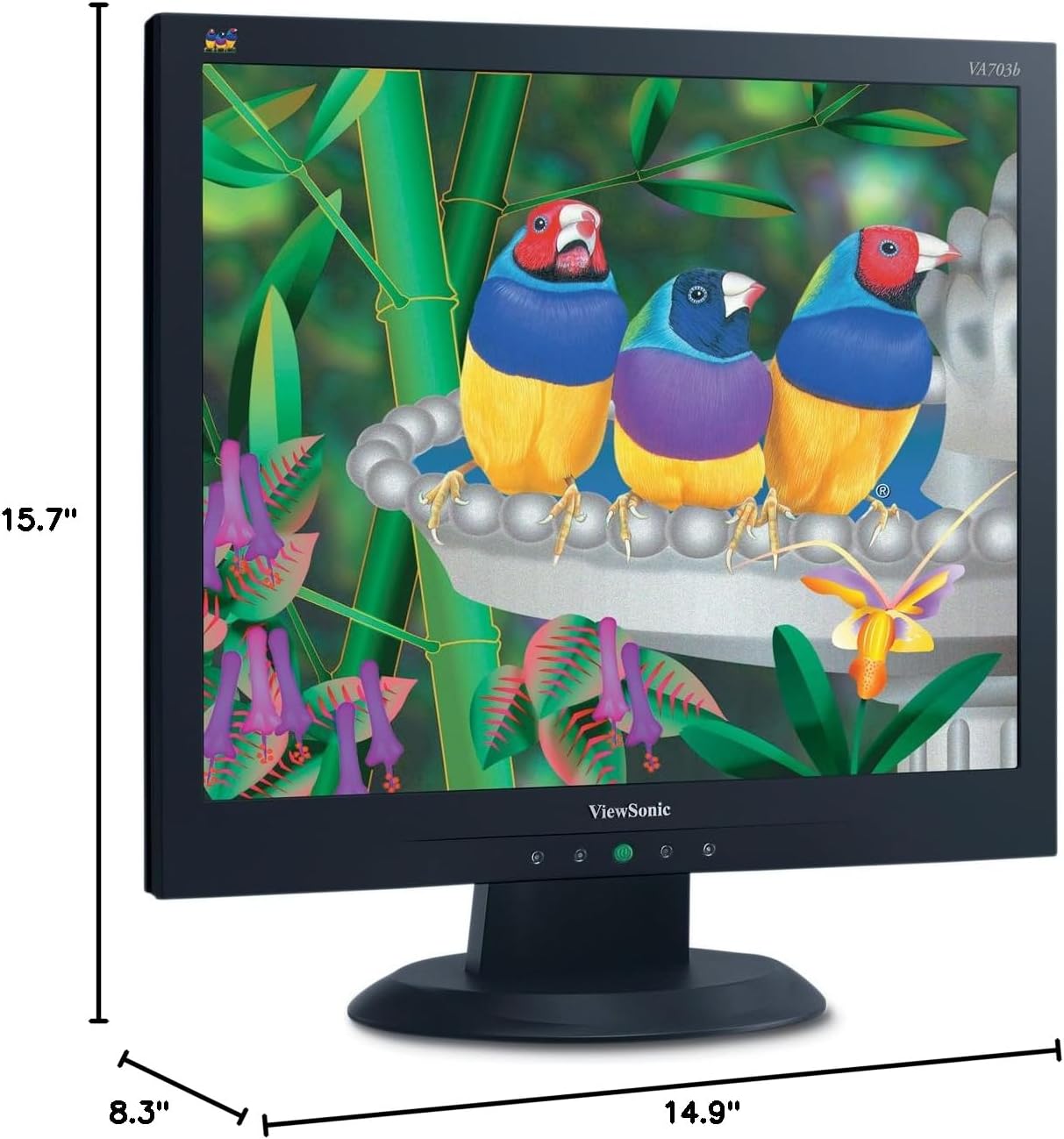
Rajah 7.1: Dimensi bagi ViewSonic VA703b monitor.
8. Waranti & Sokongan
For warranty information and technical support, please refer to the warranty card included in your product packaging or visit the official ViewSonic webtapak. Simpan resit pembelian anda sebagai bukti pembelian untuk tuntutan waranti.
For further assistance, you may contact ViewSonic customer support through their official channels. Details can typically be found on the manufacturer's webtapak atau dalam dokumentasi yang disediakan.


