1. Pengenalan
Welcome to the user manual for your new Singing Machine SMVG-620 CD+G Karaoke System. This system is designed to provide hours of entertainment with its CD+G playback capabilities, built-in camera, 5.5-inch monitor, and AM/FM radio. Please read this manual thoroughly before operating your unit to ensure proper use and to maximize your enjoyment.
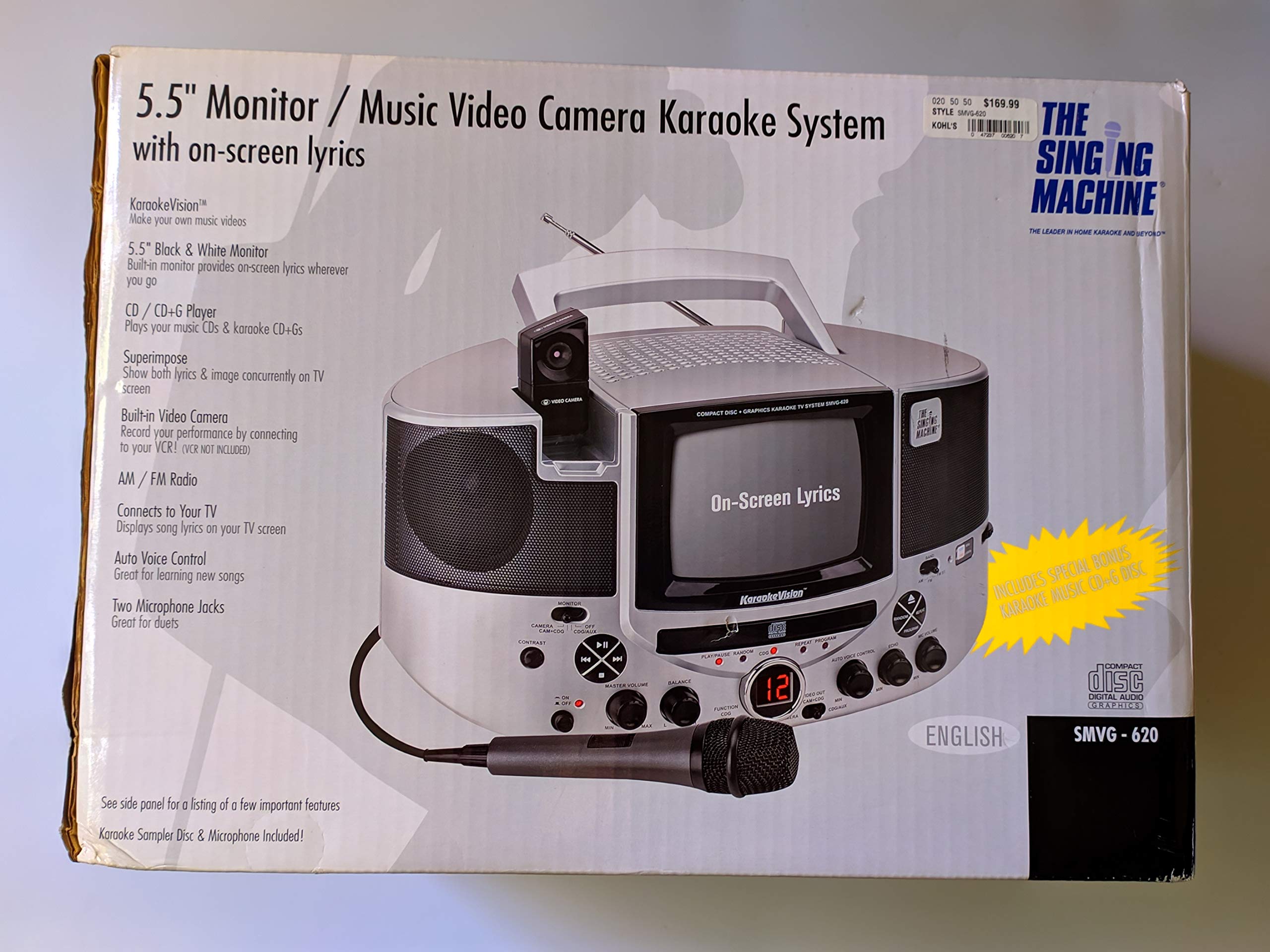
Rajah 1.1: The Singing Machine SMVG-620 CD+G Karaoke System.
For optimal performance and safety, always follow the instructions and warnings provided.
2. Maklumat Keselamatan Penting
- Baca Arahan: Semua arahan keselamatan dan pengendalian hendaklah dibaca sebelum perkakas dikendalikan.
- Kekalkan Arahan: Arahan keselamatan dan pengendalian hendaklah disimpan untuk rujukan masa hadapan.
- Perhatikan Amaran: Semua amaran pada perkakas dan dalam arahan pengendalian hendaklah dipatuhi.
- Ikuti Arahan: Semua arahan pengendalian dan penggunaan hendaklah dipatuhi.
- Air dan Kelembapan: Jangan gunakan alat ini berhampiran air.
- Pembersihan: Bersihkan hanya dengan kain kering.
- Pengudaraan: Jangan sekat sebarang bukaan pengudaraan. Pasang mengikut arahan pengilang.
- haba: Jangan pasang berhampiran mana-mana sumber haba seperti radiator, daftar haba, dapur, atau radas lain (termasuk amppenghidup) yang menghasilkan haba.
- Perlindungan Kabel Kuasa: Lindungi kord kuasa daripada berjalan atau tersepit, terutamanya pada palam, bekas kemudahan dan tempat keluar dari radas.
- Lampiran/Aksesori: Hanya gunakan lampiran/aksesori yang ditentukan oleh pengilang.
- kilat: Cabut plag radas ini semasa ribut petir atau apabila tidak digunakan untuk jangka masa yang lama.
- Servis: Rujuk semua perkhidmatan kepada pegawai perkhidmatan yang berkelayakan. Servis diperlukan apabila alat telah rosak dengan cara apa pun.
3. Kandungan Pakej
Carefully unpack your Singing Machine SMVG-620 system and ensure all items listed below are present and in good condition.
- SMVG-620 CD+G Karaoke System
- One (1) Microphone
- Sampler CD+G Disc
- Audio/Video RCA Cables
- Penyesuai Kuasa AC
- Manual Arahan

Rajah 3.1: Contents of the box, including the microphone, RCA cables, and the instruction manual.
4. Produk Lebihview
Familiarize yourself with the various parts and controls of your SMVG-620 Karaoke System.

Rajah 4.1: belakang view of the product packaging highlighting key features and components of the SMVG-620 system.
Ciri-ciri Utama:
- 5.5" Black & White Monitor: For on-screen lyrics from CD+G discs.
- Built-in Color Camera: Allows you to see yourself on the monitor or connected TV.
- Dual Microphone Jacks: Connect two microphones for duets (one microphone included).
- Radio AM/FM: Dengar stesen radio kegemaran anda.
- Pemain CD+G: Plays standard audio CDs and CD+Graphics discs.
- Kawalan Suara Auto (AVC): Helps maintain vocal balance by automatically reducing the main vocal track when you sing.
- Kawalan Gema: Adds depth and resonance to your voice.
- Professional Style Microphone: For clear vocal pickup.
- Output Audio/Video: Connects to your TV for larger screen display and enhanced audio.
5. Persediaan
5.1 Sambungan Kuasa
- Pastikan unit diletakkan di atas permukaan yang stabil dan rata.
- Connect the AC power adapter to the DC IN jack on the back of the SMVG-620 unit.
- Plug the other end of the AC power adapter into a standard wall outlet (AC 120V ~ 60Hz).
5.2 Menyambung ke Televisyen
Kepada view lyrics on a larger screen and enhance audio, connect the SMVG-620 to your television using the supplied Audio/Video RCA cables.
- Locate the AUDIO OUT (white and red) and VIDEO OUT (yellow) jacks on the back of the SMVG-620.
- Connect the white plug of the RCA cable to the white AUDIO OUT jack on the karaoke system and to the white AUDIO IN jack on your TV.
- Connect the red plug of the RCA cable to the red AUDIO OUT jack on the karaoke system and to the red AUDIO IN jack on your TV.
- Connect the yellow plug of the RCA cable to the yellow VIDEO OUT jack on the karaoke system and to the yellow VIDEO IN jack on your TV.
- Turn on your TV and select the correct A/V input source (e.g., AV1, Video 1) that corresponds to the jacks you used.
5.3 Sambungan Mikrofon
Plug the microphone into either the MIC 1 or MIC 2 jack on the front of the SMVG-620 unit.
6. Operasi
6.1 Menghidupkan/Mematikan
Tekan ke KUASA button located on the front panel to turn the unit ON or OFF.
6.2 CD+G Playback
- Open the CD compartment door and carefully place a CD+G disc (or standard audio CD) onto the spindle with the label side facing up. Close the door.
- Pilih CD+G mode using the FUNCTION selector.
- Tekan ke MAIN/JEDA butang untuk memulakan main balik.
- Laraskan VOLUME MASTER tombol ke tahap pendengaran yang anda inginkan.
- Gunakan SKIP butang (<< or >>) untuk menavigasi antara trek.
- Untuk menjeda, tekan MAIN/JEDA sekali lagi. Tekan sekali lagi untuk menyambung.
- Untuk menghentikan main balik, tekan BERHENTI butang.
6.3 Penggunaan Mikrofon
- Ensure the microphone is connected to a MIC jack.
- Laraskan VOLUME MIC tombol untuk mengawal aras output mikrofon.
- Pusingkan ECHO knob to add an echo effect to your voice.
- The AUTO VOICE CONTROL (AVC) switch can be toggled ON/OFF. When ON, the original vocal track on a CD+G disc will be reduced when you sing into the microphone.
Radio 6.4 AM/FM
- Pilih AM or FM mode using the FUNCTION selector.
- Panjangkan antena FM untuk penerimaan yang lebih baik.
- Pusingkan MENALA tombol untuk memilih stesen radio yang anda inginkan.
- Laraskan VOLUME MASTER tombol.
6.5 Fungsi Kamera
The built-in camera allows you to display your image on the 5.5-inch monitor or a connected TV.
- Ensure the unit is powered on and connected to a TV if you wish to use an external display.
- The camera feed will automatically display when the unit is in CD+G or Video mode, or when no other video source is active.
7. Penyelenggaraan
7.1 Membersihkan Unit
- Sentiasa cabut plag unit daripada salur keluar kuasa sebelum membersihkan.
- Gunakan kain lembut dan kering untuk membersihkan permukaan luar.
- Jangan gunakan pembersih, lilin atau pelarut yang melelas kerana ia boleh merosakkan kemasan.
- Untuk kanta CD, gunakan cakera pembersih kanta CD khusus.
7.2 Penjagaan CD
- Handle CDs by their edges to avoid fingerprints on the playing surface.
- Simpan cakera di dalam bekasnya apabila tidak digunakan untuk mengelakkan calar.
- Bersihkan cakera dengan kain lembut dan tidak berbulu, lap dari tengah ke luar.
8. Penyelesaian masalah
If you encounter any issues with your SMVG-620, please refer to the following common problems and solutions.
| Masalah | Kemungkinan Punca | Penyelesaian |
|---|---|---|
| Tiada kuasa | Kord kuasa tidak disambungkan dengan betul. | Pastikan penyesuai AC dipasang dengan selamat ke dalam unit dan salur keluar dinding yang berfungsi. |
| Tiada suara dari pembesar suara | Master Volume is too low. Mod fungsi yang dipilih salah. | Increase the MASTER VOLUME. Select the correct FUNCTION (CD+G, AM, FM). |
| Tiada bunyi dari mikrofon | Mikrofon tidak disambungkan. MIC VOLUME is too low. Suis mikrofon DIMATIKAN. | Plug microphone into MIC 1 or MIC 2 jack. Increase the MIC VOLUME. Ensure microphone switch is ON. |
| No video on TV / No lyrics | RCA cables not connected correctly. Incorrect TV input selected. Not a CD+G disc. | Check all RCA cable connections (yellow for video). Select the correct A/V input on your TV. Ensure you are playing a CD+G disc for lyrics. |
| CD skipping | Cakera kotor atau calar. Unit berada pada permukaan yang tidak stabil. | Clean the disc or try another disc. Place the unit on a stable, vibration-free surface. |
9. Spesifikasi
| Nombor Model | SMVG-620 (SIN SMVG620) |
| Sumber Kuasa | AC 120V ~ 60Hz (via AC Adapter) |
| Pantau | 5.5-inch Black & White |
| Kiraan Speaker | 2 |
| Peranti Serasi | Televisyen |
| Jenis Media | CD, CD+G |
| Dimensi Produk (LxWxH) | 35.8 x 20.8 x 19.3 cm (14.1 x 8.2 x 7.6 inci) |
| Berat Barang | 3.9 kg (8.6 lbs) |
10. Waranti dan Sokongan
For warranty information and customer support, please refer to the warranty card included with your product or contact The Singing Machine directly. You may also consult your retailer for details regarding their return and warranty policies.
Pengeluar: MESIN NYANYIAN


