1. Pengenalan
This manual provides essential information for the installation, operation, and maintenance of the Cisco 4400 Series Wireless LAN Controller, model AIR-WLC4404-100-K9. This device is designed to manage wireless access points and provide centralized control over your wireless network infrastructure.
2. Produk Lebihview
The Cisco 4400 Series Wireless LAN Controller is a robust solution for managing enterprise-class wireless networks. It supports various wireless standards and offers high-speed data transmission capabilities.

Rajah 2.1: Depan view of the Cisco 4400 Series Wireless LAN Controller, showing the brand logo and general chassis design.
2.1 Ciri-ciri Utama
- Centralized management for wireless access points.
- Support for 2.4 GHz IEEE 802.11b/g and 5 GHz IEEE 802.11a frequency bands.
- Transmission speeds up to 54Mbps with auto-fallback.
- Multiple Ethernet interfaces for network connectivity.
- Console port for direct management access.
3. Maklumat Keselamatan
Always observe the following safety precautions when installing, operating, or maintaining the device:
- Ensure proper grounding before connecting power.
- Jangan kendalikan peranti dalam keadaan basah atau damp syarat.
- Use only the specified power cables and adapters.
- Elakkan menyekat bukaan pengudaraan untuk mengelakkan terlalu panas.
- Rujuk semua servis kepada kakitangan yang berkelayakan.
4. Persediaan dan Pemasangan
4.1 Membongkar dan Pemeriksaan
Carefully unpack the controller and inspect it for any signs of damage during transit. Report any damage to your supplier immediately.
4.2 Pemasangan Fizikal
The Cisco 4400 Series Controller is designed for rack mounting. Ensure adequate ventilation around the unit.

Rajah 4.1: Atas view of the Cisco 4400 Series Wireless LAN Controller, showing the chassis and screw points for rack mounting.
4.3 Kuasa Penyambung
Connect the appropriate power cables to the power inlets at the rear of the unit. Ensure the power switches are in the OFF position before connecting, then switch them ON after all connections are secure.
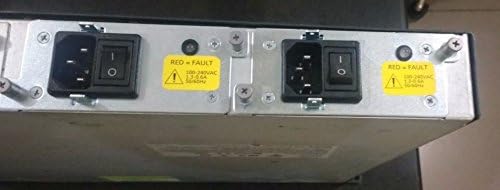
Rajah 4.2: Belakang view of the controller, highlighting the dual power input modules with power switches and fault indicators.
4.4 Network and Console Connections
Connect your network cables to the appropriate RJ-45 Ethernet ports. For initial configuration and direct management, connect a console cable to the DB-9 console port.

Rajah 4.3: Bahagian belakang terperinci view of the controller, showing the SERVICE and UTILITY Ethernet ports, CONSOLE port, and multiple numbered Ethernet ports with associated LINK and ACT LEDs.
- Pelabuhan PERKHIDMATAN: RJ-45 10/100Base-TX Ethernet port.
- UTILITY Port: RJ-45 10/100/1000Base-TX Ethernet port.
- Numbered Ports (1-4): Additional RJ-45 Ethernet ports.
- Pelabuhan CONSOLE: DB-9 serial port for command-line interface (CLI) access.
5. Mengendalikan Pengawal
5.1 Tatarajah Awal
After physical installation and power-up, access the controller via the console port using a terminal emulator (e.g., PuTTY, Tera Term) with appropriate serial settings (typically 9600 baud, 8 data bits, no parity, 1 stop bit, no flow control). Follow the on-screen prompts for initial setup, including IP address assignment and basic network parameters.
5.2 Web Interface and CLI Management
Once configured with an IP address, the controller can be managed via its web-based graphical user interface (GUI) or through the command-line interface (CLI) via SSH/Telnet or the console port. Refer to the Cisco documentation for detailed configuration guides on managing access points, creating WLANs, and setting up security policies.
6. Penyelenggaraan
6.1 Pembersihan
Regularly clean the exterior of the controller with a soft, dry cloth. Ensure ventilation openings are free from dust and debris to maintain optimal airflow and prevent overheating.
6.2 Kemas Kini Perisian Tegar
Periksa sokongan Cisco secara berkala website for firmware updates. Keeping the controller's firmware up-to-date ensures access to the latest features, security patches, and performance improvements. Follow Cisco's official procedures for firmware upgrades to avoid system disruption.
7. Penyelesaian masalah
7.1 Penunjuk LED
The controller features various LED indicators to provide status information:
- LED STATUS: Indicates the operational status of the controller.
- LED PENGGERA: Illuminates when a system alarm or fault is detected.
- LINK/ACT LEDs (per port): Indicate network link status and activity for each Ethernet port.
7.2 Isu Lazim
- Tiada Kuasa: Check power cable connections and power switches. Verify power outlet functionality.
- Tiada Kesambungan Rangkaian: Check Ethernet cable connections, port LEDs, and network configuration.
- Controller Unresponsive: Attempt to access via console port. If unresponsive, power cycle the unit.
For more advanced troubleshooting, consult the Cisco documentation or contact Cisco technical support.
8. Spesifikasi
| Ciri | Perincian |
|---|---|
| Pengeluar | Cisco Systems, Inc. |
| Nombor Model | AIR-WLC4404-100-K9 |
| Jenis Produk | Pengawal LAN Tanpa Wayar |
| Jalur Frekuensi | 2.4 GHz (IEEE 802.11b/g ISM Band), 5 GHz (IEEE 802.11a) |
| Kelajuan Penghantaran | 54Mbps (IEEE 802.11a/g auto-fallback), 11Mbps (IEEE 802.11b auto-fallback) |
| Antara Muka Ethernet | 1 x RJ-45 10/100Base-TX, 1 x RJ-45 10/100/1000Base-TX, Multiple additional RJ-45 ports |
| Antara Muka Konsol | 1 x DB-9 Console Management |
| Dimensi (H x W x D) | 1.75" x 17.45" x 15.75" (Saiz Produk: 1.77 x 17.44 x 15.75 inci) |
| Berat badan | 15.3 lb (15.3 pounds) |
| ASIN | B000E120GC |
| Tarikh Mula-mula Tersedia | 4 Oktober 2006 |
9. Waranti dan Sokongan
Specific warranty terms and conditions for the Cisco 4400 Series Wireless LAN Controller are not detailed in this manual. Please refer to the official Cisco website or your purchase documentation for comprehensive warranty information.
For technical support, software downloads, and additional documentation, visit the official Cisco Support weblaman web atau hubungi penjual semula Cisco sah anda.
Anda boleh mendapatkan maklumat lanjut di Kedai Cisco di Amazon.


