pengenalan
This manual provides comprehensive instructions for the setup, operation, and maintenance of your Coby CT-P9040 5.8 GHz Analog Cordless Phone. Please read this manual thoroughly before using your phone to ensure proper functionality and to prevent damage.
Kandungan dan Komponen Pakej
Sebelum anda memulakan, pastikan semua komponen terdapat dalam pakej:
- Telefon bimbit tanpa wayar
- Unit Pangkalan
- Penyesuai Kuasa AC
- Tali Talian Telefon
- Pek Bateri Boleh Dicas semula
- Manual Pengguna (dokumen ini)
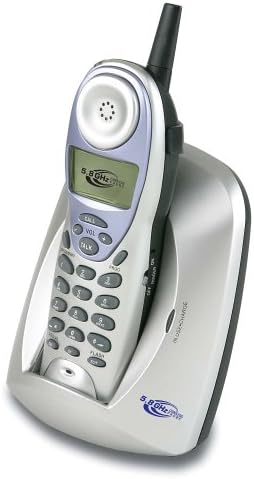
Image: The Coby CT-P9040 cordless phone, showing the handset docked in its silver base unit. The handset features a display screen, numeric keypad, and function buttons. The base unit has a charging cradle for the handset.
Panduan Persediaan
1. Pemasangan Bateri
- Cari petak bateri di belakang telefon bimbit.
- Buka penutup petak bateri.
- Connect the rechargeable battery pack connector to the jack inside the compartment.
- Place the battery pack into the compartment and close the cover securely.
2. Sambungan Unit Pangkalan
- Connect one end of the telephone line cord to the "LINE" jack on the back of the base unit.
- Connect the other end of the telephone line cord to a standard telephone wall jack.
- Connect the AC power adapter to the "DC IN" jack on the back of the base unit.
- Pasangkan penyesuai kuasa AC ke soket elektrik standard.
3. Pengecasan Awal
Place the handset in the base unit's charging cradle. Ensure the "IN CHARGE" indicator light on the base unit illuminates, indicating proper charging. For optimal battery performance, charge the handset for at least 12-14 hours before initial use.
Arahan Operasi
Membuat Panggilan
- Pick up the handset from the base unit or press the CAKAP butang.
- Dengarkan nada dail.
- Dail nombor telefon yang dikehendaki.
- Untuk menamatkan panggilan, tekan butang CAKAP button again or place the handset back in the base unit.
Menjawab Panggilan
Apabila telefon berdering, angkat telefon bimbit atau tekan butang CAKAP butang untuk menjawab panggilan.
Fungsi Dail Semula
Untuk memanggil semula nombor terakhir yang dipanggil, tekan REDIAL butang pada telefon bimbit.
Pelarasan Kelantangan
Semasa panggilan, gunakan VOL+ dan VOL - butang pada telefon bimbit untuk melaraskan kelantangan cuping telinga.
Fungsi Denyar
Tekan ke FLASH button to use call waiting or transfer calls if supported by your telephone service provider.
Storing Phone Numbers (Speed Dial)
Your phone can store up to 10 numbers for frequently called contacts. Refer to the detailed instructions in the full manual for programming speed dial entries.
Penyelenggaraan dan Penjagaan
- Jauhkan telefon daripada sumber haba, cahaya matahari langsung dan kelembapan.
- Bersihkan permukaan telefon dengan lembut, damp kain. Jangan gunakan pembersih atau pelarut yang melelas.
- Pastikan sesentuh pengecas pada telefon bimbit dan unit asas bersih untuk mengekalkan pengecasan yang betul.
- If the phone will not be used for an extended period, remove the battery from the handset.
Menyelesaikan masalah
| Masalah | Kemungkinan Punca | Penyelesaian |
|---|---|---|
| Tiada nada dail | Telephone line cord is disconnected. | Pastikan kord talian telefon disambungkan dengan selamat pada kedua-dua unit asas dan bicu dinding. |
| Telefon bimbit tidak dicas | Handset not properly seated in cradle or dirty charging contacts. | Reseat the handset in the base unit. Clean the charging contacts on both the handset and base unit with a dry cloth. |
| Kualiti bunyi kurang baik / Statik | Interference from other electronic devices or out of range. | Move the base unit away from other electronic devices (e.g., microwaves, Wi-Fi routers). Move closer to the base unit. |
| Tidak boleh membuat/menerima panggilan | Power adapter disconnected or battery low. | Check if the AC power adapter is securely plugged in. Ensure the handset battery is fully charged. |
Spesifikasi
- model: CT-P9040 SVR
- Kekerapan: 5.8 GHz Analog
- Saluran: 40 Channel Auto Scan
- Ingatan: 10-number speed dial storage
- Fungsi: Flash, Redial, Pause, Tone/Pulse Switch
- Bicu Alat dengar: Built-in 2.5mm
- Pemasangan: Desk and Wall Mountable
- Dimensi (L x W x H): 5 x 8 x 4 inci
- Berat: 1.8 paun
- warna: Perak
- ID Pemanggil: Tidak Disokong
- Operasi berbilang talian: Operasi Talian Tunggal
Waranti dan Sokongan
For warranty information and technical support, please refer to the warranty card included with your product or visit the official Coby webtapak. Simpan resit pembelian anda sebagai bukti pembelian untuk tuntutan waranti.
For further assistance, you may contact Coby customer service. Contact details are typically available on the manufacturer's webtapak atau dalam pembungkusan produk.


