pengenalan
Welcome to the KODAK EasyShare Z7590 Digital Camera user manual. This guide provides detailed instructions for setting up, operating, and maintaining your camera. The EasyShare Z7590 is a 5.0-megapixel digital camera featuring a 10x optical zoom Schneider-Kreuznach Variogon lens, designed to capture high-quality images and videos. Its intuitive design and advanced features make it suitable for various photography needs.
The camera is equipped with a 2.2-inch high-resolution indoor/outdoor display, capable of recording continuous VGA (640 x 480) video with audio. It supports SD/MMC memory cards for expanded storage and includes a 32MB internal memory.
Apa yang ada dalam Kotak
Verify that all items are present in your camera package:
- KODAK EasyShare Z7590 Zoom Digital Camera
- High-capacity KODAK EasyShare Li-Ion Rechargeable Battery (1700mAh)
- Rapid Battery Charger Kit
- Audio-Video Cable
- Kabel USB
- Tali Leher
- Lens Cap with Strap
- Getting Started Kit (with KODAK EasyShare Software)
- Custom Camera Insert (for optional KODAK EasyShare camera and printer docks)
Persediaan
1. Mengecas Bateri
Before initial use, fully charge the provided Li-Ion rechargeable battery using the rapid battery charger.
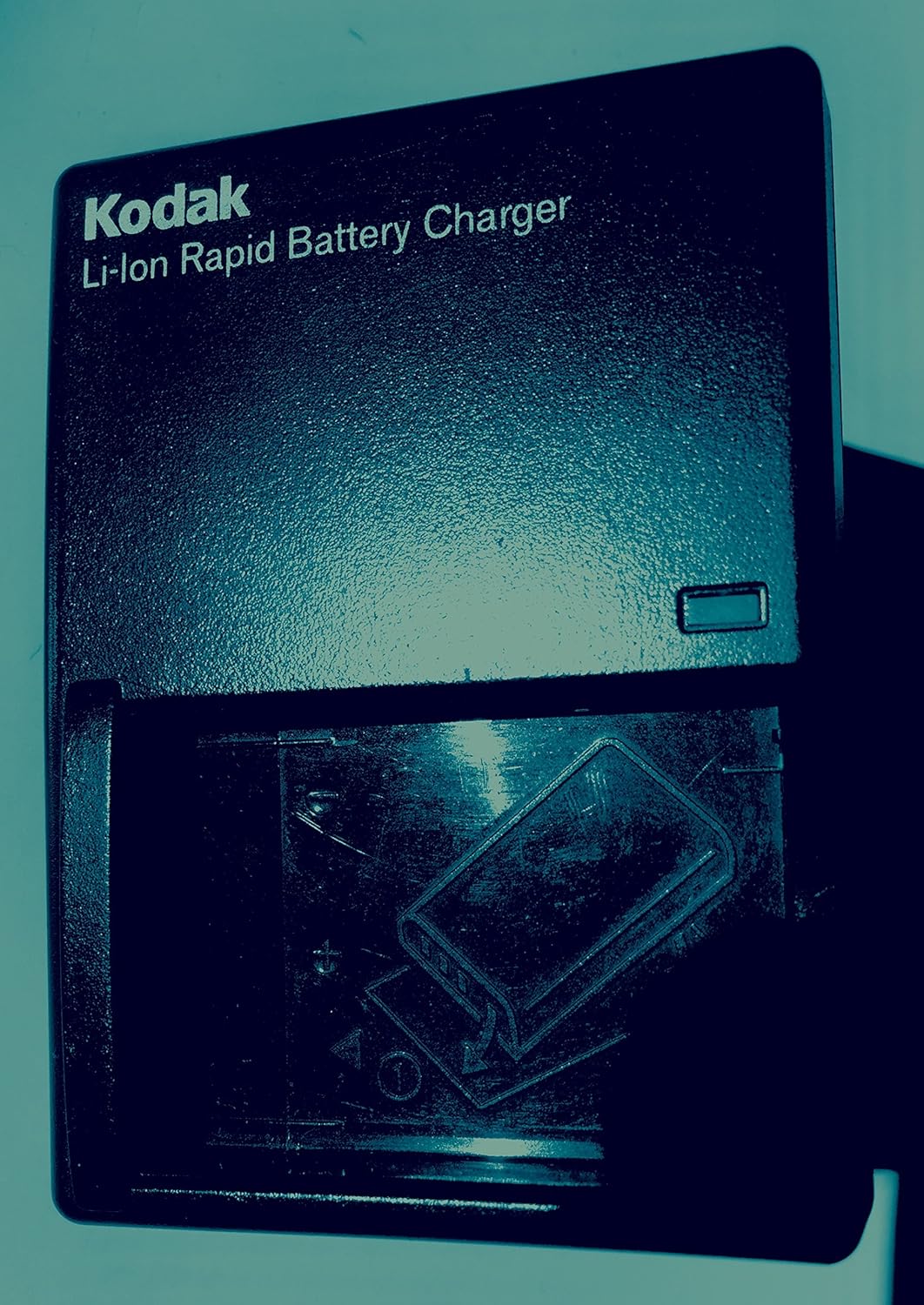
Imej: KODAK Li-Ion Rapid Battery Charger. Insert the battery into the charger as indicated by the diagram on the charger.
- Insert the KODAK Li-Ion battery into the rapid battery charger.
- Palamkan pengecas ke salur keluar kuasa.
- The charging indicator light will show the charging status. Refer to the charger's specific instructions for light indications.
- Once fully charged, remove the battery and insert it into the camera.
2. Memasukkan Kad Memori
The camera has 32MB of internal memory. For extended shooting, insert an SD or MMC memory card.

Imej: SD and MMC Memory Cards. The camera supports both SD and MMC card types.
- Locate the memory card slot on the camera (typically on the side or bottom).
- Insert the SD or MMC card with the metal contacts facing the correct direction, as indicated by a diagram near the slot.
- Tolak kad ke dalam sehingga ia klik pada tempatnya.
3. Attaching the Neck Strap and Lens Cap
Attach the neck strap for secure handling and the lens cap to protect the lens when not in use.

Imej: KODAK EasyShare Z7590 Digital Camera. The camera is shown with the neck strap attached and the lens cap covering the lens.
Mengendalikan Kamera
Kawalan Kameraview
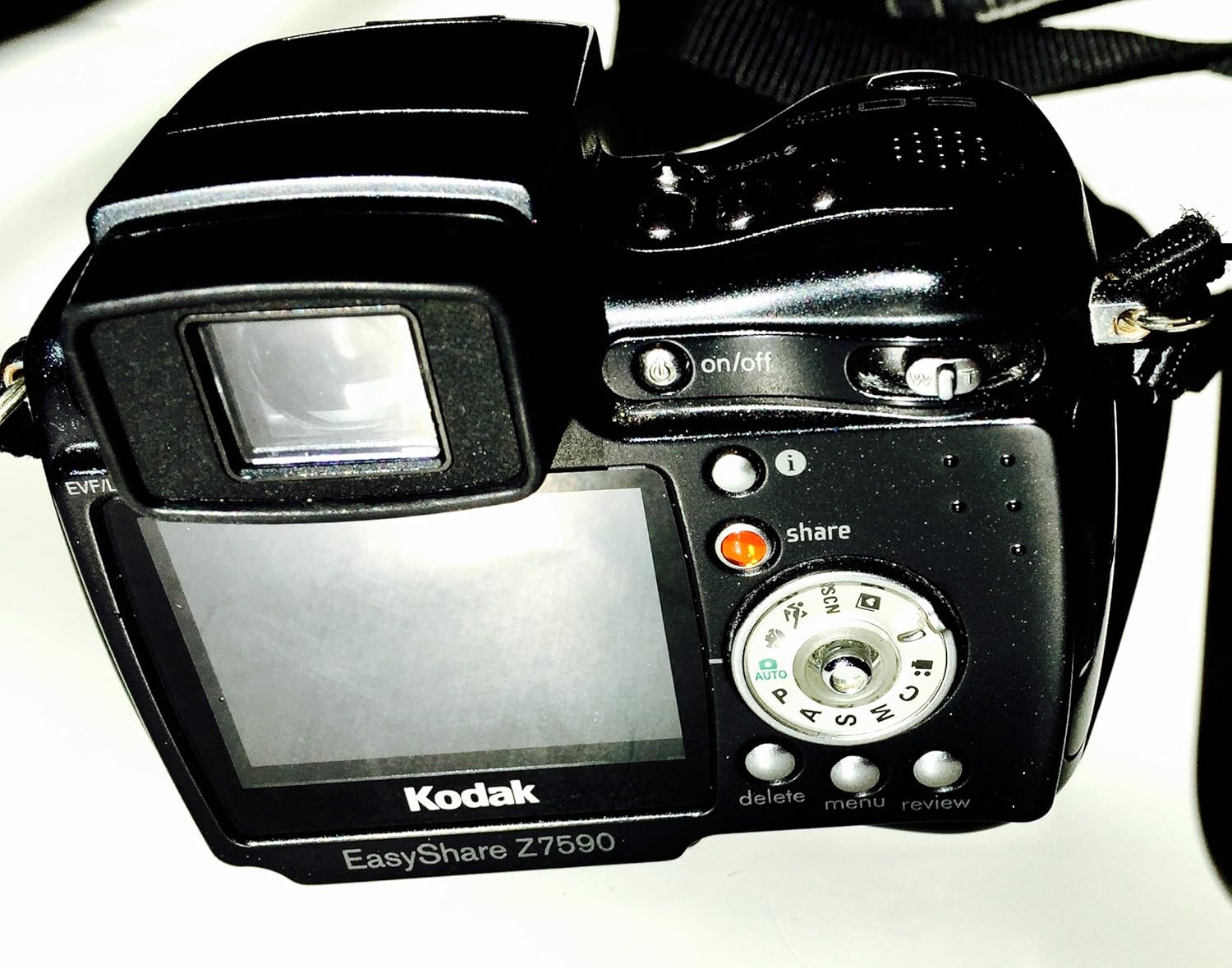
Imej: belakang view of the KODAK EasyShare Z7590 Digital Camera. This image highlights the LCD screen, control dial, and various buttons such as 'on/off', 'share', 'delete', 'menu', and 'review'.
- Butang Kuasa: Terletak di bahagian atas kamera, digunakan untuk menghidupkan atau mematikan kamera.
- Butang Pengatup: Tekan separuh jalan untuk fokus, tekan sepenuhnya untuk mengambil gambar.
- Tuas Zum: Controls the 10x optical zoom and 3x advanced digital zoom.
- Mod Dail: Selects shooting modes (Auto, Program, Aperture Priority, Shutter Priority, Manual, Scene, Movie).
- Paparan LCD: 2.2-inch high-resolution screen for composing shots and reviewgambar.
- Butang Kongsi: Untuk tagging photos for printing or emailing.
- Butang Menu: Mengakses tetapan dan pilihan kamera.
- Butang Padam: Removes unwanted photos or videos.
- Review Butang: Memasuki mod main balik ke view media yang ditangkap.
Mod Penangkapan
The mode dial allows selection of various shooting modes to suit different photographic situations.
- Mod Auto (AUTO): Kamera secara automatik menetapkan pendedahan optimum.
- Program Mode (P): Camera sets optimal shutter speed and aperture combination.
- Aperture Priority Mode (A): You choose the aperture, and the camera sets the shutter speed.
- Shutter Priority Mode (S): You choose the shutter speed, and the camera sets the aperture.
- Mod Manual (M): Kawalan penuh ke atas apertur dan kelajuan pengatup.
- Mod Tersuai: Allows you to create and save your own capture settings.
- Mod Pemandangan (SCN): Pre-programmed settings for specific scenarios (e.g., Portrait, Landscape, Sport, Night).
- Mod Filem: For recording video with audio.
Mengambil Foto
- Hidupkan kamera menggunakan butang kuasa.
- Pilih mod penggambaran yang anda inginkan menggunakan dail mod.
- Frame your shot using the LCD display or electronic viewpencari.
- Use the zoom lever to adjust the focal length.

Imej: Depan view of the KODAK EasyShare Z7590 Digital Camera, highlighting the Schneider-Kreuznach Variogon lens with 10x optical zoom.
- Press the shutter button halfway to focus. The focus indicator will confirm focus.
- Tekan butang pengatup sepenuhnya untuk menangkap imej.
Merakam Video
- Turn the mode dial to Movie Mode.
- Tekan butang pengatup untuk mula merakam.
- Tekan butang pengatup sekali lagi untuk menghentikan rakaman.
- Videos are recorded in VGA (640 x 480) at 12 frames per second or QVGA (320 x 240) at 20 frames per second, with audio.
Ciri Lanjutan
Kawalan Manual
For experienced users, the Z7590 offers extensive manual controls:
- Pampasan Pendedahan: +/- 2.0 EV in 0.3 EV steps.
- Apertur: Wide (f2.8-8.0) and Tele (f3.7-8.0).
- Kelajuan Pengatup: Automatic: 1/8-1/1700 sec.; Manual: 16-1/1000 sec.
- ISO Equivalents: Automatic: 80-160; Selectable: 80, 100, 200, 400, 800.
- Fokus automatik: Multi-zone, center weighted, selectable: left, center, right.
- Exposure Metering Type: Auto: TTL-AE matrix metering; Selectable: multi-pattern, center-weighted, center spot.
- Imbangan Putih: Auto, daylight, tungsten, fluorescent, open shade.
- Flash Compensation: 1.0 EV in 1/2 EV steps.
- Mod Denyar: Auto, red-eye, fill, off.
Continuous Shooting and Bracketing
- First Burst Mode: Captures up to 5 frames in rapid succession at 2 frames per second.
- Last Burst Mode: Captures up to 30 frames at 2 frames per second, saving the last 4 frames.
- Autoexposure Bracketing: 3 images with user-selectable brackets (+/-0.3, +/-0.7 or +/-1.0 EV).
Mod Pemandangan
The camera includes 16 programmed scene modes for optimized shooting in various conditions:
- Portrait Modes: Portrait, Self-portrait, Night Portrait, Backlight.
- Landscape Modes: Landscape, Night Landscape, Fireworks.
- Bright Scene Modes: Beach and Snow.
- Action Modes: Sport and Children.
- Close-up Modes: Macro and Flower.
- Mod Parti: For indoor settings with lower light.
- Text/Documents Mode: Ensures sharp text when photographing documents.
- Manner/Museum Mode: Use when sound or flash are not desired.
Mod Warna
Adjust the color output of your images with 5 available color modes:
- High Color
- Low Color
- Warna Semulajadi
- Sepia
- Hitam dan Putih
Menyambung dan Berkongsi
The KODAK EasyShare Z7590 is designed for easy sharing of your photos and videos.
Menggunakan Butang Kongsi
The exclusive Share button on the camera allows you to tag favorite pictures for later printing or emailing directly from the camera when connected to a computer with KODAK EasyShare Software.
KODAK EasyShare Software
The included KODAK EasyShare Software works seamlessly with your camera to enable one-button transferring and sharing. It provides tools to view, edit, organize, print, or create slide shows from your computer. The "One Touch to Better Pictures" feature automatically adjusts inkjet printer settings for optimal photo quality on KODAK Inkjet Photo Papers.
Menyambung ke Komputer
Use the provided USB cable to connect your camera to a computer for transferring files.
Menyambung ke TV
Use the provided Audio-Video cable to connect your camera to a television for viewmemaparkan foto dan video pada skrin yang lebih besar.
Penyelenggaraan
Proper care and maintenance will ensure the longevity and optimal performance of your KODAK EasyShare Z7590 Digital Camera.
- Membersihkan Lensa: Use a soft, lint-free cloth specifically designed for camera lenses. Avoid using abrasive materials or harsh chemicals. Gently wipe the lens in a circular motion.
- Membersihkan Badan Kamera: Lap badan kamera dengan kain lembut dan kering. Untuk kotoran degil, sedikit dampen the cloth with water. Do not use solvents or alcohol.
- Penjagaan Bateri: Simpan bateri di tempat yang sejuk dan kering. Jangan dedahkannya kepada suhu yang melampau. Tanggalkan bateri jika kamera tidak akan digunakan untuk tempoh yang lama.
- Storan: Store the camera in a dry, dust-free environment, preferably in a camera bag or case. Avoid direct sunlight and high humidity. Ensure the lens cap is on when storing.
- Penjagaan Kad Memori: Handle memory cards carefully. Avoid bending or exposing them to static electricity. Format memory cards periodically within the camera to maintain performance.
Menyelesaikan masalah
This section addresses common issues you might encounter with your KODAK EasyShare Z7590 Digital Camera.
| Masalah | Kemungkinan Punca / Penyelesaian |
|---|---|
| Kamera tidak dihidupkan. |
|
| Gambar kabur. |
|
| Flash tidak menyala. |
|
| Ralat kad memori. |
|
| Tidak boleh menyambung ke komputer. |
|
Spesifikasi
Key technical specifications for the KODAK EasyShare Z7590 Digital Camera:
| Ciri | Perincian |
|---|---|
| Nama Model | Kodak Easyshare Z7590 |
| Jenama | KODAK |
| Resolusi Pegun Berkesan | 5 MP |
| Teknologi Penderia Foto | CCD |
| Zum Optik | 10x |
| Zum Digital | 3x |
| Jenis Kanta | Kanta Variogon Schneider-Kreuznach |
| Panjang Fokus Minimum | 38 Milimeter |
| Panjang Fokus Maksimum | 380 Milimeter |
| Saiz Skrin | 2.2 Inci |
| Jenis Paparan | High-resolution Indoor/Outdoor LCD |
| Penstabilan Imej | Digital, Optik |
| Disokong File Format | JPEG (Still), MPEG-4 (Video) |
| Resolusi Video | VGA (640 x 480) at 12 fps, QVGA (320 x 240) at 20 fps |
| Memori Dalaman | 32 MB |
| Jenis Memori Denyar | SD/MMC card expansion slot |
| Kelajuan Pengatup Minimum | 16 saat |
| Kelajuan Pengatup Maksimum | 1/1700 Seconds (Auto), 1/1000 Seconds (Manual) |
| Julat ISO | Auto (80-160), Selectable (80, 100, 200, 400, 800) |
| Teknologi Ketersambungan | USB |
| Sumber Kuasa | Li-Ion Rechargeable Battery (1700mAh) |
| Berat Barang | 0.88 paun |
Waranti dan Sokongan
For information regarding warranty coverage, please refer to the warranty card included with your product or visit the official KODAK support webtapak.
For technical assistance, troubleshooting beyond this manual, or service inquiries, please contact KODAK customer support.
- Pengeluar: Kodak Digital
- Kedai Jenama: Visit the KODAK Store on Amazon


