1. Pengenalan
This manual provides essential instructions for the proper use, setup, operation, and maintenance of your Memorex 3202-5599 4X DVD+RW for Video discs. Please read this manual thoroughly before using the product to ensure optimal performance and longevity of your discs.
2. Produk Lebihview
The Memorex 3202-5599 DVD+RW discs are designed for recording and rewriting video content. These single-sided discs offer a storage capacity suitable for various video applications.
- Rewritable Format: Allows for multiple recordings and erasures, making them ideal for temporary storage or content that may be updated.
- Rakaman Video: Specifically designed for video applications, enabling transfer of home movies from VHS or 8mm cassettes, or recording and editing television programs.
- kapasiti: Each disc can store up to 6 hours of video content or 4.7 GB of data.
- Keserasian: Compatible with home DVD recorders that support DVD+RW recording.
- Tulis kelajuan: Supports recording at up to 4x speed.
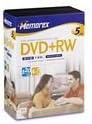
Rajah 2.1: Depan view of the Memorex 4X DVD+RW for Video 5-pack packaging. The packaging displays the Memorex brand logo, "DVD+RW" designation, and indicates a 5-disc pack.
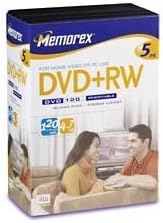
Rajah 2.2: Bersudut view of the Memorex 4X DVD+RW for Video 5-pack packaging. This image shows the side and front of the packaging, highlighting the "DVD+RW" label and the 4.7 GB / 120 min capacity.
3. Persediaan
- Semak Keserasian Peranti: Ensure your DVD recorder or computer drive supports DVD+RW discs. Refer to your device's instruction manual for compatibility information.
- Pengendalian Cakera: Hold the disc by its edges or the center hole to avoid touching the recording surface. Fingerprints, dust, or scratches can affect performance.
- Masukkan Cakera: Carefully insert the Memorex DVD+RW disc into your compatible DVD recorder or computer drive with the label side facing up.
- Initial Formatting (if required): Some DVD recorders may require initial formatting of a new DVD+RW disc before recording. Follow the on-screen prompts or your device's manual for this process. This typically prepares the disc for recording.
4. Arahan Operasi
4.1 Merakam Video
- Prepare Content: Connect your video source (e.g., VCR, camcorder, TV tuner) to your DVD recorder according to your recorder's instructions.
- Pilih Mod Rakaman: Choose the desired recording quality and mode on your DVD recorder. Higher quality settings will consume more disc space.
- Mulakan Rakaman: Initiate recording from your DVD recorder. Ensure the source content is playing correctly.
- Finalize (if applicable): For some recorders, finalizing the disc may be necessary for playback on other devices. Consult your recorder's manual. DVD+RW discs generally do not require finalizing for continued recording on the same device.
4.2 Rewriting/Erasing Content
Salah satu advan utamatages of DVD+RW discs is their rewritability. You can erase existing content and record new content multiple times.
- Masukkan Cakera: Insert the DVD+RW disc containing the content you wish to erase or overwrite into your compatible DVD recorder or computer drive.
- Access Erase Function: Navigate to the erase or format function within your DVD recorder's menu or your computer's disc utility software.
- Sahkan Padam: Follow the prompts to confirm the erasure. Be aware that erasing typically removes all data from the disc.
- Record New Content: Once erased, the disc is ready for new recordings as described in Section 4.1.
5. Penyelenggaraan dan Penjagaan
- Pengendalian: Always hold discs by the edges or the center hole. Avoid touching the shiny recording surface.
- Pembersihan: If a disc becomes dirty, gently wipe it with a soft, lint-free cloth from the center outwards. Do not use abrasive materials or harsh chemical cleaners.
- Storan: Store discs in their original cases or in protective sleeves to prevent scratches and dust accumulation. Keep them away from direct sunlight, extreme temperatures, and high humidity.
- Pelabelan: Use a soft, felt-tip marker specifically designed for optical discs to label the non-recording side. Avoid ballpoint pens or sharp objects that could damage the disc.
6. Penyelesaian masalah
| Masalah | Kemungkinan Punca | Penyelesaian |
|---|---|---|
| Disc not recognized by recorder/drive. |
|
|
| Recording errors or failed recordings. |
|
|
| Playback issues (stuttering, freezing). |
|
|
7. Spesifikasi
| Ciri | Perincian |
|---|---|
| Jenama | Memorex |
| Nombor Model | 3202-5599 |
| Jenis Cakera | DVD+RW |
| Tulis Kelajuan | 4x |
| Kapasiti Penyimpanan Memori | 4.7 GB |
| Recording Capacity (Video) | Up to 6 Hours (depending on recording mode) |
| Dimensi Produk | 7.5 x 5.5 x 3 inci (pembungkusan) |
| Berat Barang | 1 pound (packaging) |
| UPC | 034707055995 |
8. Waranti dan Sokongan
For information regarding product warranty, technical support, or service inquiries, please refer to the official Memorex website or contact Memorex customer support directly. Contact details are typically available on the product packaging or the manufacturer's official webtapak.
Sila simpan bukti pembelian anda untuk sebarang tuntutan waranti.


