1. Pengenalan dan Lebihview
The Master Lock 5400EC Set Your Own Combination Portable Lock Box is designed for secure storage of keys, offering durability and convenience. Its portable design allows for easy installation over door knobs. Users can set their own four-digit combination for keyless access and enhanced security. A protective shutter door shields the combination dials from environmental elements like weather, dirt, and grime. The molded body and vinyl-coated shackle are engineered to prevent scratching of door surfaces.
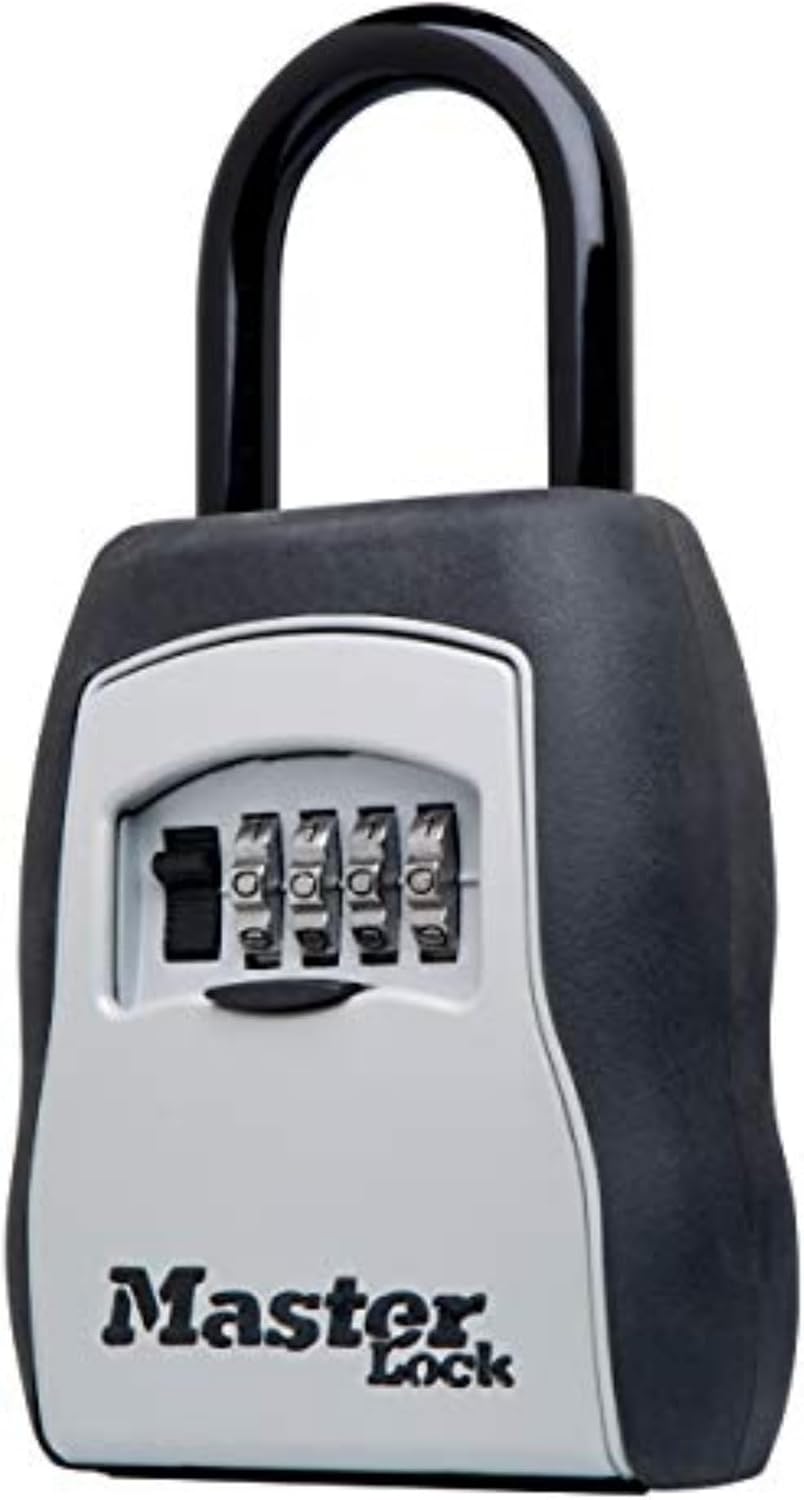
Figure 1: Master Lock 5400EC Key Lock Box
2. Ciri-ciri Utama
- Kapasiti Besar: Securely stores up to five standard (2-inch) house keys.
- Customizable Combination: Features a four-digit combination lock that can be set and reset to thousands of personalized code options.
- Pembinaan Tahan Lama: Built with a metal body for enhanced durability, suitable for both indoor and outdoor use.
- Perlindungan Permukaan: Includes a vinyl-coated shackle to prevent scratching of door surfaces and a shutter door to protect combination dials from weather and debris.
- Reka Bentuk Mudah Alih: Offers removable "over the knob" installation, fitting most ball, biscuit, and tulip door knob styles.
- Pre-set Combination: The lock box combination is initially preset to 0-0-0-0. Instructions for resetting the combination are included.
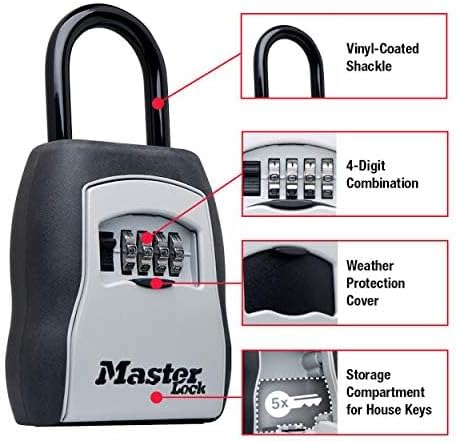
Figure 2: Key features of the lock box including vinyl-coated shackle, 4-digit combination, weather protection cover, and storage compartment.
3. Arahan Persediaan
3.1 Setting Your Combination
- Open the lock box by setting the dials to the default combination (0-0-0-0) and pulling down the cover.
- Locate the reset lever inside the lock box. Push the reset lever into position 'A' (towards the shackle).
- Rotate the combination dials to your desired four-digit combination. Ensure the numbers are clearly aligned.
- Push the reset lever back to position 'B' (away from the shackle).
- Scramble the combination dials to lock the box. Your new combination is now set.

Figure 3: Visual guide for setting the lock box combination.
3.2 Installation (Over-the-Knob Design)
- Ensure the lock box is open and the shackle is released.
- Begin installing with the lock box facing away from the door.
- Turn the lock box around to face you once it is over the door knob or handle.
- Close the shackle securely onto the lock box and close the compartment door.
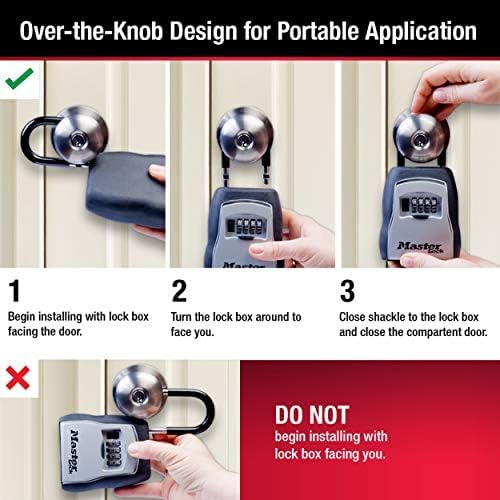
Figure 4: Proper installation method for the portable lock box.

Figure 5: The lock box is compatible with most knobs and handles, but not levers.
4. Arahan Operasi
4.1 Opening the Lock Box
- Rotate the combination dials to your set four-digit code.
- Pull down the shutter door to reveal the key compartment.
- Retrieve or place keys as needed.
4.2 Closing and Securing the Lock Box
- Ensure all keys are securely placed within the compartment.
- Close the shutter door firmly.
- Scramble the combination dials to prevent unauthorized access.
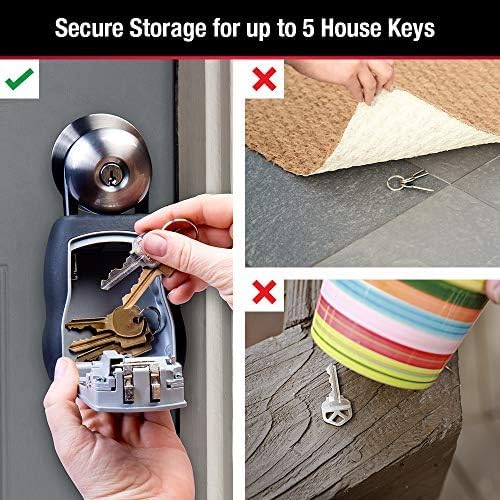
Figure 6: The lock box provides a secure alternative to traditional key hiding spots.
5. Penyelenggaraan
To ensure the longevity and proper functioning of your Master Lock Key Lock Box, follow these maintenance guidelines:
- Pembersihan tetap: Lap bahagian luar secara berkala dengan kain lembutamp kain untuk menghilangkan kotoran dan kekotoran. Elakkan pembersih yang kasar.
- Shutter Door Care: Keep the shutter door free of debris to ensure smooth operation and proper protection of the combination dials.
- Pelinciran: If the dials become stiff, apply a small amount of graphite lubricant to the moving parts. Do not use oil-based lubricants.
- Perlindungan Cuaca: While designed for outdoor use, extreme weather conditions may affect performance over time. Ensure the shutter door is always closed when not in use.
6. Penyelesaian masalah
- Dials are Stiff: Apply graphite lubricant to the dials. Ensure no foreign objects are obstructing movement.
- Cannot Open with Correct Combination: Double-check that each number is precisely aligned. Ensure the reset lever is in the correct position (B) after setting the combination.
- Shackle is Stuck: Ensure the combination is correctly entered and the release mechanism is fully engaged. Check for any obstructions.
7. Spesifikasi
| Jenama | Master Lock |
| Nama Model | 5400D (5400EC) |
| Jenis Kunci | Kunci Kod Mekanikal |
| bahan | logam |
| warna | Hitam |
| Berat Barang | 1.06 paun |
| Dimensi Luaran (H x W x D) | 6.25in (158.75mm) x 3.56in (90.42mm) x 1.50in (38mm) |
| Dimensi Dalaman (H x W x D) | 3in (76.2mm) x 2.75in (70mm) x 1in (25mm) (L-shaped interior) |
| Panjang Belenggu | 1.406in (35.71mm) |
| Lebar Belenggu | 1.875in (47.62mm) |
| Diameter Belenggu | 0.406in (10.3mm) |
| Kapasiti Utama | 5 standard (2 inch) house keys |
| Negara Asal | China |
| UPC | 071649214516 |

Figure 7: Internal dimensions and key capacity of the lock box.
8. Waranti dan Sokongan
The Master Lock 5400EC Key Lock Box comes with a Waranti Seumur Hidup Terhad, providing peace of mind regarding its durability and performance.
For additional support, user guides, or troubleshooting assistance, please refer to the official Master Lock website or contact their customer service. Digital versions of the user guide and manual are also available: