1. Pengenalan
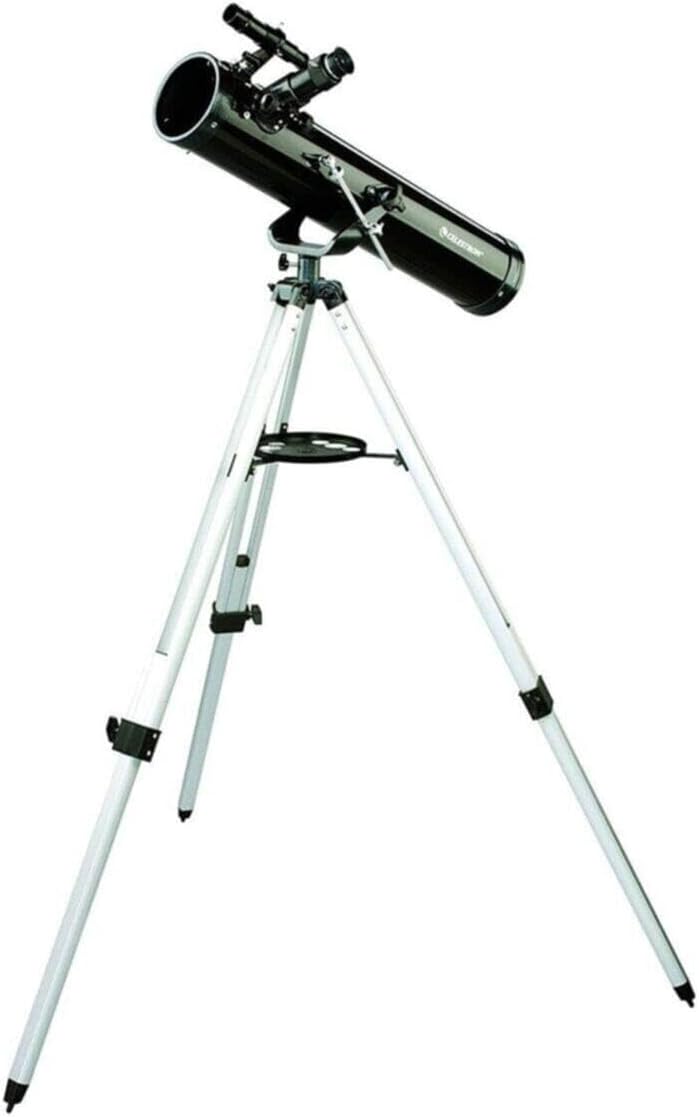
The Celestron PowerSeeker 76AZ telescope is designed for aspiring astronomers, offering a combination of quality and features for observing celestial objects. This Newtonian reflector telescope features a 76mm aperture and a 700mm focal length, providing enhanced image brightness and clarity through its fully coated glass optical components. Its altazimuth mount is suitable for both astronomical and terrestrial viewing.
2. Apa yang ada di dalam Kotak
Buka pek semua komponen dengan berhati-hati dan sahkan bahawa anda telah menerima item berikut:
- PowerSeeker 76 Telescope Optical Tube
- Gunung Altazimuth
- Aluminum Tripod with Accessory Tray
- Skop Pencari 5x24
- 20mm Eyepiece (1.25")
- 4mm Eyepiece (1.25")
- 3x Barlow Lens (1.25")
3. Persediaan
Assembly of your PowerSeeker 76AZ telescope is straightforward and requires no tools. Follow these steps to prepare your telescope for observation:
- Pasang Tripod: Extend the legs of the aluminum tripod to a stable position. Attach the accessory tray to the tripod's center brace.
- Pasang Gunung: Secure the altazimuth mount to the top of the tripod. Ensure it is firmly tightened.
- Pasang Tiub Optik: Place the telescope optical tube onto the altazimuth mount. Secure it using the provided mounting screws or clamps.
- Pasang Finderscope: Luncurkan pencari 5x24 ke dalam pendakapnya pada tiub optik dan ketatkan skru penahan.
- Masukkan Kanta Mata: Insert either the 20mm or 4mm eyepiece directly into the focuser. For higher magnification, you can first insert the 3x Barlow lens into the focuser, then insert an eyepiece into the Barlow lens.
4. Mengendalikan Teleskop
Once assembled, your telescope is ready for observation. Familiarize yourself with its controls for optimal viewing.
4.1. Aligning the Finderscope
The finderscope helps locate objects before viewing them through the main telescope. To align it:
- Point the main telescope at a distant, easily identifiable terrestrial object (e.g., a treetop or street sign) during daylight hours.
- Center the object in the main telescope's 20mm eyepiece.
- Look through the finderscope and adjust its alignment screws until the crosshairs are centered on the same object.
4.2. Memberi tumpuan
To achieve a clear image, rotate the focuser knob until the object appears sharp. Always start with the lowest power eyepiece (20mm) for a wider field of view, then switch to higher power (4mm) or use the Barlow lens for more detailed observation.
4.3. Using Eyepieces and Barlow Lens
- Kanta Mata 20mm: Provides lower magnification and a wider field of view, sesuai untuk mencari objek dan memerhati jasad cakerawala yang lebih besar seperti Bulan atau gugusan bintang.
- Kanta Mata 4mm: Offers higher magnification for detailed views of planets or lunar features. Use after locating the object with the 20mm eyepiece.
- 3x Kanta Barlow: Increases the magnification of any eyepiece by three times. Insert the Barlow into the focuser first, then insert an eyepiece into the Barlow.

4.4. Altazimuth Mount Operation
The altazimuth mount allows for simple up-and-down (altitude) and left-and-right (azimuth) movement. Loosen the tension knobs slightly to move the telescope manually, then tighten them to hold its position. The slow-motion control rod provides fine adjustments for tracking objects.

4.5. Observing the Moon
The Moon is an excellent first target. Its bright surface and numerous craters offer spectacular views even with modest magnification. Start with the 20mm eyepiece to see the entire lunar disk, then switch to the 4mm eyepiece or use the Barlow lens to explore specific craters and mountain ranges.

5. Penyelenggaraan
Proper care and maintenance will ensure the longevity and performance of your telescope.
5.1. Cleaning Optics
Dust and moisture can accumulate on the telescope's lenses and mirrors. Handle optical surfaces with extreme care.
- habuk: Use a camel's hair brush or a can of compressed air (never blow with your mouth) to gently remove loose dust.
- Cap Jari/Cacat: For stubborn marks, use a specialized optical cleaning solution and lens tissue. Apply a small amount of solution to the tissue, not directly to the lens, and wipe gently in a circular motion from the center outwards.
- Jangan sekali-kali menyentuh permukaan optik dengan jari anda.

5.2. Penyimpanan
When not in use, store your telescope in a dry, dust-free environment. Keep all caps on the optical tube and eyepieces to prevent dust accumulation.
6. Penyelesaian masalah
If you encounter issues with your telescope, consult the following common problems and solutions:
- Image is blurry or out of focus:
- Adjust the focuser knob slowly until the image is sharp.
- Ensure the eyepiece is fully inserted into the focuser or Barlow lens.
- Atmospheric conditions (heat waves, turbulence) can cause blurring, especially at high magnifications. - Tidak dapat mencari objek:
- Verify that the finderscope is properly aligned with the main telescope (refer to Section 4.1).
- Start with the 20mm eyepiece for a wider field of view to locate objects, then switch to higher magnification.
- Ensure you are observing from a dark location away from light pollution. - Image is dim or faint:
- This telescope has a 76mm aperture, which is suitable for brighter objects like the Moon and planets. Faint deep-sky objects may appear dim.
- Observe from a dark-sky site to maximize light gathering.
- Avoid using excessively high magnification, as it can dim the image. - View is wobbly or unstable:
- Ensure the tripod legs are fully extended and locked, and placed on a stable, level surface.
- Keep the tripod legs as short as possible while still allowing comfortable viewing.
- Tighten all knobs and screws on the mount and optical tube.
7. Spesifikasi
| Reka Bentuk Optik | Pemantul Newton |
| Apertur | 76 mm (3 inci) |
| Panjang Fokus | 700 mm |
| Nisbah Fokus | f/9.2 |
| Jenis Gunung | Altazimuth |
| Finderscope | 5x24 |
| Cermin mata | 20mm, 4mm (1.25") |
| Lensa Barlow | 3x (1.25") |
| Tripod | Aluminium dengan Dulang Aksesori |
| Dimensi (dipasang) | 29 x 10 x 9 inci (anggaran) |
| Berat Barang | 13.97 paun |
8. Waranti dan Sokongan
For technical assistance, warranty information, or customer service inquiries regarding your Celestron PowerSeeker 76AZ Telescope, please contact Celestron customer support directly. Refer to the official Celestron webtapak atau pembungkusan produk untuk butiran hubungan dan terma jaminan terkini.


