1. Pengenalan
Manual ini menyediakan arahan penting untuk pemasangan, pengendalian dan penyelenggaraan Bogen Classic Series anda yang betul. Amp C20. Sila baca manual ini dengan teliti sebelum menggunakan produk ini bagi memastikan prestasi yang selamat dan cekap. Simpan manual ini untuk rujukan pada masa hadapan.
2. Maklumat Keselamatan
PERINGATAN: Produk ini mengandungi bahan kimia yang diketahui oleh State of California yang menyebabkan barah dan cacat lahir atau bahaya pembiakan yang lain.
Sentiasa patuhi langkah berjaga-jaga keselamatan asas semasa menggunakan peralatan elektrik untuk mengurangkan risiko kebakaran, renjatan elektrik dan kecederaan kepada orang ramai.
- Jangan dedahkan perkakas ini kepada hujan atau lembapan.
- Jangan sekat sebarang bukaan pengudaraan. Pasang mengikut arahan pengilang.
- Jangan pasang berhampiran mana-mana sumber haba seperti radiator, daftar haba, dapur, atau radas lain (termasuk amppenghidup) yang menghasilkan haba.
- Hanya gunakan lampiran/aksesori yang ditentukan oleh pengilang.
- Rujuk semua servis kepada kakitangan perkhidmatan yang berkelayakan.
3. Produk Lebihview
Siri Klasik Bogen Amp C20 ialah saluran tunggal ampPengisi kuasa direka untuk pelbagai aplikasi audio. Ia mempunyai pembinaan yang teguh dan prestasi yang andal.
3.1 Ciri-ciri Utama
- Saluran tunggal amplebih hidup
- Reka bentuk Pemasangan Permukaan
- Masukan voltage: 120 Volt
- Kuasa Keluaran: 20 Watt
3.2 Kandungan Pakej
Setelah membuka bungkusan, pastikan item berikut disertakan:
- Siri Klasik Bogen Amp C20
- corong
- Manual Arahan (dokumen ini)
3.3 Kawalan dan Penunjuk Panel Hadapan

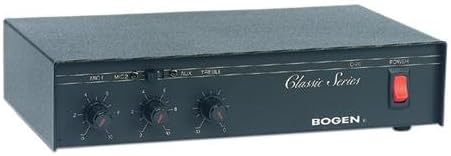
Imej 1: Panel hadapan Siri Klasik Bogen Amp C20. Imej ini memaparkan tombol kawalan MIC1, MIC2, AUX dan TREBLE, berserta suis POWER dan penjenamaan "Siri Klasik".
- Kawalan Aras Input MIC1: Melaraskan kelantangan untuk Input Mikrofon 1.
- Kawalan Aras Input MIC2: Melaraskan kelantangan untuk Input Mikrofon 2.
- Kawalan Aras Input AUX: Melaraskan kelantangan untuk input Bantu.
- Kawalan TREBLE: Melaraskan tindak balas frekuensi tinggi output audio.
- Suis kuasa: Togol ampkuasa lifier hidup dan mati.
3.4 Sambungan Panel Belakang
Imej 2: Panel belakang Siri Klasik Bogen Amp C20. Imej ini menunjukkan pelbagai sambungan input dan output, termasuk terminal input kuasa dan pembesar suara.
Panel belakang mengandungi sambungan untuk kuasa, input mikrofon, input tambahan dan output pembesar suara. Butiran khusus tentang sambungan ini disediakan dalam bahagian Persediaan.
4. Persediaan dan Pemasangan
4.1 Pemasangan
Siri Klasik Bogen Amp C20 direka bentuk untuk pemasangan permukaan. Pastikan permukaan pemasangan stabil dan mampu menampung berat unit (kira-kira 4.5 paun). Benarkan pengudaraan yang mencukupi di sekitar unit untuk mengelakkan terlalu panas.
4.2 Sambungan Elektrik
- Pastikan suis POWER pada panel hadapan berada dalam kedudukan OFF.
- Sambungkan kord kuasa ke soket AC 120 Volt standard.
4.3 Sambungan Input Audio
Sambungkan sumber audio anda kepada input yang sesuai pada panel belakang:
- Mikrofon: Sambungkan mikrofon ke bicu input MIC1 dan MIC2.
- Peranti Bantu: Sambungkan sumber audio aras talian (cth., pemain CD, pemain media) ke bicu input AUX.
4.4 Sambungan Output Pembesar Suara
Sambungkan pembesar suara anda ke terminal output pembesar suara pada panel belakang. Pastikan kekutuban yang betul (+ ke + dan - ke -) untuk semua sambungan pembesar suara. Rujuk manual pembesar suara anda untuk keperluan padanan impedans.
5. Operasi
5.1 Menghidupkan/Mematikan
- Untuk menghidupkan ampLampu, tekan suis POWER pada panel hadapan ke kedudukan ON. Penunjuk kuasa (jika ada) akan menyala.
- Untuk mematikan kuasa, tekan suis POWER ke kedudukan OFF.
5.2 Melaraskan Tahap Input
- Mulakan dengan semua kawalan aras input (MIC1, MIC2, AUX) ditetapkan kepada kedudukan minimumnya.
- Mula memainkan audio daripada sumber yang anda inginkan.
- Tingkatkan kawalan aras input yang sepadan secara perlahan-lahan sehingga kelantangan yang diingini dicapai.
- Laraskan kawalan TREBLE untuk memperhalusi tindak balas frekuensi tinggi mengikut pilihan anda.
5.3 Petua Penggunaan Umum
- Elakkan menetapkan tahap kelantangan terlalu tinggi, yang boleh menyebabkan herotan dan berpotensi merosakkan pembesar suara.
- Pastikan semua sambungan selamat sebelum mengendalikan amplebih hidup.
6. Penyelenggaraan
6.1 Pembersihan
Lap bahagian luar ampLap dengan kain lembut dan kering. Jangan gunakan pembersih cecair atau pembersih aerosol, kerana ia boleh merosakkan kemasan atau komponen dalaman.
6.2 Pengudaraan
Pastikan bukaan pengudaraan bebas daripada habuk dan serpihan secara berkala untuk memastikan aliran udara yang betul dan mencegah pemanasan melampau.
6.3 Menservis
Tiada bahagian yang boleh diservis pengguna di dalam amppengikat. Rujuk semua servis kepada kakitangan perkhidmatan yang berkelayakan.
7. Penyelesaian masalah
Jika anda mengalami masalah dengan Siri Klasik Bogen anda Amp C20, rujuk jadual berikut sebelum menghubungi sokongan.
| Masalah | Kemungkinan Punca | Penyelesaian |
|---|---|---|
| Tiada keluaran bunyi. |
|
|
| Bunyi herot. |
|
|
| Statik atau berderak dari tombol. | Habuk atau pengoksidaan pada potensiometer kawalan. | Rujuk kakitangan servis yang berkelayakan untuk pembersihan atau penggantian potensiometer. |
| Unit menjadi terlalu panas atau mengeluarkan bau. |
|
|
8. Spesifikasi
| Ciri | Perincian |
|---|---|
| Jenama | Bogen |
| Model | C20 |
| Nombor Model Item | C20 |
| Nombor Bahagian Pengilang | C20 |
| Dimensi Item (L x W x H) | 11.37 x 7.37 x 2.87 inci |
| Dimensi Produk | 11.37 x 7.37 x 2.87 inci |
| Berat Barang | 4.5 paun |
| Voltage | 120 Volt |
| Wattage | 50 watt |
| Kuasa Keluaran | 20 Watt |
| Bilangan Saluran | 1 |
| Jenis Pemasangan | Lekapan Permukaan |
| Pengeluar | Bogen |
| UPC | 765368330250 |
| Tarikh Mula-mula Tersedia | 16 Julai 2004 |
Catatan: Spesifikasi boleh berubah tanpa notis.
9. Waranti dan Sokongan
Untuk maklumat jaminan dan sokongan teknikal, sila rujuk Bogen rasmi webtapak atau hubungi bahagian perkhidmatan pelanggan mereka. Simpan resit pembelian anda sebagai bukti pembelian untuk tuntutan waranti.
Maklumat Hubungan:
- Webtapak: www.bogen.com (Pemegang tempat, sebenar URL mungkin berbeza-beza)
- Perkhidmatan Pelanggan: Rujuk kepada webtapak untuk butiran hubungan serantau.