pengenalan
This manual provides comprehensive instructions for the installation, operation, and maintenance of the HP DL489A Nvidia Quadro FX 1100 128MB DDR II SDRAM AGP 8x Graphics Card. Please read this manual thoroughly before installation and use to ensure proper functionality and to prevent damage.
Maklumat Keselamatan
Sentiasa patuhi langkah keselamatan berikut:
- Ensure your computer is powered off and unplugged from the wall outlet before installing or removing the graphics card.
- Keluarkan sebarang elektrik statik dari badan anda dengan menyentuh objek logam yang dibumikan sebelum mengendalikan kad.
- Pegang kad grafik di tepinya untuk mengelak daripada menyentuh komponen sensitif.
- Jangan dedahkan kad kepada kelembapan atau suhu yang melampau.
Persediaan dan Pemasangan
Follow these steps to install the HP DL489A Nvidia Quadro FX 1100 graphics card into your computer system.
1. Sediakan Sistem Anda
- Power off your computer and disconnect all cables, including the power cord.
- Open the computer case. Refer to your computer's manual for specific instructions on how to open the case.
- Locate an available AGP 8x slot on your motherboard.
2. Pasang Kad Grafik
- Carefully align the graphics card with the AGP slot.
- Press down firmly and evenly on both ends of the card until it is securely seated in the slot. You may hear a click if your slot has a locking mechanism.
- Secure the card with a screw to the computer chassis, if applicable.
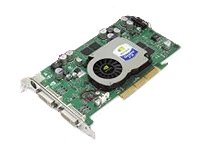
Image: The HP DL489A Nvidia Quadro FX 1100 Graphics Card. This image shows the physical card, highlighting its AGP connector and cooling solution, ready for installation into a compatible motherboard slot.
3. Close and Connect
- Tutup bekas komputer.
- Reconnect all cables, including the power cord, monitor cables (DVI), and any peripherals.
- Hidupkan komputer anda.
4. Pemasangan Pemandu
After the operating system loads, it may automatically detect the new hardware. If not, you will need to install the appropriate drivers. Drivers for the Nvidia Quadro FX 1100 can typically be found on the official Nvidia website or HP support website. Follow the on-screen instructions provided by the driver installer.
Mengendalikan Kad Grafik
Once installed and drivers are configured, the HP DL489A graphics card will manage your system's display output. It supports dual DVI-D monitors.
Konfigurasi Paparan
To configure your display settings, including resolution, refresh rate, and multiple monitor setups:
- Windows: Right-click on the desktop and select "Display settings" or "NVIDIA Control Panel."
- Linux: Use your desktop environment's display settings utility or the NVIDIA X Server Settings application.
The card supports resolutions up to 1920x1200 per DVI output.
Penyelenggaraan
Penyelenggaraan yang betul memastikan jangka hayat dan prestasi optimum kad grafik anda.
- Penyingkiran habuk: Periodically open your computer case and gently clean dust from the graphics card's heatsink and fan using compressed air. Ensure the fan does not spin rapidly during cleaning.
- Kemas Kini Pemandu: Keep your graphics drivers updated. Check the official Nvidia or HP websites for the latest compatible drivers.
- Pemantauan Suhu: Monitor the card's temperature, especially during heavy use, using system monitoring software. Ensure adequate airflow within your computer case.
Menyelesaikan masalah
Bahagian ini menangani isu biasa yang mungkin anda hadapi.
Tiada Output Paparan
- Ensure the monitor cables are securely connected to both the graphics card and the monitor.
- Pastikan monitor dihidupkan dan ditetapkan kepada sumber input yang betul.
- Check if the graphics card is fully seated in the AGP slot.
- Try connecting the monitor to the motherboard's integrated graphics (if available) to rule out other system issues.
Driver Installation Issues
- Download drivers only from official Nvidia or HP support webtapak.
- Ensure you are downloading the correct drivers for your operating system and the Quadro FX 1100.
- Uninstall any previous graphics drivers before attempting a new installation.
Ketidakstabilan atau Ranap Sistem
- Ensure your power supply unit (PSU) meets the minimum requirements for your system, including the graphics card.
- Check for overheating. Clean dust from the card's fan and heatsink.
- Verify that the graphics drivers are up to date and correctly installed.
Spesifikasi
Key technical specifications for the HP DL489A Nvidia Quadro FX 1100 Graphics Card:
| Ciri | Perincian |
|---|---|
| Nombor Model | DL489A |
| Pemproses Grafik | Nvidia Quadro FX 1100 |
| Saiz Memori | 128 MB |
| Jenis Memori | DDR II SDRAM |
| Antara muka | AGP 8x |
| Port Output | Dual DVI-D |
| Dimensi Produk | 12 x 9 x 3 inci |
| Berat Barang | 2 paun |
Waranti dan Sokongan
For warranty information and technical support, please refer to the documentation provided with your original computer system or contact Hewlett Packard customer support directly. Specific warranty terms may vary based on region and purchase date.
Sokongan HP Webtapak: https://www.hp.com/support