1. Pengenalan
This manual provides instructions for the proper setup, operation, and maintenance of your Bushnell Tasco LumiNova 40060578 Telescope. Designed for beginners and amateur astronomers, this refracting telescope offers a gateway to exploring the night sky.
Key features include a 76mm objective lens, a 6x24 finderscope for easy object location, and a diagonal mirror for comfortable viewing. The telescope also comes with a solar filter for safe solar observation (when used correctly) and a Tasco SkyWatch CD-ROM to assist with celestial navigation.
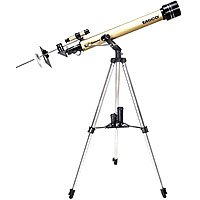
Figure 1: The main optical tube assembly of the Tasco LumiNova 40060578 telescope, including the objective lens and focuser.
2. Persediaan dan Pemasangan
Follow these steps to assemble your telescope. Ensure all components are handled with care.
- Buka Pembungkusan Komponen: Tanggalkan semua bahagian daripada pembungkusan dengan berhati-hati dan sahkannya dengan senarai pembungkusan.
- Pasang Tripod: Extend the tripod legs and secure them. Ensure the tripod is stable on a level surface.
- Attach Equatorial Mount: Secure the equatorial mount head to the top of the tripod. Tighten all locking screws.
- Pasang Tiub Optik: Attach the telescope's optical tube to the equatorial mount. Ensure it is balanced and securely fastened.
- Pasang Finderscope: Slide the 6x24 finderscope into its bracket on the main optical tube and tighten the retaining screws.
- Insert Diagonal Mirror: Insert the diagonal mirror into the focuser drawtube. Secure it with the thumbscrew.
- Masukkan Kanta Mata: Choose an eyepiece (e.g., the lowest magnification for initial setup) and insert it into the diagonal mirror. Secure it with the thumbscrew.
3. Mengendalikan Teleskop Anda
3.1 Aligning the Finderscope
The finderscope helps you locate objects quickly. It must be aligned with the main telescope.
- Halakan teleskop utama ke objek yang jauh dan pegun (contohnya, puncak pokok atau lampu jalan) semasa waktu siang.
- Letakkan objek di tengah-tengah kanta mata teleskop utama.
- Lihat melalui finderscope dan laraskan skru penjajarannya sehingga objek yang sama berada di tengah-tengah rerambut silang finderscope.
3.2 Memberi tumpuan
Once an object is centered, turn the focuser knob slowly until the image appears sharp. Fine adjustments may be needed as objects move or conditions change.
3.3 Pembesaran Berubah
To change magnification, simply swap eyepieces. Higher magnification eyepieces have smaller focal lengths (e.g., 10mm vs. 25mm). Always start with the lowest magnification (largest focal length eyepiece) to locate objects, then switch to higher magnifications for more detail.
3.4 Using the Solar Filter
WARNING: NEVER look directly at the sun through your telescope or finderscope without a professionally manufactured, certified solar filter properly installed over the front of the objective lens. Permanent eye damage or blindness will result.
The included solar filter is designed for safe solar observation. Ensure it is securely attached to the front of the telescope's objective lens before pointing the telescope at the sun. Do not use the finderscope during solar observation unless it also has a proper solar filter.
3.5 Using the Tasco SkyWatch CD-ROM
The Tasco SkyWatch CD-ROM provides a database of over 10,000 celestial objects. Install it on your computer to plan your observing sessions and identify stars, planets, and deep-sky objects visible from your location.
4. Penyelenggaraan dan Penjagaan
- Pembersihan Optik: Use a soft, lint-free cloth specifically designed for optical lenses. Breathe lightly on the lens surface to fog it, then gently wipe in a circular motion from the center outwards. Avoid touching optical surfaces with your fingers.
- Storan: When not in use, store the telescope in a dry, dust-free environment. Keep all caps on the objective lens and eyepiece openings to prevent dust accumulation.
- Penjagaan Am: Avoid exposing the telescope to extreme temperatures or sudden temperature changes. Do not overtighten screws or force any components.
5. Penyelesaian masalah
| Masalah | Kemungkinan Punca | Penyelesaian |
|---|---|---|
| Imej kabur atau tidak fokus. | Tetapan fokus yang salah. | Adjust the focuser knob slowly until the image is sharp. |
| Difficulty finding objects. | Finderscope is not aligned. | Align the finderscope with the main telescope as described in Section 3.1. |
| Imej malap atau gelap. | Using too high magnification for conditions; light pollution. | Switch to a lower magnification eyepiece. Observe from a darker location if possible. |
| Tiada imej yang kelihatan. | Dust caps still on; eyepiece not inserted correctly. | Remove all dust caps. Ensure eyepiece is fully inserted and secured. |
6. Spesifikasi
- Nombor Model: 40060578
- Jenama: Bushnell (Tasco)
- Diameter Kanta Objektif: 76 mm
- Eyepiece Description: Plössl
- Penerangan Pemasangan Teleskop: Gunung Khatulistiwa
- Jenis Fokus: Fokus Manual
- Finderscope: Reflex (6x24 included)
- Dimensi Produk: 76.2 x 26.04 x 20.32 cm (30 x 10.25 x 8 inci)
- Berat produk: 4.17 kg (9.19 lbs)
- UPC: 046162060575