pengenalan
This manual provides detailed instructions for the proper use and care of your Audiovox CE-145G Personal CD Player. Please read this manual thoroughly before operating the device to ensure optimal performance and longevity.
Ciri-ciri Produk
- 40-Second Anti-Skip Protection: Ensures continuous audio playback even during movement, utilizing a digital buffer.
- Multi-Directional Anti-Roll Sensors: Provides additional protection against playback interruption from various movements.
- 22-Track Programmable Memory: Allows customization of CD playback order.
- Bass Boost System: Meningkatkan output audio frekuensi rendah.
- 3-Beam Laser Pickup: Designed for accurate CD tracking and clear sound reproduction.
- Berbilang Mod Main Semula: Includes random play and various repeat functions.
- Tahan Suis: Prevents accidental button presses and program changes.
- Auto Matikan: Conserves battery life by automatically shutting down the player when not in use.
- Line-Out Jack: For connecting to external audio systems or power adapters.
- Built-in Rechargeable Circuitry: Supports the use of rechargeable Ni-Cad batteries (not included).
- Stereo Headphones: Included for immediate listening.
Persediaan
1. Pemasangan Bateri
The Audiovox CE-145G operates on two (2) AA batteries (not included) or an optional AC/car adapter (not included) connected via the line-out jack. For rechargeable Ni-Cad batteries, the unit features built-in charging circuitry.
- Cari petak bateri di bahagian bawah pemain CD.
- Luncurkan penutup petak bateri terbuka.
- Masukkan dua (2) bateri AA, pastikan kekutuban (+/-) betul seperti yang ditunjukkan di dalam petak.
- Tutup penutup petak bateri dengan selamat.

Image: The Audiovox CE-145G Personal CD Player in translucent green, shown with included stereo headphones. This image illustrates the overall product design and the headphones that come with the unit.
2. Menyambung Fon Kepala
Insert the stereo headphone plug into the headphone jack located on the side of the CD player.

Image: A close-up of the stereo headphones included with the Audiovox CE-145G CD player, showing the earcups and the 3.5mm audio jack.
Arahan Operasi
1. Basic CD Playback
- Open the CD compartment lid by pressing the "OPEN" button or sliding the latch.
- Place a CD onto the center spindle with the label side facing up.
- Tutup penutup petak CD dengan kuat sehingga ia berbunyi.
- Tekan ke MAIN/JEDA button to begin playback. The track number and elapsed time will display.
- Untuk menjeda main balik, tekan MAIN/JEDA sekali lagi. Tekan sekali lagi untuk menyambung semula.
- Untuk menghentikan main balik, tekan BERHENTI butang.
- Untuk melangkau ke trek seterusnya, tekan butang Langkau ke Hadapan butang (►►|).
- To return to the beginning of the current track or go to the previous track, press the SKIP KE BELAKANG butang (|◄◄).
- Untuk mara laju atau undur dalam trek, tekan dan tahan Langkau ke Hadapan or SKIP KE BELAKANG butang, masing-masing.
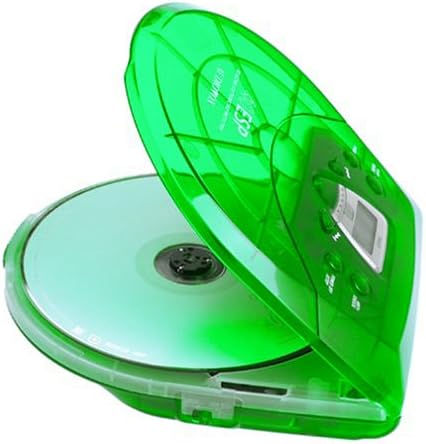
Image: The Audiovox CE-145G Personal CD Player with its translucent green lid open, revealing a compact disc placed inside the compartment.
2. Anti-Skip Protection (ESP)
The CE-145G features a 40-second Electronic Skip Protection (ESP) buffer. This system stores up to 40 seconds of audio data, allowing for uninterrupted playback even if the player experiences minor shocks or vibrations. This feature is automatically active during playback.
3. Programmable Memory (22 Tracks)
You can program up to 22 tracks to play in a specific order.
- Dalam mod STOP, tekan butang PROGRAM button. The display will show "PROG" and "01".
- Gunakan Langkau ke Hadapan or SKIP KE BELAKANG buttons to select the desired first track.
- Tekan PROGRAM again to confirm the track. The display will show "02".
- Ulangi langkah 2 dan 3 untuk menambah sehingga 22 trek pada program anda.
- After programming the last track, press MAIN/JEDA to start playback of your programmed sequence.
- Untuk mengosongkan program, tekan butang BERHENTI butang dua kali.
4. Peningkatan Bass
To enhance the bass frequencies, locate the BASS BOOST switch (or button) on the unit and activate it. Deactivate it to return to standard audio output.
5. Fungsi Tahan
The TAHAN switch prevents accidental button presses. Slide the TAHAN switch to the "ON" position to disable all control buttons. Slide it to "OFF" to re-enable controls.
6. Auto Matikan
To conserve battery life, the CD player will automatically power off after a period of inactivity (e.g., when a CD finishes playing and no buttons are pressed). To restart, press the MAIN/JEDA butang.
Penyelenggaraan
- Membersihkan Unit: Wipe the exterior of the player with a soft, damp kain. Jangan gunakan pembersih atau pelarut yang melelas.
- Membersihkan Kanta CD: If playback issues occur due to a dirty lens, use a specialized CD lens cleaning kit. Do not touch the lens directly.
- Penjagaan CD: Kendalikan CD dengan tepinya. Pastikan ia bersih dan bebas daripada calar. Simpan dalam bekasnya apabila tidak digunakan.
- Penjagaan Bateri: Tanggalkan bateri jika unit tidak akan digunakan untuk tempoh yang lama untuk mengelakkan kebocoran.
Menyelesaikan masalah
| Masalah | Kemungkinan Punca | Penyelesaian |
|---|---|---|
| Tiada kuasa | Bateri mati atau dimasukkan dengan salah; penyesuai AC tidak disambungkan atau rosak. | Replace batteries, check polarity, or ensure AC adapter is properly connected and functional. |
| CD skips or stops | CD is dirty or scratched; unit is subjected to excessive shock; lens is dirty. | Clean CD, use a different CD, avoid strong impacts, clean the CD lens. |
| Tiada bunyi | Headphones not connected properly; volume too low; headphones faulty. | Ensure headphones are fully plugged in, increase volume, try different headphones. |
| Butang tidak bertindak balas | Suis HOLD diaktifkan. | Slide the HOLD switch to the "OFF" position. |
Spesifikasi
- model: CE-145G
- Jenama: Audiovox
- Perlindungan Anti-Skip: 40 saat (Perlindungan Langkau Elektronik)
- Programmable Tracks: 22
- Sumber Kuasa: 2 x AA batteries (not included) or optional AC/car adapter
- Output Audio: 3.5mm headphone jack, Line-out jack
- Dimensi (Lebih kurang): 11.8 x 8.3 x 2.6 inci (Saiz Pakej)
- Berat (Lebih kurang): 1.35 paun (Berat Item)
- warna: Translucent Green
Waranti dan Sokongan
The Audiovox CE-145G Personal CD Player is backed by a 90-day parts-and-labor warranty dari tarikh pembelian. Sila simpan bukti pembelian anda untuk tuntutan waranti.
For technical support or warranty service, please refer to the contact information provided with your product packaging or visit the official Audiovox webtapak.


