pengenalan
This manual provides detailed instructions for the setup, operation, and maintenance of your Audiovox CE-122 Personal CD Player with Car Kit. Please read this manual thoroughly before using your device to ensure proper functionality and to maximize your listening experience.
The Audiovox CE-122 is a portable CD player designed for versatile use, featuring a Digital Anti-Shock System (DASS) for uninterrupted playback during movement, a 22-track programmable memory, and a bass boost function. It includes a complete car kit for in-vehicle use.
Kandungan Pakej
Sahkan bahawa semua item yang disenaraikan di bawah disertakan dalam pakej anda:
- Audiovox CE-122 Portable CD Player
- Fon kepala
- Penyesuai AC
- Penyesuai Kereta
- Penyesuai Kaset
- Manual Pengguna (dokumen ini)
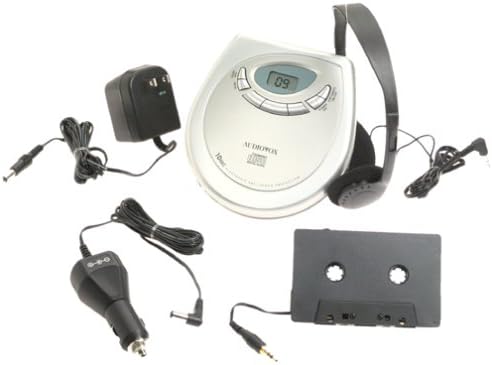
Imej: The Audiovox CE-122 portable CD player shown with all its accessories, including headphones, AC adapter, car adapter, and cassette adapter.
Ciri-ciri Produk
- Plays audio CD and CD-R/RW discs.
- AC/DC operation for home and portable use.
- Complete car kit included for in-vehicle audio.
- Digital Anti-Shock System (DASS) provides up to 20 seconds of skip protection.
- 22-track programmable memory for custom playback sequences.
- Bass boost feature for enhanced audio.
- Forward and reverse search functions.
- Repeat and pause functions.
- Key hold switch to prevent accidental button presses.
- Line out jack for connecting to external audio systems.
- Auto power off function to conserve battery life.
- Dual stereo headphone jack for shared listening.
- Built-in charger for rechargeable batteries (rechargeable batteries not included).
Persediaan
1. Memasukkan Bateri
The CD player operates on 4 AA batteries (included). For rechargeable batteries (not included), ensure they are inserted correctly for charging.
- Buka penutup petak bateri yang terletak di bahagian bawah unit.
- Masukkan 4 bateri AA, perhatikan polariti yang betul (+/-) seperti yang ditunjukkan di dalam petak.
- Tutup penutup petak bateri dengan selamat.
2. Connecting Power (AC Adapter)
For home use or to charge rechargeable batteries:
- Plug the small end of the AC adapter into the DC IN 4.5V jack on the CD player.
- Palamkan hujung satu lagi penyesuai AC ke soket dinding standard.
- If using rechargeable batteries, select the 'charge' function (if available on your model) to begin charging.
3. Menyambung Fon Kepala
Plug the headphones into one of the two headphone jacks on the side of the CD player.

Imej: Satu jarak dekat view of the headphones included with the Audiovox CE-122 CD player.
4. Car Kit Setup
To use the CD player in your vehicle:
- Plug the car adapter into your vehicle's cigarette lighter or 12V power outlet.
- Connect the small end of the car adapter to the DC IN 4.5V jack on the CD player.
- Insert the cassette adapter into your vehicle's cassette player.
- Connect the audio cable from the cassette adapter to the LINE OUT jack on the CD player.
- Ensure your car stereo is set to the cassette function to hear the CD player's audio.
Arahan Operasi
1. Memasukkan CD
- Tekan butang BUKA untuk membuka penutup petak CD.
- Place a CD (audio CD or CD-R/RW) onto the center spindle with the label side facing up.
- Tekan CD dengan lembut sehingga ia berbunyi klik di tempatnya.
- Tutup penutup petak CD dengan kuat sehingga ia terselak.

Imej: The Audiovox CE-122 portable CD player with its lid open, revealing the disc compartment where a CD is placed.
2. Main Semula Asas
- Main: Tekan ke MAIN/JEDA button to start playback. The track number will appear on the display.
- Jeda: Tekan ke MAIN/JEDA button during playback to pause. Press again to resume.
- Berhenti: Tekan ke BERHENTI butang untuk menghentikan main balik.
3. Navigasi Trek
- Langkau Laluan: Tekan ke Langkau ke Hadapan (►►) or SKIP KE BELAKANG (◄◄) buttons to move to the next or previous track.
- Cari: Tekan dan tahan butang Langkau ke Hadapan (►►) or SKIP KE BELAKANG (◄◄) buttons during playback to fast forward or rewind within a track.
4. Fungsi Ulangan
Tekan ke ULIKAN button to cycle through repeat modes:
- Ulang 1: Mengulangi trek semasa.
- Ulang Semua: Mengulang semua trek pada cakera.
- Ulang Mati: Disables repeat function.
5. Memori Boleh Diprogram
Anda boleh memprogram sehingga 22 trek untuk dimainkan dalam susunan tertentu:
- Dengan CD dihentikan, tekan butang PROGRAM butang.
- Gunakan Langkau ke Hadapan (►►) or SKIP KE BELAKANG (◄◄) buttons to select the desired track.
- Tekan PROGRAM again to add the track to the memory.
- Ulang langkah 2 dan 3 sehingga 22 trek.
- Tekan MAIN/JEDA untuk memulakan main balik urutan yang diprogramkan.
6. Peningkatan Bass
Tekan ke BASS BOOST butang untuk mengaktifkan atau menyahaktifkan ciri peningkatan bes.
7. Key Hold Switch
Luncurkan TAHAN switch to the ON position to disable all buttons, preventing accidental operation during transport.
8. Digital Anti-Shock System (DASS)
The DASS provides up to 20 seconds of skip protection. This feature is automatically active during playback to ensure smooth audio even during movement.
9. Auto Mati
The unit will automatically power off after a period of inactivity or when a CD finishes playing to conserve battery life.

Imej: The Audiovox CE-122 portable CD player, a silver-colored device with a digital display and control buttons, shown alongside its black over-ear headphones.
Penyelenggaraan
1. Membersihkan Pemain CD
- Lap bahagian luar unit dengan kain lembut dan kering. Jangan gunakan pembersih atau pelarut yang melelas.
- To clean the lens, use a specialized CD lens cleaner disc. Do not touch the lens directly.
2. Penjagaan Bateri
- Tanggalkan bateri jika unit tidak akan digunakan untuk tempoh yang lama untuk mengelakkan kebocoran.
- Gantikan semua bateri pada masa yang sama; jangan campurkan bateri lama dan baharu atau jenis bateri yang berbeza.
3. Penyimpanan
Store the CD player in a cool, dry place away from direct sunlight and extreme temperatures.
Menyelesaikan masalah
If you encounter issues with your Audiovox CE-122, please refer to the following common problems and solutions:
- Tiada Kuasa:
• Check if batteries are inserted correctly and are not depleted. Replace if necessary.
• Ensure the AC adapter or car adapter is securely connected and the power source is active. - CD Not Playing / Disc Error:
• Ensure the CD is inserted correctly with the label side up.
• Check if the CD is scratched or dirty. Clean the CD with a soft, lint-free cloth.
• Make sure the CD compartment lid is fully closed.
• The disc format may not be supported (e.g., data CD instead of audio CD or CD-R/RW). - Skipping During Playback:
• While the DASS provides protection, severe shocks or vibrations can still cause skipping. Try to keep the player stable.
• Ensure the CD is clean and free of scratches.
• Low battery power can sometimes affect anti-shock performance. Replace or recharge batteries. - Tiada Bunyi:
• Check headphone connection and ensure they are fully plugged in.
• Laraskan tahap kelantangan.
• If using the car kit, ensure the car stereo is set to the correct input (cassette function) and volume is up. - Butang Tidak Menjawab:
• Periksa sama ada TAHAN switch is in the ON position. Slide it to OFF to enable buttons.
Spesifikasi
| Nombor Model | CE-122 |
| Format Cakera yang Disokong | Audio CD, CD-R/RW (MP3 compatible) |
| Perlindungan Anti-Kejutan | 20 seconds (Digital Anti-Shock System) |
| Memori Boleh Diprogram | 22 trek |
| Sumber Kuasa | 4 x AA batteries, AC adapter (4.5V DC), Car adapter (12V DC) |
| Ketersambungan | Auxiliary (Line Out), Dual Headphone Jacks |
| Dimensi (Anggaran) | 11.1 x 7.8 x 3.2 inci (Pakej) |
| Berat (Anggaran) | 1.5 paun |
Waranti dan Sokongan
For warranty information and customer support, please refer to the documentation provided at the time of purchase or contact Audiovox customer service. Keep your proof of purchase for warranty claims.


