1. Pengenalan
This manual provides detailed instructions for the setup, operation, and maintenance of your Koss HG857 Portable CD System. The HG857 is a versatile audio system featuring a CD player, digital AM/FM tuner, and dual cassette decks, designed for both portable use and as a compact stereo system. Please read this manual thoroughly before using your unit to ensure proper operation and to maximize its performance.

Rajah 1: Depan view of the Koss HG857 Portable CD System with the CD compartment open, showing the main unit and detachable speakers.
2. Persediaan
2.1 Membongkar
Carefully remove all components from the packaging. Ensure you have the main unit, two detachable speakers, the remote control, and this instruction manual. Retain the packaging for future transport or storage.
2.2 Pembesar Suara Penyambung
The Koss HG857 features detachable speakers. Connect the speaker wires from each speaker to the corresponding speaker terminals on the rear of the main unit. Ensure correct polarity (red to red, black to black) for optimal sound.

Rajah 2: Belakang view of the Koss HG857 system, showing the main unit with detachable speakers connected, highlighting the speaker terminals and power input.
2.3 Mengkuasakan Unit
Kuasa AC
Connect the AC power cord to the AC inlet on the rear of the unit and then plug it into a standard AC 120V, 60Hz wall outlet.
Kuasa Bateri
For portable use, the unit requires 8 D-size batteries. Open the battery compartment on the bottom of the unit and insert the batteries, observing the correct polarity (+/-) as indicated.
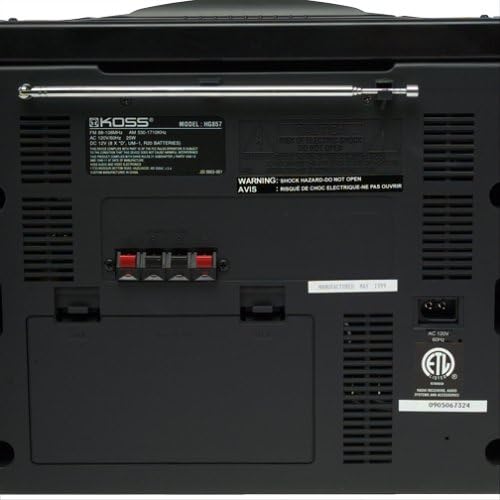
Rajah 3: Terperinci view of the Koss HG857 rear panel, showing the AC power input, speaker terminals, and the extendable FM antenna.
2.4 Persediaan Antena
For FM reception, extend the telescopic antenna fully. For AM reception, the unit uses a built-in ferrite bar antenna; rotate the unit for best reception.
3. Operasi
3.1 Kawalan Asas
- Butang kuasa: Tekan untuk menghidupkan atau MATI unit.
- Kawalan VOLUME: Rotate to adjust the overall sound level.
- Kawalan BAKI: Adjusts the balance between the left and right speakers.
- DYNAMIC BASS BOOST (DBB): Activates or deactivates enhanced bass response.
3.2 Operasi Pemain CD
- Buka penutup petak CD.
- Letakkan CD dengan bahagian label menghadap ke atas.
- Tutup penutup petak CD.
- Tekan ke CD / AUX butang untuk memilih mod CD.
- Tekan ke MAIN/JEDA butang untuk memulakan main balik.
- guna Langkau / CARI buttons to navigate tracks or fast forward/rewind.
- JADUAL: Allows programming up to 20 tracks in a desired order.
3.3 Radio Tuner Operation
- Tekan ke TUNER button to select AM or FM band.
- Gunakan MENALA butang untuk menala secara manual ke stesen.
- Tekan dan tahan MENALA butang untuk carian stesen automatik.
- PRESET: Store and recall up to 20 AM/FM stations.
3.4 Operasi Dek Kaset
The unit features dual cassette decks (Deck A and Deck B).
Main balik
- Open the cassette door and insert a cassette tape.
- Tekan ke PITA button to select tape mode.
- Tekan BERMAIN on either Deck A or Deck B to start playback.
- guna REWIND, CEPAT KE HADAPAN, dan BERHENTI/EJECT butang mengikut keperluan.
Rakaman
You can record from CD, Radio, or Tape A to Tape B.
- Insert a blank, recordable cassette into Deck B.
- Select the desired source (CD, TUNER, or TAPE A).
- Tekan ke REKOD button on Deck B. Playback from the source will begin automatically.
- Tekan BERHENTI on Deck B to end recording.
3.5 Alat Kawalan Jauh
The included remote control allows convenient operation of most functions from a distance. Ensure the remote has working batteries and is pointed towards the main unit's sensor.
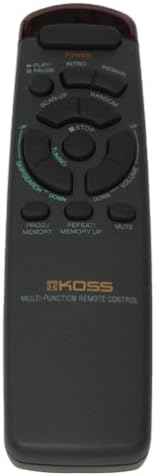
Figure 4: The multi-function remote control for the Koss HG857, showing various buttons for CD, tuner, and tape operations.
3.6 Bicu Fon Kepala
A stereo headphone jack is provided for private listening. Plugging in headphones will mute the speakers.
4. Penyelenggaraan
4.1 Pembersihan
Wipe the unit with a soft, dry cloth. Do not use abrasive cleaners or solvents. For the CD lens, use a specialized CD lens cleaner.
4.2 Penggantian Bateri
If using battery power, replace all 8 D-size batteries when the unit's performance degrades. Ensure proper polarity.
4.3 CD and Cassette Care
- Pegang CD di tepinya untuk mengelakkan cap jari dan calar.
- Store cassettes away from direct sunlight and heat.
- Periodically clean cassette heads with a head cleaner.
5. Penyelesaian masalah
| Masalah | Kemungkinan Punca | Penyelesaian |
|---|---|---|
| Tiada kuasa | AC cord not plugged in; Batteries depleted or incorrectly inserted. | Periksa sambungan AC; Gantikan bateri, pastikan kekutuban yang betul. |
| Tiada bunyi | Volume too low; Headphones connected; Speakers not connected properly. | Increase volume; Disconnect headphones; Check speaker connections. |
| CD melangkau atau tidak dimainkan | CD dirty or scratched; CD inserted incorrectly; Unit in wrong mode. | Clean CD; Reinsert CD label side up; Select CD mode. |
| Penerimaan radio yang lemah | Antena tidak dipanjangkan/diletakkan; Isyarat lemah. | Extend and adjust FM antenna; Rotate unit for AM; Try a different location. |
| Isu main balik kaset | Tape tangled or damaged; Heads dirty. | Check tape condition; Clean cassette heads. |
| Alat kawalan jauh tidak berfungsi | Bateri berkurangan atau dimasukkan dengan salah; Halangan antara alat kawalan jauh dan unit. | Replace remote batteries; Ensure clear line of sight to unit's sensor. |
6. Spesifikasi
- model: HG857
- Sumber Kuasa: AC 120V, 60Hz; 8 x D-size batteries
- Pemain CD: Top-loading, 20-track programmable
- Penala Radio: Digital AM/FM, 20 station presets
- Cassette Decks: Dual cassette, recordable
- Penceramah: Detachable 3-way speakers with Dynamic Bass Boost
- Ketersambungan: Bateri fon kepala stereo
- Dimensi (lebih kurang): 27.8 x 12.5 x 11.6 inci (Saiz Pakej)
- Berat (lebih kurang): 16.7 paun (Berat Item)
- Pengeluar: Koss Audio & Video
- Pertama Tersedia: 4 September 1999
7. Waranti & Sokongan
For warranty information and customer support, please refer to the warranty card included with your product or visit the official Koss webtapak. Simpan resit pembelian anda sebagai bukti pembelian.
Koss Official Webtapak: www.koss.com


