pengenalan
This manual provides instructions for the setup, operation, and maintenance of your Logitech Wingman Force Joystick, model 963155-0403. This device is designed to enhance your PC gaming experience with force feedback technology and programmable controls.
Kandungan Pakej
Sahkan bahawa pakej anda mengandungi item berikut:
- Logitech Wingman Force Joystick
- Penyesuai Kuasa
- USB Cable (integrated or separate)
- Software CD (if applicable, for WingMan Software)
- Manual Pengguna (dokumen ini)
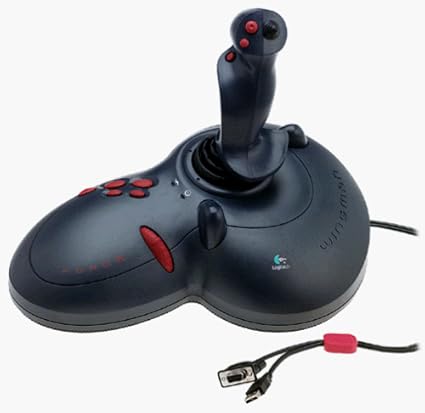
Figure 1: The Logitech Wingman Force Joystick packaging, showing the joystick and its features.
Persediaan
- Sambungkan Kuasa: Plug the power adapter into the joystick and then into a standard electrical outlet.
- Sambung ke PC: Connect the joystick's USB cable to an available USB port on your computer. The joystick also supports serial interfaces.
- Pasang Perisian: Insert the WingMan Software CD (if provided) into your computer's CD-ROM drive and follow the on-screen instructions to install the drivers and WingMan Software. If no CD is provided, drivers may be automatically installed by your operating system or available for download from the Logitech support webtapak.
- Keperluan Sistem: Ensure your computer runs a compatible Windows operating system.
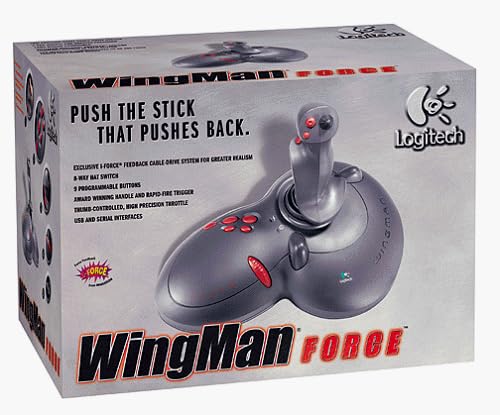
Figure 2: The Logitech Wingman Force Joystick, illustrating its ergonomic design and button layout.
Arahan Operasi
Kawal Selesaiview
- Joystick Handle: Provides precise control for in-game movement.
- 9 Butang Boleh Aturcara: Customize these buttons using the WingMan Software for various in-game actions.
- Suis Topi 8-Cara: Located on top of the joystick, this switch allows for quick camera views or directional commands.
- Thumb-Controlled Throttle: Adjust speed or thrust with the integrated throttle control.
Force Feedback Technology
The Wingman Force Joystick utilizes Logitech's exclusive I-Force force feedback technology with a cable-drive system. This system provides realistic tactile feedback, such as vibrations from impacts, recoil from weapons, and resistance during maneuvers, enhancing immersion in compatible games.
Using WingMan Software
The WingMan Software allows you to:
- Program the 9 buttons for specific game functions.
- Cipta dan simpan berbilang profiles untuk permainan yang berbeza.
- Adjust force feedback intensity settings.
- Calibrate the joystick for optimal performance.
Refer to the WingMan Software's help documentation for detailed instructions on customization and profile pengurusan.
Penyelenggaraan
To ensure the longevity and optimal performance of your joystick:
- Pembersihan: Use a soft, dry cloth to wipe the surface of the joystick. Avoid using abrasive cleaners or solvents.
- Storan: Store the joystick in a clean, dry environment away from extreme temperatures and direct sunlight.
- Penjagaan Kabel: Avoid bending or crimping the cables excessively.
Menyelesaikan masalah
- Problem: Joystick not recognized by computer.
- Penyelesaian:
- Ensure the USB cable is securely connected to both the joystick and the computer.
- Cuba sambungkan ke port USB lain.
- Verify that the power adapter is properly connected and the joystick is receiving power.
- Reinstall the WingMan Software drivers.
- Problem: Inconsistent or absent force feedback.
- Penyelesaian:
- Check the force feedback settings within the WingMan Software and ensure they are set to an appropriate level.
- Ensure the game you are playing supports force feedback and that it is enabled in the game's settings.
- Restart your computer and the game.
- Sahkan semua sambungan selamat.
- Problem: Buttons or controls are unresponsive.
- Penyelesaian:
- Calibrate the joystick using the WingMan Software.
- Ensure the joystick drivers are up to date.
- Test the joystick in a different game or application to determine if the issue is game-specific.
Spesifikasi
| Ciri | Perincian |
|---|---|
| Nombor Model | 963155-0403 |
| Jenama | Logitech |
| Jenis Pengawal | Kayu bedik |
| Teknologi Ketersambungan | USB, Bersiri |
| Peranti Serasi | PC Windows |
| Dimensi Produk | 13.5 x 9.63 x 9.25 inci |
| Berat Barang | 4.14 paun |
| Paksa Maklum Balas | I-Force feedback cable-drive system |
| Butang | 9 butang boleh diprogramkan |
| Suis Topi | suis topi 8 hala |
| Pendikit | Thumb-controlled, high precision throttle |
Waranti dan Sokongan
Untuk maklumat jaminan dan sokongan teknikal, sila rujuk dokumentasi yang disertakan dengan produk anda atau lawati sokongan rasmi Logitech. website. You can typically find drivers, FAQs, and contact information for customer service there.
Sokongan Logitech Webtapak: www.logitech.com/support


