1. Produk Lebihview
The Vgate vLinker MS is a professional-grade Bluetooth OBD2 diagnostic scan tool designed to transform your iPhone, Android device, or Windows PC into a powerful vehicle diagnostic system. It provides access to MS-CAN networks in addition to all legislated OBD-II protocols, making it compatible with a wide range of vehicles.
This compact and economical device is engineered for superior performance, featuring smart sleep modes, anti-hacking security, and extensive third-party app support. It is suitable for almost all 12V or 24V vehicles, including cars, SUVs, and trucks, manufactured from 1996 onwards that support standard OBD2 protocols. For small diesel vehicles, it supports those with a load of 6.5T or less that comply with OBD2 protocols.

Figure 1: Vgate vLinker MS diagnostic engine for 12V car or 24V truck

Figure 2: Vgate vLinker MS compatibility with 12V or 24V vehicles (cars, SUVs, trucks)

Figure 3: Vgate vLinker MS Bluetooth professional grade diagnostic scanning tool
Video 1: Vgate vLinker MS unboxing and physical overview
2. Ciri-ciri Utama
- Works with 12V or 24V automotive systems.
- Apple MFI certified device.
- World’s fastest Bluetooth OBD-II adapter with a baud rate of 3Mbps.
- Hacker-proof security.
- Kemas kini perisian tegar percuma.
- Supports OBD request bytes up to 4K bytes.
- Supports 5 CAN channels: HS-CAN, MS-CAN, SW-CAN, CH-CAN, LS-CAN.
- BatterySaver technology for low power consumption (operating current 28mA, sleep current as low as 3mA).
- Automatic sleep & wake-up functionality.
- Superior compatibility with more 3rd party apps & software than other adapters.

Figure 4: Vgate vLinker MS key features summary
Expanded CAN Protocol Support
The vLinker MS Bluetooth (MFI) model enhances diagnostic capabilities by adding CH-CAN and LS-CAN protocols. This expansion ensures compatibility with a broader range of car models, offering more diagnostic options for users.

Figure 5: Vgate vLinker MS showing additional CAN protocols
All System Diagnosis
The vLinker MS supports comprehensive diagnosis across various vehicle systems, including:
- Sistem Pemantauan Tekanan Tayar (TPMS)
- Brek Letak Kereta Elektronik (EPB)
- Enjin
- Supplemental Restraint System (SRS)
- Penderia Sudut Stereng (SAS)
- Sistem Penghantaran

Figure 6: Vgate vLinker MS All System Diagnosis capabilities
3. Persediaan dan Pemasangan
Kandungan Pakej
Before starting, ensure all items are present in your package:
- Vgate vLinker MS Bluetooth OBD2 Scanner
- Start Guide (English)
- Third-Party App Operating Guide
- EU Compliance Statement / ISED Warning

Figure 7: Vgate vLinker MS product packaging and contents
Initial Setup Steps
- Muat turun Aplikasi: Scan the QR code provided in the manual or on the product package to download the appropriate Vgate FwUpdater app. You will also need a compatible third-party OBD2 diagnostic application (e.g., Car Scanner ELM327 OBD2, OBD Auto Doctor, OBD Fusion, Carista OBD, InCarDoc, DashCommand, Shift OBD Complete, OBD JScan, AlfaOBD, BimmerLink, Bimmer-Tool, MotorData Hybrid, PHEV Watchdog, Leaf Spy Pro, Scan My Tesla, Tes-LAX - CAN Bus Explorer).
- Sediakan Kenderaan: Ensure your vehicle's engine is off before plugging in the device.
- Sambungkan Peranti: Plug the vLinker MS Bluetooth adapter into your vehicle's OBD-II port.
- Mulakan Enjin: Hidupkan enjin kenderaan anda.
- Pasangkan Bluetooth: Press the 'Pair' button on the vLinker MS device. Open your phone's Bluetooth settings, search for 'vLinker MS XXXXXX' (where XXXXXX is a unique identifier), and tap to connect. A random pairing code will be generated; click 'Pair' to confirm.
- Lancarkan Apl: Open your chosen third-party diagnostic application and connect to the vLinker MS.

Figure 8: Vgate Apps available for vLinker MS Bluetooth (QR codes for various apps)
4. Arahan Operasi
Once the vLinker MS is successfully connected to your vehicle and paired with your smart device, you can use a compatible third-party application to perform various diagnostic functions.
Operasi Am
- Ensure the vLinker MS is securely plugged into the OBD-II port and the vehicle's ignition is on (engine running for full diagnostics).
- Confirm Bluetooth connection between the vLinker MS and your smartphone/PC.
- Launch your preferred diagnostic application. The app should automatically detect and connect to the vLinker MS. If not, manually select the device within the app's settings.
- Follow the on-screen instructions within the diagnostic app to perform desired functions such as reading/clearing trouble codes, viewing live data, or performing system-specific tests.

Figure 9: Vgate vLinker MS faster, smoother programming with 4K bytes OBD request and 3M bps baud rate
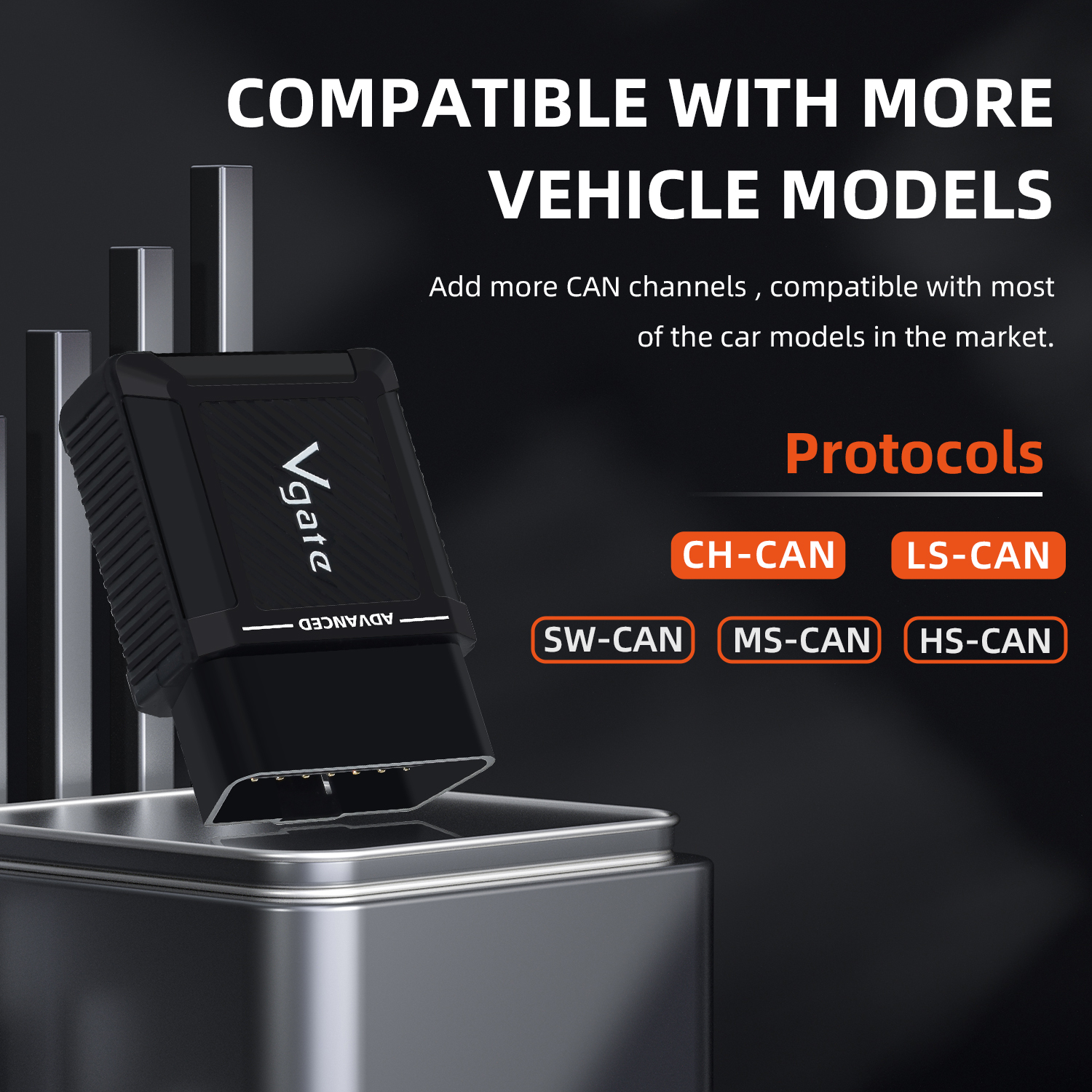
Figure 10: Vgate vLinker MS diagram showing support for 5 CAN protocols and connection points
5. Penyelenggaraan
Kemas kini Perisian Tegar
The vLinker MS supports online firmware updates to ensure optimal performance and compatibility with the latest vehicle protocols and diagnostic features. It is recommended to regularly check for and install updates.
Note: Pirated products cannot be upgraded.
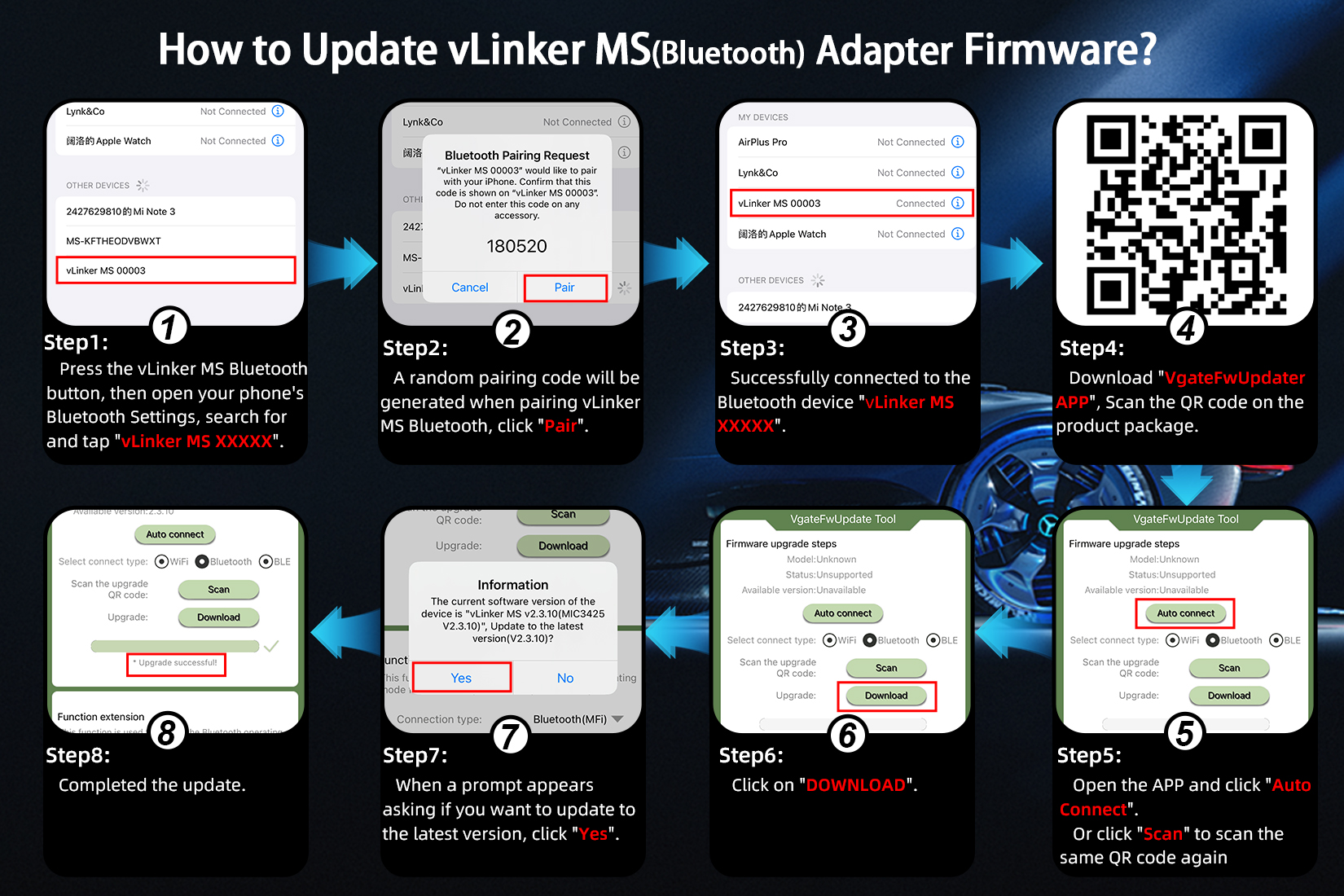
Figure 11: Step-by-step instructions on how to update Vgate vLinker MS Bluetooth adapter firmware
Pengurusan Kuasa
The vLinker MS features BatterySaver technology, which includes an automatic sleep mode when idle. The sleep current is as low as 3mA, preventing battery drain if the device is left plugged into the vehicle's OBD-II port.
Pembersihan
Lap peranti dengan kain lembut dan kering. Jangan gunakan bahan kimia yang keras atau pembersih yang kasar.
6. Penyelesaian masalah
- Peranti Tidak Dihidupkan: Ensure the vLinker MS is securely plugged into the vehicle's OBD-II port. Check the vehicle's battery.
- Isu Berpasangan Bluetooth: Make sure the 'Pair' button on the vLinker MS is pressed. Restart your smart device's Bluetooth and try pairing again. Ensure no other devices are actively connected to the vLinker MS.
- App Connection Failure: Verify that you are using a compatible third-party diagnostic application. Close and reopen the app. Ensure the app has necessary permissions to access Bluetooth.
- Tiada Data atau Bacaan Salah: Confirm your vehicle is OBD2 compliant and the engine is running (or ignition is on). Ensure the app settings are correctly configured for your vehicle type and the vLinker MS device.
- Kegagalan Kemas Kini Perisian Tegar: Ensure a stable internet connection during updates. If the device is a pirated product, it cannot be upgraded.
7. Spesifikasi
| Ciri | Spesifikasi |
|---|---|
| Nama Jenama | Vgate |
| Model | vLinker MS |
| Jenis Item | Pembaca Kod & Alat Imbasan |
| Ciri Khas | Bluetooth |
| Kemas Kini Perisian | Ya (Kemas Kini Percuma Sepanjang Hayat) |
| Versi Perkakasan | 2024 terbaru |
| Versi perisian | 2024 terbaru |
| Sokongan Bahasa | Inggeris, Perancis, Jerman, Itali, Jepun, Poland, Portugis, Rusia, Sepanyol |
| Pensijilan | CE, RoHS |
| Nombor Bahagian Pengilang | KINGBOLEN YA200 |
| Vehicle Type Compatibility | Passenger Vehicle (12V/24V petrol, 12V/24V small diesel <6.5T) |
| Ketersambungan | OBD2 Cable, Bluetooth |
| Antara Muka OBD | OBDII |
| UPC | 602747786638 |
| asal usul | Tanah Besar China |
| Arus Operasi | 28mA |
| Tidur Semasa | 3mA |
| Kadar Baud | 3Mbps |
| OBD Request Bytes | Sehingga 4K bait |
| Max Bytes of One Reading | 4095 |
| ELM327 Instruction Compatibility | V2.3 |
| STN Instruction Compatibility | V2.3 |
| Protokol yang Disokong | SAE J1850-PWM, SAE J1850-VPW, ISO 9141-2, ISO 14230-4(slow), ISO 14230-4(fast), ISO 15765-4(CAN), SAE J1939(CAN), ISO 11898(raw CAN), Medium Speed CAN(MS-CAN), Single Wire CAN(GMLAN), Chassis CAN(CH CAN), Infotainment CAN(LS CAN), Bluetooth c3.0 interface, Apple MFI Certification |
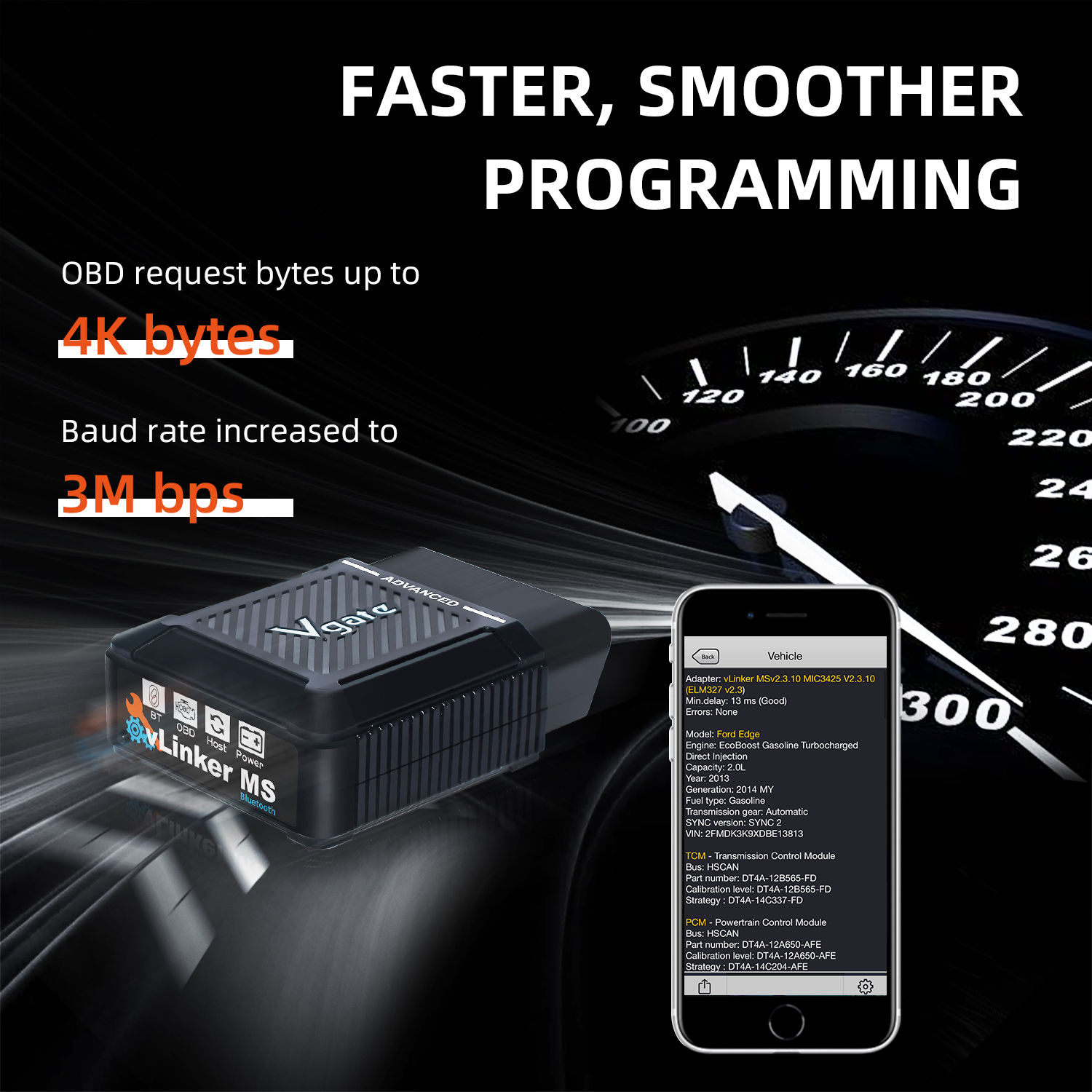
Figure 12: Product Reference Table comparing vLinker FS BT and vLinker MS protocols and features
Dimensi Fizikal
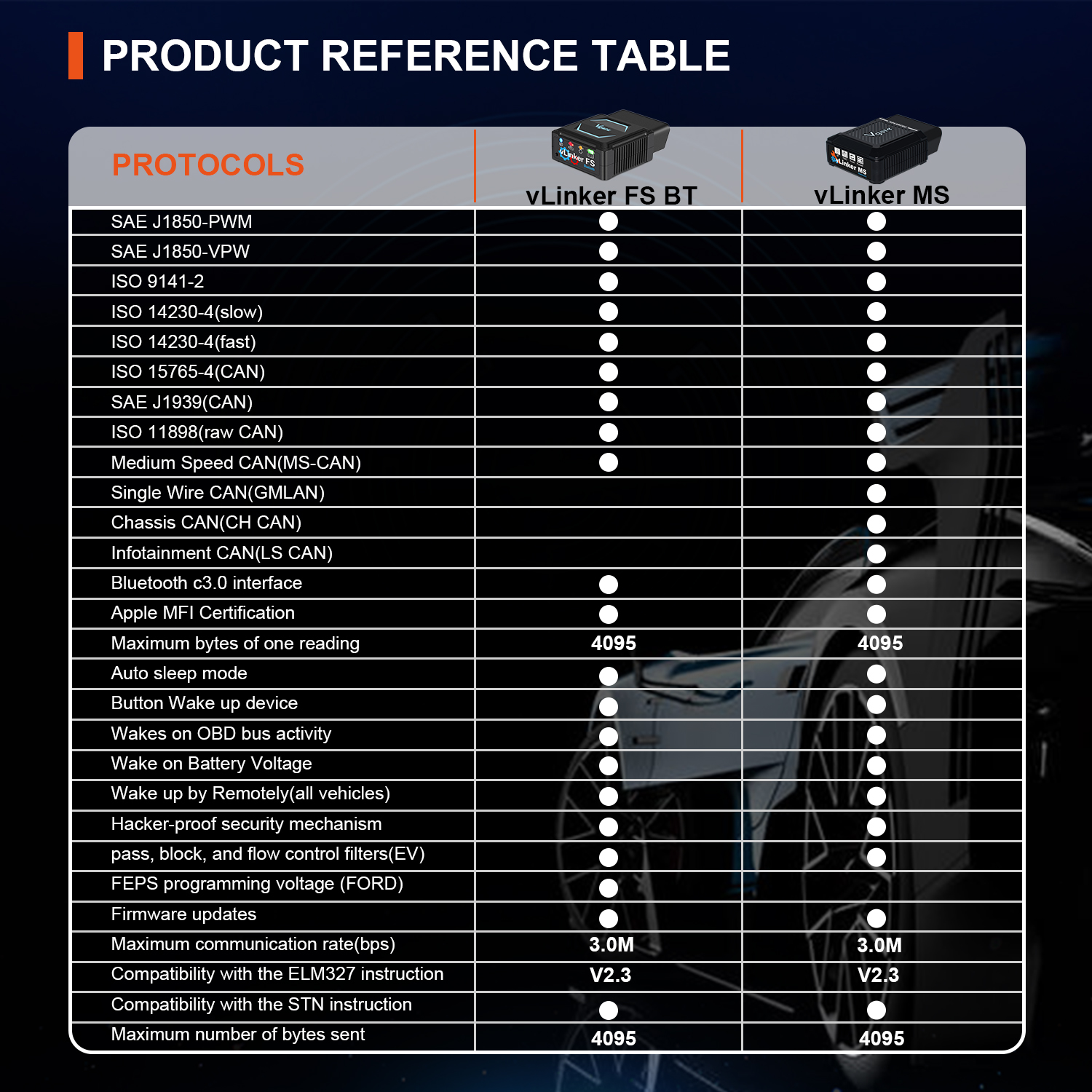
Figure 13: Vgate vLinker MS dimensions and portability features (efficient, practical, portable)
8. Waranti dan Sokongan
Vgate is a professional supplier of automotive diagnostic Code Reader Scanner products, offering reliable service and solutions worldwide. The vLinker MS comes with free lifetime firmware updates.
Penyata Pematuhan
The device complies with EU Radio Equipment Directive (2014/53/EU), Electromagnetic Compatibility Directive (2014/30/EU), and WEEE Directive (2012/19/EU). It also includes an ISED Warning for radio frequency exposure.
For detailed compliance information, refer to the EU Compliance Statement and ISED Warning included in the product packaging.
Keselamatan & Privasi
Vgate is committed to protecting your privacy. Your personal details are kept safe and secure and are not shared with any third parties without your consent.
9. Petua Pengguna
- Keserasian Apl: The vLinker MS is known to work with popular apps like 'Car Scanner PRO' and 'BimmerLink'. Always check the app's compatibility list for the vLinker MS Bluetooth model.
- Keserasian Kenderaan: Ensure your vehicle is manufactured in 1996 or later and is OBD2 compliant. The device supports both 12V and 24V systems.
- Kemas kini Firmware: Regularly check for and install firmware updates using the Vgate FwUpdater app to maintain optimal performance and access new features.
- Oil Reset Functionality: The ability to perform specific functions like 'Oil Reset' depends on the capabilities of the third-party diagnostic app you are using and your vehicle's support for such commands via OBD2.
- '2025 Upgraded' Model: The '2025 Upgraded' designation refers to the latest hardware and software revisions, ensuring you have the most current version of the device with improved performance and features.


