
1. Pengenalan
Thank you for choosing the Thomson 24HQG3S15C Smart TV. This manual provides essential information for the safe and efficient operation of your new television. Please read these instructions thoroughly before using the product and retain them for future reference.
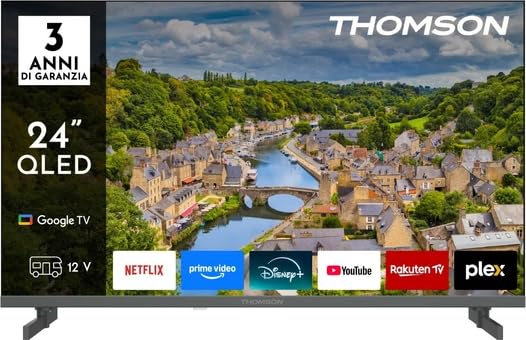
Rajah 1: Depan view of the Thomson 24HQG3S15C Smart TV.
2. Maklumat Keselamatan
Sentiasa patuhi langkah berjaga-jaga keselamatan berikut untuk mengelakkan renjatan elektrik, kebakaran atau kerosakan pada TV.
- Sumber Kuasa: Pastikan bekalan kuasa voltage matches the rating label on the TV.
- Pengudaraan: Jangan sekat bukaan pengudaraan. Benarkan ruang yang mencukupi di sekeliling TV untuk aliran udara yang betul.
- Air dan Kelembapan: Jangan dedahkan TV kepada hujan atau lembapan. Jangan letakkan objek yang diisi dengan cecair, seperti pasu, di TV.
- Pembersihan: Cabut plag TV sebelum membersihkan. Gunakan kain lembut dan kering. Jangan gunakan pembersih cecair atau pembersih aerosol.
- penempatan: Letakkan TV pada permukaan yang stabil dan rata. Elakkan meletakkannya di bawah cahaya matahari langsung atau berhampiran sumber haba.
- Kanak-kanak: Awasi kanak-kanak untuk memastikan mereka tidak memanjat atau bermain dengan TV.
- Servis: Jangan cuba servis TV sendiri. Rujuk semua servis kepada kakitangan perkhidmatan yang berkelayakan.
3. Kandungan Pakej
Carefully unpack your Thomson 24HQG3S15C Smart TV and check that all the following items are included:
- Thomson 24HQG3S15C Smart TV
- Alat Kawalan Jauh
- Kabel Kuasa
- Manual Pengguna (dokumen ini)
- TV Stand (if applicable, check packaging)
- Skru untuk Kaki TV (jika berkenaan)
Jika terdapat sebarang barang yang hilang atau rosak, sila hubungi peruncit anda dengan segera.
4. Persediaan
4.1 Memasang Pendirian (Pilihan)
If you are not wall-mounting the TV, you will need to attach the included stand. Follow these steps:
- Letakkan TV menghadap ke bawah pada permukaan yang lembut dan bersih untuk mengelakkan kerosakan skrin.
- Jajarkan dirian dengan lubang pelekap di bahagian bawah TV.
- Selamatkan dirian menggunakan skru yang disediakan. Pastikan ia diketatkan dengan kuat.
4.2 Pemasangan Dinding (Pilihan)
The TV supports VESA standard mounting (100 x 100 mm). Use a compatible wall-mount bracket (not included) and follow the instructions provided with the bracket. Ensure the wall can support the weight of the TV.
Note: Remove the stand before wall mounting.
4.3 Menyambung Peranti Luaran
Refer to the following connection options:
- HDMI (x3): Connect Blu-ray players, game consoles, or set-top boxes. The TV supports HDMI 1.4 and Audio Return Channel (ARC) on one port.
- USB 2.0 (x2): Sambungkan peranti storan USB untuk main balik media.
- Input Antena/Kabel: Connect an antenna for DVB-T/T2 or a cable for DVB-C.
- Input Satelit: Connect a satellite dish for DVB-S/S2.
- Ethernet (LAN): Sambungkan kabel Ethernet untuk sambungan internet berwayar.
- Slot CI+: Insert a Common Interface Plus module for encrypted channels.
4.4 Kuasa Awal Hidup dan Persediaan Kali Pertama
- Sambungkan kabel kuasa ke TV dan kemudian ke salur keluar kuasa.
- Tekan butang kuasa pada alat kawalan jauh atau pada TV.
- The TV will guide you through the initial setup process, including language selection, network connection (Wi-Fi or Ethernet), channel scanning, and Google TV account setup.
5. Mengendalikan TV Pintar Anda
5.1 Alat Kawalan Jauh Lebihview
The included remote control allows you to access all functions of your TV. Familiarize yourself with the buttons for power, volume, channel, input selection, and Smart TV navigation.
Note: Insert two AAA batteries (not included) into the remote control, observing polarity.
5.2 Fungsi Asas TV
- Hidupkan/Mati Kuasa: Tekan ke kuasa butang.
- Kawalan Kelantangan: Gunakan VOL +/- butang.
- Pemilihan Saluran: Gunakan CH +/- butang atau pad nombor.
- Sumber Input: Tekan ke Sumber button to switch between HDMI, TV, USB, etc.
- Menu: Akses menu tetapan TV.
5.3 Ciri TV Pintar (TV Google)
Your Thomson 24HQG3S15C runs on Google TV, offering a personalized entertainment experience.
- Skrin Utama: Access recommended content, installed apps (e.g., Disney+), and settings.
- Kawalan Suara: Use the Google Assistant feature (if available on your remote) to search for content, control smart home devices, and more.
- App Store: Muat turun aplikasi tambahan daripada Gedung Google Play.
- HbbTV: Access interactive services from broadcasters (if supported in your region).
- Mod Pintar: Select from various picture and sound modes like Energy Saving, Game, Movie, Sport, Standard, and Vivid.
6. Ketersambungan
The TV offers various connectivity options for seamless integration with your home network and devices.
- Wi-Fi: Built-in Wi-Fi allows wireless connection to your home network for internet access and streaming.
- Bluetooth 5.1: Sambungkan fon kepala tanpa wayar, bar bunyi atau peranti lain yang didayakan Bluetooth.
- LAN Ethernet: Menyediakan sambungan internet berwayar yang stabil.
- HDMI (x3): High-Definition Multimedia Interface for digital audio and video. One port supports ARC (Audio Return Channel) for simplified audio connections to compatible sound systems.
- USB 2.0 (x2): Universal Serial Bus ports for connecting external storage devices to play media files (3GP, AVI, FLV, MKV, MOV, MP4, MPG, WEBM for video; AAC, FLAC, MP3, WAV for audio; BMP, GIF, JPG, PNG for images).
- Digital Tuners: Supports DVB-C, DVB-S, DVB-S2, DVB-T, DVB-T2 for various digital broadcast standards.
7. Penyelenggaraan
7.1 Membersihkan TV
- Skrin: Lap skrin perlahan-lahan dengan kain lembut yang tidak berbulu. Untuk tanda degil, sedikit dampen kain dengan air atau pembersih skrin khusus (jangan sesekali sembur terus ke skrin).
- Kabinet: Gunakan kain lembut dan kering untuk mengelap kabinet TV.
- JANGAN gunakan: Abrasive cleaners, waxes, or solvents like alcohol, benzene, or thinners, as these can damage the TV's finish or screen.
- Sentiasa cabut plag TV sebelum membersihkan.
7.2 Kemas Kini Perisian
Your Smart TV may receive software updates to improve performance and add new features. Ensure your TV is connected to the internet. Updates can usually be checked and installed via the TV's settings menu (System > About > System update).
8. Penyelesaian masalah
If you encounter problems with your TV, refer to the following common issues and solutions:
| Masalah | Kemungkinan Punca / Penyelesaian |
|---|---|
| Tiada kuasa |
|
| Tiada gambar, tetapi bunyi hadir |
|
| Tiada bunyi, tetapi ada gambar |
|
| Alat kawalan jauh tidak berfungsi |
|
| Tidak dapat menyambung ke Wi-Fi |
|
Jika masalah berterusan, sila hubungi sokongan pelanggan.
9. Spesifikasi
| Ciri | Perincian |
|---|---|
| Model | Thomson 24HQG3S15C |
| Saiz Paparan | 24 inci (61 cm pepenjuru) |
| Resolusi | 1366 x 768 piksel (HD) |
| Teknologi Paparan | QLED |
| Kadar Segar Semula | 60 Hz |
| Platform TV Pintar | Google TV |
| Penala Digital | DVB-C, DVB-S, DVB-S2, DVB-T, DVB-T2 |
| Wi-Fi | ya |
| Bluetooth | Versi 5.1 |
| LAN Ethernet | ya |
| Port HDMI | 3 (HDMI 1.4, one with ARC) |
| Port USB 2.0 | 2 |
| Output Audio (RMS) | 6 W (2 pembesar suara) |
| Sokongan HDR | HDR10 |
| Pemasangan VESA | 100 x 100 mm |
| Dimensi (dengan pendirian) | 53.5 sm (W) x 15.1 sm (D) x 35.3 sm (H) |
| Berat (dengan pendirian) | 2.4 kg |
| Kelas Kecekapan Tenaga (SDR) | E |
| Energy Consumption (SDR) | 17 kWj/1000j |
10. Waranti dan Sokongan
For warranty information, please refer to the warranty card included in your product packaging or contact your retailer. Thomson provides customer support for technical assistance and service inquiries.
Please visit the official Thomson website or refer to your purchase documentation for contact details and further support resources.